


Maven-firmware
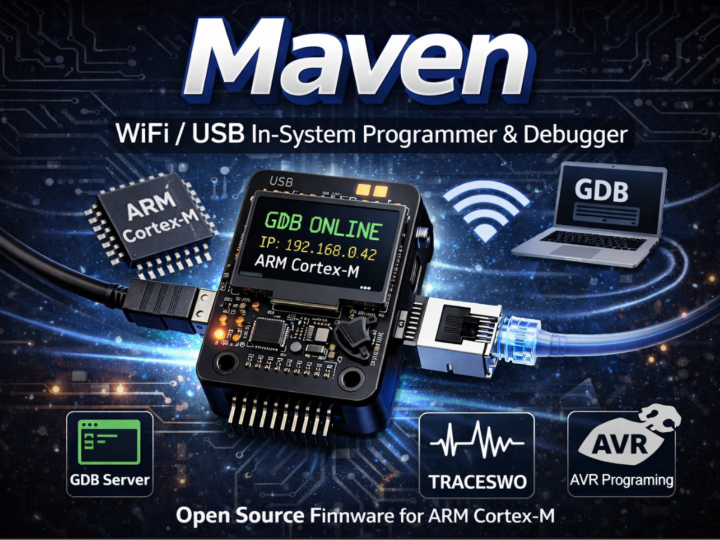
Maven is an ARM Cortex-M debug probe firmware with a native GDB server over Ethernet via W5500, enabling SWD/JTAG debugging, flash programming, and network serv

WIZnet - W5500
x 1

What the Project Does
Maven is not just a programmer—it is a network-connected debug probe.
Instead of using USB-only tools like ST-Link or CMSIS-DAP, this firmware turns a small embedded board into a standalone debugging server:
A host PC connects via TCP (Ethernet) or USB
The firmware runs a GDB server internally
It communicates with the target MCU via SWD/JTAG
It optionally exposes:
Telnet (UART bridge)
HTTP (configuration UI)
SWO trace streaming
Data Flow
GDB (PC)
   ↓ TCP (Ethernet)
W5500 (hardware TCP/IP)
   ↓ SPI
SAM4S MCU (Maven firmware)
   ↓ SWD/JTAG
Target Cortex-M MCU
This removes the need for middleware like OpenOCD—GDB connects directly to the device.
Where WIZnet Fits
The project uses WIZnet W5200/W5500 Ethernet controllers, typically via SPI.
Role of W5500 in This System
Handles TCP/IP stack in hardware
Provides up to 8 hardware sockets
Manages:
TCP retransmissions
Checksums
Buffering
Exposes a simple register interface over SPI
This is critical because:
The MCU is already busy with:
SWD/JTAG timing
Flash programming
RTOS inspection
A software TCP/IP stack (like LwIP) would increase:
CPU load
latency jitter
complexity
Why W5500 is a Good Fit Here
Deterministic networking (important for debug sessions)
Minimal RAM usage on MCU
Simple integration with Arduino-style Ethernet APIs or native drivers
Stable wired connection (better than Wi-Fi for debugging)
Implementation Notes
1. WIZnet Driver Integration
File: src/network/wiz5x00.c
/*
 * Driver for the Wiznet WIZ5200 and/or WIZ5500 Ethernet Controllers
 *
 * Compile with one or both of -DWIZ_5200=1 -DWIZ_5500=1.
 * If both are defined, driver will auto-detect the chip flavour.
 *
 * Works with on-chip TCP/IP stack, or MACRAW mode for LwIP support.
 */
Why this matters:
The driver supports both W5200 and W5500 transparently
Auto-detection allows the same firmware binary across hardware variants
Two modes:
Native mode → uses W5500 TCP/IP offload
MACRAW mode → bypasses it and feeds LwIP
2. Dual Network Stack Architecture
File: src/network/Makefile.inc
else ifdef MK_INCLUDE_WIZNET_NATIVE
    DEFINES += -DNETWORK_DEV_WIZCHIP=1
else ifdef MK_INCLUDE_WIZNET_LWIP
    DEFINES += -DNETWORK_DEV_WIZCHIP=1
    MK_INCLUDE_LWIP := 1
endif
Why this matters:
The firmware can switch between:
Hardware TCP/IP (W5500)
Software TCP/IP (LwIP)
This is rare and powerful:
Enables performance vs flexibility trade-offs
Makes the project a reference architecture
3. MACRAW Mode (LwIP Bridge)
File: src/network/wiz5x00.c
s->s_type = WIZ5x00_SREG_MR_P_MACRAW;
if (ws->ws_chip == WIZ_CHIP_5200)
    s->s_type |= WIZ5200_SREG_MR_MF;
else
    s->s_type |= WIZ5500_SREG_MR_MFEN;

wiz_command(ws, 0, WIZ5x00_SREG_CR_OPEN, WIZ5x00_SREG_SR_MACRAW, 100);
Why this matters:
Socket 0 is opened in MACRAW mode
W5500 becomes a raw Ethernet MAC
LwIP handles full TCP/IP stack
This shows:
W5500 is not just used as-is
It can be re-purposed depending on architecture needs
4. Socket Buffer Allocation
rx_size = WIZ5x00_BUFFER_SIZE_RX / ws->ws_nsockets;
tx_size = WIZ5x00_BUFFER_SIZE_TX / ws->ws_nsockets;
Why this matters:
W5500 has internal SRAM (32KB)
It is divided across sockets
Trade-off:
More sockets → less buffer per socket
Fewer sockets → higher throughput per connection
5. Hardware TCP Keep-Alive (W5500 Only)
wiz_sreg_write8(ws, sn, WIZ5500_SREG_KPALVTR, 10);Why this matters:
Uses W5500 hardware keep-alive
No MCU intervention required
Improves:
connection stability
long debugging sessions
6. MAC Address Generation
File: sam4s4_wizchip.c
mac[0] = 0x6u;
crc = crypto_crc32(sn, sizeof(*sn));
memcpy(&mac[2], &crc, sizeof(crc));
Why this matters:
No factory MAC needed
Device generates unique MAC from serial number
Practical for small-batch hardware
Practical Tips / Pitfalls
Ensure SPI clock stability—W5500 timing issues can cause silent failures
Allocate socket buffers based on actual usage (GDB + Telnet + HTTP)
Prefer native mode unless advanced routing (LwIP) is required
Watch for shared reset lines (W5500 + display in this design)
Use hardware keep-alive to avoid stale debug sessions
Be careful with interrupt vs polling design—network latency can affect debugging responsiveness
FAQ
Why use W5500 instead of a software TCP/IP stack?
W5500 offloads TCP/IP entirely, reducing MCU load and ensuring deterministic behavior—critical for real-time debugging and SWD timing.
How does W5500 connect to the MCU?
Via SPI. Typical signals:
MOSI / MISO / SCK
CS (chip select)
RESET
optional INT (interrupt)
What exactly does W5500 do in this project?
It provides a hardware TCP/IP interface so the firmware can expose:
GDB server (TCP)
Telnet (UART bridge)
HTTP configuration UI
without implementing a full network stack in software.
Can beginners build this?
Not easily. You need:
ARM debugging knowledge (SWD/JTAG)
embedded networking basics
RTOS familiarity
Intermediate to advanced level.
How does this compare to Wi-Fi solutions?
Ethernet (W5500):
deterministic
low latency
stable for debugging
Wi-Fi:
higher jitter
more complex stack
less reliable for continuous debug sessions
Source
Maven Firmware (Steve C. Woodford, Maverick Embedded Technology Ltd.)
License: BSD 3-Clause
Tags
W5500, WIZnet, Embedded Debugging, GDB Server, Ethernet MCU, ARM Cortex-M, SWD, IoT Gateway, Hardware TCP/IP, Maven Firmware