


MaixPy-v1_scripts
MaixPy Ethernet examples using WIZnet W5x00 over SPI for TCP, UDP, HTTP, and HTTPS communication on Sipeed Maix boards.
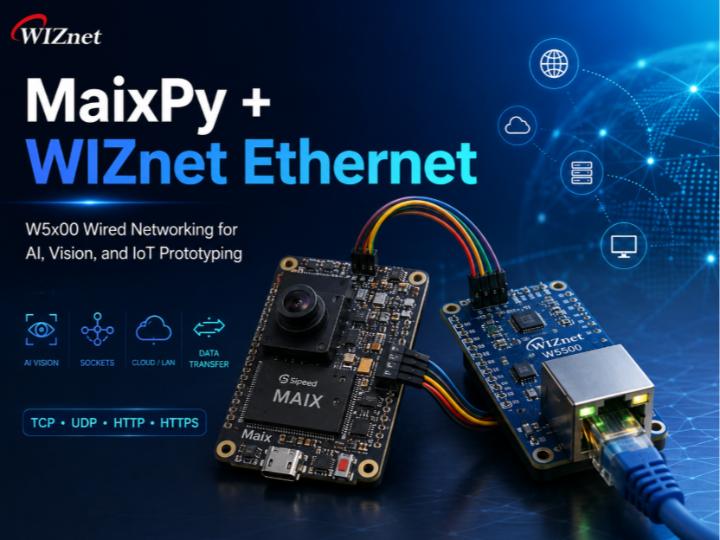

WIZnet - W5500
x 1

What the Project Does
The original MaixPy repository is a broad example collection for Sipeed Maix boards. It includes camera examples, machine-vision examples, multimedia demos, peripheral control, and network communication. For WIZnet UCC curation, the important part is the network example group that shows how MaixPy can communicate through a WIZnet W5x00 Ethernet module.
The project’s Ethernet path follows this structure:
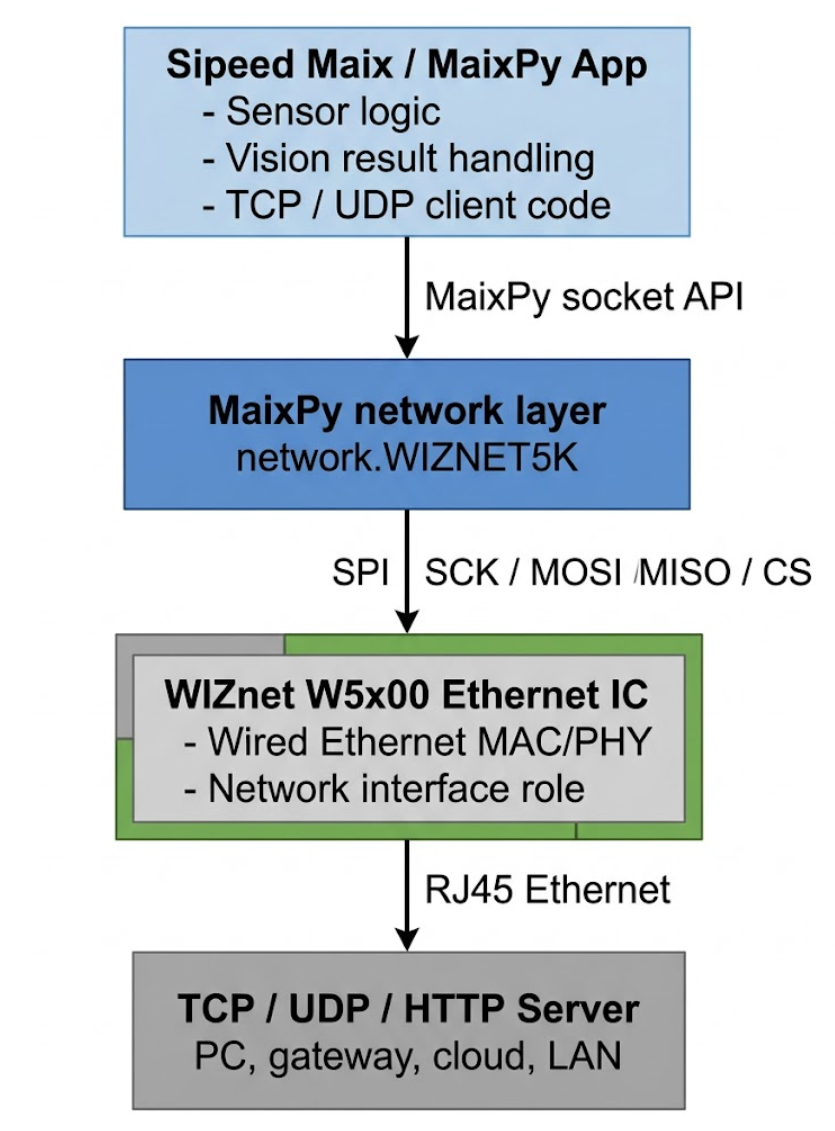
In practice, the MaixPy board initializes the SPI bus, creates the WIZNET5K network interface, checks network status, and then opens a socket. TCP examples connect to a server and exchange messages. UDP examples send datagrams and wait for a response. HTTP and HTTPS examples show how the same wired network path can be reused for higher-level requests.
This makes the project useful for embedded networking education, sensor data transmission, machine-vision result reporting, and wired IoT prototyping.
Where WIZnet Fits
The WIZnet product is used through MaixPy’s network.WIZNET5K class. The provided material identifies the device family as W5x00-class, so the safest product description is WIZnet W5x00 / WIZNET5K rather than claiming a specific chip such as W5500 without confirming the exact module.
WIZnet fits between the MaixPy application and the Ethernet cable. The MaixPy script does not directly handle low-level Ethernet signaling. Instead, it talks to the WIZnet controller over SPI, and the WIZnet module provides the wired Ethernet interface used by socket communication.
This matters because MaixPy boards are often used for camera and AI workloads. Those workloads already consume CPU time and memory. A dedicated Ethernet controller gives the application a separate, stable wired network path, which is useful when Wi-Fi is unreliable, unavailable, or unsuitable for repeatable testing.
Implementation Notes
The provided evidence shows direct WIZnet usage in the MaixPy examples.
In network/network_wiznet5k.py, the key initialization pattern is:
nic = network.WIZNET5K(spi=spi1, cs=WIZNET5K_SPI_CS)This line creates the WIZnet Ethernet network interface using an SPI object and a chip-select pin. It is the core point where the project changes from a generic MaixPy script into a wired Ethernet-capable MaixPy script.
The supplied SPI pin configuration is:
WIZNET5K_SPI_SCK = 21
WIZNET5K_SPI_MOSI = 8
WIZNET5K_SPI_MISO = 15
WIZNET5K_SPI_CS = 20
These pins define the connection between the Sipeed Maix board and the WIZnet Ethernet module. They should be treated as an example, not a universal pinout. Different Maix boards, expansion boards, or firmware builds may require different GPIO assignments.
The TCP example flow is:
SPI init
  -> WIZNET5K NIC creation
  -> Ethernet/IP configuration
  -> TCP socket creation
  -> connect(server_ip, port)
  -> send message
  -> receive response
The UDP example flow is:
SPI init
  -> WIZNET5K NIC creation
  -> Ethernet/IP configuration
  -> UDP socket creation
  -> send packet to server
  -> receive packet response
Relevant files for curation include:
network/network_wiznet5k.pymodules/spmod/sp_ethernet/demo_ethernet_tcp.pymodules/spmod/sp_ethernet/demo_ethernet_udp.pynetwork/demo_socket_tcp_client.pynetwork/demo_socket_udp_client.pynetwork/demo_http_get_jpg.pynetwork/demo_socket_https.py
The important point is that the WIZnet module is not just mentioned in documentation. It appears directly in the network initialization path through network.WIZNET5K.
Practical Tips / Pitfalls
- Verify SCK, MOSI, MISO, and CS wiring before debugging software.
- Check Ethernet link status before assuming a socket or server problem.
- Use DHCP for quick tests, but static IP is often easier for fixed LAN demos.
- Keep server IP and port values configurable instead of hard-coding them deeply.
- UDP examples should handle packet loss and timeout cases.
- TCP examples should close sockets cleanly after failed connections.
- For camera or vision use cases, avoid blocking socket calls inside frame-processing loops.
- Confirm the exact WIZnet module before writing chip-specific claims such as W5500-only behavior.
FAQ
Q: Why use a WIZnet W5x00 Ethernet controller with MaixPy?
A: It gives MaixPy a stable wired Ethernet path through SPI. This is useful when the application needs repeatable LAN communication, lower setup complexity than Wi-Fi, or reliable data transfer from a board running camera, AI, or sensor tasks.
Q: How does the WIZnet module connect to the Sipeed Maix board?
A: It connects through SPI using SCK, MOSI, MISO, and CS. The example creates the interface with network.WIZNET5K(spi=spi1, cs=WIZNET5K_SPI_CS), so the software pin configuration must match the actual hardware wiring.
Q: What role does WIZnet play in this project?
A: WIZnet provides the wired Ethernet network interface. MaixPy uses it as the transport path for TCP, UDP, HTTP, and HTTPS examples, while the application code can remain close to standard socket programming.
Q: Can beginners follow this example?
A: Yes, but they should already understand basic MaixPy execution, SPI wiring, IP addresses, and simple client-server networking. The most common beginner issue will likely be wrong pin mapping or incorrect server IP settings.
Q: How does this compare with Wi-Fi?
A: Wi-Fi is convenient when cabling is impossible, but it can introduce pairing, signal, interference, and access-point configuration issues. WIZnet Ethernet is better for bench testing, fixed installations, industrial prototypes, and repeatable TCP/UDP experiments.
Source
Original project link: not provided in the supplied material.
License: not confirmed from the supplied material.
Tags
WIZnet, WIZNET5K, W5x00, Ethernet, MaixPy, Sipeed Maix, MicroPython, SPI, TCP, UDP, HTTP, HTTPS, IoT, Embedded, Vision AI