


How Does WizFi360 Connect a DIY ASCOM Alpaca Cover Calibrator to N.I.N.A.?
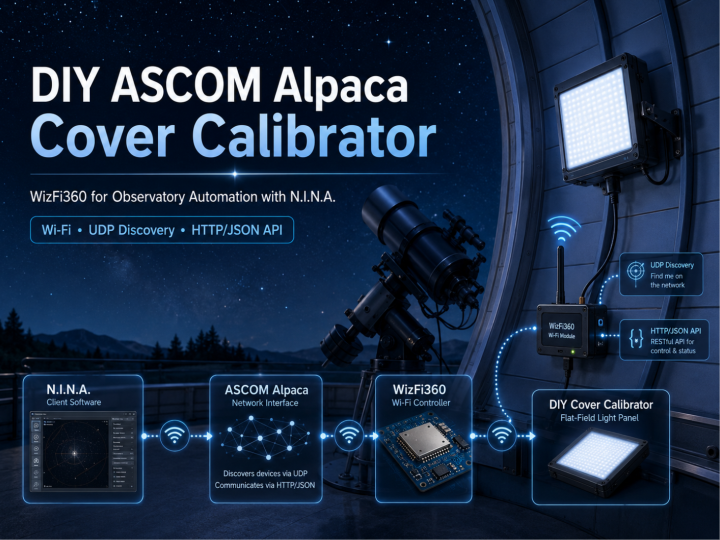
A telescope-automation maker uses WizFi360 AT commands, UDP discovery, and HTTP/JSON responses to expose a custom astronomical device to N.I.N.A. over a local.
WIZnet - WizFi360
x 1

Overview
This project comes from a Korean maker whose blog focuses on telescopes, ASCOM devices, autofocusers, observatory equipment, and N.I.N.A.-based automation.
The goal is to build a custom cover calibrator for astrophotography. A cover calibrator combines a controllable flat-field light source—and, in some implementations, a motorized cover—with software integration so an imaging application can operate it automatically.
The intended device is mounted inside or near the observatory dome rather than permanently attached to the telescope. Because the dome moves, the author chose wireless communication and used a WizFi360 Wi-Fi module as the network interface.
Direct answer: WizFi360 connects the experimental controller to the observatory Wi-Fi network and carries the UDP and HTTP traffic required by ASCOM Alpaca. N.I.N.A. sends a discovery request, the controller responds with its Alpaca server port, and N.I.N.A. then accesses device-management and cover-calibrator API endpoints through the WizFi360 connection.
ASCOM describes Alpaca as a network-based device-control architecture using HTTP and JSON. N.I.N.A. supports Alpaca device discovery and direct network connections, making this architecture suitable for remote observatory equipment.
What Problem Is It Solving?
Astrophotographers normally capture flat frames to correct effects such as uneven illumination, optical vignetting, and dust shadows. A flat-field panel must illuminate the telescope aperture consistently, and automated imaging software needs a way to control the panel brightness and read its state.
Commercial cover calibrators are available, but the author identified two practical limitations:
- A commercial unit for an 8-inch reflector can be expensive.
- Mounting a large unit permanently on the telescope adds weight and mechanical complexity.
The proposed alternative is a custom panel installed on the observatory structure and controlled remotely.
The expected workflow is:
- N.I.N.A. starts a calibration sequence.
- It discovers the custom device through ASCOM Alpaca.
- It establishes a network connection to the controller.
- It reads the calibrator and cover states.
- It requests brightness or cover operations.
- The controller operates the physical flat-field device.
The public post primarily demonstrates steps 2 through 4. It proves that the network endpoint can be discovered and queried, but it does not yet document a finished enclosure, motor mechanism, illumination circuit, or complete field test.
Maker and Observatory Context
The author is not presenting WizFi360 as an isolated Wi-Fi demonstration.
The blog is centered on astronomical equipment and observatory automation, with recurring topics including:
- ASCOM
- ASCOM Alpaca
- N.I.N.A.
- Auto focusers
- Cover calibrators
- Telescope mounts
- Dome control
- All-sky cameras
That context gives the project more value than a generic AT-command test. WizFi360 is being evaluated as the network interface for a real observatory device that must integrate with an existing astronomy-control ecosystem.
The same blog also documents other Arduino- and ASCOM-related observatory work. However, those separate posts should be treated as author context rather than evidence that the cover-calibrator prototype uses a particular Arduino board or Ethernet shield. The MCU and complete controller hardware are not identified clearly in this source post.
What Are N.I.N.A. and ASCOM Alpaca?
N.I.N.A.
N.I.N.A., or Nighttime Imaging ‘N’ Astronomy, is an open-source astrophotography application designed to configure equipment and automate deep-sky imaging sequences. Its equipment layer can work with native drivers, conventional ASCOM drivers, and ASCOM Alpaca devices.
In this project, N.I.N.A. acts as the client application.
ASCOM Alpaca
ASCOM defines common interfaces for astronomical devices such as telescope mounts, focusers, cameras, domes, switches, and cover calibrators.
Alpaca brings these device interfaces onto an IP network using HTTP and JSON. It also provides a discovery mechanism so client software can locate compatible device servers on the local network. ASCOM recommends Alpaca for new network-connected device implementations.
In this project, Alpaca defines the messages that the experimental controller must accept and return.
WizFi360
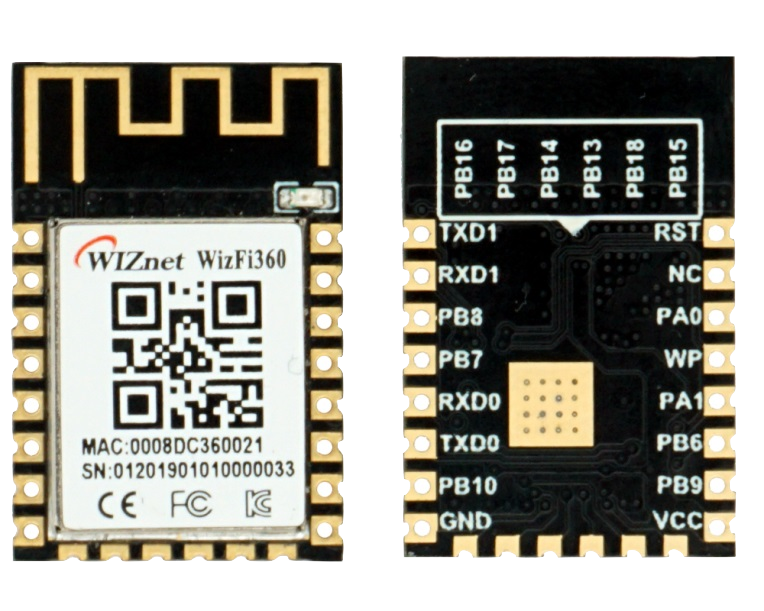
WizFi360 is the communication path between the embedded controller and the local network. It supports Station, SoftAP, and combined Station/SoftAP operation, and can create TCP or UDP connections using serial AT commands.
System Architecture
                    Local Observatory Network
                              │
                              │ Wi-Fi
                              ▼
┌────────────────────────────────────────────────────────┐
│                       WizFi360                         │
│                                                      │
│  UDP discovery reception     TCP/HTTP data exchange │
└──────────────────────────────┬─────────────────────────┘
                               │ UART / AT commands
                               ▼
                     Embedded Controller
                               │
                  ASCOM Alpaca device logic
                               │
              ┌────────────────┴────────────────┐
              ▼                                 ▼
     Flat-panel brightness                Cover mechanism
          control                          or state logic
Client-side flow:
N.I.N.A.
   │
   │ Alpaca discovery request
   ▼
WizFi360 + Embedded Controller
   │
   │ {"AlpacaPort":5000}
   ▼
N.I.N.A.
   │
   │ HTTP management and device API requests
   ▼
Custom Cover Calibrator
The public evidence confirms the network and API portions. The physical-output portion remains a planned or partially documented stage.
How the WizFi360 Network Path Works
1. Joining the Wi-Fi network
The log begins by disabling command echo and placing WizFi360 in Station mode:
ATE0
AT+CWMODE_DEF=1
It then connects to an access point:
AT+CWJAP_DEF="HOME", ...
WIFI CONNECTED
WIFI GOT IP
An IP-status query returns the assigned address, gateway, and netmask.
This is consistent with WizFi360 Station-mode operation: the module joins an existing wireless LAN and can obtain network configuration through the access point.
2. Enabling multiple network connections
The source enables multiple connection mode and asks WizFi360 to include remote-address information with received data:
AT+CIPMUX=1
AT+CIPDINFO=1
This is useful because the controller needs to distinguish discovery traffic from subsequent HTTP client connections.
The project uses WizFi360’s normal AT-command transmission model. Incoming data appears through +IPD, while outgoing responses are sent with AT+CIPSEND. WIZnet’s documentation describes the same receive and send mechanism for normal transmission mode.
Alpaca Discovery
The most important source evidence is the discovery exchange.
The controller receives:
alpacadiscovery1It then returns:
{"AlpacaPort":5000}This tells the Alpaca client that an Alpaca device server is available and that its management and device APIs can be reached on TCP port 5000.
ASCOM’s discovery mechanism is intended to locate Alpaca servers on the same local network or VLAN. After discovering the server address and port, the client can query the management API to determine which devices are exposed.
This exchange is the clearest proof that WizFi360 is not being used merely to obtain an IP address. It carries the actual device-discovery protocol required by the astronomy application.
Alpaca Management API
After discovery, N.I.N.A. opens an HTTP connection and requests the server’s API information.
API versions
GET /management/apiversions HTTP/1.1The controller returns:
{
  "Value": [1],
  "ClientTransactionID": 0,
  "ServerTransactionID": 1,
  "ErrorNumber": 0,
  "ErrorMessage": ""
}
Server description
GET /management/v1/description HTTP/1.1The response identifies the experimental endpoint as:
{
  "ServerName": "NB CoverCalibrator Alpaca",
  "Manufacturer": "NoBrand",
  "ManufacturerVersion": "1.0",
  "Location": "Unknown"
}
Configured devices
GET /management/v1/configureddevices HTTP/1.1The server reports one configured device:
{
  "DeviceName": "NBC",
  "DeviceType": "CoverCalibrator",
  "DeviceNumber": 0
}
This sequence proves that the controller presents itself as an Alpaca server rather than as a generic serial-over-Wi-Fi bridge.
Cover Calibrator Device API
Once N.I.N.A. recognizes the device, it begins querying the cover-calibrator API.
The log contains requests for:
connectedcalibratorstatemaxbrightnessbrightnesscoverstatedescriptiondriverinfodriverversionsupportedactions
A connection request appears as:
PUT /api/v1/covercalibrator/0/connected HTTP/1.1with:
Connected=TrueThe controller responds with an Alpaca transaction result showing no error.
N.I.N.A. then repeatedly reads device state:
GET /api/v1/covercalibrator/0/calibratorstate
GET /api/v1/covercalibrator/0/brightness
GET /api/v1/covercalibrator/0/coverstate
The sample responses indicate:
- Calibrator state value:
1 - Maximum brightness:
255 - Current brightness:
0 - Cover state:
0
The exact interpretation of each numeric state should follow the ASCOM CoverCalibrator interface definitions. The important source-backed result is that N.I.N.A. accepts the endpoint and continuously polls its properties through the WizFi360 network path.
Why N.I.N.A. Generates So Many Requests
The author notes that N.I.N.A. issues many commands in rapid succession and expects the device to respond consistently.
That observation is technically useful. An embedded Alpaca server must do more than return a single successful discovery packet. It must handle repeated HTTP requests, preserve transaction IDs, produce correctly formatted JSON, and avoid blocking while the client polls multiple properties.
The observed traffic pattern is approximately:
Connect device
      │
      ├─ Read connection state
      ├─ Read calibrator state
      ├─ Read maximum brightness
      ├─ Read current brightness
      ├─ Read cover state
      ├─ Read device information
      └─ Repeat operational state polling
This makes the project a practical protocol-validation exercise for WizFi360 and a constrained embedded controller.
Role of WizFi360
WIZnet role: WizFi360 provides the wireless IP interface that allows an embedded astronomy controller to appear as an ASCOM Alpaca device on the observatory network.
Its role can be divided into four layers.
1. Wireless LAN attachment
WizFi360 joins the existing observatory access point and obtains network connectivity.
2. UDP discovery transport
It receives the Alpaca discovery datagram and transmits the JSON response containing the server port.
3. TCP transport for HTTP
It accepts client connections used for Alpaca management and device API requests.
4. Serial network offload
The embedded controller interacts with the network using AT commands rather than implementing a Wi-Fi MAC, TCP/IP stack, and socket layer directly.
WizFi360 supports UART control, TCP server/client operation, UDP communication, and multiple simultaneous links, matching the basic communication requirements shown in the source log.
The application logic still belongs to the host controller. WizFi360 does not implement ASCOM Alpaca itself; it transports the requests and responses generated by the controller.
Why This Is a Useful WIZnet Maker Example
Many Wi-Fi-module examples stop after:
- Joining an access point
- Opening a TCP socket
- Sending a simple web request
This source goes further. It applies WizFi360 to a specialized device ecosystem with a defined discovery process, management API, device classification, transaction handling, and repeated property polling.
The educational value is the complete application path:
Astronomy application
        │
ASCOM Alpaca protocol
        │
HTTP/JSON and UDP discovery
        │
WizFi360
        │
Embedded controller
        │
Observatory equipment
It is also a useful example of how a maker can expose a custom device to existing PC software without writing a proprietary desktop application.
Wi-Fi Instead of Wired Ethernet
The author states that a wired network could support Alpaca, but chose Wi-Fi because the intended installation is associated with a moving observatory dome.
That decision illustrates an appropriate use of WizFi360:
- The application requires IP compatibility.
- Physical cable routing is inconvenient.
- Traffic volume is small.
- Local network coverage is available.
- The device needs to integrate with existing TCP/UDP software.
This is not a Wi-Fi and Ethernet hybrid design. The demonstrated path is a single Wi-Fi network connection through WizFi360.
Source Evidence
| Function | Evidence in the post |
|---|---|
| Wi-Fi Station connection | AT+CWMODE_DEF=1, AT+CWJAP_DEF |
| IP configuration | AT+CIPSTA_CUR? |
| Multiple connections | AT+CIPMUX=1 |
| Remote endpoint information | AT+CIPDINFO=1 |
| Alpaca discovery receive | alpacadiscovery1 |
| Discovery response | {"AlpacaPort":5000} |
| HTTP server response | HTTP/1.1 200 OK |
| Alpaca management API | /management/apiversions, /description, /configureddevices |
| Device classification | DeviceType":"CoverCalibrator" |
| N.I.N.A. device connection | PUT .../connected |
| Operational polling | calibratorstate, brightness, coverstate |
All of these items appear directly in the posted WizFi360 communication log.
Limits of the Public Source
The post is explicitly described as preparation work, so it should not be presented as a completely finished cover-calibrator product.
The source does not clearly provide:
- Host MCU or controller-board model
- Circuit schematic
- WizFi360 wiring diagram
- Complete firmware source
- Flat-panel driver circuit
- Motor or cover mechanism
- Final hardware photographs
- Long-duration reliability test
- Finished N.I.N.A. calibration sequence
- Public repository or license
There is also a port detail that should be checked before reproducing the setup. The discovery reply advertises Alpaca port 5000, while one AT-command line references server port 5500. The log may combine different test stages or an already-running server configuration, but the public post does not explain the difference.
For this reason, the project should be classified as an ASCOM Alpaca network proof-of-concept and controller preparation log, not yet as a complete build guide.
Upgrade Ideas
A follow-up version would become substantially easier to reproduce with the following additions:
- Identify the host MCU and controller board.
- Publish the UART connection and power schematic.
- Document the final TCP and UDP port configuration.
- Separate the Alpaca protocol parser from the WizFi360 AT-command layer.
- Publish a minimal firmware repository.
- Add brightness-control hardware and example commands.
- Add cover-open and cover-close mechanism testing.
- Show the device inside N.I.N.A.’s equipment screen.
- Run an automated flat-frame sequence.
- Add reconnect and timeout behavior for temporary Wi-Fi loss.
Related WIZnet Maker Reading Path
WizFi360 AT Command Projects
These are useful for understanding Station mode, TCP servers, UDP communication, and serial AT-command handling before implementing a higher-level protocol.
Arduino Observatory Controllers
Arduino-based dome, weather, focuser, and relay-controller projects provide the nearest application context. They show how small controllers can automate physical observatory equipment.
W5500-Based ASCOM Alpaca Endpoint
A wired version using W5500, W5100S, or W55RP20 would be a useful companion project where fixed observatory equipment does not require wireless movement.
MQTT Observatory Monitoring
MQTT would complement, rather than replace, Alpaca. Alpaca can handle standardized astronomy-device control, while MQTT could publish environmental telemetry, alarms, and equipment status to a dashboard.
Source-Backed Summary
This project demonstrates an early-stage ASCOM Alpaca cover-calibrator controller using WizFi360 as its Wi-Fi network interface.
The WizFi360 module joins a local access point, receives an Alpaca discovery request, and returns the TCP port of the experimental device server. N.I.N.A. then accesses the server’s management endpoints and recognizes a CoverCalibrator device. The communication log also shows repeated HTTP requests for connection, brightness, calibrator state, cover state, driver information, and supported actions.
Its strongest WIZnet Maker value is not the unfinished lighting hardware. It is the successful integration of WizFi360 with a specialized network-control standard used in astronomy automation.
Its main limitation is reproducibility: the host controller, circuit, complete firmware, and finished mechanical system are not publicly documented.
FAQ
Q. What is being built?
A custom flat-field cover calibrator intended for remote operation inside an astronomical observatory.
Q. What does WizFi360 do?
WizFi360 connects the embedded controller to the local Wi-Fi network and transports Alpaca UDP discovery and HTTP/JSON API traffic.
Q. Does WizFi360 implement ASCOM Alpaca internally?
No. The host controller must generate and process the Alpaca protocol. WizFi360 provides the network communication layer.
Q. How does N.I.N.A. find the device?
N.I.N.A. sends an Alpaca discovery request. The controller receives it through WizFi360 and replies with JSON containing the Alpaca server port.
Q. Which device type is exposed?
The management response identifies device number 0 as a CoverCalibrator.
Q. Is the physical cover calibrator complete?
The source does not prove that the full lighting and mechanical system is complete. It primarily documents network and protocol preparation.
Q. Is this an Ethernet project?
It is an IP-networked ASCOM Alpaca project, but the demonstrated physical network interface is WizFi360 Wi-Fi rather than wired Ethernet.
Q. Is it a hybrid Wi-Fi and Ethernet design?
No. Only the WizFi360 Wi-Fi path is demonstrated in this post.
Q. Why use Wi-Fi for observatory equipment?
The intended device is associated with a moving dome, where a wired network cable could be inconvenient.
Q. Can the same architecture use W5500?
Conceptually, yes. Alpaca uses standard IP networking, HTTP, JSON, and discovery traffic. A fixed installation could implement the same application over a W5500-based wired network interface, but that conversion is not shown in the source.