


GLITCH-Software
How to Build a Telemetry & Telecommand System with W5500 on ESP32

WIZnet - W5500
x 1

What the Project Does
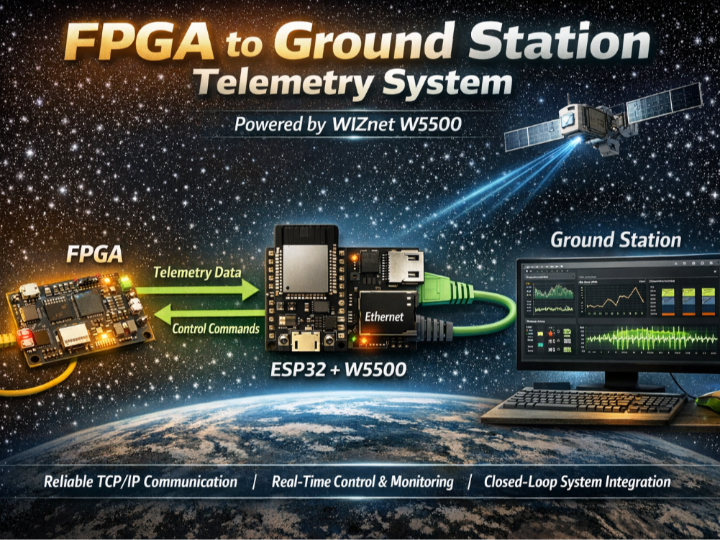
Think of this system as a miniature satellite communication stack on the ground.
- The FPGA acts like a payload instrument, continuously generating experiment data
- The ESP32 behaves as a communication module, translating raw data into structured packets
- The Ground Station is the control center, visualizing data and issuing commands
The full system forms a closed-loop pipeline:
- Data Generation (FPGA)
Sensor data, GNSS info, and SRAM bit-flip results are packaged into telemetry frames - Data Bridging (ESP32)
- UART receives raw byte streams
- Packets are validated (length + CRC)
- Data is restructured into TCP-ready format
- Network Transmission (W5500 Ethernet)
- Packets are sent via TCP to the ground station
- Commands are received back over the same channel
- Visualization & Control (Python GUI)
- Real-time graphs (temperature, altitude, radiation)
- Logging to CSV
- Command interface (mode change, reset, etc.)
This architecture separates concerns cleanly:
- FPGA → deterministic data generation
- MCU → protocol handling
- W5500 → network transport
- PC → UI and analytics
Where WIZnet Fits
The WIZnet W5500 is the critical bridge between embedded logic and network infrastructure.
In this project, it:
- Provides hardware TCP/IP stack offload
- Enables SPI-based Ethernet connectivity on ESP32
- Handles socket-level communication (up to 8 sockets)
Why this matters in this architecture:
- The ESP32 is already busy with:
- UART parsing
- CRC validation
- packet queue management
- By offloading TCP/IP:
- CPU load is reduced
- timing becomes more deterministic
- packet loss risk is minimized
- Compared to Wi-Fi:
- Wired Ethernet avoids interference
- Latency is stable → important for continuous telemetry
In short, W5500 converts the ESP32 from a “best-effort network node” into a deterministic telemetry gateway.
Implementation Notes
1) System-Level Data Flow
[ FPGA ]
   │ UART (TM)
   ▼
[ ESP32 ]
   │ Packet parsing + CRC
   │
   ├── TX → TCP (via W5500) → Ground Station
   └── RX ← TCP (TC) ← Ground Station
   │
   ▼
[ FPGA ] (TC via UART)
This flow is directly reflected in the project structure .
2) W5500 Initialization (Actual Project Code)
File: MCU/ethernet_test/components/ethernet/ethernet.c
// Initialize W5500 Ethernet interface
init_wiz550io_eth();

// Apply default configuration for W5500
ETH_W5500_DEFAULT_CONFIG(...);

// Create MAC layer for W5500 over SPI
esp_eth_mac_new_w5500(...);

// Create PHY layer abstraction
esp_eth_phy_new_w5500(...);
Why this matters:
- This explicitly selects W5500 over internal EMAC
- The ESP-IDF Ethernet stack binds W5500 as the active interface
- All TCP communication (telemetry + command) depends on this path
3) Runtime Integration
File: main/main.c
void app_main(void)
{
    ethernet_setup();      // W5500 initialization
    start_tcp_server();    // Handles telemetry TX / command RX
    start_uart_task();     // Receives FPGA data
}
Architecture Insight:
- UART and TCP run as separate tasks
- W5500 enables non-blocking network I/O
- System behaves like a streaming pipeline
4) Conceptual Integration Example (ioLibrary Style)
If implemented without ESP-IDF abstraction, the same logic would look like:
// Conceptual integration example based on WIZnet ioLibrary

#include "wizchip_conf.h"

// SPI callbacks
reg_wizchip_spi_cbfunc(spi_read, spi_write);

// Allocate socket buffers (8 sockets)
uint8_t txsize[8] = {2,2,2,2,2,2,2,2};
uint8_t rxsize[8] = {2,2,2,2,2,2,2,2};
wizchip_init(txsize, rxsize);

// Network configuration
wiz_NetInfo netinfo = {
    .mac = {0x00,0x08,0xDC,0x01,0x02,0x03},
    .ip  = {192,168,0,10},
    .sn  = {255,255,255,0},
    .gw  = {192,168,0,1}
};

wizchip_setnetinfo(&netinfo);
This highlights:
- Direct socket buffer control
- Deterministic memory usage
- No OS-level TCP stack required
Practical Tips / Pitfalls
- Ensure SPI wiring is short and stable to avoid packet corruption
- Always check PHY link status before opening sockets
- Use CRC at both UART and TCP boundaries (already implemented)
- Avoid dynamic memory in packet path for stability
- Monitor socket usage (W5500 supports 8 simultaneous sockets)
- Prefer static IP during bring-up phase
- Consider watchdog reset for long-duration streaming
FAQ
Q: Why use W5500 instead of ESP32 Wi-Fi?
A: W5500 provides hardware TCP/IP offload and deterministic wired communication, avoiding Wi-Fi latency spikes and packet loss under interference.
Q: How is W5500 connected to ESP32?
A: Via SPI (MISO, MOSI, SCK, CS). The ESP-IDF driver initializes it using esp_eth_mac_new_w5500() and esp_eth_phy_new_w5500().
Q: What role does W5500 play in this project?
A: It acts as the TCP transport layer, sending telemetry data to the ground station and receiving telecommands in real time.
Q: Is this suitable for beginners?
A: This is an advanced system involving FPGA, RTOS tasks, networking, and packet design. Intermediate to advanced embedded experience is recommended.
Q: How does it compare to ENC28J60 or LwIP-based Ethernet?
A: Unlike ENC28J60 or LwIP, W5500 includes a hardware TCP/IP stack, reducing CPU usage and simplifying firmware while improving timing predictability.
Source
- Original Project: GLITCH-Software
- Project Documentation:
- License: Not specified
Tags
#W5500 #ESP32 #Ethernet #Telemetry #FPGA #TCPIP #EmbeddedSystems #IoT #UART #GroundStation