


Flow.io-Waveshare
https://github.com/christophebelmont/Flow.io-Waveshare

WIZnet - W5500
x 1

How Does flow.io Use W5500 to Connect Pool Monitoring and Equipment Control?
flow.io-Waveshare is an open-source pool automation project built for the Waveshare ESP32-S3-ETH-8DI-8RO and ESP32-S3-POE-ETH-8DI-8RO controllers. It brings sensor acquisition, local control logic, eight relay outputs, a web interface, MQTT, Home Assistant integration, and local display support into one ESP32-S3 firmware project.
What makes the repository useful as a reference is that it covers more than network connectivity. It documents the path from pool measurements to control decisions and then to physical outputs, while also providing the files needed to reproduce its companion hardware.
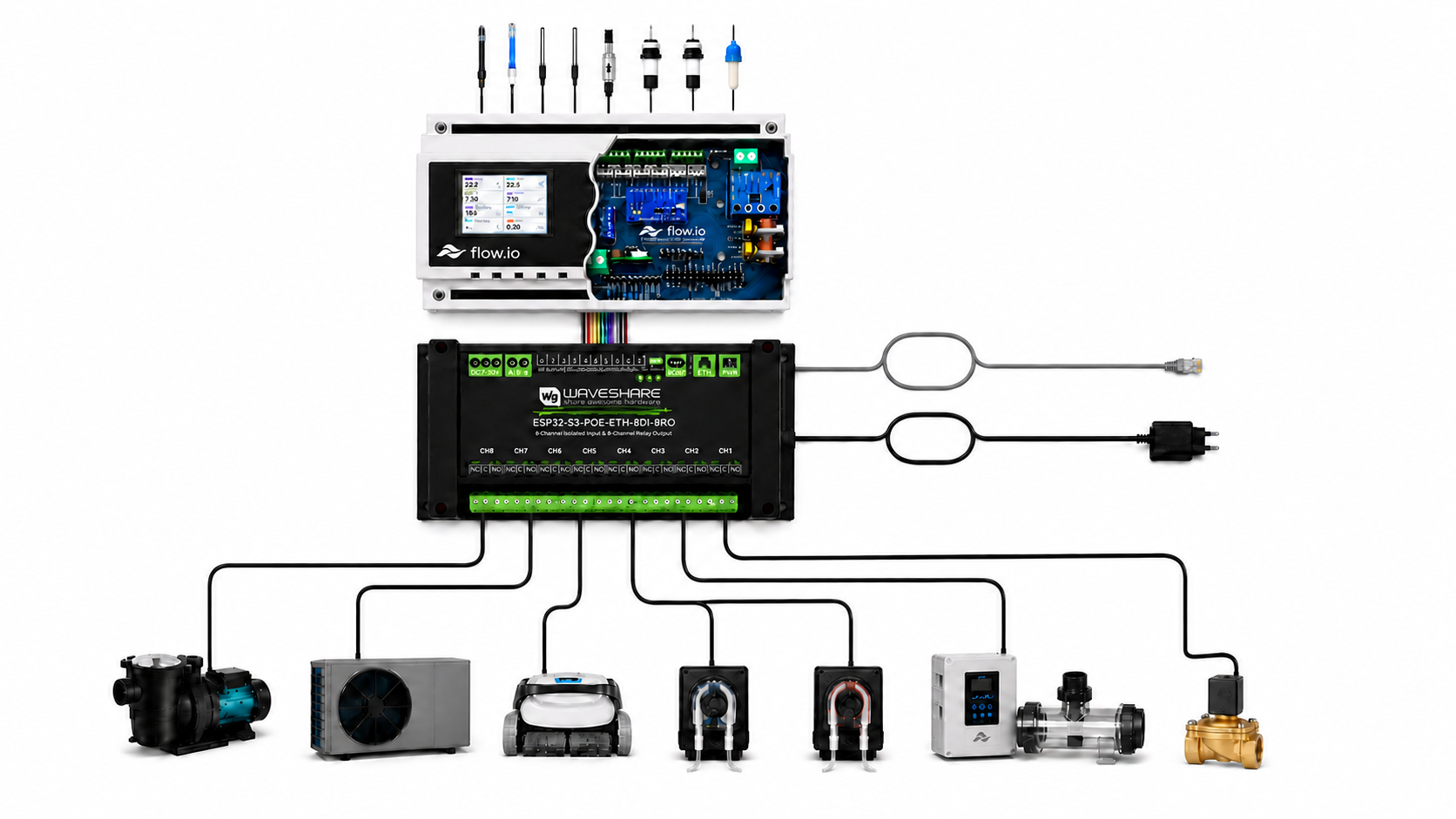
From Pool Sensors to Controlled Equipment
The repository describes support for measurements including:
- water and air temperature;
- pH and oxidation-reduction potential (ORP);
- hydraulic pressure;
- pool and treatment-tank levels;
- water consumption and equipment runtime.
These values enter the firmware through its I/O modules and are stored in a shared data layer. The PoolLogic module evaluates operating modes, schedules, thresholds, and safety conditions. PoolDevice then applies the requested state to the configured output while checking whether the device is enabled, mapped to valid I/O, and allowed by its dependencies.
Pool sensors and digital inputs
              |
              v
       I/O modules and DataStore
              |
              v
    PoolLogic: schedules and conditions
              |
              v
  PoolDevice: dependency interlocks
              |
              v
       TCA9554 and eight relays
              |
              +-- Local web interface
              +-- Nextion display
              +-- MQTT / Home Assistant
In the default profile, EXIO1 through EXIO8 are assigned to filtration, pH dosing, disinfectant dosing, pool robot, water filling, salt chlorination, lighting, and heating. These outputs are not driven directly by ESP32 GPIOs. They are exposed through a TCA9554 I/O expander at I2C address 0x20. The mapping can be checked in the Waveshare I/O layout and the controller documentation.
The Role of W5500 Ethernet
The W5500 provides the wired Ethernet interface between the ESP32-S3 controller and the local network. The board profile defines the following SPI connection:
| W5500 signal | ESP32-S3 GPIO |
|---|---|
| MOSI | 13 |
| MISO | 14 |
| SCLK | 15 |
| CS | 16 |
| INT | 12 |
| RESET | 39 |
The SPI clock is configured at 8 MHz. During startup, the Ethernet module resets the W5500, initializes the SPI bus, and calls ETH.begin(ETH_PHY_W5500, ...). It then processes link and DHCP address events and updates the shared network state. These details are visible in WaveshareBoard.h and EthernetModule.cpp.
There is an important architectural distinction: this project does not call the WIZnet ioLibrary socket API directly. It uses the Arduino-ESP32 Ethernet interface, whose W5500 path creates an Espressif Ethernet MAC driver and connects it to the ESP32 networking environment. The implementation can be compared with Espressif's ETH.cpp. Therefore, W5500 is clearly the wired-network component, but this is not a direct hardware-socket or ioLibrary example.
Wi-Fi support is also present. The firmware considers networking available when either Ethernet has obtained an IP address or the Wi-Fi station is connected. A Wi-Fi access point can additionally be used during provisioning. This makes the project a hybrid wired-and-wireless design, although the repository does not present measured evidence of seamless or lossless failover between the two paths.
Control Dependencies Are Part of the Design
flow.io is more than a web-controlled relay board. Its default device model gives the chlorine-dosing pump and pool robot a dependency on the filtration device. If a required dependency is lost, PoolDevice forces the dependent output off and records interlock as the blocking reason. This behavior is described in the PoolDevice module documentation.
The documented PoolLogic functions include:
- calculation of a daily filtration window from water temperature;
- pH and ORP treatment control;
- a delay before dosing or salt chlorination is permitted after filtration starts;
- low- and high-pressure detection;
- low treatment-tank and low pool-level alarms;
- freeze protection, winter operation, heating, robot scheduling, and automatic filling.
Configuration fields and runtime alarm states for these functions are listed in the PoolLogic documentation.
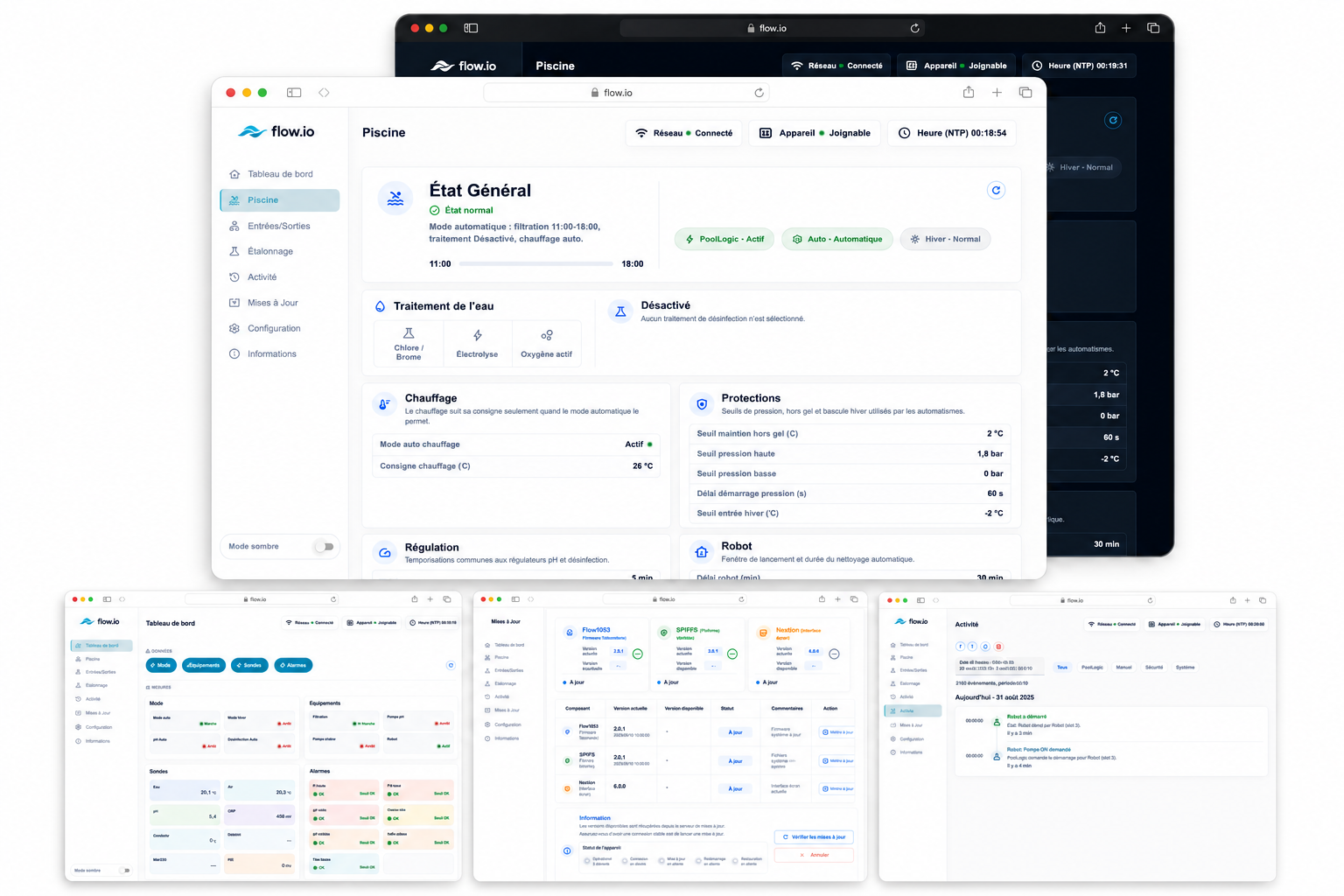
Local Interface, MQTT, and Home Assistant
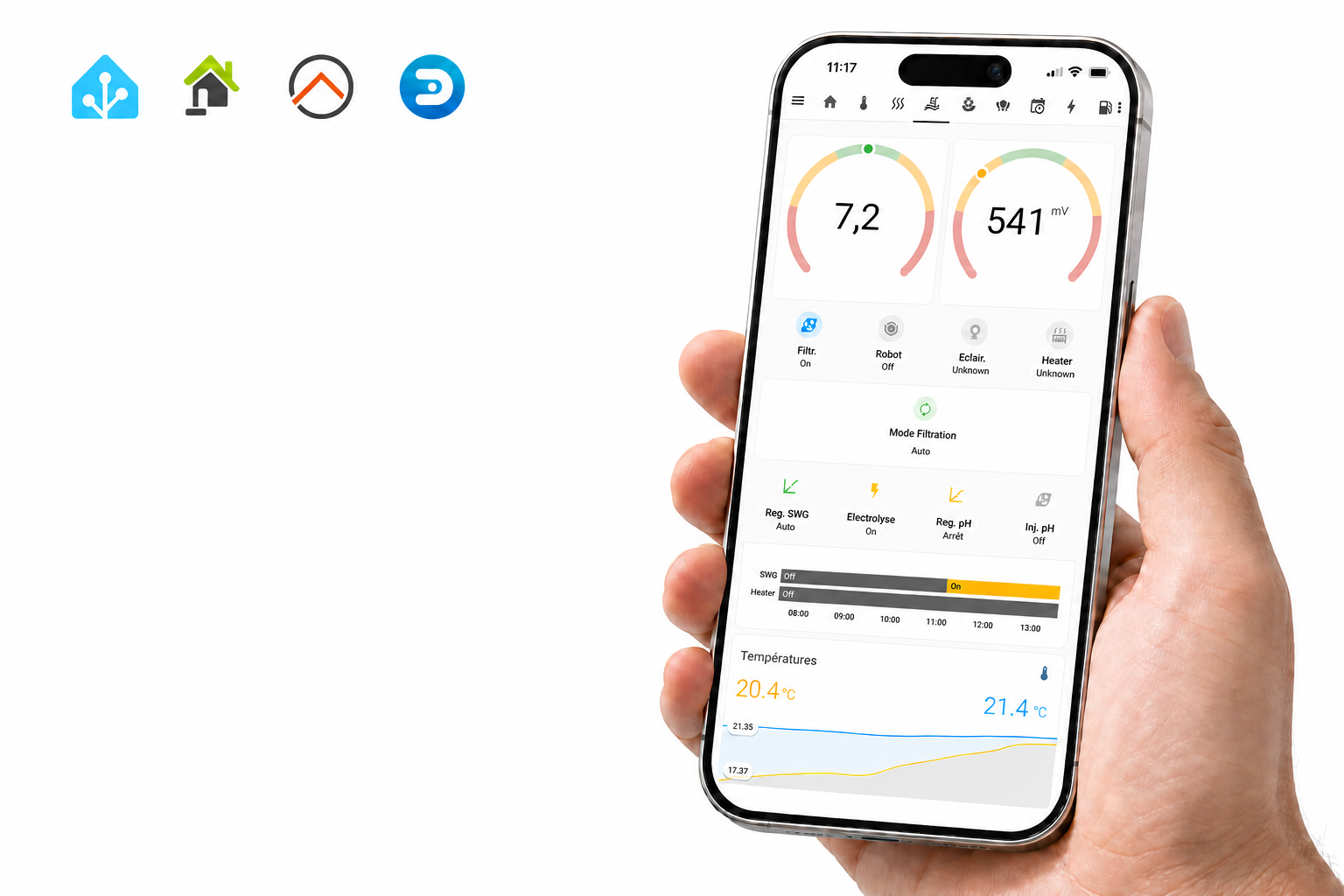
The controller provides a local web interface and supports a Nextion display for on-site status and commands. MQTT is used to publish runtime data and receive commands. The Home Assistant module generates MQTT Discovery entities after the MQTT connection and runtime state are ready, as documented in HAModule.md.
Wi-Fi and MQTT credentials are not compiled into the default firmware. The migration document states that these values start empty and that MQTT remains disabled until it is configured through the interface and stored in NVS.
Reproducible Hardware Assets
The repository includes more than firmware source. Its hardware catalog marks Companion Board v1.1 as supported and lists an EasyEDA PCB source file, a Gerber archive, and a 3D OBJ model. SHA-256 hashes are provided for the production files. The catalog also lists source and compiled files for several Nextion display models.
These assets can be inspected in hardware/catalog.yaml. The firmware itself is built with one dedicated PlatformIO environment named Flowio-waveshare-esp32-s3, as shown in platformio.ini.
What Has Been Verified?
The repository's migration record reports a successful production build on August 25, 2026. For that recorded build, RAM usage was 106,828 of 327,680 bytes, and application flash usage was 2,060,114 of 6,553,600 bytes. The validation covered metadata generation, SPIFFS preparation, compilation, linking, and ESP32-S3 image generation.
The same document explicitly states that this build does not replace testing on the physical controller. W5500 networking, I/O expanders, OneWire sensors, displays, RTC, relays, isolated inputs, provisioning, MQTT, and OTA remain on its hardware-test list. It also notes that the selected PlatformIO board definition and the retained 16 MB partition table require confirmation against the exact ESP32-S3 module fitted to the controller. See the migration and validation record.
The available evidence supports describing flow.io as a substantial and reproducible open-source implementation. It does not yet support claims of certified safety, verified long-term field reliability, or validated seamless Ethernet/Wi-Fi failover.
Why This Project Is Worth Exploring
flow.io-Waveshare shows how a W5500-equipped ESP32-S3 controller can sit at the center of a complete automation path: receiving physical measurements, applying equipment dependencies, driving relay outputs, and sharing status with local and MQTT clients. Its value as a reference comes from the visible architecture and manufacturing material, not merely from a list of supported features.
Developers interested in W5500-based automation can use the repository to study the board mapping, Ethernet lifecycle, modular control structure, web and MQTT integration, and the boundary between a successful firmware build and the hardware validation still required for deployment.
Project: christophebelmont/Flow.io-Waveshare
Frequently Asked Questions
Does flow.io use the W5500 hardware socket API directly?
No. The project initializes W5500 through Arduino-ESP32's ETH.begin(ETH_PHY_W5500, ...) interface. In this configuration, W5500 provides the wired Ethernet connection through Espressif's Ethernet driver and ESP32 networking environment. The project does not directly use WIZnet ioLibrary socket calls such as socket(), send(), or recv().
Can the controller operate without an Internet connection?
The repository is designed around local control logic and includes a local web interface and local display support. The ESP32-S3 performs sensor processing and equipment control on the controller rather than delegating those decisions to a cloud service. MQTT and Home Assistant require access to a configured MQTT broker, but the broker may be hosted on the local network.
Does the project support both Ethernet and Wi-Fi?
Yes. The firmware contains both W5500 Ethernet and ESP32 Wi-Fi modules. It treats the network as ready when Ethernet has an IP address or the Wi-Fi station is connected, and it can use a Wi-Fi access point for provisioning. However, the available documentation does not provide measured results for seamless or lossless failover between Ethernet and Wi-Fi.
Does the PoE model receive power through the W5500?
No. W5500 provides the Ethernet communication function. Power over Ethernet is a feature of the Waveshare ESP32-S3-POE-ETH-8DI-8RO board and its power circuitry, not a power-delivery feature of the W5500 chip itself. The exact PoE installation requirements should be checked against the Waveshare board documentation and the network equipment being used.
Can the companion hardware be reproduced from the repository?
The repository provides an EasyEDA source file, Gerber archive, 3D model, documentation, and SHA-256 hashes for Companion Board v1.1. These files make the design inspectable and provide a starting point for reproduction. Fabrication success, component substitutions, enclosure fit, and operation with the selected sensors still need to be checked by the builder.
Is flow.io ready to control a real pool without additional testing?
The public evidence is not sufficient for that claim. The repository records a successful firmware build, but its own migration document distinguishes this from testing on physical hardware. Networking, sensors, relay behavior, OTA, electrical loads, chemical dosing safeguards, and long-term operation should be validated for the specific installation before deployment.
Where should a developer start when reviewing the project?
Start with WaveshareBoard.h for the hardware mapping, EthernetModule.cpp for the W5500 lifecycle, WaveshareIoLayout.h for input and output assignments, and the PoolLogic and PoolDevice documentation for control behavior. The migration record is also important because it separates the completed build validation from the hardware tests that remain.