


EthernetEspAT
EthernetEspAT maps Arduino Ethernet API to ESP AT, enabling WIZ850io/W5500 wired HTTPS for small Arduino boards.

WIZnet - W5500
x 1

What the Project Does
EthernetEspAT is an Arduino communication library by Juraj Andrassy that exposes the familiar Arduino Ethernet API through an ESP8266 or ESP32 module running AT firmware. Instead of connecting the main Arduino board directly to an Ethernet controller over SPI, the Arduino talks to the ESP module over Serial, and the ESP module handles the wired network interface through Ethernet-capable AT firmware. The project is published as version 1.0.0 under LGPL-2.1 and depends on WiFiEspAT.
The library is designed for projects that already use Arduino-style networking code but need a different physical transport. From the sketch writer’s point of view, the API still looks like Ethernet.begin(), EthernetClient, EthernetServer, and EthernetUDP. Internally, those calls are translated into ESP AT driver operations through WiFiEspAT. The repository README states that EthernetEspAT creates a standard Arduino Ethernet networking API over ESP8266 or ESP32 AT commands and extends WiFiEspAT with an Ethernet object plus Ethernet-named aliases for WiFiEspAT client, server, and UDP classes.
The practical result is important for small Arduino systems. An 8-bit AVR board such as an Uno or Mega normally has very limited RAM and flash for modern secure networking. EthernetEspAT shifts the network stack and SSL/TLS handling to the ESP module, allowing the Arduino sketch to use wired network communication with a much smaller application-side footprint. The library metadata explicitly notes that it enables secure layer communication over a wired network, especially for AVR-based boards.
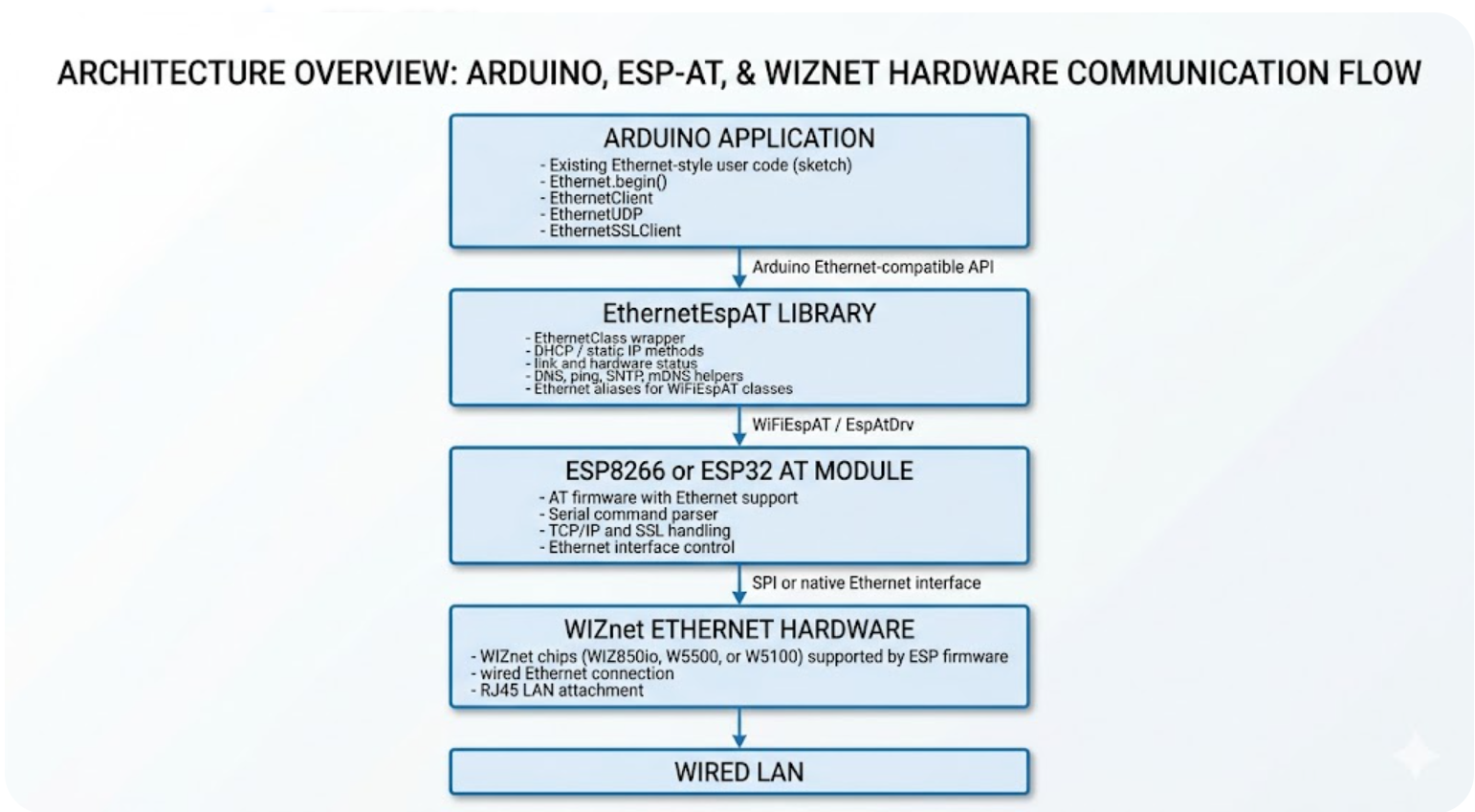
A typical data flow is:
Generated By Gemini
This is not a direct W5500 driver library for Arduino sketches. The Arduino board does not directly call W5500 socket registers. Instead, EthernetEspAT talks to ESP AT firmware, and the ESP firmware is responsible for controlling the Ethernet hardware. That distinction is the key to understanding the project.
Where WIZnet Fits
The WIZnet device relevant to this project is WIZ850io, a module based on W5500. The README includes a reference hardware photo described as a 3.3 V Arduino board with an ESP8266 Ethernet shield containing a Wemos D1 mini and a Wiznet WIZ850io module.
WIZ850io does not appear as a direct C++ driver target inside EthernetEspAT’s source files. The library abstracts Ethernet through ESP AT commands. WIZnet support is therefore one layer below the Arduino library, inside the AT firmware loaded on the ESP module. The README explains that standard Espressif AT firmware builds do not support Ethernet by default; ESP32 AT firmware has Ethernet commands, but they must be enabled and built from source. It also notes that the official ESP32 AT source supports LAN8720, IP101, DP83848, and RTL8201, while a modified AT firmware supporting W5500 is available.
For ESP8266, the path is different. The README states that Espressif’s ESP8266 AT firmware does not support Ethernet, but Jiri Bilek’s ESP_ATMod firmware supports Ethernet chips available in the ESP8266 Arduino platform, including W5500, W5100, and ENC28J60.
This makes the WIZnet role very specific:
WIZ850io/W5500 is the wired Ethernet hardware used by the ESP AT network adapter, not the component directly driven by the Arduino sketch.
That architecture has a clear trade-off. It adds an ESP module between Arduino and Ethernet hardware, so the hardware path is more complex than a classic Arduino Ethernet Shield. In return, the Arduino sketch can keep the familiar Ethernet API and gain access to AT-firmware-managed networking features such as DNS, TCP, UDP, SNTP, and SSL/TLS support through WiFiEspAT-compatible classes.
For WIZnet, the most interesting point is not raw W5500 socket programming. It is API migration. Existing Arduino Ethernet applications can be adapted to an ESP AT based wired setup while keeping code shape close to the standard Ethernet library.
Implementation Notes
src/Ethernet.h
The header defines the public Ethernet-compatible interface. It includes WiFiEspAT client, server, UDP, and SSL client headers, then exposes EthernetClass methods such as begin(), localIP(), linkStatus(), hardwareStatus(), hostByName(), ping(), sntp(), and wifiOff(). It also maps Ethernet-named classes onto WiFiEspAT types.
extern EthernetClass Ethernet;

typedef WiFiUDP EthernetUDP;
typedef WiFiServer EthernetServer;
typedef WiFiClient EthernetClient;
typedef WiFiSSLClient EthernetSSLClient;
This snippet matters because it shows the project’s main design decision. EthernetEspAT does not reimplement TCP, UDP, or TLS client classes. It gives them Ethernet-compatible names while reusing WiFiEspAT’s existing transport classes. That keeps the Arduino sketch interface familiar without duplicating network client code.
src/Ethernet.cpp
The implementation wraps EspAtDrv, the AT command driver from WiFiEspAT. Initialization opens communication with the ESP module over a Stream, usually Serial1. If the AT driver initializes successfully, the library marks Ethernet hardware as found.
bool EthernetClass::init(Stream& serial, int8_t resetPin) {
  bool ok = EspAtDrv.init(&serial, resetPin);
  if (ok) {
    hwStatus = EthernetHardwareFound;
  }
  return ok;
}
This code exists because the Arduino MCU does not manage the Ethernet controller directly. The first requirement is reliable Serial communication with the ESP AT module. If the ESP module does not respond, Ethernet.hardwareStatus() reports no usable network hardware from the Arduino application’s perspective.
The DHCP path is also handled through the AT driver. The library optionally sets a MAC address, enables Ethernet DHCP through EspAtDrv.ethEnableDHCP(), then waits until localIP() returns a valid address.
int EthernetClass::begin(uint8_t *mac, unsigned long timeout) {
  if (mac != nullptr && !EspAtDrv.ethSetMac(mac))
    return 0;

  if (!EspAtDrv.ethEnableDHCP())
    return false;

  if (timeout) {
    const unsigned long start = millis();
    while ((millis() - start) < timeout) {
      if (localIP() != INADDR_NONE)
        return true;
      delay(200);
    }
  }
  return (localIP() != INADDR_NONE);
}
This is the core of the EthernetEspAT value proposition. To the sketch, Ethernet.begin() looks like standard Arduino Ethernet initialization. Under the hood, it enables Ethernet DHCP in the ESP AT firmware and polls the assigned IP address through AT commands.
examples/WebClient/WebClient.ino
The WebClient example shows how the library targets both small AVR boards and boards with hardware Serial ports. On AVR boards without Serial1, it creates a SoftwareSerial port on pins 6 and 7 and lowers the AT baud rate to 9600. Other boards use 115200 baud.
#if defined(ARDUINO_ARCH_AVR) && !defined(HAVE_HWSERIAL1)
#include <SoftwareSerial.h>
SoftwareSerial Serial1(6, 7);
#define AT_BAUD_RATE 9600
#else
#define AT_BAUD_RATE 115200
#endif
The example then initializes the network adapter, attempts DHCP, falls back to static IP if DHCP fails, and opens a TCP client connection.
Serial1.begin(AT_BAUD_RATE);
Ethernet.init(Serial1);

if (Ethernet.begin() == 0) {
  if (Ethernet.linkStatus() == LinkOFF) {
    Serial.println("Ethernet cable is not connected.");
  }
  Ethernet.begin(ip);
}

if (client.connect(server, 80)) {
  client.println("GET /asciilogo.txt HTTP/1.1");
}
The important part is not the HTTP request itself. The important part is migration: a sketch can use Ethernet.init(), Ethernet.begin(), Ethernet.linkStatus(), and EthernetClient while the physical network is actually an ESP AT module with Ethernet support.
Practical Tips / Pitfalls
- Confirm the AT firmware first. EthernetEspAT requires AT firmware built with Ethernet support; standard AT firmware is not enough in many cases.
- Do not treat this as a direct W5500 Arduino driver. WIZ850io/W5500 is handled by the ESP AT firmware layer, while the Arduino sketch talks to the ESP module over Serial.
- Use a reliable UART connection. On AVR boards,
SoftwareSerialat 9600 bps is safer but slower. For heavier traffic, a board with hardwareSerial1is a better fit. - Choose ESP8266 or ESP32 based on firmware availability. ESP8266 requires ESP_ATMod for Ethernet support, while ESP32 requires Ethernet-enabled AT firmware and W5500 support may require a modified build.
- Keep packet volume realistic on 8-bit boards. HTTPS may be possible through
EthernetSSLClient, but RAM pressure and Serial throughput still limit application design. - If migrating from the standard Arduino Ethernet library, start with DHCP and TCP client examples before adding SSL, UDP, SNTP, or mDNS.
- For wired-only products, use
wifiOff(true)carefully. It can be useful for disabling Wi-Fi radio behavior, but persistent changes should be tested before deployment.
FAQ
Q: Why use WIZ850io W5500 with EthernetEspAT?
A: WIZ850io gives the ESP AT module a wired Ethernet interface, while EthernetEspAT lets the Arduino sketch keep the standard Ethernet API. This is useful when the main Arduino board is too small to handle modern networking or SSL/TLS directly, but the project still needs wired LAN behavior.
Q: How does WIZ850io connect to the Arduino platform in this architecture?
A: The Arduino board does not connect directly to WIZ850io in the library model. The Arduino talks to an ESP8266 or ESP32 over Serial AT commands; the ESP module then connects to the WIZ850io/W5500 through firmware-supported Ethernet hardware integration.
Q: What role does W5500 play in this project?
A: W5500 is the wired Ethernet controller behind the ESP AT module. It provides the physical LAN connection, while EthernetEspAT provides the Arduino-facing API wrapper. The library source itself wraps EspAtDrv rather than directly configuring W5500 registers.
Q: Can beginners use EthernetEspAT?
A: Beginners can use it if they already understand Arduino Serial, basic Ethernet setup, and library examples. The difficult part is not the sketch API; it is preparing the correct ESP AT firmware with Ethernet support and wiring the ESP-to-Ethernet hardware reliably.
Q: How does this compare with using the standard Arduino Ethernet library directly with W5500?
A: A direct W5500 library is simpler at the hardware level because the Arduino talks to W5500 over SPI. EthernetEspAT is more layered, but it lets an ESP module handle networking and SSL/TLS while the Arduino sketch keeps Ethernet-style calls. For very small boards that need secure wired communication, that trade-off can be worthwhile.
Source
- Original project: Networking-for-Arduino/EthernetEspAT by Juraj Andrassy.
- Version and metadata: EthernetEspAT 1.0.0, LGPL-2.1, Communication category, all Arduino architectures, depends on WiFiEspAT.
- Verified source files:
src/Ethernet.h,src/Ethernet.cpp, andexamples/WebClient/WebClient.ino. - Provided project brief: EthernetEspAT curation detail document.
Tags
#WIZ850io #W5500 #WIZnet #EthernetEspAT #Arduino #ESP8266 #ESP32 #ATCommands #WiFiEspAT #Ethernet #TLS #AVR
Would you like a Korean translation?