


ardxp
This project provides an Arduino framework that connects physical cockpit controls to the X-Plane flight simulator over UDP using an Arduino Ethernet Shield.

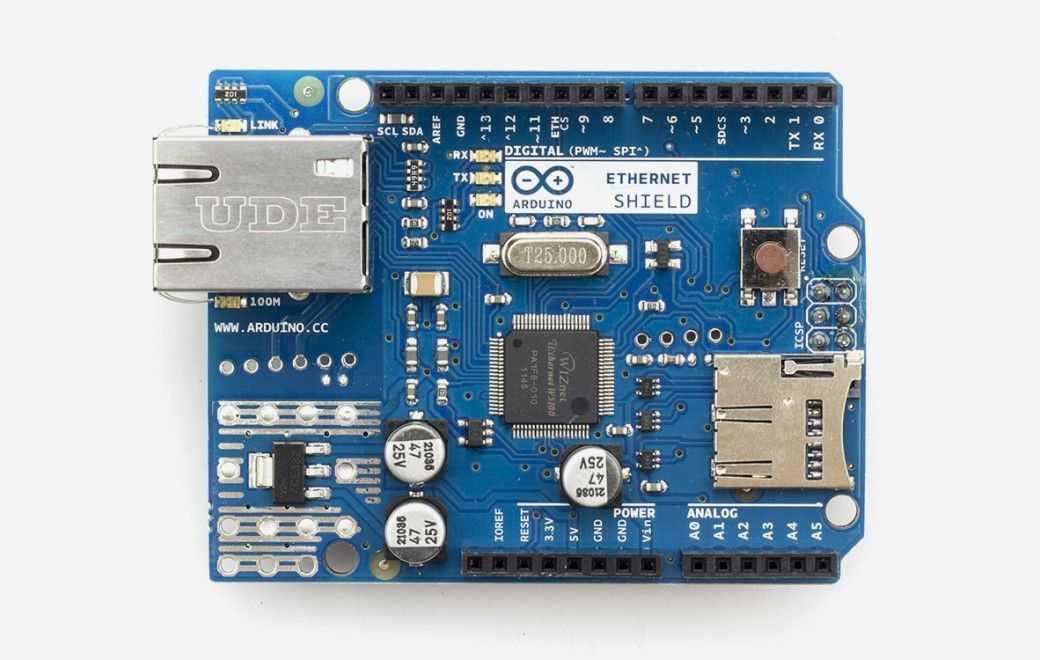
Arduino - Arduino Ethernet Shield
x 1

Where This Can Be Used
X-Plane is a professional flight simulator used for pilot training, home cockpit projects, and aircraft system development. Unlike a typical flight game, X-Plane models aircraft systems in detail and allows external hardware to interact with the simulator in real time.
This makes it possible to build physical cockpit panels using switches, rotary encoders, potentiometers, LEDs, and displays that behave like the controls found in a real aircraft.
To support this, X-Plane exposes thousands of Commands and DataRefs. Commands trigger simulator actions such as landing gear or autopilot functions, while DataRefs represent internal simulator variables such as airspeed, altitude, switch states, or instrument readings.
The challenge is connecting those physical controls to the simulator.
This project provides a reusable Arduino communication framework that bridges physical cockpit hardware and X-Plane over UDP using an Arduino Ethernet Shield. Instead of implementing the X-Plane networking protocol for every new cockpit project, developers can reuse the framework to automatically discover the simulator, exchange Commands and DataRefs, and synchronize hardware with the simulator.
Typical applications include:
- Home cockpit panels
- Flight training simulators
- DIY instrument clusters
- Switch and annunciator panels
- Throttle quadrants
- Autopilot control panels
- Simulator hardware prototypes
By separating the networking layer from the application logic, the framework allows developers to focus on building cockpit hardware rather than implementing UDP communication from scratch.
System Block Diagram
Switches / Potentiometers
         │
         ▼
     Arduino
         │
         ▼
Application Logic
         │
         ▼
Arduino Ethernet Library
         │
         ▼
Arduino Ethernet Shield
         │
         ▼
UDP Network
         │
         ▼
X-Plane Flight Simulator
         │
         ├── DataRef Updates
         ├── Commands
         └── Simulator Feedback
Architecture Overview
The framework acts as a bridge between physical cockpit hardware and the simulator.
Hardware inputs such as buttons or potentiometers are read by the Arduino. The framework converts these values into X-Plane UDP packets, while also listening for incoming simulator data that can update LEDs, displays, or other cockpit indicators.
Unlike simple UDP examples, communication is bidirectional, allowing the simulator and hardware to remain synchronized throughout operation.
What the Project Does
The framework initializes the Arduino Ethernet interface using DHCP, discovers the simulator through the X-Plane multicast beacon, and then exchanges UDP packets with X-Plane.
Three primary operations are supported:
- Send simulator commands (
CMND) - Write simulator variables (
DREF) - Subscribe to simulator variables (
RREF)
The included example demonstrates this by reading a potentiometer and writing its normalized value into an X-Plane DataRef.
const int zone_1_pot = A3;

writeDataref(
    PSTR("cl300/gshldl_h"),
    pot_value / 1023.0
);
Rather than being tied to one aircraft, the framework is designed to be reused for almost any cockpit hardware project by changing the target commands or DataRefs.
Where the Arduino Ethernet Shield Fits
Networking is handled using the standard Arduino Ethernet stack.
The example includes:
#include <Ethernet.h>
#include <EthernetUdp.h>
During startup the sketch requests an IP address using DHCP before opening UDP communication with X-Plane.
Serial.println(F("Waiting for DHCP."));
Ethernet.begin(mac);

Serial.println(Ethernet.localIP());
Using the Arduino Ethernet Library keeps the application code focused on simulator communication rather than Ethernet implementation, making the framework easier to adapt to different cockpit hardware.
Source Code Highlights
1. Arduino Ethernet Initialization
File: example1/ardxp_ex1.ino
Ethernet.begin(mac);The framework starts the Arduino Ethernet interface using DHCP, allowing the simulator network configuration to be assigned automatically.
2. UDP Communication
EthernetUDP udp;

udp.beginPacket(xplane_ip, xplane_port);
udp.write(packetBuffer, n_bytes);
udp.endPacket();
All communication with X-Plane is performed over UDP using the Arduino Ethernet Library.
3. Automatic Simulator Discovery
IPAddress BECN_ip(239,255,1,1);

udp.beginMulticast(BECN_ip, BECN_port);
Instead of requiring users to manually configure the simulator IP address, the framework listens for X-Plane multicast beacon packets and automatically discovers the simulator on the network.
This significantly simplifies setup for cockpit builders.
4. DataRef Framework
The framework provides reusable helper functions including:
subscribeDataref()writeDataref()sendCommand()
These functions abstract the X-Plane UDP protocol, allowing application code to work directly with simulator commands and variables instead of manually constructing packets.
Software Flow
Arduino Boot
      │
      ▼
DHCP Address
      │
      ▼
Listen for X-Plane Beacon
      │
      ▼
Discover Simulator
      │
      ▼
Open UDP Communication
      │
      ▼
Read Hardware Input
      │
      ▼
Generate X-Plane Packet
      │
      ▼
Send UDP Command
      │
      ▼
Receive Simulator Updates
When the Arduino starts, it obtains a network address and automatically discovers the X-Plane simulator using its multicast beacon. Once connected, it continuously exchanges UDP packets with the simulator—sending hardware inputs such as switches or potentiometers while receiving simulator updates to keep cockpit controls synchronized.
Engineering Highlights
Automatic Network Discovery
Instead of requiring manual IP configuration, the framework detects X-Plane using its multicast beacon protocol, reducing deployment effort.
Reusable UDP Framework
The project is structured as a reusable communication layer rather than a single-purpose example. Developers only need to define the hardware logic while reusing the existing networking functions.
Bidirectional Communication
The framework supports both transmitting commands to the simulator and receiving simulator state through DataRef subscriptions, enabling synchronized cockpit hardware.
Protocol Abstraction
X-Plane packet formats are wrapped inside helper functions such as sendCommand(), writeDataref(), and subscribeDataref(), making application development considerably simpler.
Practical Tips / Pitfalls
Verify the Arduino Ethernet Shield is detected before troubleshooting simulator communication.
Ensure both the simulator and Arduino are on the same subnet for multicast beacon discovery.
Check firewall settings if X-Plane discovery packets are not received.
Use valid X-Plane Command and DataRef names for reliable operation.
When subscribing to many DataRefs, choose update rates carefully to avoid unnecessary network traffic.
Keep hardware input handling separate from simulator protocol logic for easier maintenance.
FAQ
1. Why use an Arduino Ethernet Shield for X-Plane?
The Ethernet Shield provides a simple wired network interface that integrates directly with the Arduino Ethernet Library, allowing the framework to communicate with X-Plane using its native UDP protocol.
2. How does the framework discover X-Plane?
It listens for X-Plane's multicast BECN beacon packets. Once the simulator is discovered, subsequent UDP communication uses the detected IP address automatically instead of requiring manual configuration.
3. What can the framework send to X-Plane?
The framework supports three primary operations:
Simulator commands (CMND)
Writing DataRefs (DREF)
Subscribing to DataRefs (RREF)
This allows both hardware control and simulator feedback using the same communication layer.
4. Is it suitable for beginners?
Yes. Basic Arduino users can quickly understand the project because networking is encapsulated inside reusable helper functions. Learning X-Plane DataRefs and commands is the primary challenge rather than the Ethernet implementation.
5. Can it be expanded into a complete cockpit?
Absolutely. The framework is designed as reusable infrastructure rather than a single demonstration. Additional switches, encoders, annunciators, displays, and multiple Arduino panels can all be integrated while reusing the same UDP communication layer.
Source
Repository
ardxp
Primary Files
README.md
example1/ardxp_ex1.ino
example1/readme.md
LICENSE
License
GNU General Public License v3.0, according to the uploaded project analysis.
Tags
Arduino Ethernet Shield • Arduino Ethernet Library • Arduino • W5500 • WIZnet • X-Plane • Flight Simulator • UDP • DataRef • Cockpit Interface • Maker • Simulation