


ardxp
This project provides an Arduino framework that connects physical cockpit controls to the X-Plane flight simulator over UDP using an Arduino Ethernet Shield.

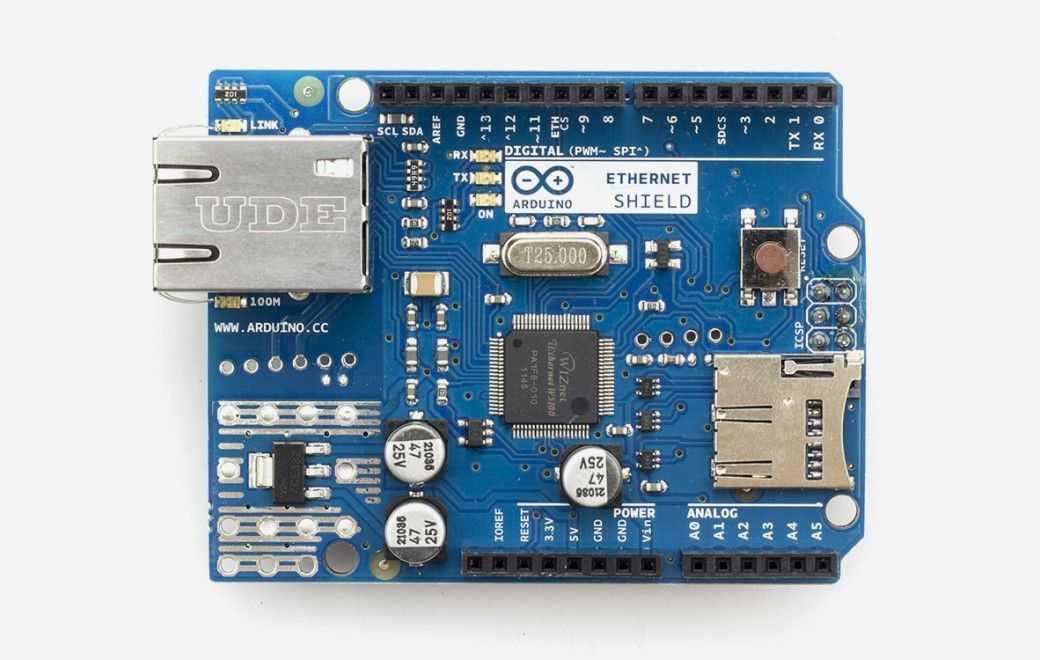
Arduino - Arduino Ethernet Shield
x 1

A reusable Arduino communication framework that connects physical cockpit controls (switches, rotary encoders, potentiometers) to the X-Plane flight simulator over UDP, using an Arduino Ethernet Shield (W5500).
1. The Problem
X-Plane isn't a typical flight game — it models aircraft systems in professional-grade detail and exposes two things over the network for external hardware to interact with:
- Commands — trigger simulator actions (landing gear, autopilot functions, etc.)
- DataRefs — represent internal simulator variables (airspeed, altitude, switch states, etc.)
The catch: every new cockpit hardware project would otherwise need to reimplement X-Plane's UDP protocol from scratch. ardxp abstracts that networking layer away, so developers can focus on the cockpit hardware itself instead of the wire protocol.
Typical uses: home cockpit panels, flight training simulators, DIY instrument clusters, switch/annunciator panels, throttle quadrants, autopilot panels.
2. What It Provides
Three core operations are supported:
| Function | Purpose |
|---|---|
sendCommand() | Send a command to the simulator (CMND) |
writeDataref() | Write a value to a simulator variable (DREF) |
subscribeDataref() | Subscribe to a simulator variable (RREF) |
The standout feature is automatic simulator discovery — the framework listens for X-Plane's multicast beacon (BECN) instead of requiring a manually configured IP address.
IPAddress BECN_ip(239,255,1,1); udp.beginMulticast(BECN_ip, BECN_port);The included example reads a potentiometer and writes its normalized value directly into an X-Plane DataRef:
const int zone_1_pot = A3; writeDataref(PSTR("cl300/gshldl_h"), pot_value / 1023.0);3. How It Works (at a glance)
Arduino boot
   → Get IP via DHCP
   → Listen for X-Plane beacon (auto-discovery)
   → Open UDP channel
   → Read hardware input (switch / potentiometer)
   → Build & send X-Plane packet
   → Receive simulator updates → refresh LEDs/displays
   → (repeat, bidirectionally)
Unlike simple one-way UDP examples, ardxp is bidirectional — it sends hardware input to the simulator while simultaneously receiving state updates back, keeping physical cockpit indicators in sync.
4. Implementation Notes
Ethernet init (DHCP)
Serial.println(F("Waiting for DHCP.")); Ethernet.begin(mac); Serial.println(Ethernet.localIP());UDP send
udp.beginPacket(xplane_ip, xplane_port); udp.write(packetBuffer, n_bytes); udp.endPacket();Networking is delegated entirely to the standard Arduino Ethernet library (Ethernet.h, EthernetUdp.h), so application code only needs to deal with simulator logic, not raw Ethernet plumbing.
5. Practical Checklist
- Confirm the Ethernet Shield is detected first — easy to mistake this for a simulator communication issue
- The X-Plane PC and Arduino must be on the same subnet for multicast beacon discovery to work
- If the beacon isn't found, check firewall settings first
- Use exact, valid Command/DataRef names (typos fail silently)
- When subscribing to many DataRefs, tune update rates to avoid flooding the network
- Keep hardware input handling separate from protocol logic for easier maintenance
Related Projects
| Project | WIZnet Product | Why It's Similar |
|---|---|---|
| Home Cockpit Simulator for X-Plane | W5500 | The most closely related project. It uses Arduino and Ethernet to build a physical cockpit interface that communicates directly with the X-Plane flight simulator. |
| Home Automation Control Devices Remotely Through Internet Using Arduino | W5100/W5500 | Demonstrates Arduino-based Ethernet control of physical devices over a network, following a similar hardware-to-network communication architecture. |
| Arduino Ethernet Servo Motor | W5100 | Controls physical hardware through Ethernet using an Arduino and WIZnet Ethernet module. While not X-Plane-specific, it shares the same pattern of remotely controlling real-world devices over Ethernet. |
6. FAQ
Q. Why an Ethernet Shield specifically? It plugs directly into the Arduino Ethernet library, letting the framework speak X-Plane's native UDP protocol without extra translation layers.
Q. Is this beginner-friendly? Yes. Networking is encapsulated in helper functions, so the real learning curve is understanding X-Plane's Command/DataRef naming — not the Ethernet implementation.
Q. Can it scale to a full cockpit build? Yes — it's designed as reusable infrastructure, not a one-off demo. Multiple Arduino panels, switches, encoders, and displays can all share the same UDP communication layer.
Tags
Arduino Ethernet Shield • Arduino Ethernet Library • Arduino • W5500 • WIZnet • X-Plane • Flight Simulator • UDP • DataRef • Cockpit Interface • Maker • Simulation