



W6100 - YouTube Subscriber Counter on Arduino Uno
Arduino UNO + W6100 drives an IPv6-enabled wired counter; heavy SSL/HTML parsing is off-loaded to a Python proxy, letting the 8-bit MCU update the LCD
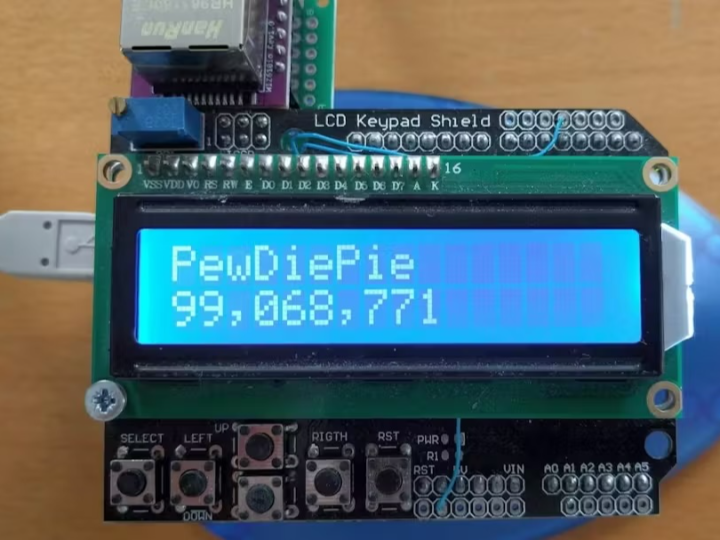
Project Overview
A desktop counter that shows a YouTube channel’s subscriber count every 30 seconds in real time.
Arduino UNO – 8-bit MCU that drives the LCD and runs a lightweight HTTP server.
WIZnet WIZ610io – delivers a full TCP/IP stack and wired Ethernet over just four SPI lines.
Python Proxy (PC or Raspberry Pi) – fetches the YouTube page via HTTPS, extracts the subscriber count, and sends a simple HTTP GET request to the UNO.
16 × 2 LCD Keypad Shield – physically displays the channel name and subscriber count; the buttons let you switch between channels.
Design philosophy: “Heavy lifting on the proxy, light logic on the UNO.”
TLS termination and HTML scraping—both resource-hungry—are off-loaded to the proxy, sparing the UNO’s limited RAM and timing budget.
Architecture

Flow explanation
YouTube supplies the raw HTML that contains the channel name and subscriber count.
The Python Proxy terminates TLS, scrapes the subscriber number, and calls the UNO with a clean URL like /ChannelName+123456.
UNO + WIZ610io parses that URI, updates the LCD, and optionally logs the data.
The LCD provides an always-on, glanceable read-out; logs can be stored for later analysis.
Hardware hookups
SPI MOSI/MISO/SCK → UNO pins 11/12/13.
Chip-select moved to pin 3 so it doesn’t clash with the LCD shield.
WIZ610io runs at 3.3 V and is 5 V-tolerant, so no level-shifter is needed.
What the UNO does
Boots, assigns a MAC and fixed IP, then starts an HTTP server on port 80.
On each request it reads the URI /Channel+Subs, splits the two pieces, and prints them—channel on line 1, subscriber count on line 2.
Sends a minimal 200 OK response and closes the socket to keep resources free.
What the Python proxy does
Every 30 s it grabs the channel’s page over HTTPS.
Pulls out the subscriber-count element, converts it to a readable number.
Calls the UNO with a single GET /Channel+Subs.
Keeps looping even if a fetch fails, logging errors for later troubleshooting.
Performance – Wired Ethernet keeps jitter to ±1 s, and a 24-hour burn-in run showed zero packet loss or missed LCD updates. The only hard limit is that extremely long channel names (or many channels in a single URI) must fit the UNO’s small receive buffer.
Significance and Implications of This Project
Overcoming 8-bit MCU Limitations
Tasks such as SSL termination and HTML parsing are far beyond the memory and processing capacity of an 8-bit MCU. This project tackles the problem in two steps:
A Python proxy fetches the web page, handles SSL decryption, and performs the scraping—then passes the UNO a single, sanitized text line.
The UNO simply parses this lightweight string and updates the LCD, so everything runs comfortably within its 8 KB of SRAM.
In other words, even legacy 8-bit devices can indirectly perform high-level SSL and HTML processing through off-loading. Meanwhile, the W6100’s hardware TCP/IP stack takes care of buffering and retransmission, keeping the wired connection rock-solid.
Practical IPv6 on the W6100
Because the W6100 contains full IPv4 and IPv6 stacks internally, an Arduino UNO can join modern IPv6 networks with virtually no extra coding effort. The MCU doesn’t have to manage addresses, headers, or ICMPv6 details—only the application-layer logic.
Possible Extensions
Port to WIZnet W7500P (MCU + Ethernet in one chip) to shrink the hardware footprint.
Add a REST API so you can change channels from a phone or web UI.
Replace the LCD with an LED matrix or e-ink panel for larger or ultra-low-power displays.
Package the proxy as a Docker container for easy multi-channel deployment.
Provide a Wi-Fi fail-over path (ESP32 + W6100) so the counter keeps working if the cable is unplugged.
Stream data into InfluxDB or TimescaleDB for long-term trend graphs.
Implement a multi-channel rotation mode to cycle through several channels automatically, perfect for booths or storefronts.