



pico_fota OTA
A Bootloader That Refuses to Die: Firmware Recovery Over Ethernet, Served by a 92 KB Bootloader
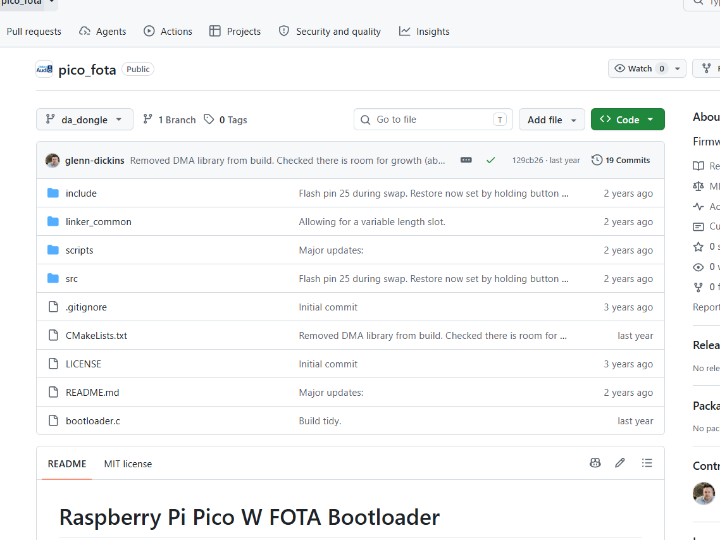
pico_fota — A Bootloader That Refuses to Die: Firmware Recovery Over Ethernet, Served by a 92 KB Bootloader
#W5500 #TOE #RP2040 #Bootloader #FOTA #Recovery #SecureBoot #AES-ECB #SHA256 #ioLibrary #Rollback
📚 Context: Commercial product firmware — the recovery path of a shipping audio networking dongle by DickinsAudio (Australia). Verification status: WIZnet chip usage confirmed at code level (
Sn_MR_TCPsocket, ioLibrary DHCP, WIZnet OUI00:08:DC). Builds as a component of a private parent project; not standalone-reproducible. See Reproducibility Notes.
01 — What is this project?
Every embedded engineer has met this failure: a firmware update goes wrong, the device boots into nothing, and the only way back is a screwdriver, a case teardown, and a USB cable. For a device sitting inside a rack, a ceiling, or a customer's studio wall, that is not a bug — it is a truck roll.
The usual answer is a bootloader with an A/B slot layout and a rollback timer. That handles bad firmware. It does not handle no firmware — the case where both slots are empty, corrupted, or where the application itself was never able to bring up the network to fetch a replacement.
pico_fota closes that last gap. It is a fork of Jakub Zimnol's pico_fota_bootloader (originally a Pico W / Wi-Fi design), re-engineered by DickinsAudio for a wired RP2040 product. The decisive change: the bootloader itself speaks Ethernet.
Hold the recovery button for five seconds at power-up and the RP2040 never reaches the application. Instead, a 92 KB bootloader brings up a WIZnet Ethernet controller, pulls a DHCP lease, opens a TCP listener on port 80, and serves a single-page HTML upload form. Drop a firmware binary into the browser, and the bootloader streams it directly into flash, verifies its SHA256, decrypts it with AES-ECB, swaps the slots, commits, and jumps into the freshly recovered application.
No JTAG. No BOOTSEL button. No case teardown. A network cable and a web browser.
02 — Why put a web server in a bootloader?
🔷 Recovery must not depend on the thing that broke
A FOTA path implemented in the application is only as reliable as the application. If the update logic, the network stack, or the RTOS fails to start, the recovery path fails with it. Moving the network recovery into the bootloader makes it orthogonal to application health — the code that rescues the device is the code that runs before anything can go wrong.
🔷 The upload client already exists on every desk
There is no custom flashing tool, no vendor utility, no Python script, and no driver install. The bootloader serves this to any browser on the LAN:
<h1>SYSTEM RECOVERY</h1>
Booted in recovery mode. A new firmware can be loaded here.
<input type="file" id="input" onchange="upload()">
<button onclick="location.href='reboot'">REBOOT</button>
A FileReader reads the binary, fetch() POSTs it as application/octet-stream, and the bootloader parses the body straight out of the socket. The entire client is 983 bytes of HTML served from a C string literal. A field technician needs no software and no training.
🔷 Wired, not wireless — on purpose
The upstream project targeted the Pico W over Wi-Fi. This fork replaced that with Ethernet, and for a recovery path the reasoning is hard to argue with: no SSID, no PSK, no association state, no regulatory domain, no roaming, no 2.4 GHz congestion. A recovery mechanism that requires the operator to first configure wireless credentials is not a recovery mechanism. Plug in the cable, the link comes up, DHCP resolves, the page loads.
🔷 Where this sits in the WIZnet ecosystem
The RP2040 has no Ethernet MAC and no PHY. Reaching the network requires an external part, and the realistic choices are an SPI MAC+PHY with a software TCP/IP stack (ENC28J60 + LwIP), or a hardwired TCP/IP offload controller (WIZnet W5500 / W5100S). For an application, both work. For a 92 KB bootloader, only one does — as the next section shows.
03 — System architecture
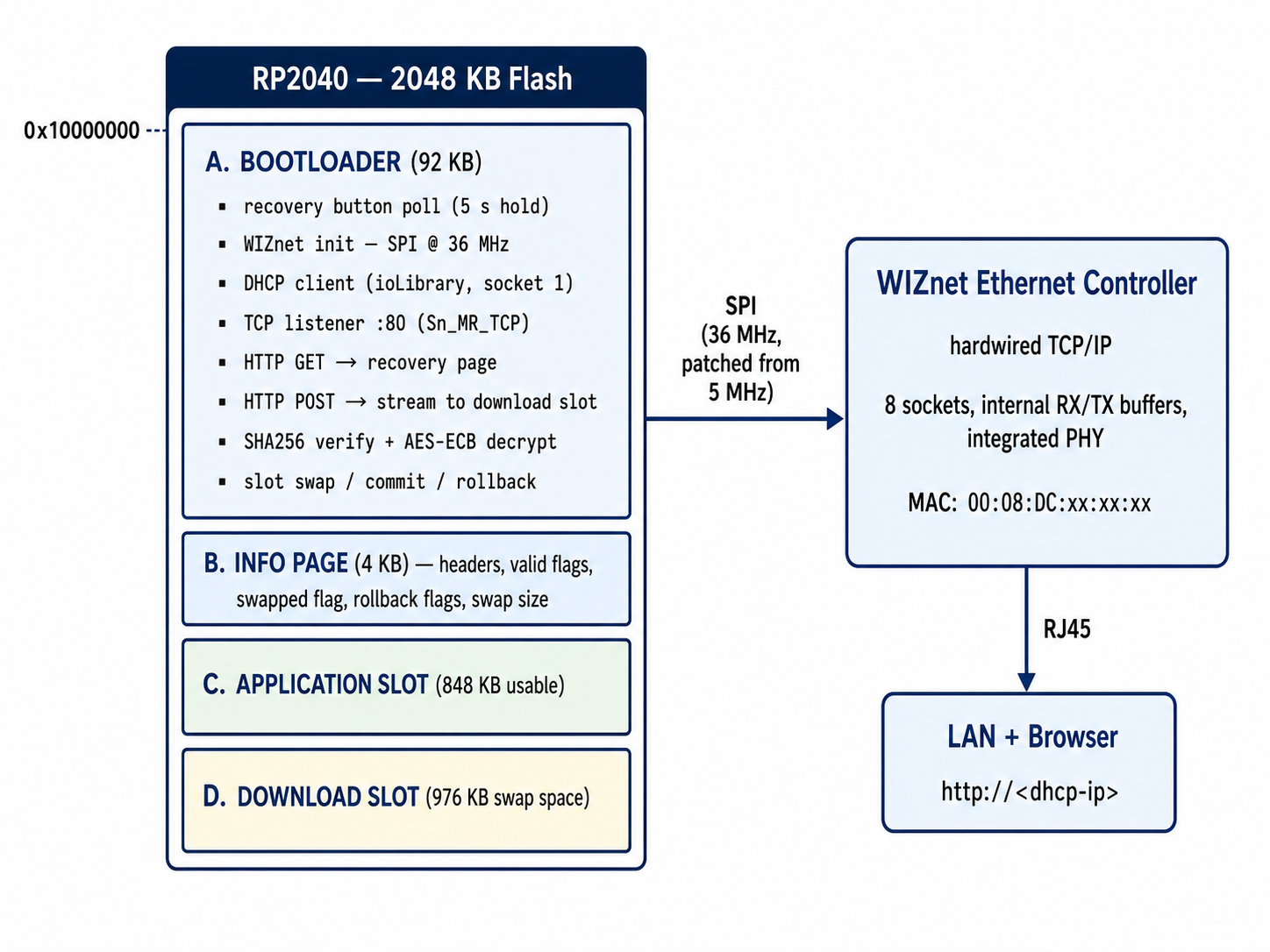
Recovery flow
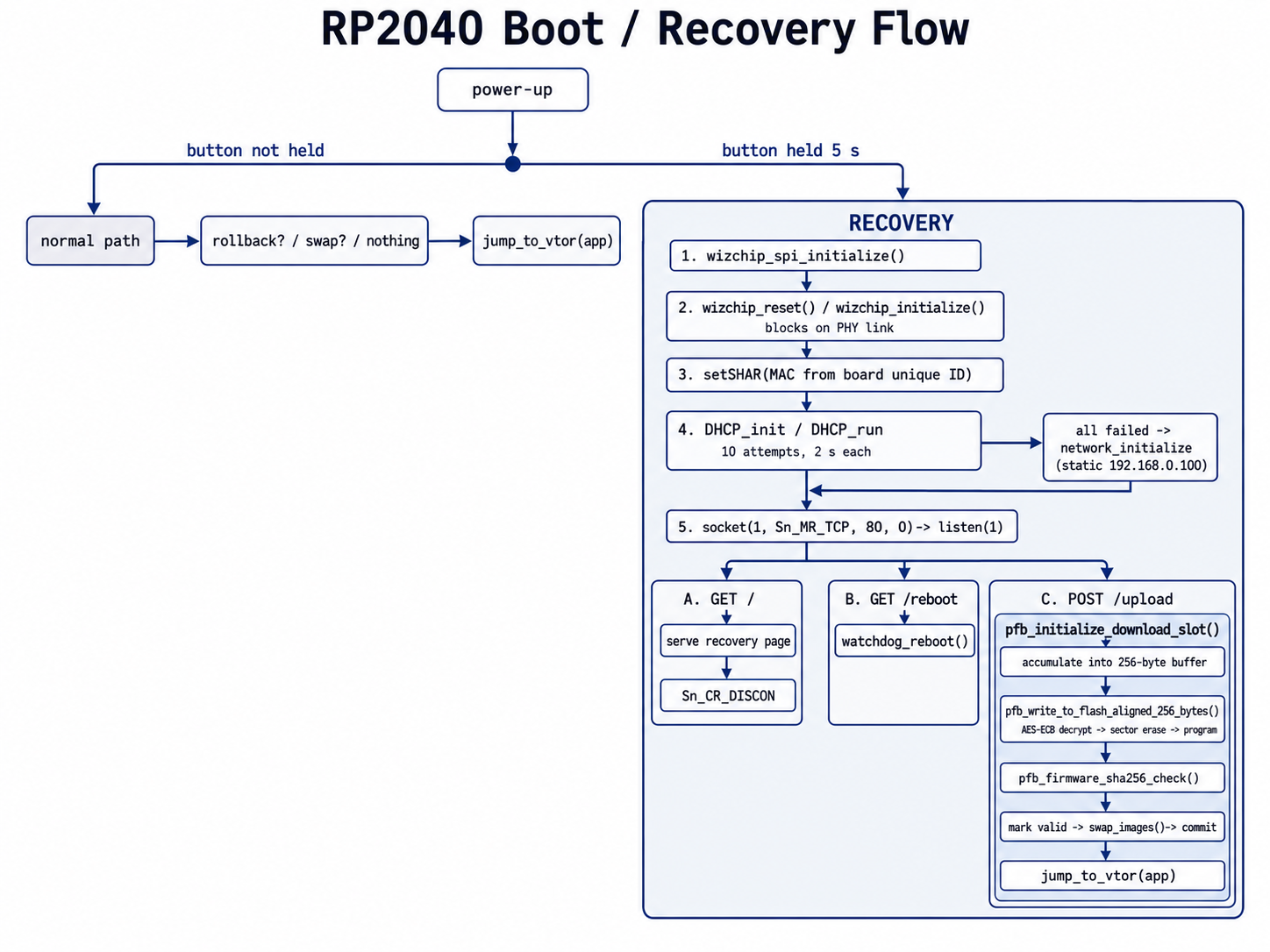
04 — Why WIZnet? ⭐
🔷 The technical core: 92 KB is the entire argument
The bootloader must fit in 92 KB of flash together with mbedTLS AES-ECB, mbedTLS SHA256, the flash driver, the slot-swap logic, an HTTP request parser, and a DHCP client. There is no room left for a software TCP/IP stack.
A software stack such as LwIP costs roughly 40–60 KB of flash and tens of kilobytes of RAM for pbuf pools, TCP control blocks, and reassembly buffers — before a single line of recovery logic is written. On top of that it needs a timer tick, periodic polling, and an ARP/ICMP/TCP state machine that must keep running while flash sectors are being erased with interrupts disabled.
The WIZnet controller removes that entire problem. TCP connection establishment, sequence numbers, ACK generation, retransmission, windowing, and reassembly all execute in silicon on the Ethernet chip. The bootloader's contribution is a handful of SPI register transactions:
socket(1, Sn_MR_TCP, 80, 0x00);   // open socket 1 as a TCP server on port 80
listen(1);                         // hardware handles the three-way handshake
len = getSn_RX_RSR(1);             // how many bytes are waiting in the chip's RX buffer
len = recv(1, g_ethernet_buf, len);
send(1, (uint8_t *)page_recover, sizeof(page_recover));
setSn_CR(1, Sn_CR_DISCON);         // clean FIN
That is the complete TCP surface of this bootloader. It costs a few kilobytes of driver code and one 2 KB application buffer — not a stack.
🔷 Socket mode: TCP / TOE (Sn_MR_TCP), plus ioLibrary DHCP
This project uses the WIZnet controller in TOE TCP server mode (Sn_MR_TCP) on socket 1, bound to port 80. This is the purest expression of what a TOE part is for: the host MCU never sees a TCP segment, only an ordered byte stream it can drain with recv().
The same socket index is reused earlier for the DHCP client, which ioLibrary's DHCP_init() / DHCP_run() implement over UDP. The bootloader makes up to ten DHCP attempts of two seconds each, then falls back to a static configuration:
DHCP_init(1, g_ethernet_buf);            // socket 1, UDP under the hood
for (; wait > 0; wait--) {
    if (DHCP_run() == DHCP_IP_LEASED) break;
    sleep_ms(100);
    gpio_put(LED_PIN, !gpio_get(LED_PIN));   // heartbeat while negotiating
}
DHCP_stop();
Note the LED toggle inside the DHCP poll loop — the device blinks while it negotiates, so a technician standing in front of a rack can tell "searching" from "hung" without a serial console.
🔷 A detail that proves real deployment: the MAC address
pico_unique_board_id_t id;
pico_get_unique_board_id(&id);
net_info.mac[0] = 0x00;   net_info.mac[1] = 0x08;   net_info.mac[2] = 0xDC;
net_info.mac[3] = id.id[5];
net_info.mac[4] = id.id[6];
net_info.mac[5] = id.id[7];
setSHAR(net_info.mac);
00:08:DC is WIZnet's IEEE-registered OUI. The lower three bytes come from the RP2040's factory-unique board ID, so every unit in the field gets a distinct, deterministic, collision-free MAC with no provisioning step and no MAC EEPROM on the BOM. This is not tutorial code; this is what a manufacturer does when they need a thousand boards to coexist on a customer's network.
🔷 The SPI clock note
wizchip_spi_initialize(); // NOTE MAKE SURE TO PATCH THIS TO BE 36Mhz not 5Mhz SPI
The author's own comment records that the reference port's default 5 MHz SPI was raised to 36 MHz. That is not cosmetic. A recovery upload moves the better part of a megabyte through this link, and the recovery page tells the user to expect roughly two minutes. At 5 MHz that number would be considerably less friendly. The WIZnet SPI interface has the headroom to be pushed, and this project pushes it.
🔷 Versus the alternatives
| WIZnet TOE (this project) | ENC28J60 + LwIP | Wi-Fi (CYW43, upstream design) | |
|---|---|---|---|
| Flash cost in bootloader | ioLibrary driver + DHCP, a few KB | LwIP core ≈ 40–60 KB | CYW43 firmware blob + stack, far larger |
| RAM cost | one 2 KB buffer | pbuf pools, TCBs, reassembly | driver + stack + firmware working set |
| TCP correctness | in silicon, vendor-validated | your build, your bugs | vendor stack |
Behaviour during flash_range_erase with IRQs off | chip buffers inbound data autonomously | stack starves, risk of drop | stack starves |
| Recovery prerequisites | plug in cable | plug in cable | SSID + PSK must already be configured |
| Deterministic bring-up time | link-up + DHCP | link-up + DHCP | scan + associate + DHCP |
The fourth row deserves emphasis. swap_images() runs with save_and_disable_interrupts() held across sector erases and programs. Any software stack would be blind for those windows. The WIZnet controller keeps receiving into its own internal RX buffer regardless of what the host MCU is doing — which is precisely why the upload loop can safely alternate between recv() and flash_range_program().
🔷 Verified evidence ✅
- ✅
socket(1, Sn_MR_TCP, 80, 0x00)— TOE TCP server mode, explicit in source - ✅
wizchip_spi_initialize()→wizchip_reset()→wizchip_initialize()→wizchip_check()— full ioLibrary bring-up sequence - ✅
DHCP_init()/DHCP_run()/DHCP_stop()with static fallback and ten-attempt retry - ✅
setSHAR()with WIZnet OUI00:08:DC+ RP2040 unique board ID - ✅
ctlnetwork(CN_GET_NETINFO, ...)used to read back and log the leased address - ✅
getSn_RX_RSR()polled for flow control against 256-byte flash write alignment - ✅
setSn_CR(1, Sn_CR_DISCON)— deliberate graceful close rather than a bareclose() - ✅ Commit history shows staged, field-driven evolution: HTTP fallback added (2024-07-06), variable-length slots (2024-07-06), 5-second button hold and fast recovery blink (2024-07-07),
Content-Lengthcorrectness and case-insensitive method matching (2024-10-14), migration to the WIZnet SDK (2025-01-20)
05 — Key components
🌐 WIZnet Ethernet Controller — TOE TCP server mode (Sn_MR_TCP) + ioLibrary DHCP
Driven through the standard ioLibrary_Driver API (socket.h, dhcp.h, wizchip_conf.h) and the RP2040 port layer (w5x00_spi.h, port_common.h). SPI raised to 36 MHz. Socket 1 serves double duty: UDP DHCP client during bring-up, then TCP listener on port 80. MAC derived from the WIZnet OUI plus the RP2040 unique ID.
🔧 RP2040 — dual-core Cortex-M0+ host
Only the flash controller, SPI, GPIO, and watchdog are needed in recovery mode. hardware/flash.h for erase/program, hardware/watchdog.h for the reboot endpoint, pico/unique_id.h for MAC derivation.
🔐 mbedTLS (via pico_mbedtls) — AES-ECB + SHA256
Firmware images are AES-ECB encrypted at build time by scripts/aes_encrypt.py and appended with a SHA256 digest by scripts/sha256_append.py. The bootloader decrypts each 256-byte block on the way into flash and verifies the digest before permitting a swap. The AES key is compiled into both the bootloader and the image via -DPFB_AES_KEY=.
💾 A/B slot flash layout with rollback
92 KB bootloader, 4 KB info page, 976 KB swap space per side (848 KB usable application slot), inside 2048 KB of RP2040 flash. Six persistent flags in the info page track app/download headers, download-slot validity, swapped state, post-rollback state, and pending-rollback state. Normal FOTA arms a rollback that fires unless the new application calls pfb_firmware_commit(). Recovery-mode uploads deliberately commit immediately — there is no previous good image to fall back to.
🖥️ 983-byte single-page recovery client
A complete file-upload UI as a C string literal: FileReader → fetch('upload', {method:'POST'}) → application/octet-stream, plus a REBOOT button that maps to GET /reboot → watchdog_reboot().
06 — Application scenarios
01. Rack-mounted and installed AV equipment
The originating use case. A media dongle in a studio wall or a rack bay cannot be pulled for a USB reflash. One cable and a laptop browser restore it in about two minutes.
02. Industrial controllers behind a locked panel
Machinery cabinets are sealed, sometimes safety-interlocked. An Ethernet recovery path that lives below the application means a bricked update no longer means unbolting a panel and hunting for a JTAG header.
03. Fleet field service without vendor tooling
A contractor with no toolchain, no drivers, and no vendor utility can recover a unit. The device supplies its own client. This substantially lowers the cost and training burden of field support.
04. Development and CI hardware farms
A rack of boards under continuous integration will eventually be flashed with something that does not boot. A network recovery path in the bootloader makes that self-healing over the same LAN the farm already uses, with no per-board USB hub or debug probe.
05. Remote or lights-out installations
Where physical access is expensive — remote sites, ceilings, vehicles, ships — the difference between "reachable over the LAN" and "requires a visit" is the entire maintenance budget.
Conclusion
A 92 KB bootloader that serves its own web-based firmware recovery UI — made possible because the TCP/IP stack lives in the Ethernet chip, not in the flash budget.
- ✅ Network firmware recovery implemented inside the bootloader, independent of application health
- ✅ WIZnet controller used in TOE TCP server mode (
Sn_MR_TCP) on port 80, plus ioLibrary DHCP with static fallback - ✅ Complete recovery client delivered as 983 bytes of HTML — no tooling, no drivers, no training
- ✅ Hardware TCP offload lets the upload loop interleave
recv()with interrupt-disabledflash_range_erase()safely - ✅ Per-unit MAC synthesised from the WIZnet OUI
00:08:DCand the RP2040 unique board ID — zero provisioning, zero BOM cost - ✅ AES-ECB image encryption and SHA256 verification enforced in the recovery path, not only the normal FOTA path
- ✅ SPI pushed from 5 MHz to 36 MHz to keep a ~1 MB upload inside a two-minute window
- ✅ Wired Ethernet chosen over the upstream Wi-Fi design specifically to remove credential configuration from the recovery flow
- ✅ Shipping commercial firmware, evolved across two years of field-driven commits
Reproducibility Notes
This is production firmware for a specific commercial board, published as a component rather than as a tutorial. Prospective readers should know:
- Not standalone-buildable.
CMakeLists.txtlinks theETHERNET_FILES,IOLIBRARY_FILES, andDHCP_FILEStargets, which are defined by WIZnet's RP2040-HAT-C / WIZnet-PICO-C library tree. That tree, the port layer (w5x00_spi.c,port_common.h), the_WIZCHIP_definition, and the board header definingPICO_BUTTON_0all live in the private parent project. - README describes the upstream design. The documentation still reflects the original Pico W / Wi-Fi project and the original 36 KB bootloader size. The Ethernet recovery path and the 92 KB layout exist only in the code.
- To adapt it, drop the repository into a WIZnet-PICO-C-based project, define
_WIZCHIP_andPICO_BUTTON_0, and providepico_mbedtls. The recovery logic itself is self-contained inbootloader.c.
Q&A
Q. Why Sn_MR_TCP rather than MACRAW with a software stack? A. MACRAW hands raw Ethernet frames to the host and requires a full TCP/IP implementation above it — exactly the 40–60 KB this bootloader cannot afford. Sn_MR_TCP moves the entire stack into the controller, reducing the host side to socket calls. For a size-constrained bootloader, TOE mode is not a convenience, it is the enabling condition.
Q. Both DHCP and the HTTP server use socket 1. Is that a conflict? A. No — they are sequential, not concurrent. DHCP_stop() releases the socket before socket(1, Sn_MR_TCP, 80, 0) reopens it as a TCP listener. With eight hardware sockets available the project could have used separate indices; reusing one keeps the recovery state machine strictly linear and easy to reason about.
Q. What happens if DHCP fails? A. After ten attempts of two seconds each, the bootloader calls network_initialize() with a static configuration of 192.168.0.100/24, gateway 192.168.0.1. A technician can therefore recover a unit on an isolated link with no DHCP server by setting a laptop to the same subnet.
Q. Flash erase disables interrupts. Doesn't that break the transfer? A. This is the sharpest argument for a TOE part. swap_images() and the flash programming path run under save_and_disable_interrupts(). A software stack would be unable to ACK or buffer during those windows. The WIZnet controller receives into its own internal RX buffer independently of the host, so the bootloader can simply poll getSn_RX_RSR(1) when it returns and drain whatever accumulated. TCP flow control is handled by the chip.
Q. Why doesn't the recovery upload arm a rollback like a normal FOTA does? A. Because there is nothing to roll back to. Recovery mode exists precisely when the application slot is not trustworthy, so the code calls pfb_firmware_commit() and _pfb_mark_is_not_after_rollback() immediately after a successful SHA256 check, then jumps straight into the new image rather than rebooting.
Q. Is serving an unauthenticated upload endpoint safe? A. Two controls apply. The endpoint only exists after a deliberate five-second physical button hold at power-up, so it is not reachable during normal operation. And every uploaded image must decrypt correctly under the compiled-in AES key and match its appended SHA256 before it is allowed to swap — an attacker on the LAN cannot install an image without the build-time key.
Q. How does the bootloader know when the upload has finished? A. It drains the socket until no further data arrives, counting bytes into 256-byte aligned flash writes, and then validates the accumulated length with pfb_firmware_sha256_check(upload_done). The digest check is what confirms completeness; a truncated transfer simply fails verification and is rejected.
pico_fota — 죽지 않는 부트로더: 92 KB 부트로더가 직접 띄우는 이더넷 펌웨어 복구
#W5500 #TOE #RP2040 #Bootloader #FOTA #Recovery #SecureBoot #AES-ECB #SHA256 #ioLibrary #Rollback
📚 배경: 상용 제품 펌웨어 — 호주 DickinsAudio의 오디오 네트워킹 동글에 실제로 탑재된 복구 경로. 검증 상태: WIZnet 칩 사용을 코드 레벨에서 확인 (
Sn_MR_TCP소켓, ioLibrary DHCP, WIZnet OUI00:08:DC). 비공개 상위 프로젝트의 컴포넌트로 빌드되며 단독 재현은 불가. 재현성 참고 항목 확인 요망.
01 — 어떤 프로젝트인가?
임베디드 엔지니어라면 한 번쯤 겪는 상황이 있다. 펌웨어 업데이트가 잘못되고, 기기는 아무것도 부팅하지 못하고, 되살릴 방법은 드라이버로 케이스를 뜯어 USB를 꽂는 것뿐인 상황. 랙 안에, 천장 속에, 고객사 스튜디오 벽 안에 들어가 있는 장비라면 이건 버그가 아니라 출장 비용이다.
일반적인 해법은 A/B 슬롯 구조와 롤백 타이머를 갖춘 부트로더다. 이건 잘못된 펌웨어는 처리한다. 하지만 펌웨어가 아예 없는 상황 — 양쪽 슬롯이 비었거나 손상됐거나, 애초에 애플리케이션이 네트워크를 올리지 못해 새 이미지를 받아올 수조차 없는 상황 — 은 처리하지 못한다.
pico_fota는 바로 그 마지막 구멍을 막는다. Jakub Zimnol의 pico_fota_bootloader(원래는 Pico W / Wi-Fi 설계)를 DickinsAudio가 유선 RP2040 제품용으로 다시 설계한 포크다. 결정적인 변경점은 하나다. 부트로더 자신이 이더넷을 말한다.
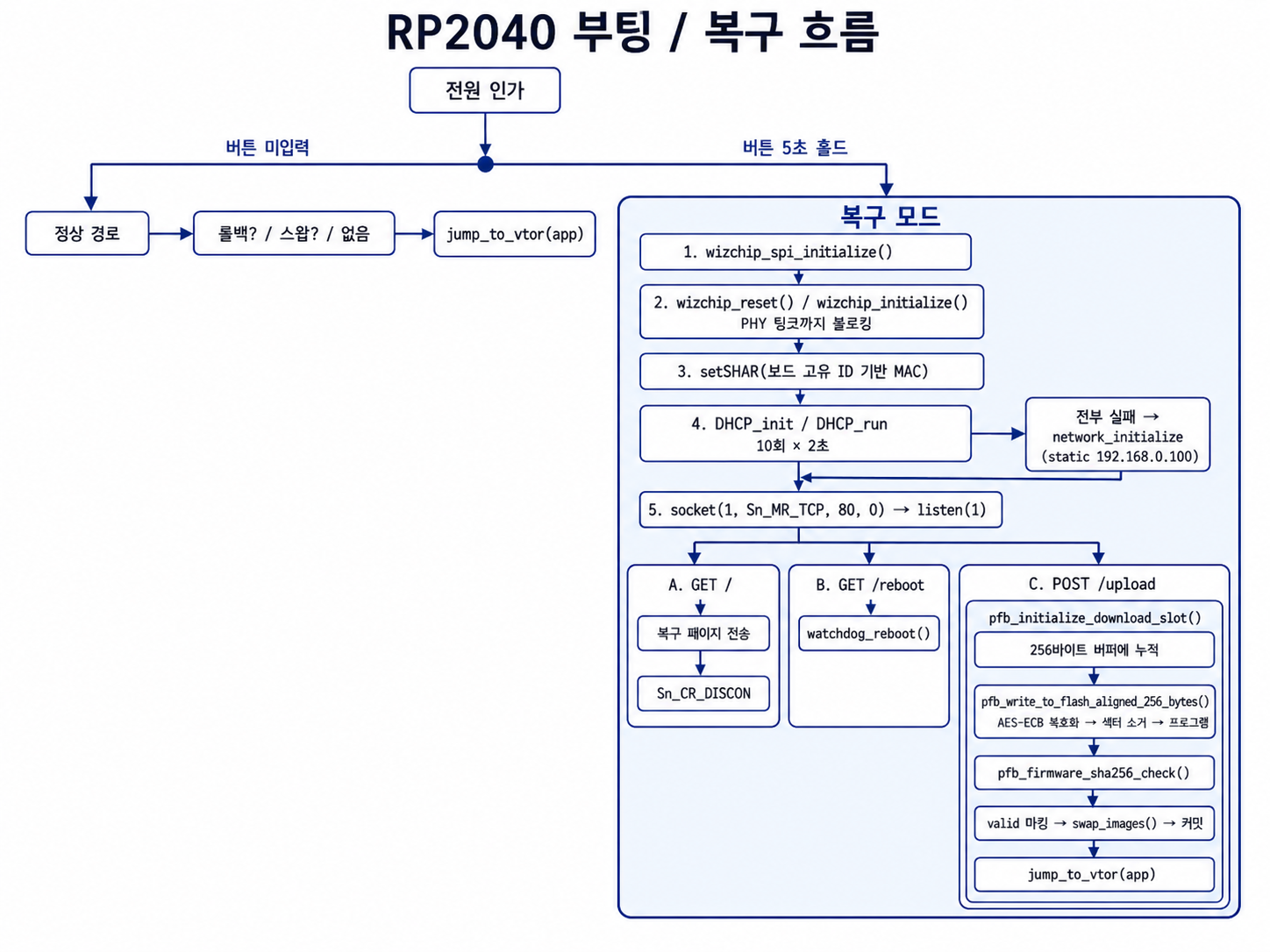
전원 인가 시 복구 버튼을 5초간 누르고 있으면 RP2040은 애플리케이션에 도달하지 않는다. 대신 92 KB 부트로더가 WIZnet 이더넷 컨트롤러를 초기화하고, DHCP로 IP를 받고, 80번 포트에 TCP 리스너를 열고, 단일 페이지 HTML 업로드 폼을 서빙한다. 브라우저에서 펌웨어 바이너리를 던져 넣으면 부트로더가 그것을 플래시로 직접 스트리밍하고, SHA256을 검증하고, AES-ECB로 복호화하고, 슬롯을 스왑하고, 커밋한 뒤, 방금 복구된 애플리케이션으로 점프한다.
JTAG도, BOOTSEL 버튼도, 케이스 분해도 없다. 랜선 하나와 웹 브라우저면 된다.
02 — 왜 부트로더에 웹서버를 넣는가?
🔷 복구 수단이 고장난 대상에 의존해선 안 된다
애플리케이션에 구현된 FOTA 경로는 애플리케이션만큼만 신뢰할 수 있다. 업데이트 로직이든 네트워크 스택이든 RTOS든, 하나라도 기동에 실패하면 복구 경로도 함께 죽는다. 네트워크 복구를 부트로더로 내리면 이 경로가 애플리케이션 상태와 **직교(orthogonal)**해진다. 기기를 구조하는 코드가, 무언가 잘못될 수 있기 이전에 실행되는 코드가 되는 것이다.
🔷 업로드 클라이언트는 이미 모든 책상 위에 있다
전용 플래싱 툴도, 벤더 유틸리티도, 파이썬 스크립트도, 드라이버 설치도 없다. 부트로더가 LAN 상의 아무 브라우저에나 이걸 내려준다:
<h1>SYSTEM RECOVERY</h1>
Booted in recovery mode. A new firmware can be loaded here.
<input type="file" id="input" onchange="upload()">
<button onclick="location.href='reboot'">REBOOT</button>
FileReader가 바이너리를 읽고, fetch()가 application/octet-stream으로 POST하고, 부트로더는 소켓에서 바로 본문을 파싱한다. 클라이언트 전체가 C 문자열 리터럴에 담긴 983바이트 HTML이다. 현장 기술자에게 필요한 소프트웨어도, 교육도 없다.
🔷 무선이 아니라 유선 — 의도된 선택
업스트림은 Pico W의 Wi-Fi를 타겟으로 했다. 이 포크는 그것을 이더넷으로 교체했고, 복구 경로라는 관점에서 보면 반박하기 어려운 논리다. SSID도, PSK도, association 상태도, 규제 도메인도, 로밍도, 2.4 GHz 혼잡도 없다. 복구를 하려면 먼저 무선 자격증명을 설정해야 하는 메커니즘은 복구 메커니즘이라 부를 수 없다. 케이블을 꽂으면 링크가 올라오고, DHCP가 풀리고, 페이지가 열린다.
🔷 WIZnet 생태계에서의 위치
RP2040에는 이더넷 MAC도 PHY도 없다. 네트워크에 닿으려면 외부 부품이 필요하고, 현실적인 선택지는 소프트웨어 TCP/IP 스택을 얹는 SPI MAC+PHY(ENC28J60 + LwIP)이거나 하드와이어드 TCP/IP 오프로드 컨트롤러(WIZnet W5500 / W5100S)다. 애플리케이션이라면 둘 다 된다. 92 KB 부트로더라면 하나뿐이다 — 다음 섹션이 그 이유다.
03 — 시스템 아키텍처
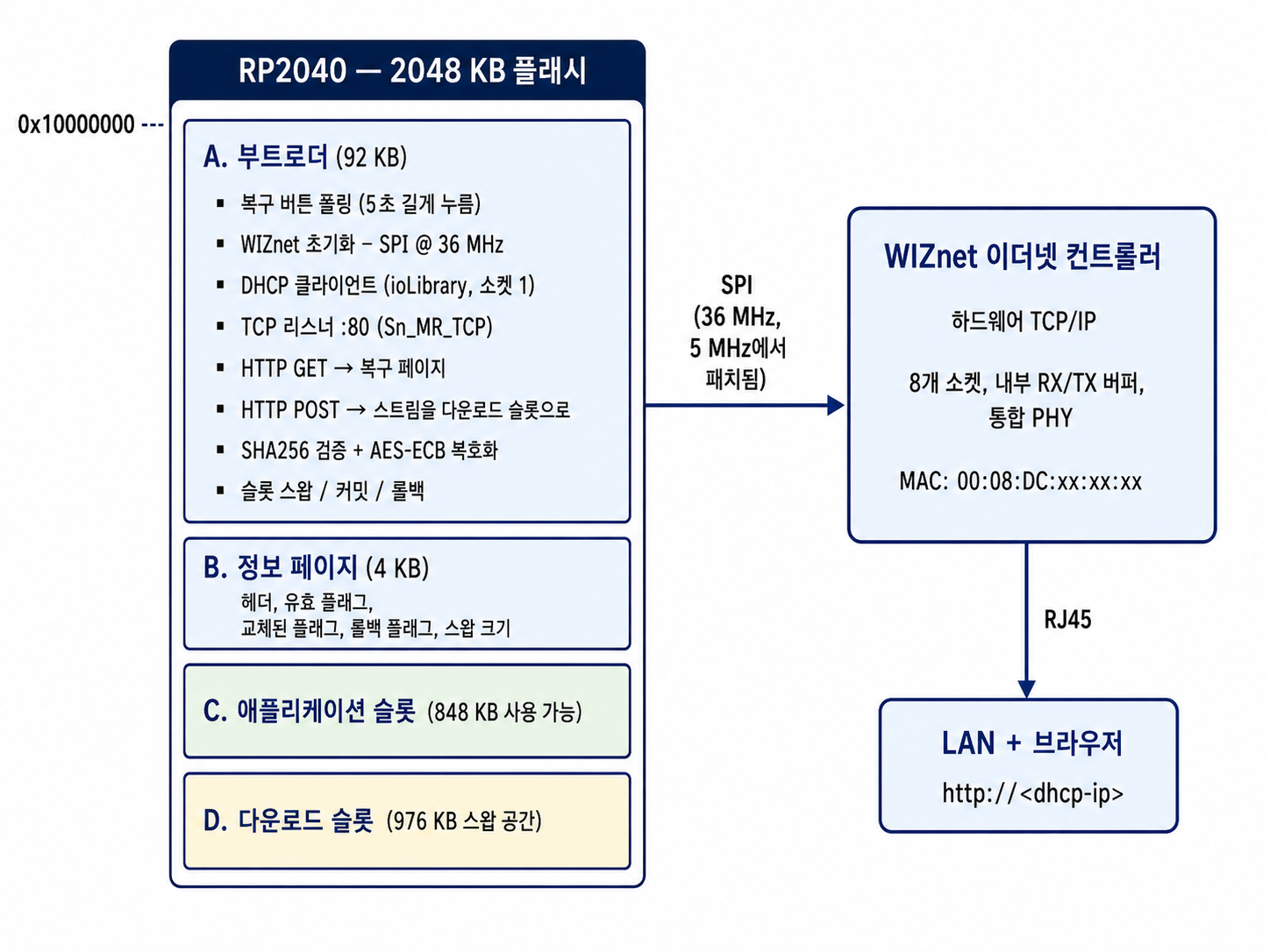
복구 흐름
04 — 왜 WIZnet인가? ⭐
🔷 기술적 핵심: 92 KB, 그 자체가 근거다
부트로더는 92 KB 플래시 안에 mbedTLS AES-ECB, mbedTLS SHA256, 플래시 드라이버, 슬롯 스왑 로직, HTTP 요청 파서, DHCP 클라이언트를 함께 담아야 한다. 소프트웨어 TCP/IP 스택이 들어갈 자리는 남지 않는다.
LwIP 같은 소프트웨어 스택은 플래시 약 40~60 KB에, pbuf 풀·TCP 컨트롤 블록·재조립 버퍼로 수십 KB RAM을 요구한다. 복구 로직 한 줄 쓰기 전에 드는 비용이다. 거기에 타이머 틱, 주기적 폴링, 그리고 인터럽트를 끈 채 플래시 섹터를 지우는 동안에도 계속 돌아야 하는 ARP/ICMP/TCP 상태 머신까지 필요하다.
WIZnet 컨트롤러는 이 문제를 통째로 없앤다. TCP 연결 수립, 시퀀스 번호, ACK 생성, 재전송, 윈도잉, 재조립이 전부 이더넷 칩 실리콘에서 수행된다. 부트로더가 담당하는 건 몇 개의 SPI 레지스터 트랜잭션뿐이다:
socket(1, Sn_MR_TCP, 80, 0x00);   // 소켓 1을 80번 포트 TCP 서버로 개설
listen(1);                         // 3-way 핸드셰이크는 하드웨어가 처리
len = getSn_RX_RSR(1);             // 칩 RX 버퍼에 대기 중인 바이트 수
len = recv(1, g_ethernet_buf, len);
send(1, (uint8_t *)page_recover, sizeof(page_recover));
setSn_CR(1, Sn_CR_DISCON);         // 정상적인 FIN
이게 이 부트로더의 TCP 표면 전부다. 드라이버 코드 수 KB와 2 KB 애플리케이션 버퍼 하나면 끝이지, 스택이 아니다.
🔷 소켓 모드: TCP / TOE (Sn_MR_TCP), 그리고 ioLibrary DHCP
이 프로젝트는 WIZnet 컨트롤러를 소켓 1에서 80번 포트에 바인딩한 TOE TCP 서버 모드(Sn_MR_TCP) 로 사용한다. TOE 부품이 존재하는 이유를 가장 순수하게 보여주는 형태다. 호스트 MCU는 TCP 세그먼트를 한 번도 보지 않고, recv()로 퍼내기만 하면 되는 순서 보장된 바이트 스트림만 본다.
같은 소켓 인덱스는 그 앞 단계에서 DHCP 클라이언트로도 쓰인다. ioLibrary의 DHCP_init() / DHCP_run()이 UDP 위에서 구현한 것이다. 부트로더는 2초짜리 DHCP 시도를 최대 열 번 반복하고, 실패하면 정적 설정으로 폴백한다:
DHCP_init(1, g_ethernet_buf);            // 소켓 1, 내부적으로 UDP
for (; wait > 0; wait--) {
    if (DHCP_run() == DHCP_IP_LEASED) break;
    sleep_ms(100);
    gpio_put(LED_PIN, !gpio_get(LED_PIN));   // 협상 중 하트비트
}
DHCP_stop();
DHCP 폴링 루프 안의 LED 토글을 눈여겨볼 만하다. 협상 중에는 기기가 깜빡이므로, 랙 앞에 선 기술자가 시리얼 콘솔 없이도 "탐색 중"과 "멈춤"을 구분할 수 있다.
🔷 실제 양산의 증거: MAC 주소
pico_unique_board_id_t id;
pico_get_unique_board_id(&id);
net_info.mac[0] = 0x00;   net_info.mac[1] = 0x08;   net_info.mac[2] = 0xDC;
net_info.mac[3] = id.id[5];
net_info.mac[4] = id.id[6];
net_info.mac[5] = id.id[7];
setSHAR(net_info.mac);
00:08:DC는 WIZnet의 IEEE 등록 OUI다. 하위 3바이트는 RP2040 공장 고유 보드 ID에서 가져온다. 즉 현장에 나가는 모든 유닛이 프로비저닝 공정 없이, BOM에 MAC EEPROM 없이, 서로 겹치지 않는 결정론적 MAC을 갖는다. 튜토리얼 코드가 아니라, 고객 네트워크에서 수천 대가 공존해야 하는 제조사가 실제로 하는 방식이다.
🔷 SPI 클럭 주석
wizchip_spi_initialize(); // NOTE MAKE SURE TO PATCH THIS TO BE 36Mhz not 5Mhz SPI
레퍼런스 포트 기본값 5 MHz를 36 MHz로 올렸다는 저자 본인의 기록이다. 이건 장식이 아니다. 복구 업로드는 이 링크로 1 MB에 가까운 데이터를 밀어 넣고, 복구 페이지는 사용자에게 약 2분을 예고한다. 5 MHz였다면 그 숫자는 훨씬 덜 친절했을 것이다. WIZnet SPI 인터페이스에는 밀어붙일 여유가 있고, 이 프로젝트는 그것을 밀어붙인다.
🔷 대안 대비 우위
| WIZnet TOE (본 프로젝트) | ENC28J60 + LwIP | Wi-Fi (CYW43, 업스트림 설계) | |
|---|---|---|---|
| 부트로더 내 플래시 비용 | ioLibrary 드라이버 + DHCP, 수 KB | LwIP 코어 약 40~60 KB | CYW43 펌웨어 블롭 + 스택, 훨씬 큼 |
| RAM 비용 | 2 KB 버퍼 하나 | pbuf 풀, TCB, 재조립 버퍼 | 드라이버 + 스택 + 펌웨어 워킹셋 |
| TCP 정확성 | 실리콘, 벤더 검증 | 내 빌드, 내 버그 | 벤더 스택 |
IRQ 차단 중 flash_range_erase | 칩이 자율적으로 수신 버퍼링 | 스택 아사, 유실 위험 | 스택 아사 |
| 복구 전제조건 | 케이블 연결 | 케이블 연결 | SSID + PSK 사전 설정 필요 |
| 결정론적 기동 시간 | 링크업 + DHCP | 링크업 + DHCP | 스캔 + 연결 + DHCP |
네 번째 행이 특히 중요하다. swap_images()는 섹터 소거와 프로그램 전 구간에서 save_and_disable_interrupts()를 잡고 실행된다. 어떤 소프트웨어 스택이든 그 구간 동안 눈이 먼다. WIZnet 컨트롤러는 호스트 MCU가 무엇을 하든 상관없이 자체 내부 RX 버퍼로 계속 수신한다. 업로드 루프가 recv()와 flash_range_program()을 안전하게 번갈아 수행할 수 있는 이유가 정확히 이것이다.
🔷 검증된 증거 ✅
- ✅
socket(1, Sn_MR_TCP, 80, 0x00)— TOE TCP 서버 모드, 소스에 명시 - ✅
wizchip_spi_initialize()→wizchip_reset()→wizchip_initialize()→wizchip_check()— ioLibrary 전체 기동 시퀀스 - ✅
DHCP_init()/DHCP_run()/DHCP_stop()+ 정적 폴백 + 10회 재시도 - ✅
setSHAR()+ WIZnet OUI00:08:DC+ RP2040 고유 보드 ID - ✅
ctlnetwork(CN_GET_NETINFO, ...)로 할당된 주소 역조회 및 로깅 - ✅ 256바이트 플래시 쓰기 정렬에 맞춘
getSn_RX_RSR()폴링 기반 흐름 제어 - ✅ 단순
close()가 아닌setSn_CR(1, Sn_CR_DISCON)명시적 정상 종료 - ✅ 커밋 히스토리에 현장 피드백 기반의 단계적 진화가 남아 있음: HTTP 폴백 추가(2024-07-06), 가변 길이 슬롯(2024-07-06), 5초 버튼 홀드 및 복구 모드 고속 점멸(2024-07-07),
Content-Length정합성 및 대소문자 무시 메서드 매칭(2024-10-14), WIZnet SDK 이관(2025-01-20)
05 — 핵심 구성요소
🌐 WIZnet 이더넷 컨트롤러 — TOE TCP 서버 모드(Sn_MR_TCP) + ioLibrary DHCP
표준 ioLibrary_Driver API(socket.h, dhcp.h, wizchip_conf.h)와 RP2040 포트 레이어(w5x00_spi.h, port_common.h)를 통해 구동. SPI는 36 MHz로 상향. 소켓 1이 두 역할을 겸한다 — 기동 시에는 UDP DHCP 클라이언트, 이후에는 80번 포트 TCP 리스너. MAC은 WIZnet OUI와 RP2040 고유 ID로 합성.
🔧 RP2040 — 듀얼코어 Cortex-M0+ 호스트
복구 모드에서 필요한 건 플래시 컨트롤러, SPI, GPIO, 워치독뿐. 소거/프로그램에 hardware/flash.h, 리부트 엔드포인트에 hardware/watchdog.h, MAC 합성에 pico/unique_id.h.
🔐 mbedTLS (pico_mbedtls 경유) — AES-ECB + SHA256
펌웨어 이미지는 빌드 시점에 scripts/aes_encrypt.py로 AES-ECB 암호화되고 scripts/sha256_append.py로 SHA256 다이제스트가 덧붙는다. 부트로더는 플래시에 쓰는 길목에서 256바이트 블록마다 복호화하고, 스왑을 허용하기 전에 다이제스트를 검증한다. AES 키는 -DPFB_AES_KEY=로 부트로더와 이미지 양쪽에 컴파일된다.
💾 롤백을 갖춘 A/B 슬롯 플래시 레이아웃
RP2040 플래시 2048 KB 안에 부트로더 92 KB, INFO 페이지 4 KB, 편당 스왑 공간 976 KB(애플리케이션 슬롯 가용 848 KB). INFO 페이지의 영속 플래그 6개가 app/download 헤더, 다운로드 슬롯 유효성, 스왑 여부, 롤백 직후 여부, 롤백 예정 여부를 추적한다. 정상 FOTA는 롤백을 예약하며, 새 애플리케이션이 pfb_firmware_commit()을 호출하지 않으면 발동한다. 복구 모드 업로드는 의도적으로 즉시 커밋한다 — 되돌아갈 정상 이미지가 없기 때문이다.
🖥️ 983바이트 단일 페이지 복구 클라이언트
C 문자열 리터럴에 담긴 완결된 파일 업로드 UI: FileReader → fetch('upload', {method:'POST'}) → application/octet-stream. 여기에 GET /reboot → watchdog_reboot()으로 매핑되는 REBOOT 버튼까지.
06 — 응용 시나리오
01. 랙 마운트 및 설치형 AV 장비
발원이 된 사용 사례. 스튜디오 벽이나 랙 베이에 들어간 미디어 동글은 USB 재플래싱을 위해 빼낼 수 없다. 케이블 하나와 노트북 브라우저로 약 2분이면 복구된다.
02. 잠긴 패널 뒤의 산업용 컨트롤러
기계 캐비닛은 밀폐돼 있고, 안전 인터록이 걸려 있는 경우도 있다. 애플리케이션보다 아래에 사는 이더넷 복구 경로가 있으면, 업데이트 실패가 더 이상 패널을 뜯고 JTAG 헤더를 찾는 일로 이어지지 않는다.
03. 벤더 툴링 없는 현장 서비스
툴체인도, 드라이버도, 벤더 유틸리티도 없는 협력업체 인력이 유닛을 복구할 수 있다. 기기가 자기 클라이언트를 스스로 제공하기 때문이다. 현장 지원의 비용과 교육 부담을 크게 낮춘다.
04. 개발 및 CI 하드웨어 팜
CI로 돌아가는 보드 랙은 결국 언젠가 부팅되지 않는 이미지로 플래싱된다. 부트로더 안의 네트워크 복구 경로는 팜이 이미 쓰고 있는 동일 LAN 위에서 이를 자가 치유로 만들며, 보드당 USB 허브나 디버그 프로브를 요구하지 않는다.
05. 원격 및 무인 설치 환경
물리적 접근 비용이 비싼 곳 — 원격지, 천장, 차량, 선박 — 에서 "LAN으로 닿는다"와 "방문해야 한다"의 차이는 유지보수 예산 전체를 가른다.
결론
92 KB 부트로더가 자체 웹 기반 펌웨어 복구 UI를 서빙한다 — TCP/IP 스택이 플래시 예산이 아니라 이더넷 칩 안에 살고 있기에 가능한 설계.
- ✅ 애플리케이션 상태와 무관하게 동작하는 부트로더 내부 네트워크 펌웨어 복구 구현
- ✅ WIZnet 컨트롤러를 80번 포트 TOE TCP 서버 모드(
Sn_MR_TCP) 로 활용, 정적 폴백을 갖춘 ioLibrary DHCP 병행 - ✅ 복구 클라이언트 전체를 983바이트 HTML로 전달 — 툴링·드라이버·교육 불필요
- ✅ 하드웨어 TCP 오프로드 덕분에 업로드 루프가
recv()와 인터럽트 차단 상태의flash_range_erase()를 안전하게 교차 수행 - ✅ WIZnet OUI
00:08:DC와 RP2040 고유 보드 ID로 유닛별 MAC 합성 — 프로비저닝 공정 제로, BOM 비용 제로 - ✅ AES-ECB 이미지 암호화와 SHA256 검증을 정상 FOTA 경로뿐 아니라 복구 경로에서도 강제
- ✅ 약 1 MB 업로드를 2분 안에 끝내기 위해 SPI를 5 MHz에서 36 MHz로 상향
- ✅ 복구 흐름에서 자격증명 설정을 제거하기 위해 업스트림 Wi-Fi 설계 대신 유선 이더넷을 선택
- ✅ 2년에 걸친 현장 피드백 기반 커밋으로 진화한, 실제 출하 중인 상용 펌웨어
재현성 참고
이 코드는 특정 상용 보드용 양산 펌웨어이며, 튜토리얼이 아니라 컴포넌트로 공개돼 있다. 참고하려는 독자는 다음을 알아야 한다.
- 단독 빌드 불가.
CMakeLists.txt가ETHERNET_FILES,IOLIBRARY_FILES,DHCP_FILES타겟을 링크하는데, 이들은 WIZnet의 RP2040-HAT-C / WIZnet-PICO-C 라이브러리 트리가 정의한다. 그 트리와 포트 레이어(w5x00_spi.c,port_common.h),_WIZCHIP_정의,PICO_BUTTON_0을 정의하는 보드 헤더가 모두 비공개 상위 프로젝트에 있다. - README는 업스트림 설계를 설명한다. 문서는 여전히 원본 Pico W / Wi-Fi 프로젝트와 원래의 36 KB 부트로더 크기를 반영한다. 이더넷 복구 경로와 92 KB 레이아웃은 코드에만 존재한다.
- 적용하려면 이 저장소를 WIZnet-PICO-C 기반 프로젝트에 넣고,
_WIZCHIP_과PICO_BUTTON_0을 정의하고,pico_mbedtls를 제공하면 된다. 복구 로직 자체는bootloader.c하나에 자족적으로 담겨 있다.
Q&A
Q. 왜 소프트웨어 스택을 얹은 MACRAW가 아니라 Sn_MR_TCP인가? A. MACRAW는 호스트에 생 이더넷 프레임을 넘기고, 그 위에 완전한 TCP/IP 구현을 요구한다. 이 부트로더가 감당할 수 없는 바로 그 40~60 KB다. Sn_MR_TCP는 스택 전체를 컨트롤러로 옮겨 호스트 측을 소켓 호출로 축소한다. 크기 제약이 있는 부트로더에서 TOE 모드는 편의가 아니라 성립 조건이다.
Q. DHCP와 HTTP 서버가 모두 소켓 1을 쓴다. 충돌하지 않나? A. 충돌하지 않는다. 동시가 아니라 순차다. DHCP_stop()이 소켓을 반납한 뒤 socket(1, Sn_MR_TCP, 80, 0)이 TCP 리스너로 다시 연다. 하드웨어 소켓이 8개나 있으니 인덱스를 나눌 수도 있었지만, 하나를 재사용함으로써 복구 상태 머신이 엄격히 선형으로 유지되어 추론하기 쉬워진다.
Q. DHCP가 실패하면? A. 2초짜리 시도를 열 번 반복한 뒤, 부트로더는 network_initialize()로 192.168.0.100/24, 게이트웨이 192.168.0.1의 정적 설정을 적용한다. 따라서 DHCP 서버가 없는 고립된 링크에서도 노트북을 같은 서브넷으로 맞추면 복구할 수 있다.
Q. 플래시 소거는 인터럽트를 끈다. 전송이 깨지지 않나? A. TOE 부품을 써야 하는 가장 날카로운 근거가 이 지점이다. swap_images()와 플래시 프로그래밍 경로는 save_and_disable_interrupts() 하에서 실행된다. 소프트웨어 스택이라면 그 구간 동안 ACK도 버퍼링도 하지 못한다. WIZnet 컨트롤러는 호스트와 독립적으로 자체 내부 RX 버퍼에 수신하므로, 부트로더는 복귀 후 getSn_RX_RSR(1)을 폴링해 쌓인 만큼 퍼내기만 하면 된다. TCP 흐름 제어는 칩이 처리한다.
Q. 복구 업로드는 왜 정상 FOTA처럼 롤백을 예약하지 않나? A. 되돌아갈 대상이 없기 때문이다. 복구 모드는 애플리케이션 슬롯을 신뢰할 수 없을 때 존재하므로, SHA256 검증에 성공하면 곧바로 pfb_firmware_commit()과 _pfb_mark_is_not_after_rollback()을 호출하고, 리부트 없이 새 이미지로 바로 점프한다.
Q. 인증 없는 업로드 엔드포인트를 여는 게 안전한가? A. 두 가지 통제가 걸린다. 이 엔드포인트는 전원 인가 시 5초간 물리 버튼을 의도적으로 눌러야만 존재하므로 정상 운용 중에는 도달할 수 없다. 그리고 업로드된 모든 이미지는 컴파일된 AES 키로 정상 복호화되고 덧붙은 SHA256과 일치해야만 스왑이 허용된다. LAN 상의 공격자는 빌드 타임 키 없이는 이미지를 설치할 수 없다.
Q. 부트로더는 업로드가 끝난 걸 어떻게 아나? A. 더 이상 데이터가 오지 않을 때까지 소켓을 비우면서 256바이트 정렬 플래시 쓰기로 바이트를 세고, 누적 길이를 pfb_firmware_sha256_check(upload_done)으로 검증한다. 완결성을 확인해주는 것은 다이제스트 검사이며, 잘린 전송은 검증에 실패해 그대로 거부된다.
Original Link: https://github.com/dickinsaudio/pico_fota (branch: da_dongle) Upstream: https://github.com/JZimnol/pico_fota_bootloader Author: DickinsAudio (Australia) License: MIT