



joynetd
W5500 Ethernet for Sharp X68000 (1987) via joystick port bit-banged SPI. inetd.x-compatible TCP/IP driver enables SMB, HTTPS, web browsing on vintage hardware.
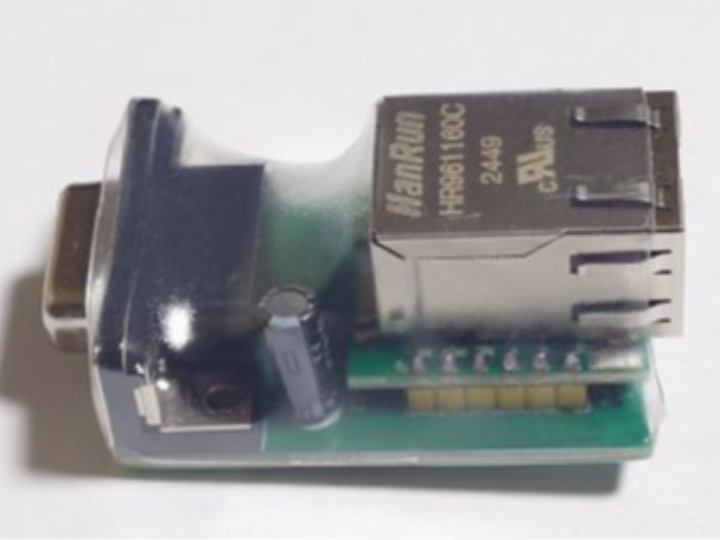
[English Version]
Ethernet Joy-kun — Bringing W5500 Ethernet to a 1987 Japanese Computer via Joystick Port
#W5500 #X68000 #RetroComputing #TCP/IP #Joystick #Sharp #Vintage #Japan
01 — What is this project?

The Sharp X68000 is a legendary Japanese home computer released in 1987. In its era, it was ahead of its time — powerful graphics, FM synthesis sound, and a passionate developer community that continues to this day.
One thing the X68000 never had natively: Ethernet. In 1987, that was fine. In 2026, retrocomputer enthusiasts want to connect their vintage machines to the modern internet — browse the web, transfer files, run network utilities.
"Ethernet Joy-kun" (イーサネットじょい君) is a hardware adapter that plugs into the X68000's joystick port and provides wired Ethernet connectivity via W5500. The companion driver joynetd.x makes it compatible with the existing X68000 TCP/IP application ecosystem — apps written for the old Keisoku-Giken inetd.x driver work without modification.
02 — Why the joystick port?
The X68000's joystick port is one of the few expansion interfaces accessible without opening the machine. It connects to an Intel 8255 PPI (Programmable Peripheral Interface) chip, which provides general-purpose digital I/O.
Ethernet Joy-kun uses this I/O to implement a bit-banged SPI interface between the X68000 and the W5500 chip. The 8255 pins become SPI clock, MOSI, MISO, and chip select signals. It's slow — the README notes "communication speed is not very fast" — but it works, and it requires no hardware modification to the original X68000.
[X68000]
  Joystick port
  (8255 PPI GPIO)
       ↓ bit-banged SPI
[Ethernet Joy-kun adapter]
       W5500
       ↓ Ethernet
  [LAN / Internet]
03 — Why W5500?
🔷 W5500 handles TCP/IP — the X68000 CPU doesn't have to
The X68000's CPU is a Motorola 68000 running at 10MHz. Implementing a software TCP/IP stack on this hardware while also running applications would be a significant CPU burden — and potentially impossible at the communication speeds needed.
W5500's hardware TCP/IP stack offloads this entirely. The X68000 only needs to move data in and out of W5500's socket buffers via the slow bit-banged SPI interface. TCP connection management, IP routing, ARP, and checksums are all handled in W5500 hardware.
🔷 MAC address flexibility
The README explicitly notes: W5500 does not have a built-in MAC address. When joynetd.x generates the configuration file with -c, it randomly generates a MAC address and stores it in joynetd.cfg. This is actually an advantage — the same hardware can have a unique identity on any network without factory-programmed addressing.
🔷 Power from the joystick port — with USB-C fallback
The adapter is powered from the joystick port's supply. If the port cannot provide enough power (indicated by the LINK LED blinking instead of solid), a USB Type-C connector provides external power input as a fallback.
04 — Software architecture
joynetd.x is a TSR (Terminate and Stay Resident) driver — the X68000 equivalent of a DOS TSR. It installs itself into memory and hooks system calls, intercepting network API requests from applications.
[X68000 Network Application]
  (telnet, wget, smbfs, etc.)
        ↓  trap instruction (API call)
[joynetd.x — TSR driver]
  ├─ inetd.x compatible API
  ├─ DHCP client (idhcpc)
  ├─ DNS resolver
  └─ W5500 driver (bit-banged SPI via 8255)
        ↓
[Ethernet Joy-kun + W5500]
        ↓
   [Network]
The driver provides a compatible API with Keisoku-Giken's inetd.x — the original commercial TCP/IP driver for X68000. This means applications written decades ago for inetd.x run unmodified on Ethernet Joy-kun.
05 — Confirmed working applications
The following applications have been tested and verified working:
| Application | Function |
|---|---|
| ping, telnet, ifconfig | TCPPACKA network utilities |
| smbfs, smbclient | SMB file sharing (connect to Windows shares) |
| httpsget | HTTPS file download |
| WebXpressionPlus | Web browser for X68000 |
| netcat | Network I/O utility |
| wget | HTTP file downloader |
A 1987 computer browsing the modern web. That's what this makes possible.
06 — Application scenarios
01. Retro computer internet access
Connect a Sharp X68000 to a modern home network and access the internet — download files, browse websites, connect to modern services. All from a machine released before the World Wide Web existed. #RetroComputing #X68000 #Sharp
02. File transfer between vintage and modern systems
Use smbfs to mount Windows network shares directly on the X68000. Transfer software, disk images, and documents between the vintage machine and modern PCs without physical media. #FileTransfer #SMB #Vintage
03. Retrocomputing community preservation
Network connectivity enables X68000 users to participate in online communities, download newly released retro software, and contribute to active development — keeping the platform alive decades after production ended. #Preservation #RetroScene #Community
04. Hardware hacking showcase
Demonstrates that W5500's hardware TCP/IP stack is flexible enough to work even when the host interface is a bit-banged GPIO connection on a 37-year-old computer. A testament to W5500's interface-agnostic design. #HardwareHacking #W5500 #BitBanging
Conclusion
A 1987 Japanese computer, a joystick port, and W5500 — connected to the internet in 2026.
Ethernet Joy-kun is equal parts engineering feat and love letter to retro computing. Using the X68000's joystick port GPIO as a bit-banged SPI interface, W5500 handles the full TCP/IP stack while the 68000 CPU focuses on running applications.
The inetd.x-compatible API means decades of existing X68000 network software works immediately. SMB file sharing, HTTPS downloads, web browsing — all from a machine that predates the World Wide Web.
W5500's hardware TCP/IP offloading is the key: without it, running a software TCP/IP stack on a 10MHz 68000 while also running applications would be impractical.
- ✅ W5500 Ethernet via joystick port (bit-banged SPI over 8255 GPIO)
- ✅ Hardware TCP/IP offload — 10MHz 68000 CPU not burdened
- ✅ inetd.x compatible API — existing apps work without modification
- ✅ DHCP client with automatic IP configuration
- ✅ Random MAC address generation (W5500 has no built-in MAC)
- ✅ USB-C external power fallback
- ✅ SMB, HTTPS, web browsing, telnet, ping verified working
- ✅ MIT licensed, actively maintained (latest release March 2026)
Q&A
Q. What is the Sharp X68000? A Japanese home computer released by Sharp in 1987. It featured a Motorola 68000 CPU at 10MHz, advanced (for the era) graphics hardware, and FM sound synthesis. It was highly regarded in Japan for games and creative applications, and maintains an active retro computing community to this day.
Q. What is bit-banged SPI? Normally, SPI communication uses dedicated hardware SPI controller pins. Bit-banging means implementing the SPI protocol in software by manually toggling GPIO pins at the correct timing. It is slower than hardware SPI but works on any GPIO pins — including the X68000's joystick port.
Q. Why is the communication speed slow? Two reasons. First, bit-banged SPI over a 10MHz CPU is inherently slow. Second, the joystick port's 8255 chip was not designed for high-speed data transfer. The README acknowledges this limitation explicitly. For practical use (file transfers, web browsing), the speed is usable but not fast.
Q. Why does W5500 need a randomly generated MAC address? The W5500 chip does not have a factory-programmed MAC address, unlike most Ethernet chips. When joynetd.x initializes for the first time, it generates a random locally-administered MAC address and saves it to the configuration file. This address persists across reboots, giving the adapter a consistent network identity.
Q. What is TSR? Terminate and Stay Resident — a program that installs itself into memory and remains active after its initial execution ends. joynetd.x works this way: run it once, and it stays in memory providing network services to all subsequently launched applications, similar to a device driver.
[한글 버전]
#W5500 #X68000 #레트로컴퓨팅 #TCP/IP #조이스틱 #Sharp #빈티지 #일본

01 — 이 프로젝트는 무엇인가?
Sharp X68000은 1987년 출시된 전설적인 일본 가정용 컴퓨터입니다. 당시 시대를 앞선 성능 — 강력한 그래픽, FM 합성 사운드 — 을 갖췄고, 지금도 활발한 개발자 커뮤니티가 유지되고 있습니다.
X68000이 기본으로 갖추지 않은 것 하나: 이더넷. 1987년에는 그래도 됐습니다. 2026년에는 레트로컴퓨터 팬들이 빈티지 기기를 현대 인터넷에 연결하고 싶어합니다 — 웹 브라우징, 파일 전송, 네트워크 유틸리티 실행.
**"이더넷 じょい君"(이더넷 조이군)**은 X68000의 조이스틱 포트에 꽂아 W5500을 통한 유선 이더넷 연결을 제공하는 하드웨어 어댑터입니다. 함께 제공되는 드라이버 joynetd.x는 기존 X68000 TCP/IP 애플리케이션 생태계와 호환됩니다 — 옛날 계측기연 inetd.x 드라이버용으로 작성된 앱이 수정 없이 동작합니다.
02 — 왜 조이스틱 포트인가?

X68000의 조이스틱 포트는 기기를 열지 않고도 접근할 수 있는 몇 안 되는 확장 인터페이스 중 하나입니다. Intel 8255 PPI(프로그래머블 주변 인터페이스) 칩에 연결되어 범용 디지털 I/O를 제공합니다.
이더넷 조이군은 이 I/O를 사용해 X68000과 W5500 칩 사이에 비트뱅 SPI 인터페이스를 구현합니다. 8255 핀이 SPI 클럭, MOSI, MISO, 칩 셀렉트 신호가 됩니다. 속도는 느리지만 — README에 "통신 속도는 그리 빠르지 않습니다"라고 명시되어 있습니다 — 동작하고, 원래 X68000의 하드웨어 개조가 전혀 필요 없습니다.
[X68000]
  조이스틱 포트
  (8255 PPI GPIO)
       ↓ 비트뱅 SPI
[이더넷 조이군 어댑터]
       W5500
       ↓ 이더넷
  [LAN / 인터넷]
03 — 왜 W5500인가?
🔷 W5500이 TCP/IP를 처리 — X68000 CPU가 안 해도 된다
X68000의 CPU는 10MHz Motorola 68000입니다. 이 하드웨어에서 애플리케이션을 실행하면서 소프트웨어 TCP/IP 스택까지 구현하면 CPU 부담이 상당하고 — 필요한 통신 속도에서는 사실상 불가능할 수도 있습니다.
W5500의 하드웨어 TCP/IP 스택이 이를 완전히 오프로드합니다. X68000은 느린 비트뱅 SPI 인터페이스로 W5500의 소켓 버퍼에 데이터를 넣고 빼기만 하면 됩니다. TCP 연결 관리, IP 라우팅, ARP, 체크섬은 모두 W5500 하드웨어가 처리합니다.
🔷 MAC 주소 유연성
README에 명시되어 있습니다: W5500에는 내장 MAC 주소가 없습니다. joynetd.x가 -c 옵션으로 설정 파일을 생성할 때 랜덤으로 MAC 주소를 생성해 joynetd.cfg에 저장합니다. 이것은 오히려 장점입니다 — 공장 프로그래밍 없이도 어느 네트워크에서나 고유한 ID를 가질 수 있습니다.
🔷 조이스틱 포트 전원 — USB-C 폴백
어댑터는 조이스틱 포트 전원으로 구동됩니다. 포트 전력이 부족하면(LINK LED가 점등 대신 점멸) USB Type-C 커넥터로 외부 전원을 공급할 수 있습니다.
04 — 소프트웨어 구조
joynetd.x는 TSR(메모리 상주 프로그램) 드라이버입니다 — X68000판 DOS TSR. 메모리에 자신을 설치하고 시스템 호출을 후킹해 애플리케이션의 네트워크 API 요청을 가로챕니다.
[X68000 네트워크 애플리케이션]
  (telnet, wget, smbfs 등)
        ↓  trap 명령 (API 호출)
[joynetd.x — TSR 드라이버]
  ├─ inetd.x 호환 API
  ├─ DHCP 클라이언트 (idhcpc)
  ├─ DNS 리졸버
  └─ W5500 드라이버 (8255 GPIO 비트뱅 SPI)
        ↓
[이더넷 조이군 + W5500]
        ↓
   [네트워크]
드라이버는 계측기연 inetd.x와 호환되는 API를 제공합니다 — X68000용 원래 상용 TCP/IP 드라이버. 수십 년 전에 inetd.x용으로 작성된 애플리케이션이 이더넷 조이군에서 수정 없이 동작합니다.
05 — 동작 확인된 애플리케이션
다음 애플리케이션의 동작이 확인되었습니다:
| 애플리케이션 | 기능 |
|---|---|
| ping, telnet, ifconfig | TCPPACKA 네트워크 유틸리티 |
| smbfs, smbclient | SMB 파일 공유 (Windows 공유 연결) |
| httpsget | HTTPS 파일 다운로드 |
| WebXpressionPlus | X68000용 웹 브라우저 |
| netcat | 네트워크 I/O 유틸리티 |
| wget | HTTP 파일 다운로더 |
1987년 컴퓨터가 현대 웹을 브라우징합니다. 이것이 가능해집니다.
06 — 응용 시나리오
01. 레트로 컴퓨터 인터넷 접속
Sharp X68000을 현대 홈 네트워크에 연결해 인터넷에 접속합니다 — 파일 다운로드, 웹사이트 브라우징, 현대 서비스 연결. 모두 월드와이드웹이 존재하기 전에 출시된 기기에서. #레트로컴퓨팅 #X68000 #Sharp
02. 빈티지와 현대 시스템 간 파일 전송
smbfs로 X68000에서 Windows 네트워크 공유를 직접 마운트합니다. 물리적 미디어 없이 빈티지 기기와 현대 PC 사이에 소프트웨어, 디스크 이미지, 문서를 전송합니다. #파일전송 #SMB #빈티지
03. 레트로컴퓨팅 커뮤니티 보존
네트워크 연결로 X68000 사용자가 온라인 커뮤니티에 참여하고, 새로 출시된 레트로 소프트웨어를 다운로드하고, 활발한 개발에 기여할 수 있습니다 — 생산 종료 수십 년 후에도 플랫폼을 살아있게 합니다. #보존 #레트로씬 #커뮤니티
04. 하드웨어 해킹 쇼케이스
37년 된 컴퓨터의 비트뱅 GPIO 연결로도 W5500 하드웨어 TCP/IP 스택이 동작함을 보여줍니다. W5500의 인터페이스 불가지론적 설계를 증명합니다. #하드웨어해킹 #W5500 #비트뱅
결론
1987년 일본 컴퓨터, 조이스틱 포트, W5500 — 2026년 인터넷에 연결됩니다.
이더넷 조이군은 공학적 위업인 동시에 레트로 컴퓨팅에 바치는 애정의 표시입니다. X68000 조이스틱 포트 GPIO를 비트뱅 SPI 인터페이스로 사용해, W5500이 전체 TCP/IP 스택을 처리하는 동안 68000 CPU는 애플리케이션 실행에 집중합니다.
inetd.x 호환 API로 수십 년 된 X68000 네트워크 소프트웨어가 즉시 동작합니다. SMB 파일 공유, HTTPS 다운로드, 웹 브라우징 — 모두 월드와이드웹보다 먼저 나온 기기에서.
W5500의 하드웨어 TCP/IP 오프로드가 핵심입니다: 없었다면 애플리케이션을 실행하면서 10MHz 68000에서 소프트웨어 TCP/IP 스택을 돌리는 것은 비현실적이었을 겁니다.
- ✅ 조이스틱 포트를 통한 W5500 이더넷 (8255 GPIO 비트뱅 SPI)
- ✅ 하드웨어 TCP/IP 오프로드 — 10MHz 68000 CPU 부담 없음
- ✅ inetd.x 호환 API — 기존 앱 수정 없이 동작
- ✅ DHCP 클라이언트 자동 IP 설정
- ✅ 랜덤 MAC 주소 생성 (W5500 내장 MAC 없음)
- ✅ USB-C 외부 전원 폴백
- ✅ SMB, HTTPS, 웹 브라우징, telnet, ping 동작 확인
- ✅ MIT 라이선스, 활발히 유지보수 중 (최신 릴리즈 2026년 3월)
Q&A
Q. Sharp X68000이란 무엇인가요? 1987년 Sharp가 출시한 일본 가정용 컴퓨터입니다. 10MHz Motorola 68000 CPU, 당시로선 첨단 그래픽 하드웨어, FM 합성 사운드를 갖췄습니다. 일본에서 게임과 창작 작업으로 높은 평가를 받았고, 지금도 활발한 레트로 컴퓨팅 커뮤니티가 있습니다.
Q. 비트뱅 SPI란 무엇인가요? 보통 SPI 통신은 전용 하드웨어 SPI 컨트롤러 핀을 사용합니다. 비트뱅은 올바른 타이밍에 GPIO 핀을 수동으로 토글해 소프트웨어로 SPI 프로토콜을 구현하는 것입니다. 하드웨어 SPI보다 느리지만 어떤 GPIO 핀에서도 동작합니다 — X68000 조이스틱 포트 포함.
Q. 왜 통신 속도가 느린가요? 두 가지 이유입니다. 첫째, 10MHz CPU에서 비트뱅 SPI는 본질적으로 느립니다. 둘째, 조이스틱 포트의 8255 칩은 고속 데이터 전송용으로 설계되지 않았습니다. README에서 이 한계를 명시합니다. 실제 사용(파일 전송, 웹 브라우징)에서는 사용 가능하지만 빠르지는 않습니다.
Q. W5500에 랜덤 MAC 주소가 필요한 이유는? 대부분의 이더넷 칩과 달리 W5500 칩에는 공장 프로그래밍된 MAC 주소가 없습니다. joynetd.x가 처음 초기화될 때 랜덤 로컬 관리 MAC 주소를 생성해 설정 파일에 저장합니다. 이 주소가 재부팅 후에도 유지되어 어댑터에 일관된 네트워크 ID를 부여합니다.
Q. TSR이란 무엇인가요? 종료 후 메모리 상주(Terminate and Stay Resident) — 초기 실행 후 메모리에 남아 활성 상태를 유지하는 프로그램입니다. joynetd.x가 이 방식으로 동작합니다: 한 번 실행하면 메모리에 상주해 이후 실행된 모든 애플리케이션에 네트워크 서비스를 제공합니다. 디바이스 드라이버와 비슷합니다.