


ESP32-S3 + WIZnet: Update Your App Over Wi-Fi or Ethernet
And your app needs no OTA code of its own.
The update logic lives in a partition that is never overwritten.
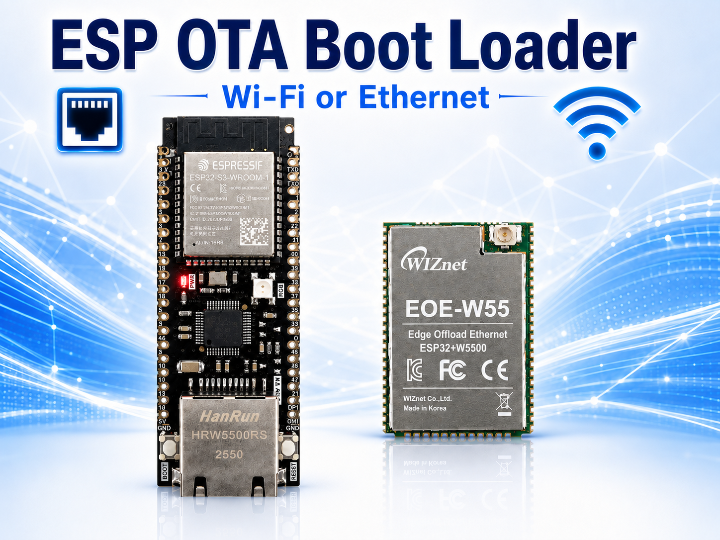
WIZnet is launching four ESP32-S3 Ethernet boards
This time, WIZnet has launched four new boards — SoM and Dev-kit models — pairing the ESP32-S3 with our own Ethernet chips (W5500 / W6300). A single module now gives you Wi-Fi alongside reliable wired Ethernet, and with this article we want to show you what these boards can do.
First up: how to implement remote firmware updates (OTA) without putting a single line of OTA code in your application.
| MCU | Flash | ethernet Chip | Interface | |
|---|---|---|---|---|
| ESP32-W5500-Dev-kit | ESP32-S3 | 16MB | W5500 | SPI |
| ESP32-W6300-Dev-kit | ESP32-S3 | 16MB | W6300 | QSPI |
| EOD-W55 | ESP32-S3 | 8MB | W5500 | SPI |
| EOE-W63 | ESP32-S3 | 8MB | W6300 | QSPI |
All four are ESP32-S3. So what can you do with them?
1.The project
It is bootloader-class firmware that pulls a new image over the network and installs it.
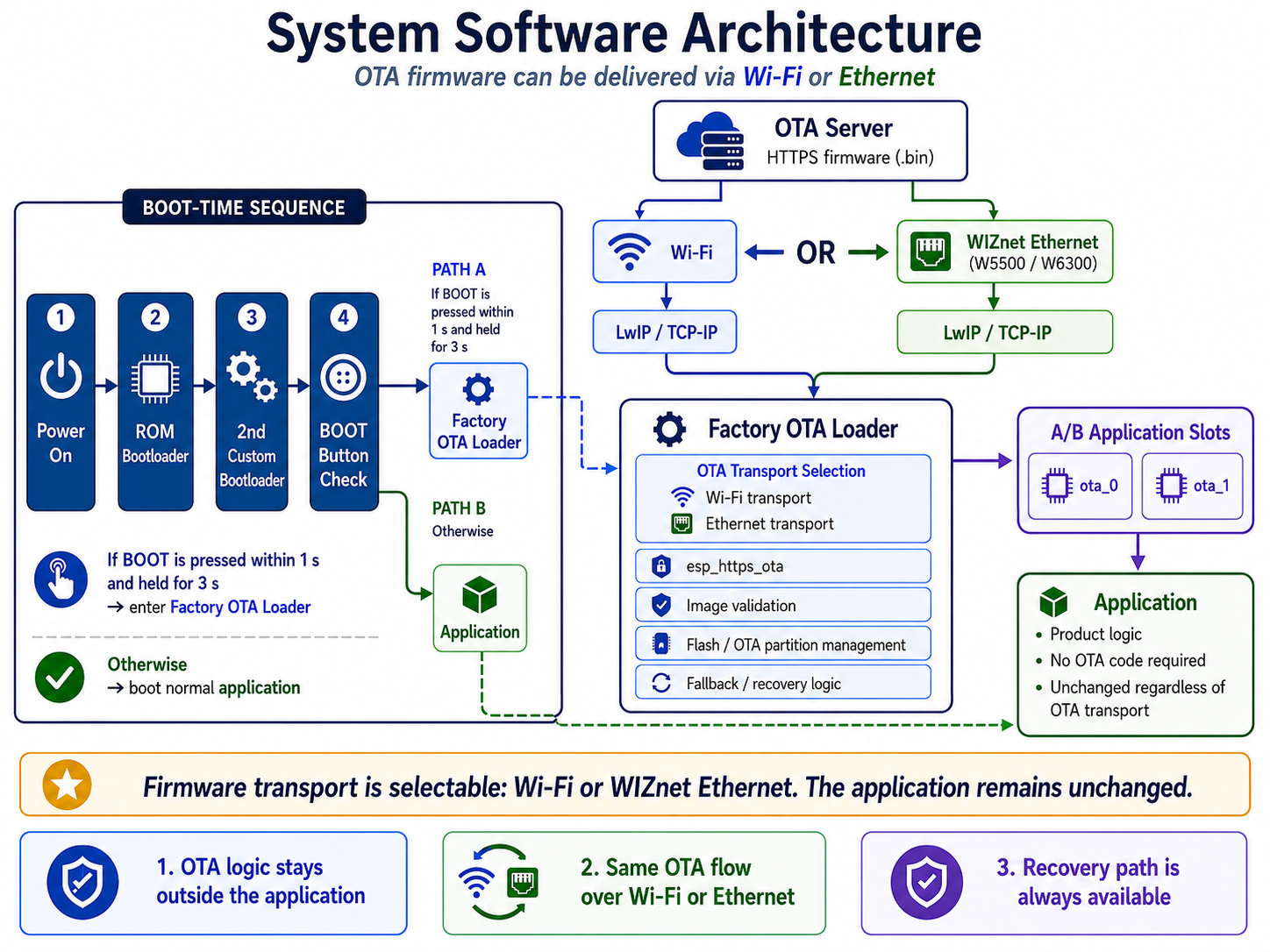
It doesn't sit in an app slot — it has a partition of its own, and when an update is due it runs instead of your application. It brings up the network, fetches the image from your server, writes it into the app slot, and reboots.
Because it behaves like a bootloader — your firmware needs no OTA code at all. The update is finished before your app ever runs, and without any cooperation from it.
So it doesn't matter what your firmware does. Flash this bootloader once, and that device can be updated over the network no matter what you put on it afterwards.
The example app shipped alongside has no networking and no OTA code. That is the proof the bootloader carries the whole job by itself.
Clone it, flash it, and you have a working update path in minutes — before you write a single line of your own firmware.
The bootloader brings up Ethernet and Wi-Fi at the same time. The ESP32-S3 has no Ethernet of its own, so that only works because a WIZnet chip sits on the board — and that pairing is what makes everything below possible.
2. The moment remote updates become impossible
It comes from two directions: the firmware, and the network.
The firmware is fine, and still can't be updated
You ship a new build. It boots. Rollback doesn't fire. Every product feature works.
And that device will never receive another update.
A wrong server URL got compiled in. A refactor or a debugging session left the OTA task crashing. A flag someone switched off for a demo shipped that way.
ESP-IDF's rollback asks whether the new image boots. It does not ask whether the new image can still update itself.
The image is healthy. Rollback has no reason to fire.
When the network changes, the path disappears
The site changes its Wi-Fi password. A security policy change alters the AP configuration. The AP gets replaced.
Every device drops off.
Pushing the new settings requires an update — and the path updates arrived on is the Wi-Fi that just went away.
A problem you could have fixed kills the path you'd fix it through.
On a closed network it's that way from the start. There is no route to the update server, so someone has to open one every time.
Both end the same way
Bad firmware or a changed network — one option is left. Someone drives out with a USB cable.
So this project does two things. It moves the update out of the app, and it gives the update a second way in — one that needs no credentials.
3. What it gets you
Three things. They matter most if your devices sit on a closed or industrial network.
1. You don't have to open the closed network to update it
Ethernet and Wi-Fi run at the same time. One talks to equipment on the closed segment; the firmware comes in over the other.
No firewall exception, no jump server, no technician on site.
2. Over Ethernet, there are no credentials
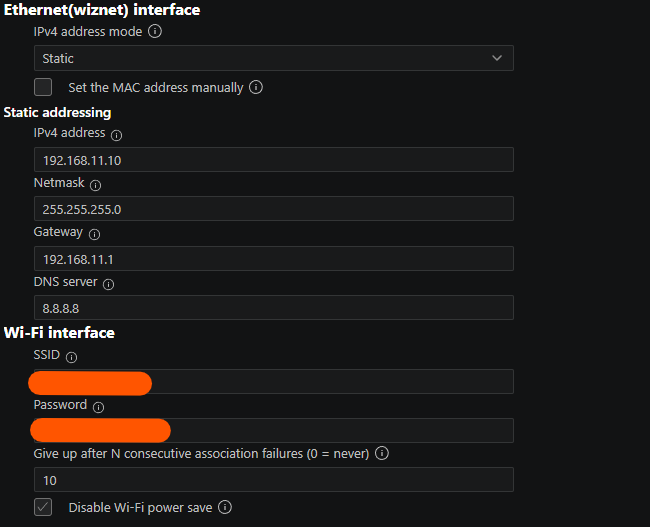
No SSID, no password. The provisioning step disappears, and a change to the site's Wi-Fi policy doesn't knock your devices offline.
Wi-Fi works too. You choose which one carries the update.
3. You don't have to think about OTA
Flash this project's OTA bootloader once, and OTA stops being your problem. Your application never calls it, never links it, never knows it exists — it just gets replaced. From where you stand, the ESP32 simply has firmware update, the way it has a UART.
4. The OTA lives outside the application
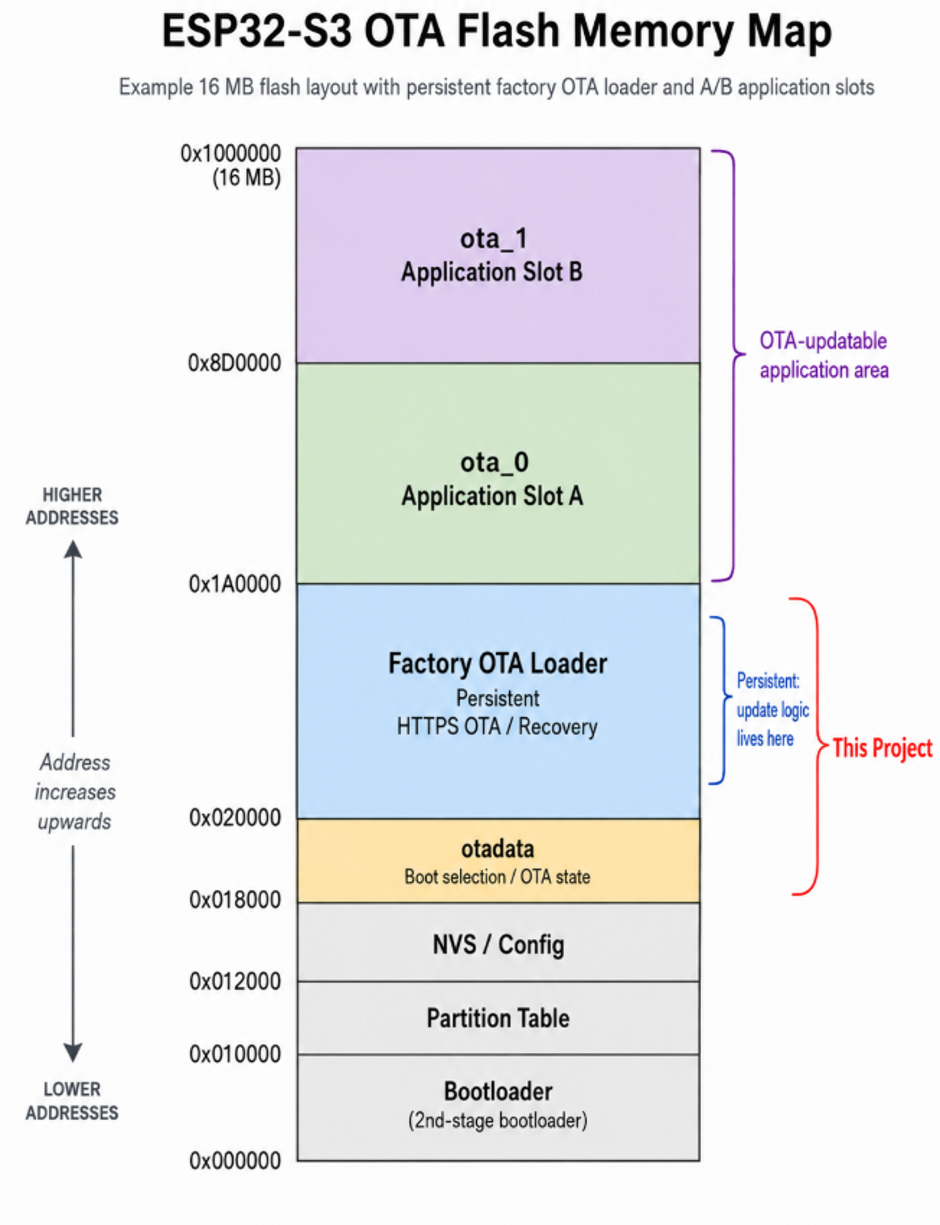
The code that performs updates lives in the factory partition. Your app goes into ota_0 / ota_1.
Here is the point.
With ordinary ESP-IDF OTA, the firmware you are uploading right now must itself contain OTA. Leave it out and that was your last update.
So every image has to keep carrying mbedTLS, LwIP and esp_https_ota — and one build that forgets is unrecoverable.
That constraint is gone here, because the ability to update belongs to the partition layout, not the image.
Firmware that knows nothing about OTA installs just fine.
The included app_example is 80 lines. Zero lines of OTA, zero lines of networking. That is the proof.
If you want the app to request an update on its own, two lines do it:
esp_ota_set_boot_partition(esp_partition_find_first( ESP_PARTITION_TYPE_APP, ESP_PARTITION_SUBTYPE_APP_FACTORY, NULL));esp_restart();Nothing happens on an ordinary boot
"Doesn't this slow down every boot?"
No. A normal boot goes straight to the app without entering the OTA bootloader.
The only cost is the one second spent checking whether to enter the OTA bootloader.
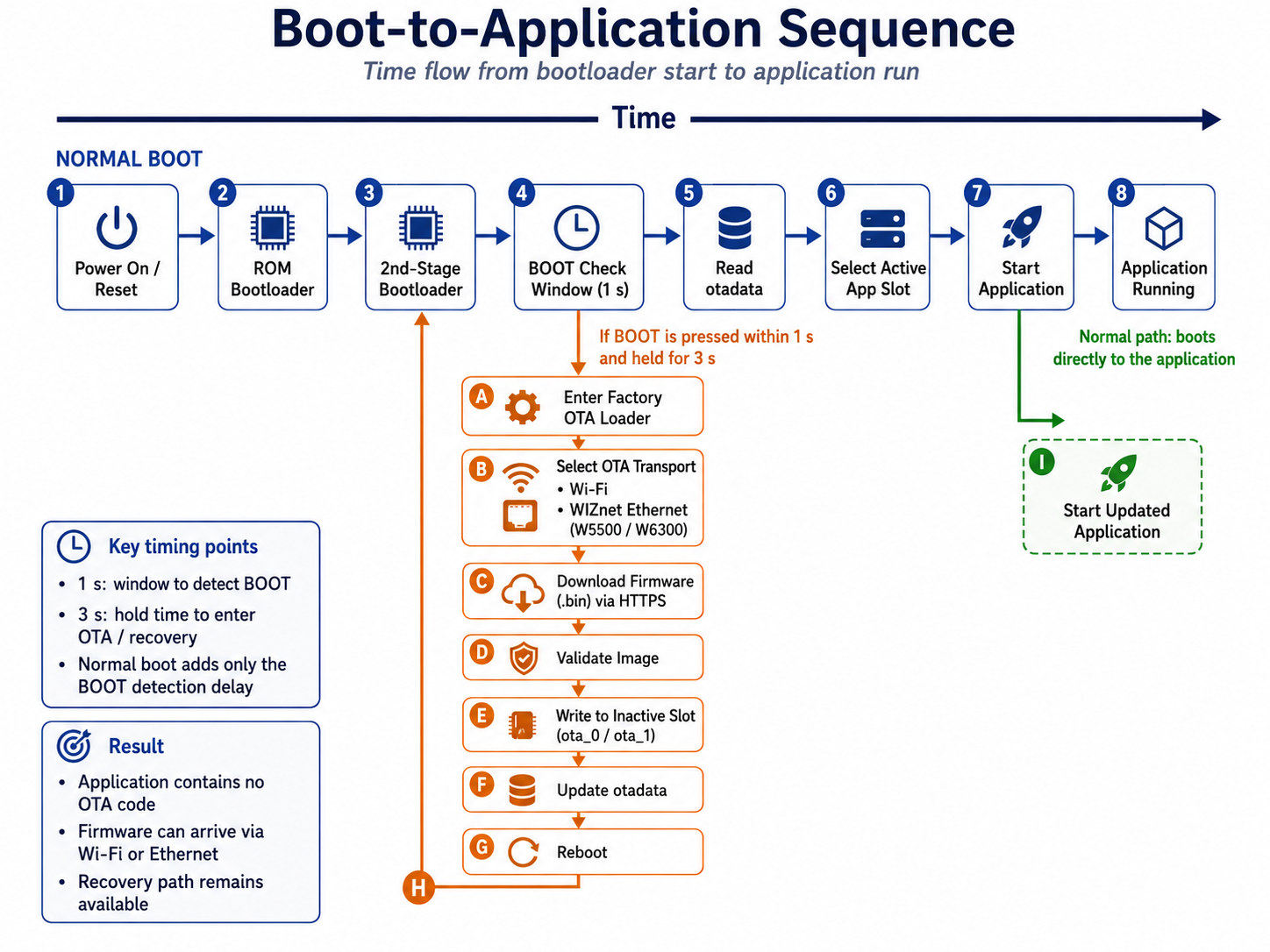
There are three ways into the OTA bootloader.
| When | |
|---|---|
| BOOT button | press within 1 s of reset, hold for 3 s |
| factory-fresh board, or right after an erase |
| the app asks | optional — the two lines above |
Because of the second row, a factory-fresh board enters the OTA bootloader by itself and pulls the app down. Your production line only ever flashes one image.
5. You can always recover
The app crashed. Or it was erased. Or it never knew about OTA in the first place.
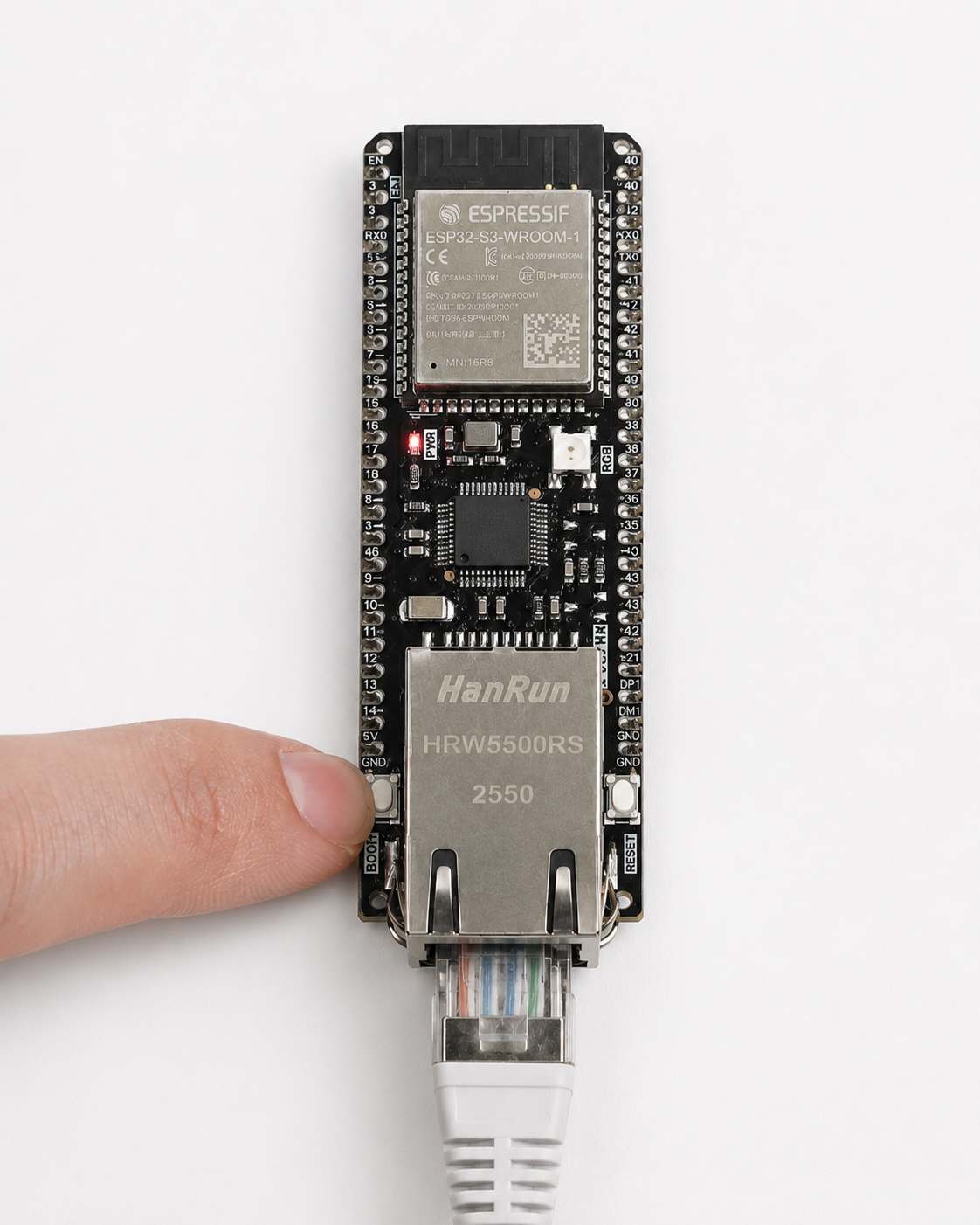
Reset, press BOOT within one second, hold it for three.
The board pulls fresh firmware off the network. No laptop, no USB cable, no toolchain, no serial driver.
Whoever is already on site can do it.
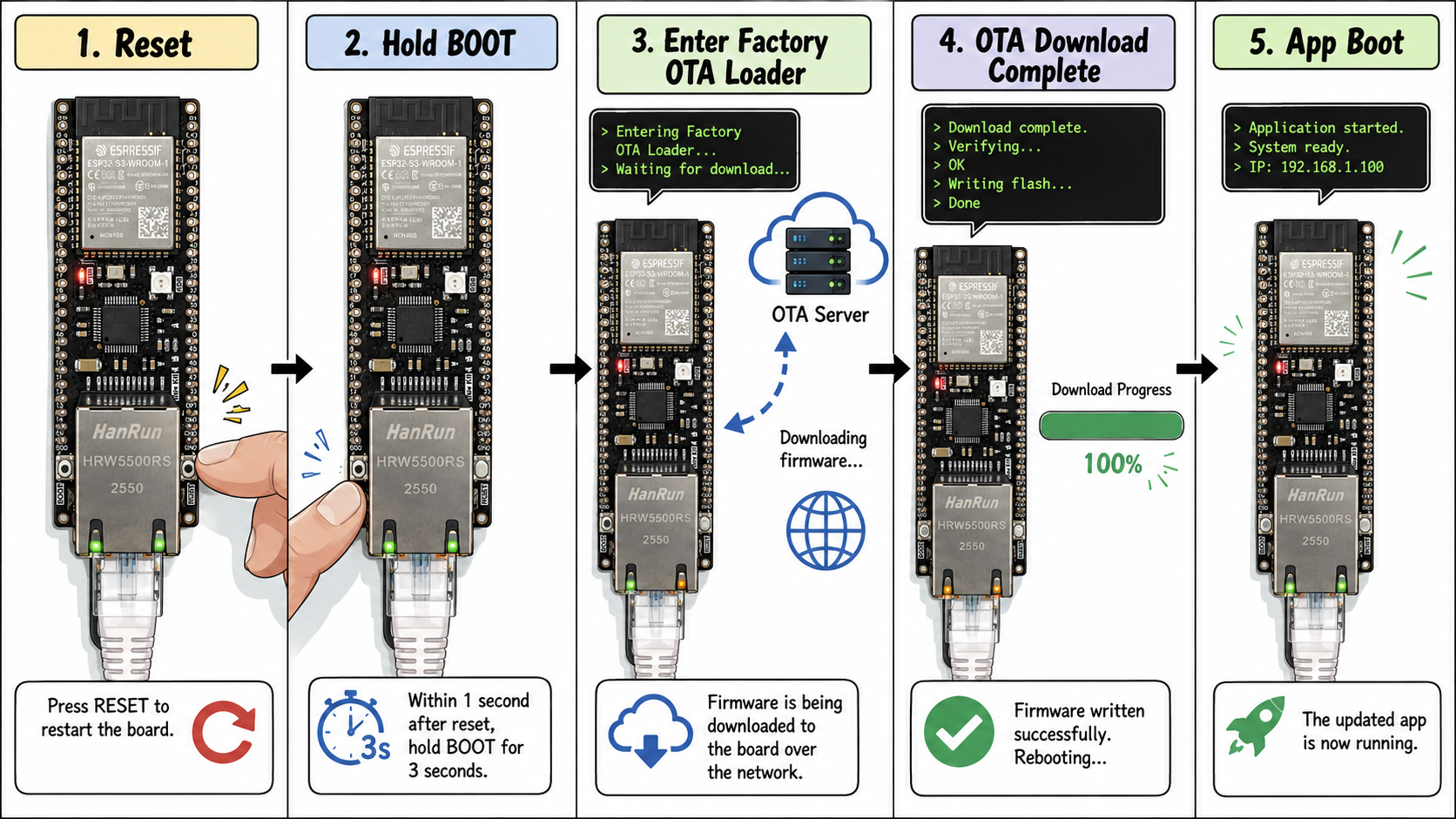
Why one second, then three
GPIO0 is a strapping pin. If it is low at the instant reset releases, the ROM enters USB download mode.
Which means you cannot hold BOOT across a reset.
The press has to land after reset, so there had to be a window to catch it. That is the one second.
The three-second hold is what keeps a brushed finger from diverting a production board into the loader.
The constraint shaped the design.
That said, these numbers are only what the example uses. The trigger pin, the one second and the three seconds are three #defines in a single file. Move the button to another pin, shorten the window, or trigger on something else entirely — change it to whatever your product needs.
6. Why Ethernet
Wi-Fi works. Here is what an Ethernet link changes.
There are no credentials
The site's Wi-Fi password changes. Every device drops off.
The only way to push the new password is... the Wi-Fi that just went away.
A problem an update could fix kills the update path first.
With Ethernet you plug it in and you are done. The deadlock cannot form.
Failures have visible causes
When Wi-Fi fails, the cause is usually outside the device: an AP firmware update, a channel change, 2.4 GHz congestion, a security policy change. You cannot touch any of it.
With Ethernet it is the cable, the switch port, the switch. All of it visible, all of it on your site.
Some places have no wireless at all
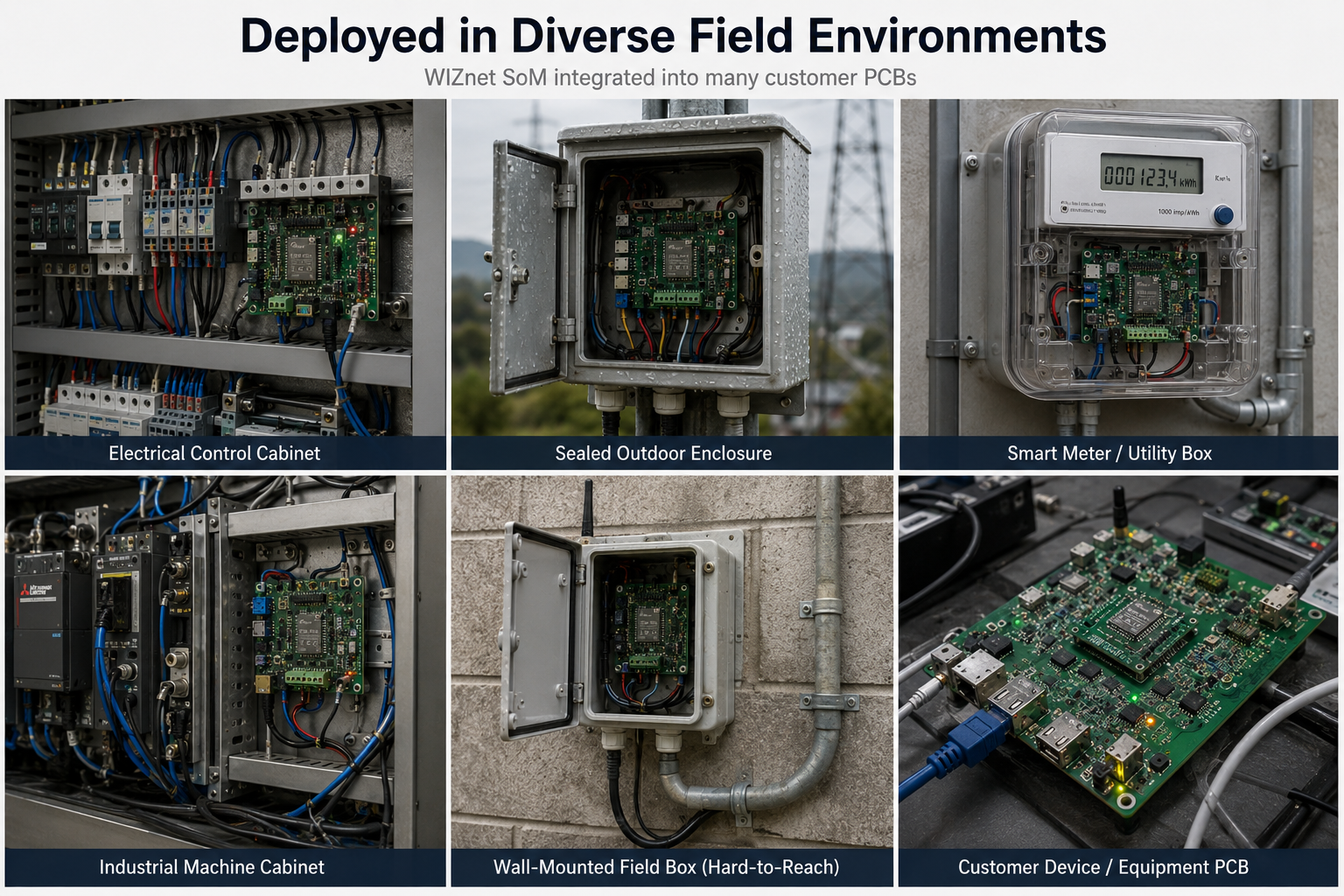
Inside a metal enclosure. Inside a switchgear cabinet. Underground. Sites where RF policy forbids wireless. A hall with 200 devices and three non-overlapping 2.4 GHz channels.
In those places the ESP32-S3's built-in radio has nothing to do.
W5500 and W6300
W5500 is SPI. W6300 is QSPI, four data lines. One board selection sets the chip and the entire pinout, so you can change boards without touching code.
7. Two networks — without opening the closed one
A closed network comes with a dilemma.
You closed it for security. But if the device sits on that network alone, the firmware has to come in the same way. So a path gets opened for every update — a jump server, a temporary route, a technician with a laptop.
With two networks, none of that is necessary.
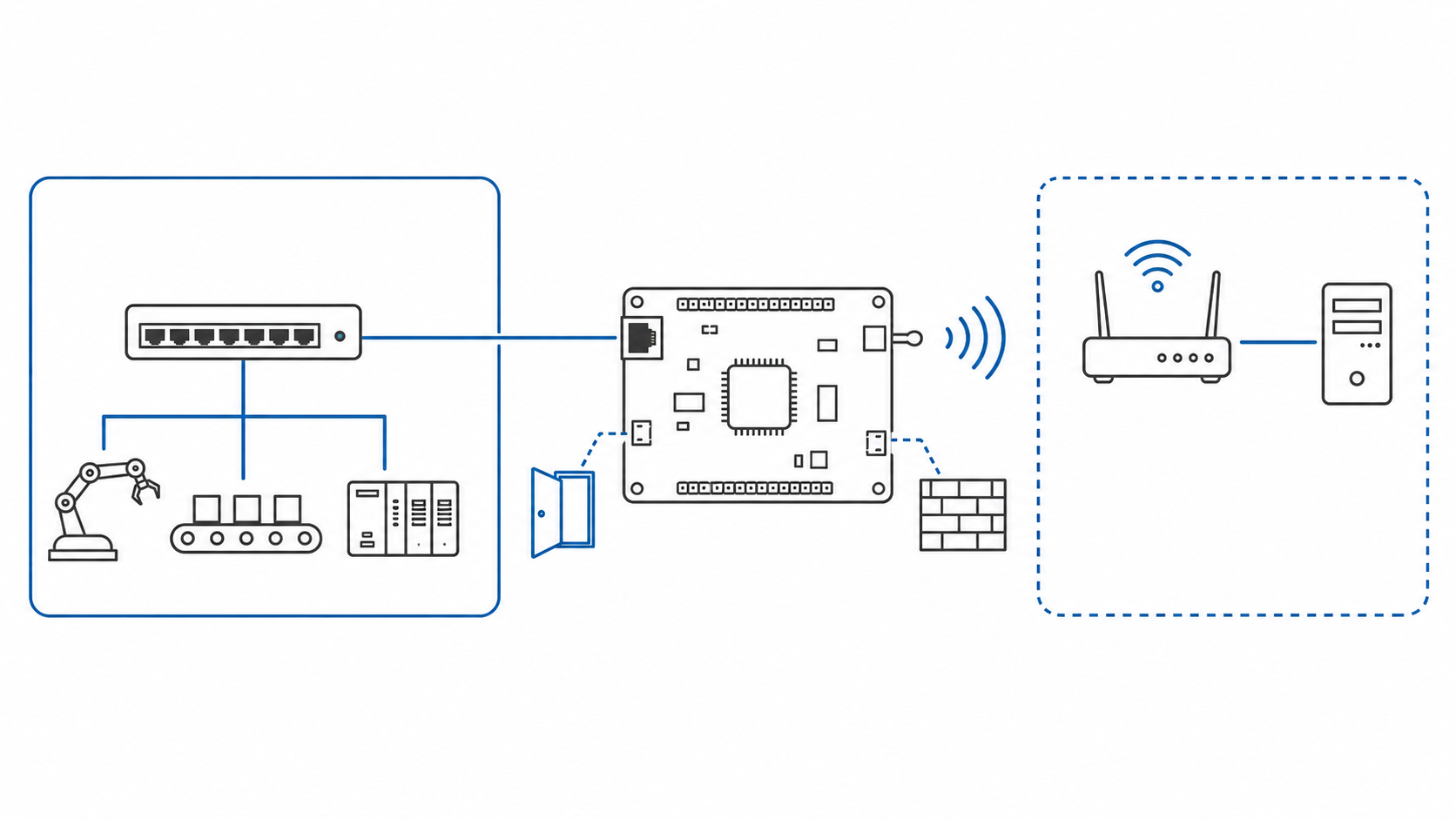
This reference brings Ethernet and Wi-Fi up at the same time, with different jobs.
- One talks to equipment on the control segment
- The other pulls firmwareWhich one does which is a single config line. If your on-premise OTA server sits on the Ethernet side, swap them.
And a service port binds only to its own interface address, so a port you opened on the closed segment does not appear on the other network.
"Can't I just enable both?"
It is not two checkboxes.
LwIP keeps one global DNS server table. Whichever DHCP lease arrives last owns DNS, so a lookup can be handed to a resolver that is only reachable out the other interface.
Both links are up, and the OTA server's name is the one thing that will not resolve.
This project already stepped on that. It is why sdkconfig.defaults carries this line:
CONFIG_ESP_NETIF_SET_DNS_PER_DEFAULT_NETIF=y8. Try it
Building and flashing is ordinary ESP-IDF. The only new thing is menuconfig.
OTA Server
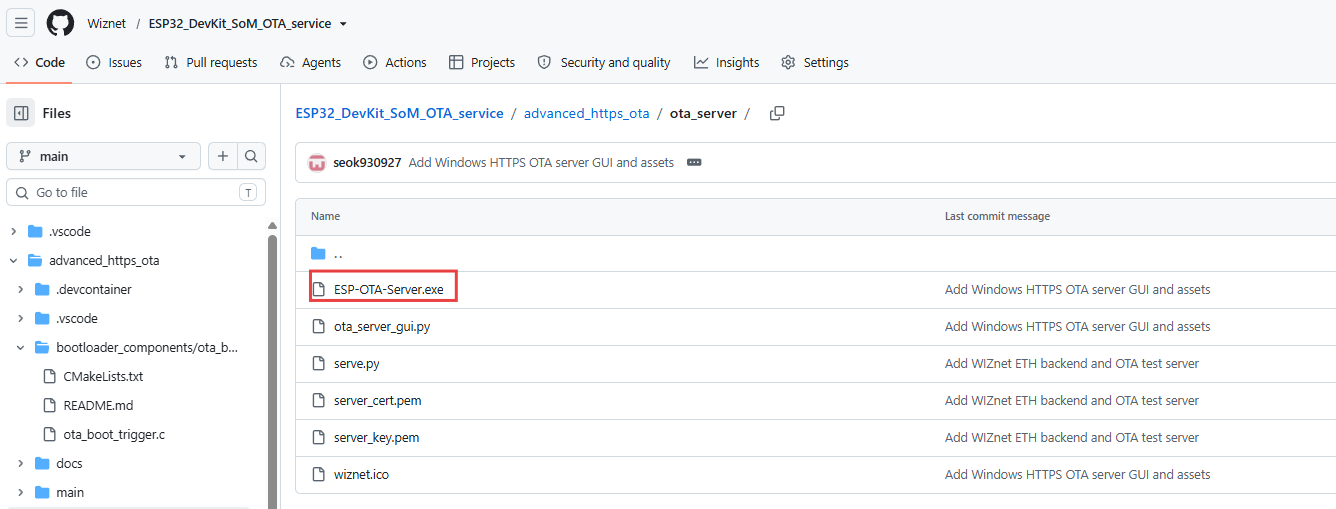
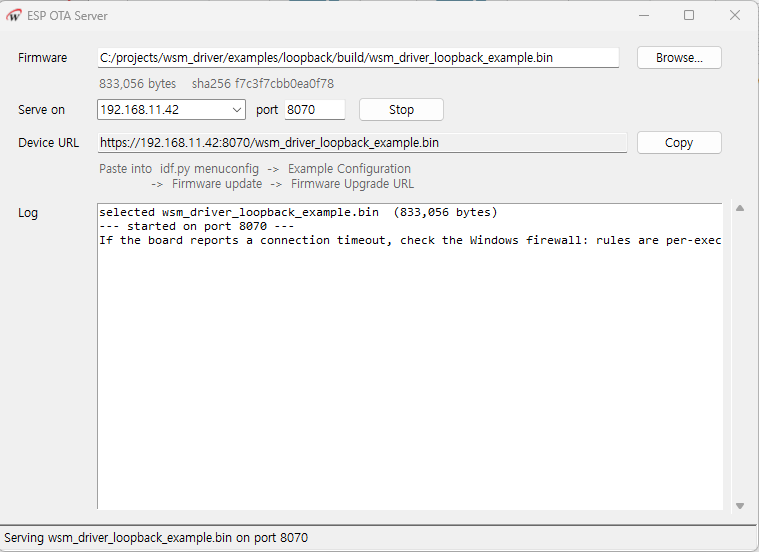
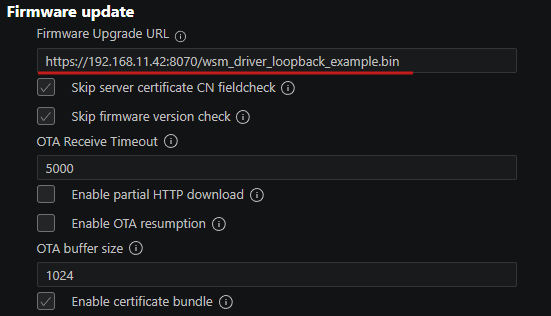
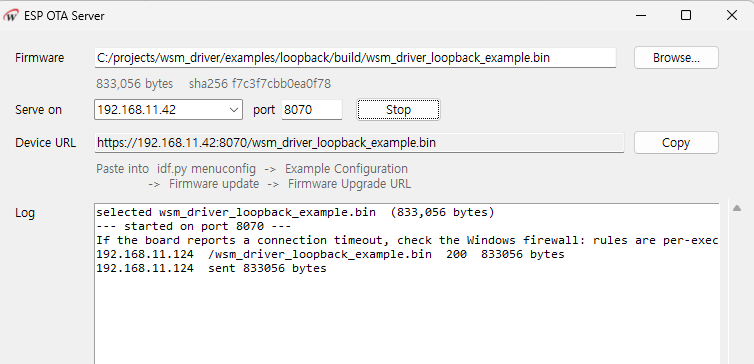
The OTA server program is included in the Git repository. It lets you run an OTA server with almost no setup. Start the server, then enter the URL it shows you into Menuconfig.
https://github.com/Wiznet/ESP32_DevKit_SoM_OTA_service/tree/main/advanced_https_ota/ota_server
Menuconfig setup
Select the interface to use for OTA.
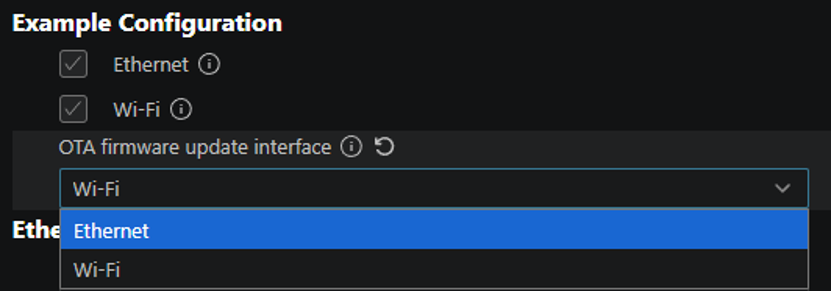
Set up Ethernet and Wi-Fi.
Set up the OTA server.
Copy the URL shown in the OTA server program and paste it in.
Build
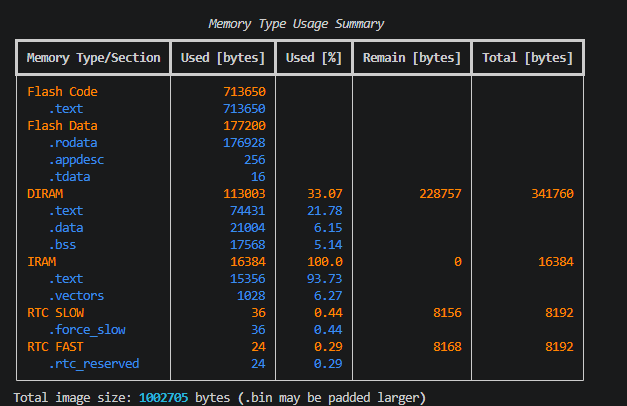
FLASH
⚠️ Build
app_example— don't flash it. The first app partition in this table isfactory, so the app would land on top of the OTA bootloader. The app is meant to arrive over OTA.\
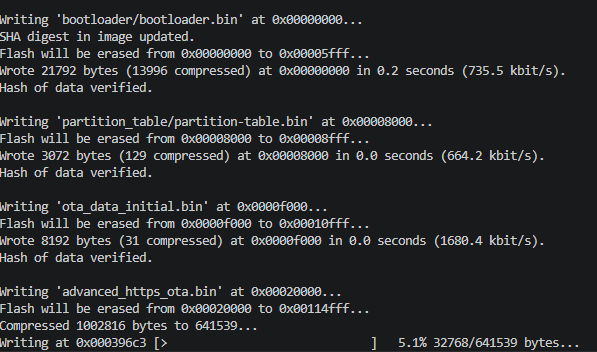
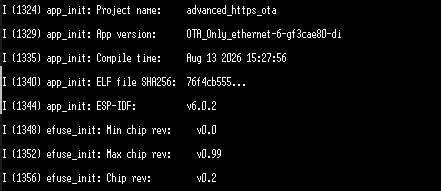
OTA Walkthrough
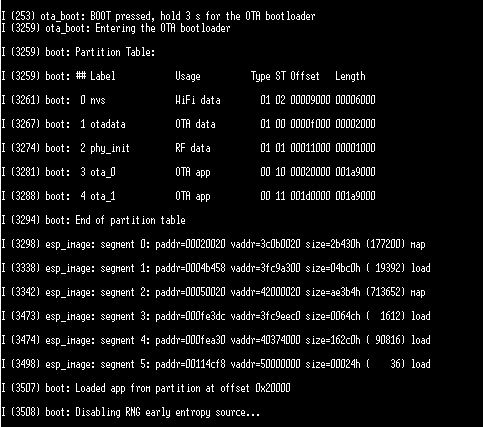
On first boot, the OTA bootloader starts automatically, as shown below.
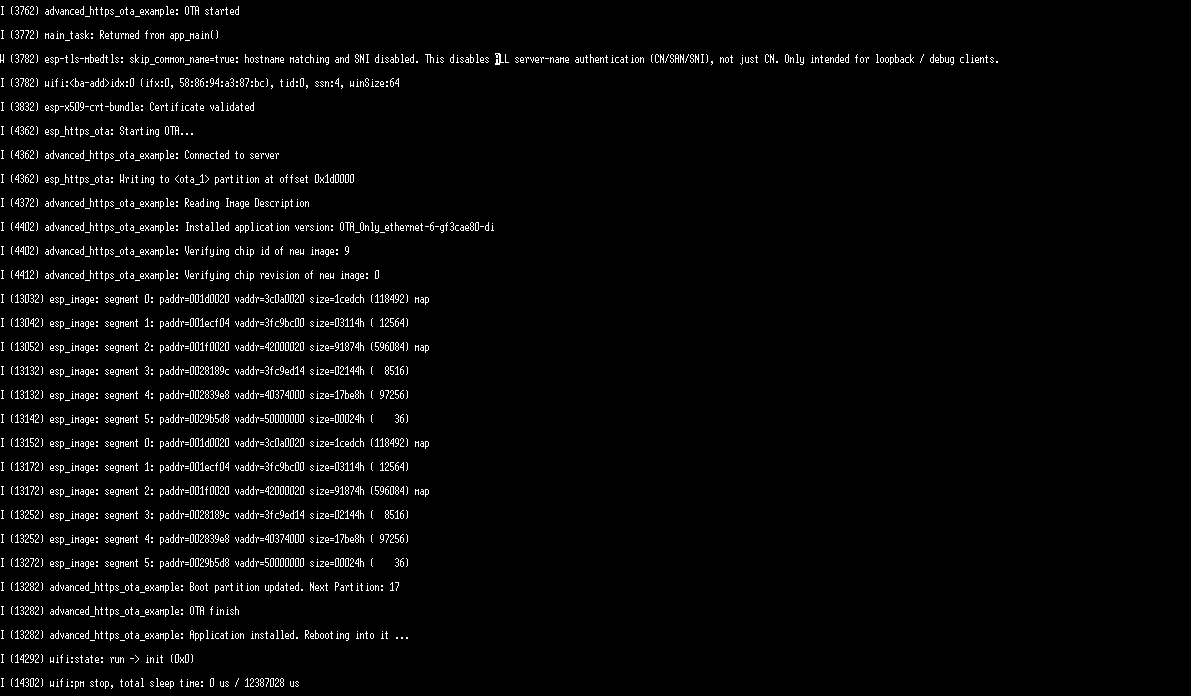
It then automatically connects to the OTA server, and the server sends the firmware file.
9. What it costs, and what it doesn't do yet
What it costs
You need at least 8 MB of flash. factory takes 1.5 MB and two app slots have to fit alongside it.
The app is stopped during an update. Reboot → loader → download → reboot. This is not a zero-downtime scheme.
The certificate and server URL are fixed in factory. They cannot be changed remotely. Never being overwritten is the benefit and the constraint at once.
The interface choice is made at build time. There is no automatic failover.
What has actually been tested
| Board | Status |
|---|---|
| ESP32-W5500-Dev-kit (16 MB) | Verified on hardware — OTA over both Ethernet and Wi-Fi, button entry, both interfaces running at once |
| ESP32-W6300-Dev-kit | Builds and links. QSPI quad mode not yet verified on hardware |
| ESP32-W5500-SoM / W6300-SoM | Currently 2 MB flash, which this layout does not fit. A separate partition table follows the move to 8 MB |
Every log and photo in this article came from the W5500-Dev-kit.
Was this what you needed?
Tell us how this would be used on your site, or what is missing. A repository issue or a comment below both work. What you tell us about your deployment is what sets the next priority.
- Repository: (link)
- Board product pages: (link)
wsm_driver: https://github.com/Wiznet/wsm_driver
-
ESP32_DevKit_SoM_OTA_service
