



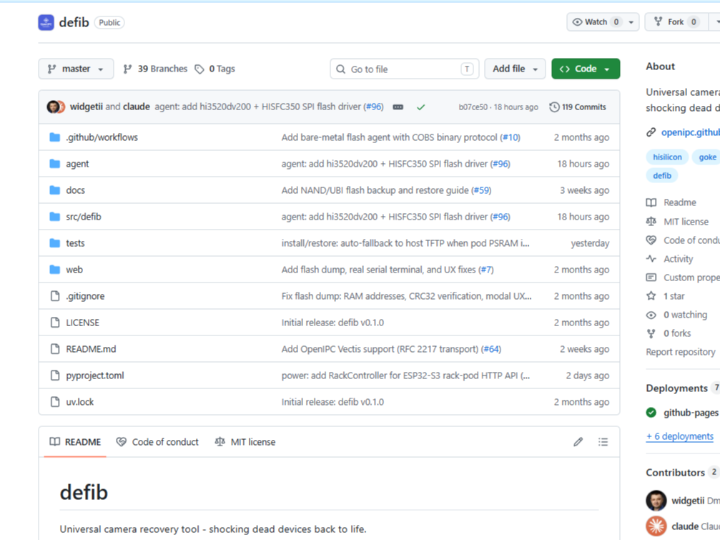
defib
Universal camera recovery tool - shocking dead devices back to life
defib — Defibrillating Dead IP Cameras Back to Life with W5500-Powered Pod TFTP
#W5500 #UDP #TFTP #IoTRecovery #OpenIPC #HiSilicon #EmbeddedNetworking #ZeroSetup #PSRAM #CameraHacking
📚 Open-source infrastructure tooling | OpenIPC ecosystem, professional/hobbyist IP camera recovery Hardware-verified on real HiSilicon/Goke IP cameras with measured end-to-end flash timings published in the PR.
01 — What is this project?
Bricked IP cameras are a fact of life for anyone working in the OpenIPC ecosystem. A failed firmware flash, a corrupt U-Boot environment, or a mismatched SoC image can render a perfectly functional camera completely unresponsive — no display, no SSH, no recovery button. The only path back is through the camera's UART boot ROM, and existing workflows are painful: they require sudo, fight with system services over port 69, demand manual NIC IP assignments on the camera's subnet, and collapse in automated test-rack environments.
defib is a modern, async Python recovery tool for bricked IP cameras — supporting HiSilicon, Goke, and 120+ SoC variants through UART serial, network, and bare-metal agent flash paths. Its name says everything: it shocks dead devices back to life. The tool runs as CLI, TUI, interactive Web UI (via WebSerial in Chrome/Edge), or headless JSON output for CI automation.
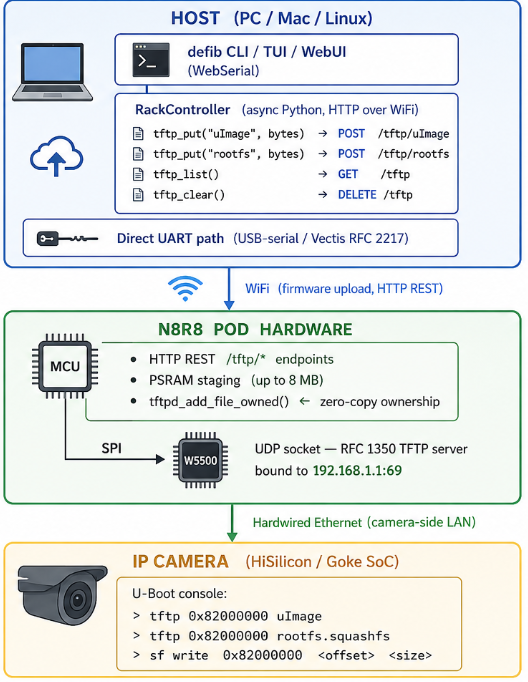
The key architectural advance in recent releases is the N8R8 rack pod: a dedicated hardware unit that bridges the host (connected over WiFi) to the camera under recovery (connected via hardwired Ethernet). The pod's W5500 chip provides the isolated camera-side LAN, and a tiny in-pod TFTP server (tftpd.c, RFC 1350) lets the camera's U-Boot fetch firmware directly from the pod at 192.168.1.1:69 — eliminating every host-side setup step.
02 — Why async Python + a dedicated hardware pod?
🔷 Boot ROM timing windows demand async orchestration
Recovering a HiSilicon camera is a multi-phase race: catch the boot ROM's sub-100 ms marker window, negotiate DDR init, send SPL, break into U-Boot console, configure networking, flash each partition with CRC32 verification. A synchronous tool blocks at every step and misses timing windows. defib's asyncio architecture runs UART, network, and power-cycle operations concurrently — and even moves the boot ROM catch loop into hardware (Vectis bridge or the pod itself) when network round-trip latency is too high.
🔷 The port-69 conflict is a real operational problem
Linux reserves port 69. A host-side TFTP server for camera recovery collides with dnsmasq, requires sudo, and requires manually assigning an IP address on the camera's subnet to a host NIC. These steps break silently in CI, conflict in multi-camera racks, and add minutes of manual setup per session. The pod-hosted TFTP path offloads all of this to the pod's W5500 interface — the host simply POSTs firmware bytes over WiFi HTTP, and U-Boot pulls them from 192.168.1.1:69 with zero host configuration.
🔷 Performance tradeoffs are measured and documented
The PR documents real end-to-end timings on hi3516ev300-nor-neo (kernel 2.0 MB + rootfs 4.2 MB):
| Method | Total | Host setup |
|---|---|---|
Agent write_flash (fastest) | 92 s | none |
Host TFTP + sf write | 132 s | sudo + dnsmasq + NIC IP |
Pod TFTP + sf write | 193 s | none |
Pod TFTP is slower than host TFTP (WiFi traversed twice) but wins decisively on operational simplicity, making it the natural fallback when the agent path is unavailable for a given SoC.
03 — System Architecture
🔷 Three Recovery Paths — defib selects automatically based on camera state
Not all bricked cameras are in the same state. defib detects the camera's condition and chooses the appropriate recovery path automatically.
| Path | Camera State | Network Used | W5500 Role |
|---|---|---|---|
| ① Bare-Metal Agent | Bootloader alive, agent-capable SoC | UART only (921600 baud) | Not used |
| ② Pod TFTP (W5500) | Bootloader (U-Boot) alive, no agent support | Ethernet via W5500 | TFTP server at 192.168.1.1:69 |
| ③ Boot ROM UART | Bootloader completely gone | UART only | Not used |
Path ① is the fastest (92 s for full 8 MB flash). The bare-metal agent replaces U-Boot entirely and transfers firmware directly over UART using COBS binary protocol.
Path ② is where W5500 is essential. U-Boot is alive but the firmware is corrupted. U-Boot has a built-in TFTP client — it requests firmware from 192.168.1.1:69 over Ethernet. The W5500 chip on the pod serves as that TFTP server, staging firmware from PSRAM.
Path ③ is for the worst case — even U-Boot is gone. The SoC's boot ROM (hardwired into silicon, cannot be erased) accepts data over UART. Vectis bridge handles the sub-100 ms timing window required to catch the boot ROM.
04 — Why W5500? ⭐
🔷 Hardware TCP/IP offload — UDP socket mode for RFC 1350 TFTP
The pod's TFTP server (tftpd.c) is bound directly to the W5500 interface via UDP socket mode (Sn_MR_UDP). RFC 1350 TFTP is inherently UDP-based: the client (U-Boot) sends a Read Request to port 69, the server responds with data blocks from a random ephemeral port, and the client ACKs each 512-byte block. W5500's hardware UDP/IP stack handles all of this — checksum computation, ARP, IP framing — without consuming MCU cycles. The MCU's job is simply to feed block data from PSRAM into the W5500 transmit buffer.
This is the correct tool for TFTP: TCP's connection overhead and retransmission logic would add unnecessary complexity to a protocol that already has its own ACK mechanism built in.
🔷 Isolated camera-side LAN — the architectural key
W5500 gives the pod a dedicated, hardwired Ethernet interface entirely separate from the host WiFi path. The camera sees a clean local network (192.168.1.0/24) with the pod as its default gateway at 192.168.1.1. There is no NAT in the TFTP data path — U-Boot speaks directly to the W5500 socket. This physical separation is what enables zero host NIC plumbing: the host never needs to appear on the camera's subnet.
🔷 PSRAM staging with zero-copy ownership transfer
The pod firmware uses tftpd_add_file_owned() — a zero-copy file registration that transfers PSRAM buffer ownership directly to the TFTP server. The initial naïve double-buffer implementation hit OOM on a 4 MB rootfs with only 8 MB of PSRAM; zero-copy ownership resolved it. W5500 reads directly from those PSRAM buffers during block transmission, keeping the MCU's working memory footprint flat regardless of firmware image size.
05 — Key Components
🌐 WIZnet W5500 — UDP Socket Mode (Sn_MR_UDP) for RFC 1350 TFTP
The camera-side network interface of the N8R8 pod. Operates in hardware UDP socket mode, hosting the pod's TFTP server at 192.168.1.1:69. W5500's hardwired TCP/IP stack manages all IP/UDP framing and ARP resolution autonomously, freeing the pod MCU to focus on PSRAM buffer management and HTTP API serving. The SPI bus between MCU and W5500 carries only application-layer data.
🐍 defib — Async Python Recovery Tool
The host-side orchestrator. RackController (src/defib/power/rack.py) provides tftp_put, tftp_delete, tftp_clear, and tftp_list as async methods wrapping synchronous urllib HTTP calls via asyncio.to_thread. Path-traversal validation on filenames prevents security issues with pod-side file storage. Errors surface as PowerControllerError with the pod's JSON error body, enabling caller-side fallback to alternate flash paths.
📦 N8R8 Pod Hardware
A dedicated recovery appliance: MCU (firmware not public per project policy), W5500 (camera-side Ethernet), PSRAM (firmware staging, 8 MB on prototype), WiFi (host-side connectivity). Designed to sit permanently in a camera test rack with automated power cycling via RouterOS PoE API or UART RTS/DTR lines.
🤖 Flash Agent (Bare-Metal, 921600 baud)
For supported SoCs, defib's bare-metal agent replaces U-Boot in the boot chain entirely. It uses COBS binary protocol at 921600 baud, achieving full 8 MB OpenIPC firmware flash + CRC32 verify in ~77 s — faster than any TFTP path. The W5500-hosted Pod TFTP is the fallback when the agent is unavailable for a given SoC.
🌐 Vectis UART Bridge
A companion C tool (OpenIPC/vectis) that exposes camera UART over TCP using RFC 2217 (Telnet COM Port Control). Includes a vendor extension sub-option (BOOTROM-CATCH, sub-option 50) that runs the HiSilicon boot ROM catch loop locally in bridge hardware — eliminating the round-trip latency problem that causes remote clients to miss the <100 ms boot ROM window.
06 — Application Scenarios
01. Automated Camera Recovery Rack
A test rack holds 10 IP cameras. defib runs as a service with RackController managing each pod. Firmware CI pushes a new OpenIPC build; defib automatically stages kernel + rootfs into each pod's W5500 TFTP server, power-cycles each camera via RouterOS PoE API, and confirms successful boot — no human interaction, no sudo, no port conflicts.
02. Field Recovery of Vendor-Firmwared Cameras
An integrator has a batch of HiSilicon cameras with vendor firmware to convert to OpenIPC. defib's restore command takes an ipctool backup file, extracts the partition layout from the embedded YAML, and reflashes — using pod TFTP to transfer partitions when the laptop's NIC cannot be easily placed on the camera's subnet.
03. OpenIPC Development Workflow
A developer iterates on OpenIPC kernel builds. Each cycle: defib install -c hi3516ev300 --firmware openipc.tgz -p /dev/uart-cam --power-cycle. Pod TFTP provides consistent timing without requiring the developer to reconfigure their laptop's network stack between test iterations.
04. Web-Based Recovery (No Install)
A non-technical user opens openipc.github.io/defib/ in Chrome. The WebSerial UI connects to the camera via USB-serial adapter and guides through chip selection, firmware download, and flash — no Python, no CLI, no package manager required.
Conclusion
defib demonstrates that a W5500 chip in a purpose-built recovery pod can eliminate every host-side network setup requirement for embedded firmware flashing — turning a complex multi-step manual process into a single command.
- ✅ W5500 UDP socket mode hosts a lightweight RFC 1350 TFTP server at
192.168.1.1:69 - ✅ Camera-side LAN physically isolated from host network — zero NIC plumbing
- ✅ PSRAM staging with zero-copy ownership transfer eliminates OOM on large firmware
- ✅ 120+ HiSilicon/Goke SoC variants supported
- ✅ Three complementary flash paths: agent (fastest), pod TFTP (zero-setup), host TFTP (fallback)
- ✅ End-to-end verified: 6.2 MB firmware staged and flashed in one command, 193 s total
- ✅ 486 tests passing across the Python host-side codebase
- ✅ Cross-platform: Linux, macOS, Windows CLI + WebSerial browser UI
Q&A
Q. Why UDP and not TCP for the pod's TFTP server? RFC 1350 TFTP is a UDP protocol by specification. U-Boot's built-in TFTP client speaks only UDP. W5500's hardware UDP socket mode (Sn_MR_UDP) is a natural fit — no TCP connection state machine overhead for a block-transfer protocol that already includes its own per-block ACK mechanism.
Q. What happens if the pod runs out of PSRAM during staging? POST /tftp/<name> returns 503 with JSON body {"error":"oom","psram_largest_free":<bytes>} when PSRAM allocation fails. RackController.tftp_put surfaces this as PowerControllerError with the body, allowing the caller to fall back to host-side TFTP or implement chunked staging.
Q. Is the pod's tftpd.c firmware publicly available? Not currently — it lives in a private branch of the rack repo per project policy. However, the host-side client interface is fully public in src/defib/power/rack.py, and the W5500 binding and PSRAM architecture are documented in code comments and the PR description.
Q. Can defib work without the N8R8 pod? Yes. defib has four independent recovery paths: direct USB-serial UART, Vectis RFC 2217 bridge, host-side TFTP (requires sudo + NIC setup), and pod TFTP via W5500. The pod is optional but eliminates all host network configuration.
Original Link: https://github.com/OpenIPC/defib
defib — W5500 탑재 복구 Pod로 벽돌된 IP 카메라를 되살리다
#W5500 #UDP #TFTP #IoT복구 #OpenIPC #HiSilicon #임베디드네트워킹 #무설정플래시 #PSRAM #카메라해킹
📚 오픈소스 인프라 툴링 | OpenIPC 에코시스템, 전문/취미 IP 카메라 복구 실제 HiSilicon/Goke IP 카메라로 하드웨어 검증 완료 — PR에 end-to-end 플래시 타이밍 측정값이 공개되어 있습니다.
01 — 이 프로젝트는 무엇인가?
벽돌(brick)이 된 IP 카메라는 OpenIPC 에코시스템에서 일하는 사람이라면 누구나 겪는 현실입니다. 펌웨어 플래시 실패, 손상된 U-Boot 환경, 잘못 매칭된 SoC 이미지 하나로도 멀쩡한 카메라가 완전히 먹통이 됩니다 — 디스플레이 없음, SSH 없음, 복구 버튼 없음. 유일한 복구 경로는 카메라 UART 부트 ROM을 통하는 것뿐인데, 기존 워크플로우는 너무 번거롭습니다: sudo 필요, 포트 69 서비스 충돌, 카메라 서브넷에 수동 NIC IP 할당, 자동화 테스트 랙에서는 더욱 취약합니다.
defib는 벽돌 IP 카메라 복구를 위한 현대적인 async Python 도구입니다 — UART 시리얼, 네트워크, 베어메탈 에이전트 플래시 경로를 통해 HiSilicon, Goke 등 120개 이상의 SoC 변종을 지원합니다. 이름이 모든 것을 말해줍니다: 죽은 장치를 다시 살립니다(제세동). CLI, TUI, 웹 UI(Chrome/Edge의 WebSerial), 또는 CI 자동화를 위한 headless JSON 출력으로 실행됩니다.
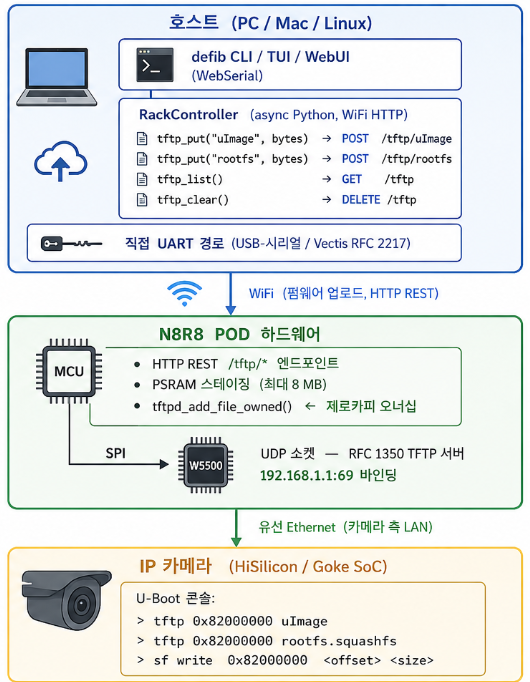
최근 릴리즈의 핵심 아키텍처 개선은 N8R8 랙 Pod입니다: 호스트(WiFi 연결)와 복구 대상 카메라(유선 Ethernet 연결)를 연결하는 전용 하드웨어 유닛입니다. Pod의 W5500 칩이 격리된 카메라 측 LAN을 제공하고, Pod 내장 TFTP 서버(tftpd.c, RFC 1350)가 카메라의 U-Boot이 192.168.1.1:69에서 직접 펌웨어를 받을 수 있게 해줍니다 — 호스트 측 TFTP 서버, sudo, NIC 플럼빙이 모두 불필요합니다.
02 — 왜 async Python + 전용 하드웨어 Pod인가?
🔷 부트 ROM 타이밍 윈도우는 async 오케스트레이션을 요구합니다
HiSilicon 카메라 복구는 멀티 페이즈 레이스입니다: 100 ms 이내의 부트 ROM 마커 윈도우 잡기, DDR 초기화 협상, SPL 전송, U-Boot 콘솔 진입, 네트워킹 설정, CRC32 검증과 함께 각 파티션 플래시. 동기식 도구는 모든 단계에서 블로킹되어 타이밍 윈도우를 놓칩니다. defib의 asyncio 아키텍처는 UART, 네트워크, 전원 사이클 작업을 동시에 실행하며, 네트워크 왕복 지연이 너무 높을 때는 부트 ROM 캐치 루프 자체를 하드웨어(Vectis 브리지 또는 Pod)로 이전합니다.
🔷 포트 69 충돌은 실제 운영 문제입니다
Linux는 포트 69를 예약합니다. 카메라 복구용 호스트 측 TFTP 서버는 dnsmasq와 충돌하고, sudo가 필요하며, 카메라 서브넷에 호스트 NIC IP를 수동 할당해야 합니다. 이런 단계들은 CI에서 조용히 실패하고, 멀티 카메라 랙에서 충돌하며, 세션마다 수 분의 수동 설정을 추가합니다. Pod 호스티드 TFTP 경로는 이 모든 것을 Pod의 W5500 인터페이스로 오프로드합니다 — 호스트는 단순히 WiFi HTTP로 펌웨어 바이트를 POST하고, U-Boot은 192.168.1.1:69에서 가져갑니다.
🔷 성능 트레이드오프는 측정되고 문서화되어 있습니다
PR에 hi3516ev300-nor-neo 실측 타이밍이 공개되어 있습니다 (커널 2.0 MB + rootfs 4.2 MB):
| 방법 | 총 시간 | 호스트 설정 |
|---|---|---|
Agent write_flash (최고속) | 92 s | 없음 |
호스트 TFTP + sf write | 132 s | sudo + dnsmasq + NIC IP |
Pod TFTP + sf write | 193 s | 없음 |
Pod TFTP가 호스트 TFTP보다 느린 이유는 WiFi를 두 번 경유하기 때문이지만, 운영 단순성에서 압도적으로 우위를 점하며 에이전트 경로가 불가능한 SoC에서의 자연스러운 폴백이 됩니다.
03 — 시스템 아키텍처
🔷 세 가지 복구 경로 — defib가 카메라 상태에 따라 자동으로 선택합니다
벽돌 상태의 카메라가 모두 같은 상태인 것은 아닙니다. defib는 카메라 상태 및 제조사를 감지하여 적합한 복구 경로를 자동으로 선택합니다.
| 경로 | 카메라 상태 | 네트워크 사용 | W5500 역할 |
|---|---|---|---|
| ① 베어메탈 에이전트 | 부트로더 살아있음, 에이전트 지원 SoC | UART만 사용 (921600 baud) | 미사용 |
| ② Pod TFTP (W5500) | 부트로더(U-Boot) 살아있음, 에이전트 미지원 | W5500을 통한 Ethernet | 192.168.1.1:69 TFTP 서버 |
| ③ 부트 ROM UART | 부트로더까지 완전히 날아간 상태 | UART만 사용 | 미사용 |
경로 ① 이 가장 빠릅니다(전체 8 MB 플래시 기준 92 s). 베어메탈 에이전트가 U-Boot을 완전히 대체하여 COBS 바이너리 프로토콜로 UART를 통해 펌웨어를 직접 전송합니다.
경로 ② 가 W5500이 핵심적으로 사용되는 경로입니다. U-Boot은 살아있지만 펌웨어가 손상된 상태입니다. U-Boot에는 내장 TFTP 클라이언트가 있어 Ethernet을 통해 192.168.1.1:69에서 펌웨어를 요청합니다. Pod의 W5500 칩이 그 TFTP 서버 역할을 하며 PSRAM에 스테이징된 펌웨어를 제공합니다.
경로 ③ 은 최악의 경우입니다 — U-Boot까지 완전히 날아간 상태. SoC 실리콘에 하드웨어적으로 고정된 부트 ROM(절대 삭제 불가)이 UART를 통해 데이터를 받습니다. Vectis 브리지가 부트 ROM 캐치에 필요한 100 ms 이내의 타이밍 윈도우를 처리합니다.
04 — 왜 W5500인가? ⭐
🔷 하드웨어 TCP/IP 오프로드 — RFC 1350 TFTP를 위한 UDP 소켓 모드
Pod의 TFTP 서버(tftpd.c)는 W5500 인터페이스에 직접 바인딩된 UDP 소켓 모드(Sn_MR_UDP)로 동작합니다. RFC 1350 TFTP는 본질적으로 UDP 기반 프로토콜입니다: 클라이언트(U-Boot)가 포트 69로 읽기 요청을 보내면, 서버가 임의의 에피메럴 포트에서 512바이트 데이터 블록으로 응답하고, 클라이언트가 각 블록을 ACK합니다. W5500의 하드웨어 UDP/IP 스택이 체크섬 계산, ARP, IP 프레이밍을 모두 자율적으로 처리합니다 — MCU 사이클을 소모하지 않고. MCU의 역할은 단순히 PSRAM에서 W5500 송신 버퍼로 블록 데이터를 공급하는 것뿐입니다.
TFTP에 정확히 맞는 도구입니다: TCP의 연결 오버헤드와 재전송 로직은 이미 자체 ACK 메커니즘을 갖춘 단순 블록 전송 프로토콜에 불필요한 복잡성을 추가할 뿐입니다.
🔷 격리된 카메라 측 LAN — 아키텍처의 핵심
W5500은 Pod에 호스트 WiFi 경로와 물리적으로 완전히 분리된 전용 유선 Ethernet 인터페이스를 제공합니다. 카메라는 깨끗한 로컬 네트워크(192.168.1.0/24)를 보게 되며, Pod가 192.168.1.1에서 게이트웨이 역할을 합니다. TFTP 데이터 경로에 NAT가 없습니다 — U-Boot이 W5500 소켓에 직접 통신합니다. 이 물리적 분리가 호스트 NIC 플럼빙 제로를 가능하게 합니다: 호스트는 카메라 서브넷에 절대 등장할 필요가 없습니다.
🔷 제로카피 오너십 전송을 통한 PSRAM 스테이징
Pod 펌웨어는 tftpd_add_file_owned()를 사용합니다 — PSRAM 버퍼 오너십을 TFTP 서버로 직접 이전하는 제로카피 파일 등록 방식입니다. 초기 단순 구현의 이중 버퍼 방식은 4 MB rootfs에서 8 MB PSRAM OOM에 걸렸고, 제로카피 오너십이 이를 해결했습니다. W5500은 블록 전송 중 PSRAM 버퍼에서 직접 읽어가므로, 펌웨어 이미지 크기와 무관하게 MCU 작업 메모리 사용량이 일정하게 유지됩니다.
05 — 주요 컴포넌트
🌐 WIZnet W5500 — UDP 소켓 모드 (Sn_MR_UDP) for RFC 1350 TFTP
N8R8 Pod의 카메라 측 네트워크 인터페이스입니다. 하드웨어 UDP 소켓 모드로 동작하며 192.168.1.1:69에서 Pod의 TFTP 서버를 호스팅합니다. W5500의 하드와이어드 TCP/IP 스택이 IP/UDP 프레이밍과 ARP 해석을 자율 처리하여 Pod MCU가 PSRAM 버퍼 관리와 HTTP API 서빙에만 집중할 수 있게 합니다. MCU와 W5500 간의 SPI 버스에는 응용 계층 데이터만 흐릅니다.
🐍 defib — Async Python 복구 도구
호스트 측 오케스트레이터입니다. RackController(src/defib/power/rack.py)가 tftp_put, tftp_delete, tftp_clear, tftp_list를 asyncio.to_thread로 래핑된 async 메서드로 제공합니다. 파일명의 경로 순회 검증이 Pod 측 파일 저장 보안 문제를 방지합니다. 에러는 Pod의 JSON 에러 바디와 함께 PowerControllerError로 표면화되어, 호출자가 대체 플래시 경로로 폴백할 수 있습니다.
📦 N8R8 Pod 하드웨어
전용 복구 어플라이언스입니다: MCU (펌웨어는 프로젝트 정책상 비공개), W5500 (카메라 측 Ethernet), PSRAM (펌웨어 스테이징, 프로토타입 8 MB), WiFi (호스트 측 연결). RouterOS PoE API 또는 UART RTS/DTR로 자동 전원 사이클링을 지원하며 카메라 테스트 랙에 상시 설치하도록 설계되었습니다.
🤖 플래시 에이전트 (베어메탈, 921600 baud)
지원되는 SoC에서는 defib의 베어메탈 에이전트가 부트 체인에서 U-Boot을 완전히 대체합니다. COBS 바이너리 프로토콜을 921600 baud로 사용하여 전체 8 MB OpenIPC 펌웨어를 플래시+검증까지 약 77 s에 완료합니다. W5500 호스티드 Pod TFTP는 특정 SoC에서 에이전트 지원이 없을 때의 폴백입니다.
🌐 Vectis UART 브리지
카메라 UART를 RFC 2217 (Telnet COM Port Control)로 TCP를 통해 노출하는 동반 C 도구(OpenIPC/vectis)입니다. 벤더 확장 서브 옵션(BOOTROM-CATCH, 서브 옵션 50)으로 HiSilicon 부트 ROM 캐치 루프를 브리지 하드웨어 로컬에서 실행하여 왕복 지연 문제를 제거합니다.
06 — 활용 시나리오
01. 자동화 카메라 복구 랙
테스트 랙에 IP 카메라 10대가 있는 환경을 가정합니다. defib가 서비스로 실행되며 RackController가 각 Pod를 관리합니다. 펌웨어 CI가 새 OpenIPC 빌드를 푸시하면 defib가 자동으로 커널+rootfs를 각 Pod의 W5500 TFTP 서버에 스테이징하고, RouterOS PoE API로 각 카메라를 전원 사이클링하고, 부팅 성공을 확인합니다 — 인간 개입 없음, sudo 없음, 포트 충돌 없음.
02. 벤더 펌웨어 카메라 현장 복구
배치 단위의 HiSilicon 카메라를 OpenIPC로 전환하는 인테그레이터에게 적합합니다. defib의 restore 커맨드가 ipctool 백업 파일을 받아 내장 YAML에서 파티션 레이아웃을 추출하고 리플래시합니다 — 노트북 NIC을 카메라 서브넷에 배치하기 어려운 상황에서 Pod TFTP를 통해 파티션을 전송합니다.
03. OpenIPC 개발 워크플로우
커널 빌드를 반복하는 개발자에게 최적입니다. 매 빌드 사이클: defib install -c hi3516ev300 --firmware openipc.tgz -p /dev/uart-cam --power-cycle. Pod TFTP 경로가 테스트 반복 간 노트북 네트워크 스택 재구성 없이 일관된 타이밍을 제공합니다.
04. 웹 기반 복구 (설치 불필요)
비기술 사용자가 Chrome에서 openipc.github.io/defib/를 열면 됩니다. WebSerial UI가 USB-시리얼 어댑터를 통해 카메라에 연결하고 칩 선택, 펌웨어 다운로드, 플래시 과정을 안내합니다 — Python 없음, CLI 없음, 패키지 매니저 없음.
결론
defib는 전용 복구 Pod에 탑재된 W5500 칩이 임베디드 펌웨어 플래싱의 모든 호스트 측 네트워크 설정 요구사항을 제거할 수 있음을 증명합니다 — 복잡한 다단계 수동 프로세스를 단일 커맨드로 전환합니다.
- ✅ W5500 UDP 소켓 모드로 경량 RFC 1350 TFTP 서버를
192.168.1.1:69에서 호스팅 - ✅ 카메라 측 LAN이 호스트 네트워크와 물리적 격리 — NIC 플럼빙 제로
- ✅ 제로카피 오너십 전송으로 대용량 펌웨어 OOM 해결
- ✅ 120개 이상의 HiSilicon/Goke SoC 변종 지원
- ✅ 세 가지 상호보완 플래시 경로: 에이전트(최고속), Pod TFTP(무설정), 호스트 TFTP(폴백)
- ✅ End-to-end 검증: 단일 커맨드로 6.2 MB 펌웨어 스테이징+플래시, 193 s
- ✅ Python 호스트 측 코드베이스 테스트 486개 통과
- ✅ 크로스플랫폼: Linux, macOS, Windows CLI + WebSerial 브라우저 UI
Q&A
Q. Pod TFTP 서버에 왜 TCP가 아닌 UDP인가요? RFC 1350 TFTP는 사양상 UDP 프로토콜입니다. U-Boot 내장 TFTP 클라이언트는 UDP만 지원합니다. W5500의 하드웨어 UDP 소켓 모드(Sn_MR_UDP)가 자연스러운 매칭입니다 — 이미 자체 블록별 ACK 메커니즘을 갖춘 단순 블록 전송 프로토콜에 TCP 연결 상태 머신 오버헤드는 불필요합니다.
Q. 스테이징 중 PSRAM이 부족하면 어떻게 되나요? POST /tftp/<name>이 PSRAM 할당 실패 시 {"error":"oom","psram_largest_free":<bytes>} JSON 바디와 함께 503을 반환합니다. RackController.tftp_put이 이를 바디 포함 PowerControllerError로 표면화하여, 호출자가 호스트 측 TFTP나 청크 업로드로 폴백할 수 있습니다.
Q. Pod의 tftpd.c 펌웨어는 공개되어 있나요? 현재는 프로젝트 정책에 따라 rack 레포의 비공개 브랜치에 있습니다. 하지만 호스트 측 클라이언트 인터페이스는 src/defib/power/rack.py에 완전히 공개되어 있으며, W5500 바인딩과 PSRAM 아키텍처는 코드 주석과 PR 설명에 문서화되어 있습니다.
Q. N8R8 Pod 없이도 동작하나요? 그렇습니다. defib는 네 가지 독립 복구 경로를 갖습니다: 직접 USB-시리얼 UART, Vectis RFC 2217 브리지, 호스트 측 TFTP(sudo + NIC 설정 필요), Pod TFTP(W5500). Pod는 선택사항이지만 모든 호스트 네트워크 설정을 제거합니다.