



creality wifi bridge
About
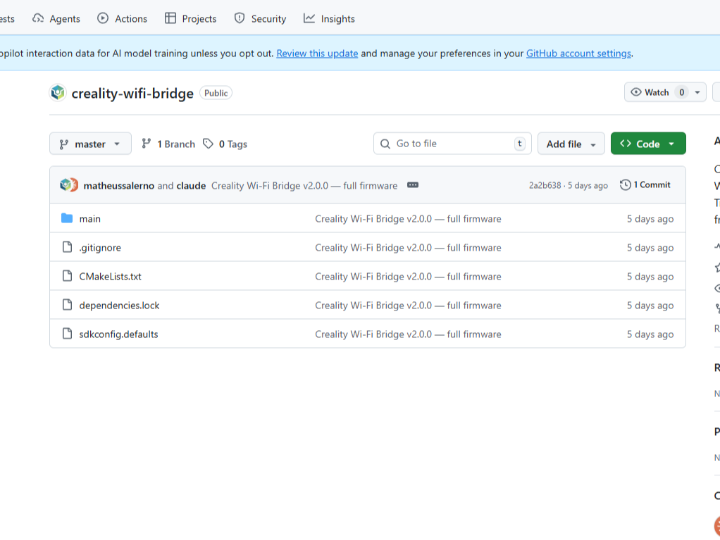
Creality Wi-Fi Bridge — ESP32-S3 + W5500 Ethernet + ILI9341 TFT. Transparent L2 bridge (MAC spoofing) from Ethernet to WiFi.
[English Version]
Creality Wi-Fi Bridge — A Transparent L2 Bridge for 3D Scanners
#ESP32-S3 #W5500 #L2Bridge #MACSpoofing #Creality #3DScanner #ILI9341
⚠️ This project has no README. This curation is based on the GitHub About description and code structure.
01 — What is this project?
Creality, known for their Ender series, makes 3D printers and scanners. Their 3D scanners (like the Ferret Pro) connect wirelessly to PCs and smartphones through an official Wi-Fi Bridge device.
The official Wi-Fi Bridge connects the scanner's Ethernet port to a Wi-Fi network. However, after firmware updates tightened Creality's security policy, users started running into issues — password setup popups not appearing, and existing workflows getting blocked. This has been widely reported in the Creality community forum.
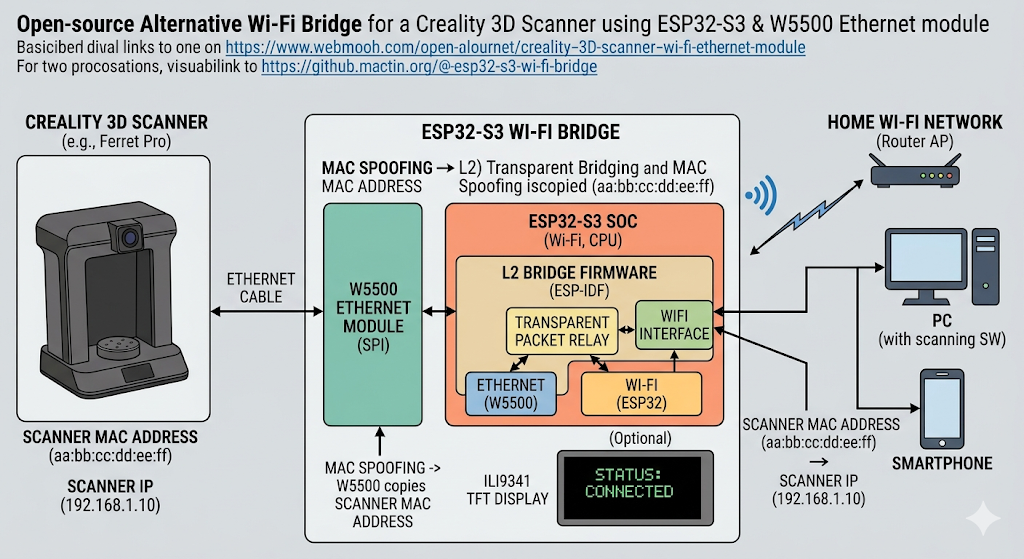
This project is an open-source alternative that reimplements the official Wi-Fi Bridge using ESP32-S3 + W5500. Using MAC spoofing, it operates as a transparent L2 bridge — from the scanner's perspective, it behaves exactly like the original official bridge.
02 — The core technology: L2 bridge and MAC spoofing
🔷 What is an L2 bridge?
Network communication has layers.
- L3 (IP layer): Routes by IP address. This is how a typical router works.
- L2 (MAC layer): Forwards packets by MAC address, passing them through without changing IP addresses.
L3 (NAT) changes IP addresses, which can cause some applications to malfunction. An L2 bridge passes packets through as-is, so devices behave as if the bridge doesn't exist. This is called a transparent bridge.
🔷 What is MAC spoofing?
The scanner's Ethernet port has its own unique MAC address. The W5500 Ethernet module copies (spoofs) the scanner's MAC address and presents it to the Wi-Fi network. From the network's perspective, it looks like the scanner is directly connected to Wi-Fi.
[Creality Scanner]
    ↕  Ethernet cable
[ESP32-S3 Bridge]
    W5500: Copies scanner's MAC address
    ESP32-S3 WiFi: Connects to AP with spoofed MAC
    ILI9341 TFT: Displays connection status
    ↕  Wi-Fi
[Router / PC / Smartphone]
03 — Why W5500?
🔷 Why hardware Ethernet is needed for L2 bridging
An L2 bridge processes packets at the MAC frame level, bypassing the IP layer. This requires direct hardware access to Ethernet MAC frames.
The W5500 has a built-in hardware TCP/IP stack, and its MAC address can be freely set in software. Reading the scanner's MAC address and writing it directly to the W5500 is the core of MAC spoofing.
🔷 Role separation between ESP32-S3 Wi-Fi and W5500 Ethernet
| Interface | Role |
|---|---|
| W5500 (Ethernet) | Wired connection to scanner, MAC spoofing |
| ESP32-S3 Wi-Fi | Wireless connection to router/PC |
| ESP32-S3 CPU | Packet relay between the two interfaces |
The ESP32-S3 forwards Ethernet packets received from W5500 to Wi-Fi, and forwards packets received from Wi-Fi to the scanner through W5500 — transparently in both directions.
04 — Key components
🧠 ESP32-S3
A high-performance Wi-Fi + Bluetooth MCU from Espressif. 240MHz dual-core, 512KB SRAM, external PSRAM support. Runs the L2 bridge logic while simultaneously handling Wi-Fi 802.11 b/g/n and the SPI interface.
🌐 WIZnet W5500
A hardware Ethernet chip connected via SPI. Its MAC address can be freely set in software, making it the key component for MAC spoofing. Handles the Ethernet layer without burdening the ESP32-S3 CPU.
🖥️ ILI9341 TFT Display
A 2.4-inch color TFT display. Shows the bridge's current status in real time — Ethernet link state, Wi-Fi connection status, IP address. Status can be checked from the device itself without a separate PC.
05 — Application scenarios
01. Replacing Creality's official Wi-Fi Bridge
Use without the security policy restrictions introduced by official firmware updates. Open-source and fully customizable. #Creality #3DScanner #Ferret
02. Connecting Ethernet-only devices to Wi-Fi
Transparently connect any device with only an Ethernet port to a Wi-Fi network. A low-cost alternative when no official bridge exists or the official one is expensive. #UniversalBridge #EthernetWiFi #IoT
03. Industrial — Converting wired equipment to wireless
When factory floor wired Ethernet equipment needs to go wireless without rewiring, a transparent L2 bridge means no changes to the equipment's IP settings. #IndustrialIoT #LegacyEquipment #Wireless
04. Network learning — L2 bridge hands-on platform
A real hardware platform for learning how MAC spoofing and transparent L2 bridging work. The ESP-IDF based C code lets you directly observe the Ethernet ↔ Wi-Fi packet relay structure. #NetworkLearning #Embedded #ESPIDF
Conclusion
If the official bridge gets locked down, build your own.
When Creality's firmware update restricted the official Wi-Fi Bridge, this developer implemented the same functionality from scratch using ESP32-S3 and W5500.
The transparent L2 bridge with MAC spoofing provides the scanner with exactly the same network environment as before. The ILI9341 TFT lets you check status without a separate PC.
An early-stage project with no README, but the technical approach is clear and the hardware design is minimal.
- ✅ Transparent L2 bridge — full pass-through without IP translation
- ✅ MAC spoofing — no changes needed to device settings
- ✅ W5500 hardware Ethernet for stable wired connection
- ✅ ILI9341 TFT real-time status display
- ✅ Open-source C code based on ESP-IDF
Q&A
Q. What is the difference between an L2 bridge and a regular router (L3 NAT)? A regular router translates IP addresses (NAT) when forwarding packets. An L2 bridge passes packets through at the MAC address layer without modification. The device's IP address doesn't change, so some applications can't even tell the bridge exists.
Q. What is MAC spoofing? A technique where a network device uses a different device's MAC address instead of its own. In this project, the W5500 copies the scanner's MAC address and presents it to the Wi-Fi network — from the network's perspective, the scanner appears to be directly connected to Wi-Fi.
Q. Why use ESP32-S3? The ESP32-S3 is a high-performance MCU that can simultaneously handle Wi-Fi and SPI. It connects to the W5500 via SPI for Ethernet processing while running the L2 bridge logic to forward packets over Wi-Fi at the same time.
Q. Is it compatible with Creality's official Wi-Fi Bridge? It is designed to behave identically from the scanner's perspective. MAC spoofing ensures network transparency, so no changes to the scanner's settings are needed.
Q. Can it be used with other Ethernet devices? Theoretically yes — any device with an Ethernet port. Since an L2 bridge relays MAC frames regardless of higher-level protocols (IP, TCP), it is protocol-agnostic.
[한글 버전]
Creality Wi-Fi Bridge — 3D 스캐너를 무선으로 연결하는 투명 L2 브릿지
#ESP32-S3 #W5500 #L2브릿지 #MAC스푸핑 #Creality #3D스캐너 #ILI9341
01 — 이 프로젝트는 무엇인가?
Creality는 Ender 시리즈로 유명한 3D 프린터/스캐너 회사입니다. Creality의 3D 스캐너(Ferret Pro 등)는 공식 Wi-Fi Bridge 하드웨어를 통해 PC나 스마트폰과 무선으로 연결됩니다.
공식 Wi-Fi Bridge는 스캐너의 이더넷 포트를 Wi-Fi 네트워크로 연결해주는 중간 장치입니다. 그런데 펌웨어 업데이트로 보안 정책이 강화되면서 비밀번호 설정 팝업이 뜨지 않거나 기존 사용 방식이 막히는 문제가 커뮤니티에서 보고되고 있습니다.
이 프로젝트는 그 공식 Wi-Fi Bridge를 ESP32-S3 + W5500으로 직접 구현한 오픈소스 대안입니다. MAC 스푸핑을 활용한 투명 L2 브릿지로, 스캐너 입장에서는 원래 공식 브릿지와 동일하게 동작합니다.
02 — 핵심 기술: L2 브릿지와 MAC 스푸핑
🔷 L2 브릿지란?
네트워크 통신에는 계층이 있습니다.
- L3 (IP 레이어): IP 주소로 라우팅. 일반적인 공유기가 이 방식.
- L2 (MAC 레이어): MAC 주소로 패킷 전달. IP 주소를 변경하지 않고 패킷을 그대로 통과.
L3 방식(NAT)은 IP 주소가 바뀌기 때문에 일부 애플리케이션이 오작동할 수 있습니다. L2 브릿지는 패킷을 변환 없이 그대로 전달하기 때문에 장치 입장에서 브릿지가 없는 것처럼 동작합니다. 이것이 투명 브릿지(Transparent Bridge) 입니다.
🔷 MAC 스푸핑이란?
스캐너의 이더넷 포트는 자신의 고유 MAC 주소를 가지고 있습니다. W5500 이더넷 모듈이 스캐너의 MAC 주소를 그대로 복사(스푸핑)해서 Wi-Fi 네트워크에 전달합니다. 네트워크에서는 스캐너가 직접 Wi-Fi에 연결된 것처럼 보입니다.
[Creality 스캐너]
    ↕  이더넷 케이블
[ESP32-S3 브릿지]
    W5500: 스캐너 MAC 주소 그대로 복사
    ESP32-S3 WiFi: MAC 스푸핑된 주소로 AP에 연결
    ILI9341 TFT: 연결 상태 표시
    ↕  Wi-Fi
[공유기 / PC / 스마트폰]
03 — 왜 W5500인가?
🔷 L2 브릿지에서 이더넷 하드웨어 스택이 필요한 이유
L2 브릿지는 IP 레이어를 거치지 않고 MAC 프레임 단위로 패킷을 처리합니다. 이 작업에는 이더넷 하드웨어가 직접 MAC 프레임에 접근할 수 있어야 합니다.
W5500은 하드웨어 TCP/IP 스택을 내장하고 있고, MAC 주소를 소프트웨어로 자유롭게 설정할 수 있습니다. 스캐너의 MAC 주소를 읽어서 W5500에 그대로 쓰는 것이 MAC 스푸핑의 핵심입니다.
🔷 ESP32-S3 Wi-Fi와 W5500 이더넷의 역할 분리
| 인터페이스 | 역할 |
|---|---|
| W5500 (이더넷) | 스캐너와 유선 연결, MAC 스푸핑 |
| ESP32-S3 Wi-Fi | 공유기/PC와 무선 연결 |
| ESP32-S3 CPU | 두 인터페이스 사이 패킷 중계 |
ESP32-S3가 W5500에서 받은 이더넷 패킷을 Wi-Fi로 전달하고, Wi-Fi에서 받은 패킷을 W5500을 통해 스캐너로 전달합니다. 양방향으로 투명하게 동작합니다.
04 — 핵심 구성 요소
🧠 ESP32-S3
Espressif의 고성능 Wi-Fi + Bluetooth MCU입니다. 240MHz 듀얼코어, 512KB SRAM, 외부 PSRAM 지원. Wi-Fi 802.11 b/g/n과 SPI 인터페이스를 동시에 처리하며 L2 브릿지 로직을 실행합니다.
🌐 WIZnet W5500
SPI로 연결되는 하드웨어 이더넷 칩입니다. MAC 주소를 소프트웨어로 자유롭게 설정할 수 있어 MAC 스푸핑 구현의 핵심 역할을 합니다. ESP32-S3의 CPU 부담 없이 이더넷 레이어를 처리합니다.
🖥️ ILI9341 TFT 디스플레이
2.4인치 컬러 TFT 디스플레이입니다. 이더넷 링크 상태, Wi-Fi 연결 상태, IP 주소 등 브릿지의 현재 상태를 실시간으로 표시합니다. 별도의 PC 없이 장치만으로 상태 확인이 가능합니다.
05 — 응용 시나리오
01. Creality 스캐너 공식 브릿지 대체
공식 Wi-Fi Bridge의 펌웨어 업데이트 이후 발생하는 보안 정책 제약 없이 자유롭게 사용할 수 있습니다. 오픈소스라 커스터마이징도 가능합니다. #Creality #3D스캐너 #Ferret
02. 이더넷 전용 장치를 Wi-Fi 네트워크에 연결
이더넷 포트만 있는 모든 장치를 Wi-Fi 네트워크에 투명하게 연결할 수 있습니다. 공식 브릿지가 없거나 비싼 경우 저비용 대안이 됩니다. #범용브릿지 #이더넷WiFi #IoT
03. 산업 현장 — 유선 장비를 무선으로 전환
공장의 유선 이더넷 장비를 케이블 공사 없이 Wi-Fi로 연결해야 할 때, 투명 L2 브릿지는 장비의 IP 설정을 변경하지 않아도 되는 장점이 있습니다. #산업IoT #레거시장비 #무선전환
04. 네트워크 학습 — L2 브릿지 실습 플랫폼
MAC 스푸핑과 투명 L2 브릿지의 동작 원리를 실제 하드웨어로 학습할 수 있는 플랫폼입니다. ESP-IDF 기반 C 코드로 이더넷 ↔ Wi-Fi 패킷 중계 구조를 직접 확인할 수 있습니다. #네트워크학습 #임베디드 #ESPIDF
결론
공식 브릿지가 막히면, 직접 만들면 된다.
Creality가 펌웨어 업데이트로 공식 Wi-Fi Bridge에 제약을 걸었을 때, 이 개발자는 ESP32-S3와 W5500으로 동일한 기능을 직접 구현했습니다.
MAC 스푸핑을 활용한 투명 L2 브릿지는 스캐너 입장에서 완전히 동일한 네트워크 환경을 제공합니다. ILI9341 TFT로 별도 PC 없이 상태를 확인할 수 있습니다.
README가 없는 초기 단계 프로젝트지만, 기술적 접근 방식이 명확하고 하드웨어 구성이 간결합니다.
- ✅ 투명 L2 브릿지 — IP 변환 없는 완전 투과
- ✅ MAC 스푸핑으로 장치 설정 변경 불필요
- ✅ W5500 하드웨어 이더넷으로 안정적 유선 연결
- ✅ ILI9341 TFT 실시간 상태 표시
- ✅ ESP-IDF 기반 C 코드 오픈소스 공개
Q&A
Q. L2 브릿지와 일반 공유기(L3 NAT)의 차이는 무엇인가요? 일반 공유기는 IP 주소를 변환(NAT)해서 패킷을 전달합니다. L2 브릿지는 MAC 주소 레이어에서 패킷을 그대로 통과시킵니다. 장치의 IP 주소가 바뀌지 않아 일부 애플리케이션이 브릿지의 존재를 인식하지 못합니다.
Q. MAC 스푸핑이란 무엇인가요? 네트워크 장치가 자신의 고유 MAC 주소 대신 다른 장치의 MAC 주소를 사용하는 기술입니다. 이 프로젝트에서는 W5500이 스캐너의 MAC 주소를 복사해 Wi-Fi 네트워크에 전달합니다. 네트워크 입장에서는 스캐너가 직접 Wi-Fi에 연결된 것처럼 보입니다.
Q. 왜 ESP32-S3를 사용하나요? ESP32-S3는 Wi-Fi와 SPI를 동시에 처리할 수 있는 고성능 MCU입니다. W5500을 SPI로 연결해 이더넷을 처리하면서 동시에 Wi-Fi로 패킷을 전달하는 L2 브릿지 로직을 실행합니다.
Q. Creality 공식 Wi-Fi Bridge와 호환되나요? 스캐너 입장에서는 동일하게 동작하도록 설계되었습니다. MAC 스푸핑으로 네트워크 투명성을 보장하기 때문에 스캐너의 설정을 변경할 필요가 없습니다.
Q. 다른 이더넷 장치에도 사용할 수 있나요? 이론적으로는 이더넷 포트가 있는 모든 장치에 적용 가능합니다. L2 브릿지는 상위 프로토콜(IP, TCP)에 무관하게 MAC 프레임을 그대로 중계하기 때문입니다.