



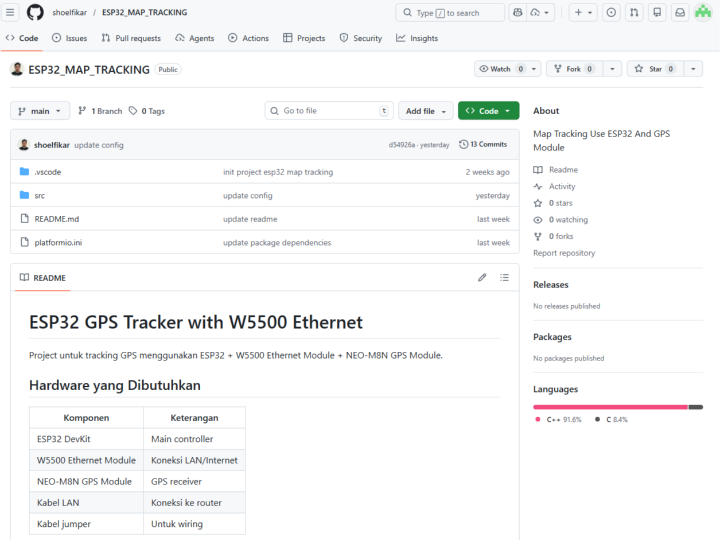
ESP32_MAP_TRACKING
Map Tracking Use ESP32 And GPS Module
프로젝트 제목 & 한 줄 소개
ESP32 GPS Tracker with W5500 Ethernet은 WIZnet W5500 이더넷 칩과 ESP32, NEO-M8N GPS 모듈을 결합하여 Wi-Fi 없이도 안정적으로 위치 데이터를 서버에 전송할 수 있는 유선 LAN 기반 GPS 트래커입니다.
배경 & 동기
산업 현장, 물류 창고, 보안 시설 등 Wi-Fi 사용이 제한되거나 무선 환경이 불안정한 곳에서는 기존의 Wi-Fi 기반 GPS 트래커가 제 역할을 하기 어렵습니다. 무선 간섭, 연결 끊김, 인증 문제가 반복적으로 발생하기 때문입니다.
이 프로젝트는 그 문제를 해결하기 위해 **유선 이더넷(W5500)**을 선택했습니다. LAN 케이블 하나로 안정적이고 보안성 높은 인터넷 연결을 확보하면서, ESP32의 강력한 처리 능력과 NEO-M8N의 정밀한 GPS 수신 성능을 조합했습니다.
시스템 구조 & 동작 원리
전체 시스템은 세 모듈이 ESP32를 중심으로 연결됩니다.
NEO-M8N GPS 모듈이 위성 신호를 수신하면, ESP32가 데이터를 파싱하고, W5500이 SPI 통신으로 이더넷을 제어해 서버에 HTTP로 위치 데이터를 전송합니다. ESP32 내부에는 웹 서버도 내장되어 있어, 브라우저에서 실시간 상태 확인도 가능합니다.
[NEO-M8N GPS] ──UART──▶ [ESP32 DevKit] ──SPI──▶ [W5500 Ethernet]
                              │                          │
                         GPS 파싱 & 처리           LAN 케이블
                              │                          │
                         웹 서버 응답             HTTP Webhook 전송
▶ 원격 서버- NEO-M8N → ESP32: UART(Serial2) 통신으로 NMEA 문장 수신
- ESP32 → W5500: SPI 통신으로 이더넷 제어 (CS: GPIO5, MISO/MOSI/SCK)
- W5500 → 서버: HTTP POST로 GPS 데이터(위도, 경도, 속도, 위성 수) 전송
- 내장 웹서버: ESP32가 직접 HTTP 서버를 열어 실시간 상태 조회 가능
- Watchdog Timer: 시스템 행(hang) 발생 시 자동 재시작으로 무인 운용 지원
구현 세부사항
하드웨어 연결
W5500 ↔ ESP32 (SPI)
| W5500 | ESP32 | 설명 |
|---|---|---|
| VCC | 3.3V | 전원 |
| GND | GND | 공통 접지 |
| MISO | GPIO 19 | 데이터 수신 |
| MOSI | GPIO 23 | 데이터 송신 |
| SCK | GPIO 18 | 클럭 |
| CS | GPIO 5 | 칩 선택 |
| RST | GPIO 4 | 리셋 |
NEO-M8N ↔ ESP32 (UART)
| GPS | ESP32 | 설명 |
|---|---|---|
| TX | GPIO 16 (RX2) | GPS → ESP32 |
| RX | GPIO 17 (TX2) | ESP32 → GPS |
소프트웨어 & 라이브러리
모듈형 아키텍처(gps_module.h, network_module.h, webserver_module.h)로 구성되어 유지보수가 용이합니다. Wi-Fi / 이더넷 전환도 config.h 설정 하나로 가능합니다.
빌드 & 실행 방법
# 1. 프로젝트 클론 git clone <repository-url> ESP32_MAP_TRACKING
cd ESP32_MAP_TRACKING
 # 2. 설정 파일 생성 cp src/config.example.h src/config.h
# config.h에서 SERVER_HOST, DEVICE_ID, SEND_INTERVAL 등 수정  # 3. 빌드 & 업로드 pio run -t upload
 # 4. 시리얼 모니터 확인 (115200 baud) pio device monitor
```
 > ⚠️ `src/config.h`는 `.gitignore`에 포함되어 있으므로 **절대 커밋하지 마세요.**
 ### Troubleshooting
 | 증상 | 원인 & 해결 |
|------|------------|
| W5500 IP가 0.0.0.0 | **SPI 배선 재확인**, LAN 케이블 연결 상태 점검 |
| GPS 위성 미수신 | **실외 환경**으로 이동, cold start 최대 5분 대기, TX/RX 교차 연결 확인 |
| 시리얼 출력 없음 | baud rate 115200 확인, EN/Reset 버튼 재시작 |
 ---
 ## 6️⃣ 결과 & 마무리
 시스템 구동 시 시리얼 모니터에 아래와 같이 정상 출력됩니다.
```
Ethernet Ready! IP: 192.168.1.xxx
GPS Fix: Valid
  Lat: -6.200123
  Lng: 106.800456   Satellites: 8   Speed: 12.3 km/h
Data sent successfully (HTTP 200) Free heap: 234512 bytesWatchdog, 자동 재연결, LED 상태 표시 기능을 갖춰 무인 장거리 운용에 적합합니다. 향후 MQTT 프로토콜 지원 및 다중 디바이스 관리 대시보드 연동으로 확장 계획 중입니다.
🔗 Original Link: GitHub Repository
💡 WIZnet Maker 커뮤니티에 대한 가치
이 프로젝트는 W5500을 처음 사용하는 메이커에게 특히 실용적인 레퍼런스가 됩니다. SPI 배선부터 DHCP IP 취득, HTTP 전송까지의 전체 흐름이 모듈형 코드로 명확하게 정리되어 있어, 자신의 프로젝트에 바로 이식할 수 있습니다. 또한 W5100S, W6100 등 다른 WIZnet 칩을 사용하는 메이커도 동일한 아키텍처를 참고해 이더넷 기반 IoT 디바이스를 빠르게 구현할 수 있습니다. 스마트 팩토리, 물류 트래킹, 농업용 원격 모니터링처럼 Wi-Fi가 닿지 않는 산업 현장에서의 활용 가능성은 특히 높으며, WIZnet 생태계에서 유선 이더넷 + GPS 조합의 실용적 출발점으로 자리잡을 수 있는 프로젝트입니다.
FAQ
Q1: 이 GPS 트래커에서 Wi-Fi 대신 WIZnet W5500을 쓰는 이유는 뭔가요?
A: 트래킹 장치는 “연결이 꾸준히 유지되는가”가 핵심입니다. 유선 이더넷은 RF 간섭, AP 로밍, 전파 환경 변화 같은 변수가 적고, W5500은 SPI로 붙는 전용 이더넷 인터페이스라 ESP32가 GPS 파싱과 데이터 포맷/전송 로직에 집중할 수 있습니다.
Q2: 이 프로젝트에서 W5500은 ESP32에 어떻게 연결되나요?
A: SPI로 연결합니다. 핀 매핑은 MISO GPIO19, MOSI GPIO23, SCK GPIO18, CS GPIO5, 그리고 RST GPIO4, 전원은 3.3V/GND입니다. 펌웨어에서는 CS 핀을 설정한 뒤(예: Ethernet.init(W5500_CS)), DHCP로 IP를 받는 흐름이 일반적입니다.
Q3: 시스템 안에서 W5500이 정확히 하는 일은 무엇인가요?
A: W5500은 ESP32가 서버로 나가는 네트워크 트래픽(예: HTTP POST)을 보내기 위한 유선 네트워크 엔드포인트입니다. GPS 모듈은 네트워크와 직접 통신하지 않고, GPS(UART) → ESP32(JSON 구성) → W5500(SPI) → 라우터(LAN) 형태로 데이터가 전달됩니다.
Q4: 초보자도 따라 할 수 있나요? 준비해야 할 지식은 무엇인가요?
A: 가능합니다. 다만 SPI 배선과 기본 IP 개념(DHCP, 게이트웨이, DNS) 정도는 이해하고 있으면 훨씬 안정적으로 진행됩니다. 초보자가 가장 많이 막히는 지점은 (1) SPI 핀/CS 핀 매핑 오류, (2) 콜드 스타트에서 GPS Fix가 즉시 잡힐 거라고 기대하는 부분입니다.
ESP32 GPS Tracker with W5500 Ethernet is a wired LAN-based GPS tracker that combines the WIZnet W5500 Ethernet chip, ESP32, and NEO-M8N GPS module to reliably transmit location data to a server — without relying on Wi-Fi.
Background & Motivation
In industrial facilities, logistics warehouses, and security-sensitive environments where Wi-Fi is restricted or wireless connectivity is unstable, conventional Wi-Fi-based GPS trackers often fall short. Wireless interference, frequent disconnections, and authentication failures make them unreliable for critical deployments.
This project addresses those challenges by choosing wired Ethernet via the W5500. A single LAN cable provides a stable, secure internet connection, while combining the processing power of the ESP32 with the precision of the NEO-M8N GPS receiver. The result is a tracker built for environments where reliability matters more than convenience.
System Architecture & How It Works
The entire system connects three modules centered around the ESP32:
[NEO-M8N GPS] ──UART──▶ [ESP32 DevKit] ──SPI──▶ [W5500 Ethernet]
                              │                          │
                       GPS Parsing & Logic          LAN Cable
                              │                          │
Web Server Response HTTP Webhook → Remote Server- NEO-M8N → ESP32: Receives NMEA sentences via UART (Serial2)
- ESP32 → W5500: Controls Ethernet over SPI (CS: GPIO5, MISO/MOSI/SCK)
- W5500 → Server: Sends GPS data (latitude, longitude, speed, satellite count) via HTTP POST
- Built-in Web Server: ESP32 opens its own HTTP server for real-time status monitoring
- Watchdog Timer: Automatically restarts the system on hang — enabling unattended operation
Software & Libraries
The codebase follows a modular architecture (gps_module.h, network_module.h, webserver_module.h) for easy maintenance. Switching between Wi-Fi and Ethernet is as simple as toggling a single flag in config.h.
Build & Flash Instructions
# 1. Clone the project git clone <repository-url> ESP32_MAP_TRACKING
cd ESP32_MAP_TRACKING
 # 2. Create config file cp src/config.example.h src/config.h
# Edit SERVER_HOST, DEVICE_ID, SEND_INTERVAL, etc.  # 3. Build & upload pio run -t upload
 # 4. Monitor serial output (115200 baud) pio device monitor
```
 > ⚠️ `src/config.h` is listed in `.gitignore`. **Never commit this file.**
 ### Troubleshooting
 | Symptom | Cause & Fix |
|---------|-------------|
| W5500 shows IP 0.0.0.0 | **Re-check SPI wiring**, verify LAN cable connection |
| GPS not acquiring satellites | Move to **outdoor environment**, wait up to 5 min for cold start, verify TX/RX cross-connection |
| No serial output | Confirm baud rate is 115200, press EN/Reset button |
 ---
 ## 6️⃣ Results & Conclusion
 When running correctly, the serial monitor outputs the following:
```
Ethernet Ready! IP: 192.168.1.xxx
GPS Fix: Valid
  Lat: -6.200123
  Lng: 106.800456   Satellites: 8   Speed: 12.3 km/h
Data sent successfully (HTTP 200) Free heap: 234512 bytes
With built-in Watchdog, auto-reconnection, and LED status indication, this system is well-suited for long-term unattended deployments. Future improvements include MQTT protocol support and integration with a multi-device management dashboard.
🔗 Original Link: GitHub Repository
💡 Value for the WIZnet Maker Community
This project serves as a practical, ready-to-use reference — especially for makers getting started with the W5500. The entire flow from SPI wiring to DHCP IP acquisition and HTTP data transmission is clearly laid out in modular, reusable code that can be directly ported to your own projects. Makers working with other WIZnet chips such as W5100S or W6100 can also apply the same architecture to quickly prototype Ethernet-based IoT devices. The use cases are particularly compelling in Wi-Fi-restricted industrial environments — smart factories, logistics tracking, remote agricultural monitoring, and more. This project stands as a solid starting point for wired Ethernet + GPS integration within the WIZnet ecosystem.
FAQ
Q: Why use the WIZnet W5500 for this GPS tracker instead of Wi-Fi?
A: A tracker is only useful when it can consistently upload data. Wired Ethernet avoids RF interference and roaming edge cases, and the W5500 provides a dedicated Ethernet interface over SPI so the ESP32 can spend its time parsing GPS and formatting payloads rather than babysitting a fragile uplink.
Q: How does the W5500 connect to ESP32 in this project?
A: Over SPI: MISO GPIO19, MOSI GPIO23, SCK GPIO18, CS GPIO5, plus RST GPIO4, and 3.3V power/GND. The firmware sets the CS pin (e.g., Ethernet.init(W5500_CS)) and then acquires an IP via DHCP.
Q: What exactly does the W5500 do inside this system?
A: It is the wired network endpoint that the ESP32 uses to open sockets and send outbound traffic (HTTP POSTs) to your server. The GPS never touches the network directly; the ESP32 bridges GPS data → JSON → Ethernet.
Q: Can a beginner build this reliably? What are the prerequisites?
A: Yes, if you’re comfortable with SPI wiring and basic IP concepts (DHCP, gateway, DNS). The two “gotchas” beginners hit most are (1) incorrect SPI pin mapping/CS selection and (2) expecting instant GPS fix during cold start.