


TallyCCUPro
TallyCCU Pro is an open-source Arduino + W5500 solution for remote CCU control of Blackmagic cameras with vMix tally integration.
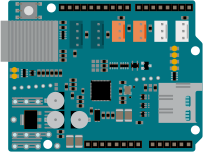
Arduino - Arduino Ethernet Shield 2
x 1


WIZnet - W5500
x 1

Arduino - Arduino IDE
x 1
Broadcast CCU Controller Built with Arduino and W5500 — TallyCCU Pro

In One Sentence
"A full camera remote control system built by stacking three Arduino boards — no expensive broadcast gear required."
In a multi-camera live production environment, two things are essential.
One is a CCU: a device that remotely adjusts a camera's exposure, color, and focus.
The other is a Tally Light: an indicator that tells camera operators which camera is currently on-air.
Traditionally, both require dedicated hardware costing thousands of dollars. TallyCCU Pro replaces all of that with an open-source Arduino-based system. It controls Blackmagic Design cameras directly over SDI and automates tally lights by integrating with vMix software switchers. The latest version is v3.7.1 (February 2026).
Key Concepts

What is a CCU (Camera Control Unit)?
A CCU is a device used in broadcast production to remotely adjust camera parameters — iris, focus, white balance, color grading, and more. Traditionally requiring expensive dedicated hardware, TallyCCU Pro replicates this functionality using an Arduino.
What is a Tally Light?
A tally light is the red/green indicator on a camera that shows whether it's live (on-air) or in preview. TallyCCU Pro automates this by integrating with vMix, a software video switcher.
Hardware Setup
Three boards are stacked in the following order:
[Blackmagic 3G-SDI Shield]  ← Top:    SDI signal I/O
[Arduino Ethernet Shield 2] ← Middle: Network (W5500) + SD card slot
[Arduino Mega 2560] ← Bottom: Main controller| Position | Component | Role |
|---|---|---|
| ③ Top | Blackmagic 3G-SDI Shield | SDI signal I/O |
| ② Middle | Arduino Ethernet Shield 2 (W5500) | Network + SD card |
| ① Bottom | Arduino Mega 2560 | Main controller (Uno not supported) |
Additional requirements:
- MicroSD card (1–32GB, FAT32 formatted)
- External 9–12V DC power required — USB power alone is insufficient
- Two I2C bridge jumper wires between Mega and SDI Shield (A4→SCL, A5→SDA)
Features
Camera Control
- Iris, focus, zoom, white balance, ISO, shutter, ND filters
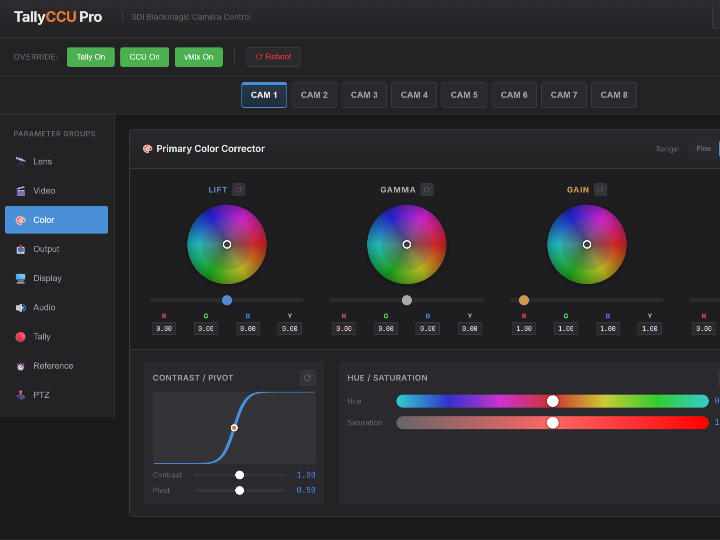
- Lift / gamma / gain / offset color correction with a visual color wheel UI
- Audio levels, phantom power
- PTZ (pan/tilt) support
Integration
- Web browser: Control from any device on the local network
- Bitfocus Companion: Hardware controller integration (see below)
- TCP API (port 8098): Open API for custom integrations
- vMix: Automatic tally light integration
Bitfocus Companion Integration
Bitfocus Companion is an open-source software that turns hardware button pads like the Elgato Stream Deck into professional control surfaces for live production. In simple terms, it's middleware that lets you map physical buttons to actions like "raise camera 2 iris" or "load preset." It's widely used in broadcast environments and has over 2,000 GitHub stars.
TallyCCU Pro is registered as an official Companion Connection Module. This means you can install it directly from within the Companion app by searching "TallyCCU Pro" — no manual configuration needed. Just enter the Arduino's IP address and you're ready to control all CCU parameters from a Stream Deck. The fact that a solo open-source project made it into Companion's official ecosystem speaks to its quality and reliability.
Real-Time Sync (v3.5+)
Parameters are synchronized instantly between the web UI and Companion via SSE (Server-Sent Events). A change made on either side is reflected on the other in real time.
Safe Mode (v3.7+)
After 3 consecutive boot failures, the system automatically enters Safe Mode. Even with power or SDI signal issues, the network remains active for remote diagnosis and recovery.
System Architecture

Web Browser  ◄──SSE──  Arduino Mega  ◄──TCP──  Bitfocus Companion
             ──POST──►              ──TCP──►
                            │
                       SDI cable
                            │
                  Blackmagic Camera
The web interface (HTML/CSS/JS) is stored on the SD card and served directly by the W5500 web server. This means the UI can be updated without reflashing the firmware.
How Networking Is Used
In TallyCCU Pro, networking is not just a remote access channel — nearly every function in the system runs over the network. The W5500 maintains four simultaneous connections, each with a distinct role.
| Connection | Direction | Purpose |
|---|---|---|
| HTTP Server | Browser → Arduino | Serve web UI, receive CCU parameters |
| SSE | Arduino → Browser | Push real-time parameter updates |
| TCP Server (port 8098) | Companion ↔ Arduino | CCU control, external integration API |
| TCP Client | Arduino → vMix | Receive tally state |
① HTTP Server — Web UI + CCU Control
The Arduino acts as an HTTP server directly. Web interface files (HTML/CSS/JS) are stored on the SD card, and the W5500 streams them to the browser over a socket on connection.
When a user adjusts a slider or color wheel in the browser, an HTTP POST request is sent to the Arduino — and that single request triggers three actions simultaneously:
- Converted to an SDI command → applied to the camera immediately
- Broadcast to TCP clients via CCUBroadcast
- Pushed to the browser UI via SSE
Internally, the code uses fixed-size char[] buffers instead of String objects to minimize memory usage.
② SSE (Server-Sent Events) — Real-Time Push
When the browser opens the web UI, an SSE connection to the Arduino is established alongside it. If a parameter changes via Companion or any other route, the Arduino immediately pushes the update to the browser, which refreshes the UI automatically.
Rather than the browser polling the server at intervals, the Arduino pushes only when a change occurs. The implementation keeps the socket open after a GET /events request and writes data: ... formatted messages to it each time an event fires.
Since v3.5, camera parameter state is held by the browser rather than the Arduino. This reduced the Arduino's RAM footprint by roughly 600 bytes. Note that due to socket resource constraints, only one SSE connection can be maintained at a time.
③ TCP Server (Port 8098) — Companion & External Integrations
The Arduino listens on port 8098 as a TCP server. Bitfocus Companion connects here for bidirectional communication. The protocol uses human-readable text commands, making custom integrations straightforward.
SUBSCRIBE          → Start subscribing to the event stream
CCU 1 iris 0.75    → Set camera 1 iris to 0.75
REQUESTSYNC        → Request current parameter state sync
PING / PONG        → Keep-alive check
When Companion changes a parameter, it's sent to the Arduino over TCP, which then broadcasts it to all connected clients. In v3.7.1, the TCP buffer was expanded from 64 to 128 bytes, fixing a bug where long commands were being truncated.
④ TCP Client — vMix Tally Reception
For tally integration, the roles are reversed. The Arduino acts as a client, connecting directly to the vMix PC.
After connecting, it sends a SUBSCRIBE TALLY message. vMix then streams tally state updates in real time whenever a camera switch occurs.
Arduino  →  "SUBSCRIBE TALLY\r\n"     →  vMix
vMix     →  "TALLY OK 1022000..."     →  Arduino
                                           ↓
                           Parse digits (0=off / 1=preview / 2=on-air)
                                           ↓
                                  Output tally signal via SDI
In v3.7.1, a bug where the Arduino repeatedly retried connections immediately after a disconnect — flooding the network — was fixed using Progressive Backoff (gradually increasing retry intervals).
Four Connections Running Simultaneously
The W5500 manages up to 8 hardware sockets independently. All four connections above can be active at the same time, handled at the chip level without MCU software overhead. This is why stable multi-connection operation is possible even within the 8KB RAM constraints of the Arduino Mega.
The Role of WIZnet W5500
All networking in TallyCCU Pro is handled by the WIZnet W5500 chip on the Arduino Ethernet Shield 2. The W5500 is a hardwired TCP/IP Ethernet controller — it processes network communication at the hardware level, offloading that work entirely from the MCU.
Because the W5500 handles all four connections independently at the chip level, the Arduino Mega can dedicate its limited resources to SDI camera control, SD card file serving, and EEPROM configuration management. This is why the project's README notes "Typical free RAM: ~2,000+ bytes" even with a full network stack running.
Potential Applications
The architecture of TallyCCU Pro extends well beyond broadcast studios.
- Corporate video / conferences: Low-cost remote CCU control for Blackmagic cameras without dedicated broadcast hardware.
- Streaming studios: Quick deployment of vMix-integrated tally systems for YouTube, Twitch, and similar platforms.
- Education & houses of worship: A practical solution for budget-constrained multi-camera environments like school broadcast rooms or churches.
- OEM/ODM: The core architecture (MCU + W5500 + SDI interface) is simple and uses readily available components. The same design can serve as the basis for a custom PCB, or be compacted using the W5500 chip directly or a WIZnet W5500-based module such as the WIZ850io.
Tech Stack Summary
| Component | Model | Role |
|---|---|---|
| MCU | Arduino Mega 2560 | Main control logic |
| Network | Arduino Ethernet Shield 2 (W5500) | All Ethernet communication |
| SDI Interface | Blackmagic 3G-SDI Shield | SDI camera control / tally output |
| Storage | MicroSD (FAT32, up to 32GB) | Web UI files and preset storage |
| Power | 9–12V DC external supply | Required for SDI Shield |
| Software Integration | vMix, Bitfocus Companion | Tally reception, Stream Deck control |
| Firmware Language | C++ (Arduino IDE) | — |
| Web Interface | HTML / CSS / JavaScript | Served from SD card |
FAQ
Q. Does this work with cameras other than Blackmagic Design?
A. No. TallyCCU Pro uses the Blackmagic SDI camera control protocol, which is proprietary to Blackmagic Design. It is compatible with Blackmagic cameras that support SDI control, such as the URSA, Pocket Cinema Camera (BMPCC), and Studio Camera lines.
Q. Can it be used without vMix?
A. Yes. The CCU control functions (iris, color correction, focus, etc.) work independently over the web UI or Companion without any vMix connection. vMix integration is only required for the tally light functionality.
Q. Why does it require an Arduino Mega instead of an Uno?
A. The Arduino Uno only has 2KB of RAM, which is insufficient to run a web server, SSE connection, TCP server, and SDI control simultaneously. The Mega's 8KB RAM is the minimum viable configuration for this system.
Q. Can the W5500 be replaced with a Wi-Fi module?
A. The current design is wired Ethernet only. In live production environments, wired connections are strongly preferred for reliability and latency reasons. That said, the modular code structure means a Wi-Fi variant could be developed as a separate build targeting a different hardware platform.
Project Links
- GitHub: https://github.com/fiverecords/TallyCCUPro
- License: CC BY-NC-SA 4.0 (free for non-commercial use)
- Latest version: v3.7.1 (February 2026)
- Listed as an official Bitfocus Companion module (searchable and installable directly from within the app)