


Pico-LLDP
A portable cable tester using Pico W and W5500 MACRAW mode to capture LLDP frames and display connected switch info — manufacturer, port, and IP — on a 2×16 LCD

WIZnet - W5500
x 1

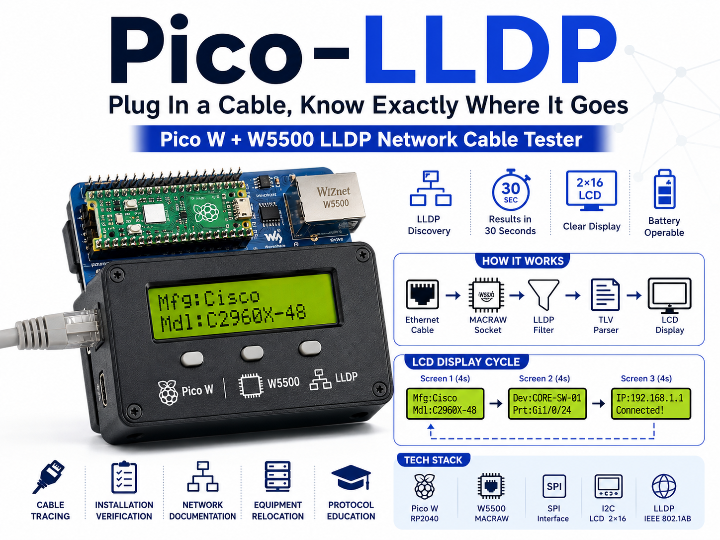
Plug In a Cable, Know Exactly Where It Goes — Pico W + W5500 LLDP Network Cable Tester
An open-source portable network diagnostic tool that connects a Raspberry Pi Pico W to a Waveshare Ethernet HAT (W5500), captures LLDP frames in real time, and displays the connected device's manufacturer, model, port, and IP address on a 2×16 LCD — all within 30 seconds of plugging in a cable.
Background: The Cable Mystery
It's a situation every network engineer knows. You pick up one of fifty patch cables and ask: which switch port does this go to? Without tooling, the answer means logging into a switch console, running show lldp neighbors, or unplugging cables one by one until the right port goes dark.
- LLDP (Link Layer Discovery Protocol), standardized as IEEE 802.1AB, was designed to solve exactly this. Most managed switches, routers, and servers periodically broadcast their hostname, port identifier, and management IP in LLDP frames — to anyone on the same physical link who's listening.
- Pico LLDP is a handheld cable tester that listens for those frames. Plug in any cable connected to an LLDP-enabled device, and within 30 seconds the 2×16 LCD shows you exactly what's on the other end.
WIZnet's Role: W5500 MACRAW Mode Is the Whole Point
In this project, the WIZnet W5500 is not just an Ethernet connection method — it's the component that makes the core functionality possible.
Why W5500 Is the Right Choice
LLDP frames cannot be received through a standard TCP/IP socket. LLDP operates below the IP layer, at Layer 2 (Ethernet). To receive LLDP, you need raw access to Ethernet frames — a MACRAW socket that captures everything on the wire without filtering.
W5500 supports this directly. By setting Socket 0 to MACRAW mode (0x04), the W5500 stores every incoming Ethernet frame in its RX buffer. The RP2040 reads frames over SPI and filters for the LLDP multicast MAC (01:80:c2:00:00:0e) and EtherType (0x88CC).
# Set W5500 Socket 0 to MACRAW mode
write_socket_reg(socket=0, addr=SN_MR, data=0x04)  # MACRAW mode
write_socket_reg(socket=0, addr=SN_CR, data=0x01)  # OPEN
This is not achievable with a software TCP/IP stack like LwIP, which operates above Layer 2 and has no raw frame access. W5500's hardware socket architecture makes MACRAW mode a first-class feature, leaving the RP2040 free for application logic.
Pin Connection
| Signal | Pico W GPIO |
|---|---|
| MISO | GP16 |
| MOSI | GP19 |
| SCK | GP18 |
| CS | GP17 |
| RST | GP20 |
How It Works: From Raw Frame to LCD Display
The system is organized in three clean layers:
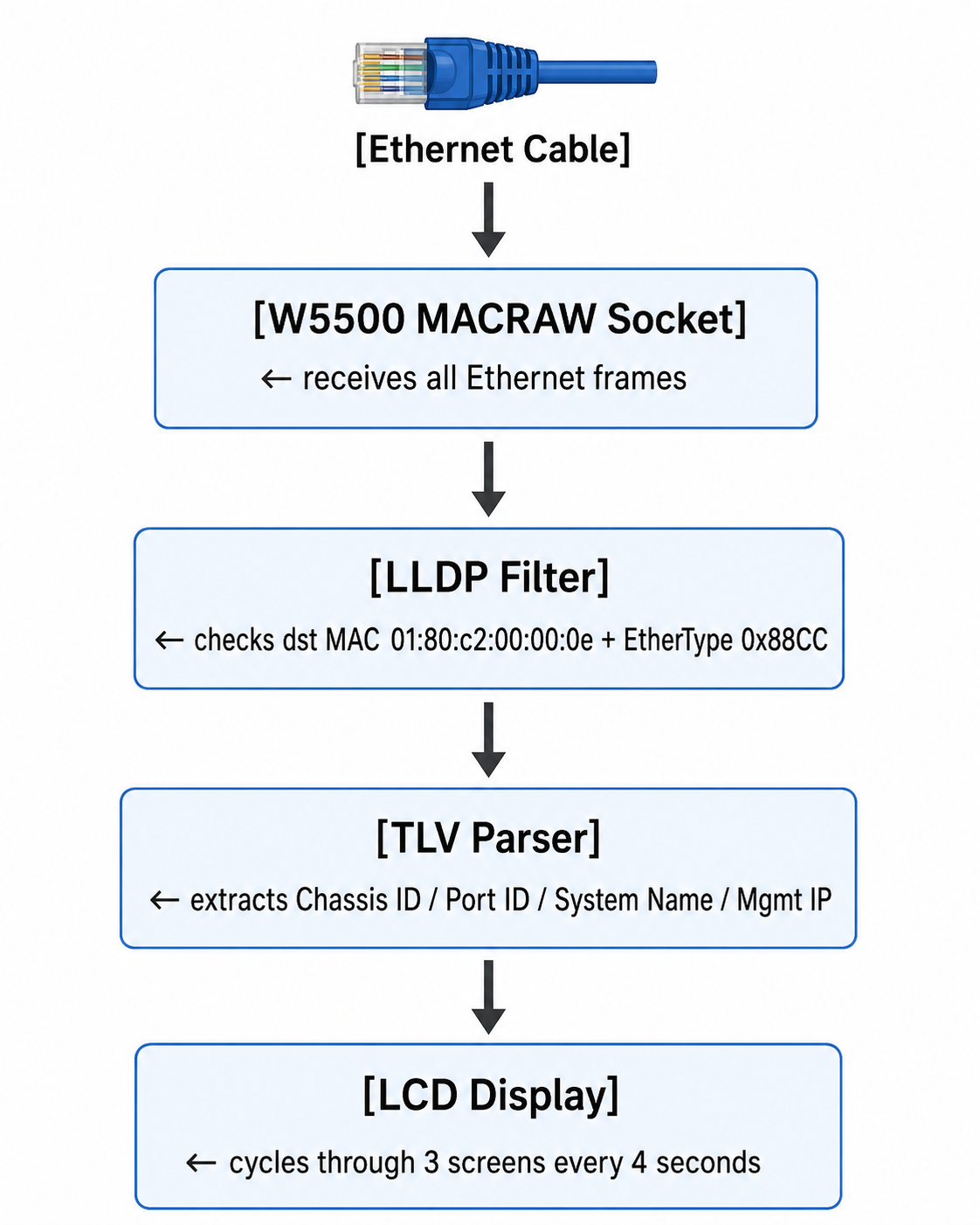
LLDP TLV Parsing
LLDP frames are structured as a sequence of TLV (Type-Length-Value) fields. The parser skips the 14-byte Ethernet header and processes TLVs sequentially:
# TLV header: upper 7 bits = Type, lower 9 bits = Length
tlv_hdr = struct.unpack('>H', frame[pos:pos+2])[0]
tlv_type = (tlv_hdr >> 9) & 0x7F
tlv_len = tlv_hdr & 0x1FF| TLV Type | Information Extracted | LCD Screen |
|---|---|---|
| Type 1 | Chassis ID (MAC or IP) | — |
| Type 2 | Port ID | Screen 2: Prt:Gi1/0/24 |
| Type 5 | System Name | Screen 2: Dev:CORE-SW-01 |
| Type 6 | System Description | Screen 1: manufacturer + model |
| Type 8 | Management Address (IPv4) | Screen 3: IP:192.168.1.1 |
The System Description string is parsed for known vendor keywords — Cisco, Juniper, Arista, HPE, Dell, Fortinet, Ubiquiti, Meraki, and more — to display a clean manufacturer name rather than a raw description string.
LCD Display Cycle
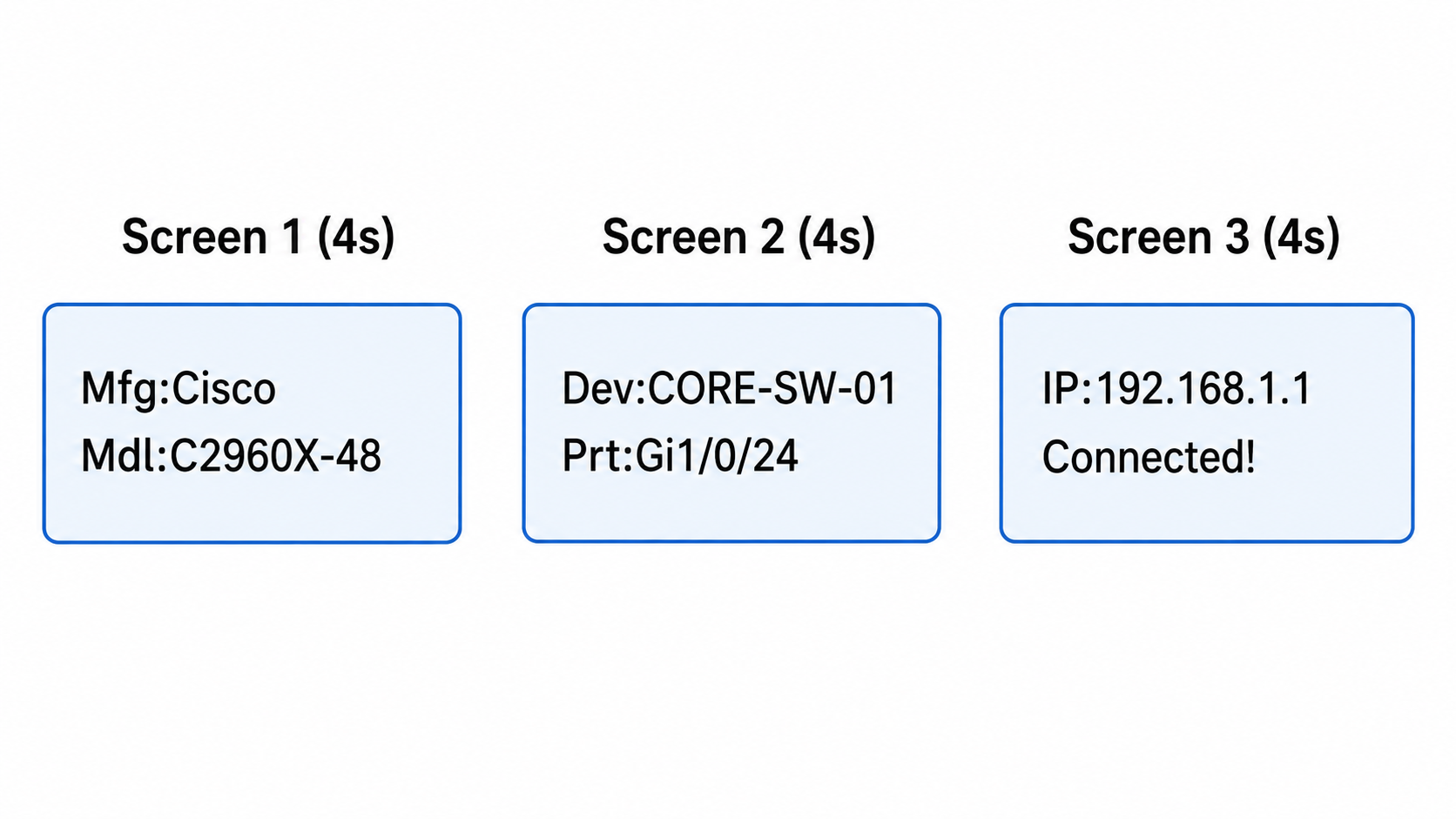
Why This Project Stands Out
- W5500 MACRAW mode in practice: W5500 is widely known as a hardwired TCP/IP controller, but this project uses it below the IP layer in MACRAW mode — a technically distinct and uncommon application that demonstrates the chip's flexibility beyond standard socket use.
- A real network engineering tool: Cable identification, port mapping, and connection verification are daily tasks for network engineers and IT teams. This project delivers a sub-$20 alternative to dedicated cable testers that cost hundreds of dollars.
- Self-contained MicroPython implementation: W5500 driver, LLDP TLV parser, I2C LCD driver, and a hardware test script — all in pure MicroPython with no external library dependencies beyond what ships with the firmware.
- Battery-operable: Drawing approximately 150mA, the device runs for around 65 hours on a 10,000mAh power bank connected to the Pico W's VSYS pin — a fully portable field tool.
Use Cases
- Cable tracing: Plug in an unlabeled cable and immediately see which switch and port it connects to — no console access needed
- Installation verification: After wiring a new rack, confirm each cable landed on the correct switch port before sealing the patch panel
- Network documentation: Walk the room systematically, record switch name + port + IP for each cable, and build an accurate network diagram
- Equipment relocation: Before and after moving servers or devices, verify the switch and port assignment hasn't changed
- Protocol education: A hands-on demonstration of how LLDP works at the frame level, with real output visible on a physical display
Tech Stack Summary
| Item | Details |
|---|---|
| MCU | Raspberry Pi Pico W (RP2040) |
| Ethernet Chip | WIZnet W5500 (Waveshare Ethernet HAT) |
| W5500 Key Mode | MACRAW socket (Layer 2 raw frame capture) |
| W5500 Pins | SPI0 (GP16/18/19), CS: GP17, RST: GP20 |
| Display | 2×16 LCD, I2C (GP0 SDA, GP1 SCL) |
| Development | MicroPython, Thonny IDE |
| Protocol | LLDP (IEEE 802.1AB), EtherType 0x88CC |
| Vendor Detection | Cisco, Juniper, Arista, HPE, Dell, Fortinet, Ubiquiti, Meraki, and more |
| Power | USB or 5V power bank via VSYS, ~150mA |
| License | MIT |
FAQ
Q. W5500 is known as a hardwired TCP/IP chip — is it used differently here? Yes. While W5500's hardwired TCP/IP stack is its signature feature, this project uses MACRAW mode instead. In MACRAW mode, W5500 bypasses the TCP/IP stack entirely and delivers raw Ethernet frames directly to the application. This is essential because LLDP operates at Layer 2, below IP — standard socket APIs simply can't reach it.
Q. Does the connected switch need to have LLDP enabled? Yes. The remote device must be transmitting LLDP frames. Most managed switches support it: Cisco (lldp run), Juniper (set protocols lldp interface all), Linux (apt install lldpd). LLDP frames are sent every 30 seconds, so allow up to 35 seconds after plugging in the cable.
Q. Does this use the Pico W's built-in Wi-Fi? No. The project relies entirely on the W5500 Ethernet HAT for wired Layer 2 frame capture. Wi-Fi operates at a completely different layer and cannot be used to receive raw Ethernet frames.
Q. What information can I get from a connected device? Manufacturer (Cisco, Juniper, Arista, etc.), model number, system hostname, connected port identifier (e.g., Gi1/0/24, eth0), and management IPv4 address. Some devices may not populate all LLDP fields — missing IP is common for devices without a management interface.
Q. How long does the battery last? At approximately 150mA draw, a 10,000mAh power bank provides roughly 65 hours of runtime. Connect 5V to the Pico W's VSYS pin for battery operation.
Project Links
- GitHub: gdludeke/Pico-LLDP
- WIZnet W5500: https://docs.wiznet.io/Product/Chip/Ethernet/W5500
- Waveshare Ethernet HAT: https://www.waveshare.com/wiki/Pico-ETH-W5500
- LLDP Standard: IEEE 802.1AB