


A PoE Smart Access Panel Powered by W5500 — From 3D Face Recognition to Vein Authentication
A DIY PoE access panel built on WIZnet W5500 + ESP32-S3, featuring 3D face, vein, and fingerprint auth via ESPHome and Home Assistant.

WIZnet - W5500
x 1

What This Project Built
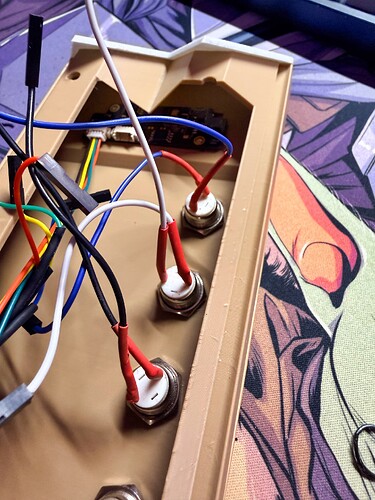
A smart access panel that handles both power and communication over a single Ethernet cable.
Mounted on the wall beside a door, it recognizes your face with a 3D camera or authenticates your palm via vein pattern. Once verified, the smart door lock opens and the lights turn on. Fingerprint authentication and QR code guest access are also supported.
| Item | Details |
|---|---|
| Core Chip | WIZnet W5500 Ethernet Controller |
| MCU | ESP32-S3 (Waveshare ESP32-S3-ETH) |
| Authentication | 3D Face Recognition / Palm Vein / Fingerprint / QR Code |
| Platform | ESPHome + Home Assistant |
| Power & Comms | PoE (single Ethernet cable) |
German maker BobMcGlobus designed and built this entirely for his own apartment patio door. Since the AI sensor he chose had no ESPHome support, he reverse-engineered the protocol and wrote a custom ESPHome component from scratch — releasing it as open source on GitHub.
Background: An Unstable Wi-Fi Connection That Sparked a Redesign
For makers building their own smart homes, door access authentication has always been a challenge. Beyond simply pressing a button to open a door, how do you make authentication happen automatically when your hands are full — say, coming home on a bike?
About a year and a half ago, BobMcGlobus first solved this with a D1 Mini and fingerprint sensor. But over time, the Wi-Fi connection grew unreliable, and he concluded he needed a more dependable communication method. That decision led to a full redesign around a PoE-capable ESP32 — and placed WIZnet's W5500 Ethernet controller at the heart of the system.
The Role of WIZnet W5500: Wired Reliability
The main board used in this project is the Waveshare ESP32-S3-ETH, which integrates an ESP32-S3 with a W5500 Ethernet controller. The W5500 handles both PoE power delivery and wired Ethernet communication.
The reasons for choosing W5500-based wired Ethernet over Wi-Fi are straightforward:
- Connection Stability — Access authentication cannot tolerate even a momentary drop in connectivity. Wired Ethernet delivers consistent responsiveness without the risk of RF interference or AP reboots.
- Single-Cable Wiring — PoE carries both power and data over one Ethernet cable, minimizing wiring complexity for an outdoor wall installation.
- Native ESPHome Support — ESPHome supports the W5500 out of the box. Activating PoE Ethernet networking requires just a few lines of YAML configuration.
# W5500 PoE configuration in ESPHome
ethernet:
  type: W5500
  clk_pin: GPIO12
  mosi_pin: GPIO11
  miso_pin: GPIO13
  cs_pin: GPIO10
  interrupt_pin: GPIO14
  reset_pin: GPIO9
In this way, the W5500 offloads the entire network stack from the ESP32, freeing the MCU's resources to focus on authentication logic.
How It Works: A Multi-Layer Authentication Pipeline
The system runs three authentication methods in a layered sequence.
Step 1 — Trigger: Motion Detection
A camera on the patio side (integrated with Home Assistant) starts the recognition process when motion is detected. This reduces power consumption and prevents unnecessary scans at idle.
Step 2 — Primary Authentication: 3D Face & Vein Recognition
The key sensor is DFRobot's SEN0677 AI Binocular Vision Sensor. Using structured 3D light, it recognizes faces and palm vein patterns — making it resistant to spoofing with photos or masks. It also supports QR code scanning for guest access.
What makes this particularly notable is that this sensor had zero ESPHome support when the project began. BobMcGlobus reverse-engineered the DFRobot Arduino library source code and wrote an ESPHome external component (esphome-dfrobot-ai10) entirely from scratch. The sensor communicates over a binary UART protocol at 115200 baud using a 0xEF 0xAA sync word and XOR checksum, connected directly to the ESP32-S3 via 3.3V-compatible UART.
Step 3 — Secondary Authentication: Fingerprint Sensor (Backup)
An R503 fingerprint sensor runs in parallel to cover situations where face recognition is impractical — low light, mask-wearing, and so on. Both authentication methods coexist within the same YAML configuration. On successful authentication, the LED ring turns green and the physical buttons are enabled for 20 seconds.
Output — Home Assistant Automation
The ESP32 stays connected to Home Assistant over the W5500 Ethernet link, with authentication results (username, method, timestamp) reflected in real time on the HA dashboard. Door unlocking and exterior lighting control are handled by HA automations.
Hardware Design Highlights
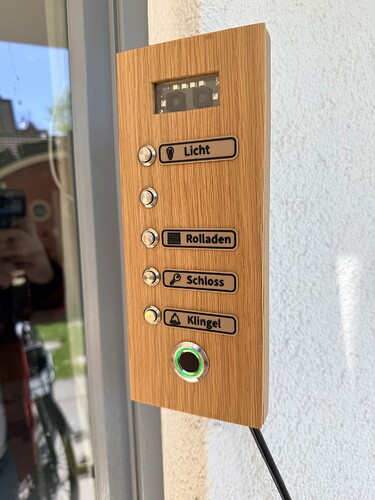
The enclosure design is worth noting as well.
- Slide-Together Case — Two 3D-printed parts slide into each other against the wall, maintaining water resistance while allowing easy disassembly for maintenance.
- Microscope Slide Glass — A standard microscope slide is used as the front cover for the AI vision sensor — cheap, optically clear, and a perfect fit.
- Solid Oak Faceplate — A 5mm solid oak board gives the panel a finish that looks like a piece of interior décor rather than an industrial device.
Where This Design Can Go Next
The architecture of this project extends well beyond a single apartment patio door.
| Use Case | Why It Fits |
|---|---|
| Small Offices / Co-working Spaces | Multiple access panels can be deployed using only a PoE switch — no Wi-Fi infrastructure needed. W5500-based nodes connect directly to the switch, making scaling straightforward. |
| Smart Buildings / Hospitality | The QR code guest access feature enables time-limited entry using a QR code issued at check-in — ideal for hotels or short-term rentals. |
| Industrial Sites / Data Centers | Palm vein recognition enables contactless authentication even with gloves on, making it a strong fit for cleanrooms and manufacturing environments. |
| ODM/OEM Opportunity | The ESPHome + W5500 combination keeps firmware customization costs low, and single-cable PoE wiring reduces installation overhead. The design is a ready reference for small-to-mid-size security device makers and building automation vendors. |
The W5500 is a standalone Ethernet controller with an SPI interface, compatible with a wide range of MCU platforms beyond ESP32 — including RP2040 and STM32. The networking layer in this project can be reused as-is, regardless of MCU or firmware changes.
Tech Stack Summary
| Component | Details |
|---|---|
| Ethernet Controller | WIZnet W5500 (SPI, PoE-capable) |
| MCU Module | Waveshare ESP32-S3-ETH (ESP32-S3 + W5500 integrated) |
| Firmware Framework | ESPHome 2026.1.5 (ESP-IDF based) |
| Primary Auth Sensor | DFRobot SEN0677 (3D face/vein/QR, UART 115200) |
| Secondary Auth Sensor | R503 Fingerprint Sensor (optical, with LED ring) |
| Smart Home Platform | Home Assistant (local API) |
| Custom Component | esphome-dfrobot-ai10 (MIT License, open source on GitHub) |
| Power Supply | PoE (single Ethernet cable) |
| Enclosure | 3D-printed case + oak faceplate |
| Communication | Ethernet (W5500) / UART (SEN0677) / UART (R503) |
Closing
This project is a strong example of the W5500 being chosen not merely as a Wi-Fi alternative, but as a purpose-fit PoE Ethernet solution for a security-critical application. The combination of a W5500 PoE node with an AI sensor inside the ESPHome ecosystem points to a design pattern that can scale from smart homes into small commercial access systems. Given the visibility of the ESPHome community and the Home Assistant forum, this build serves as a practical reference for developers and companies exploring PoE-based edge security products.
Project Links
- Home Assistant Community Post: https://community.home-assistant.io/t/i-built-a-poe-esphome-access-panel-3d-face-recognition-fingerprint-oak-finish-custom-component/1003959
- GitHub (Custom Component): https://github.com/BobMcGlobus/esphome-dfrobot-ai10
- https://www.reddit.com/r/homeassistant/comments/1skat7y/i_built_the_ultimate_poe_esphome_access_panel_3d/