


Which PLATYPUS W55RP20 Module Converts 3.3 V UART to Ethernet Without Custom Firmware?
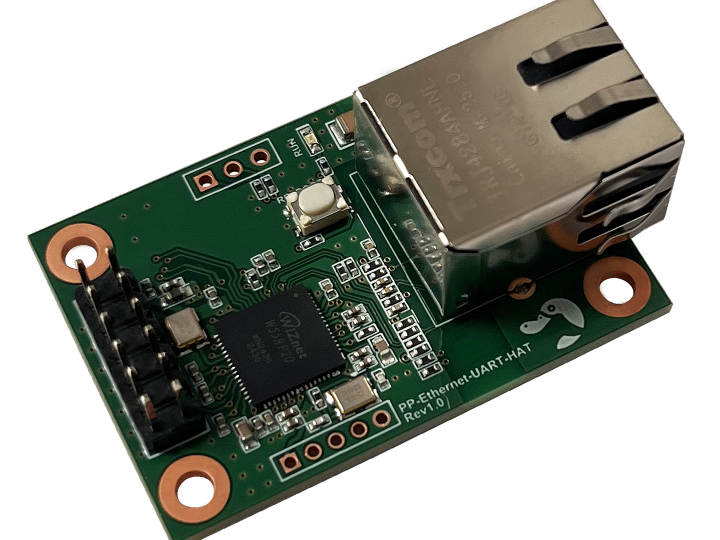
PP-Ethernet-UART-HAT is a 45 x 30 mm PLATYPUS module that converts 3.3 V UART to Ethernet on a WIZnet W55RP20 and ships with W55RP20-S2E firmware preloaded.
WIZnet - W55RP20
x 1

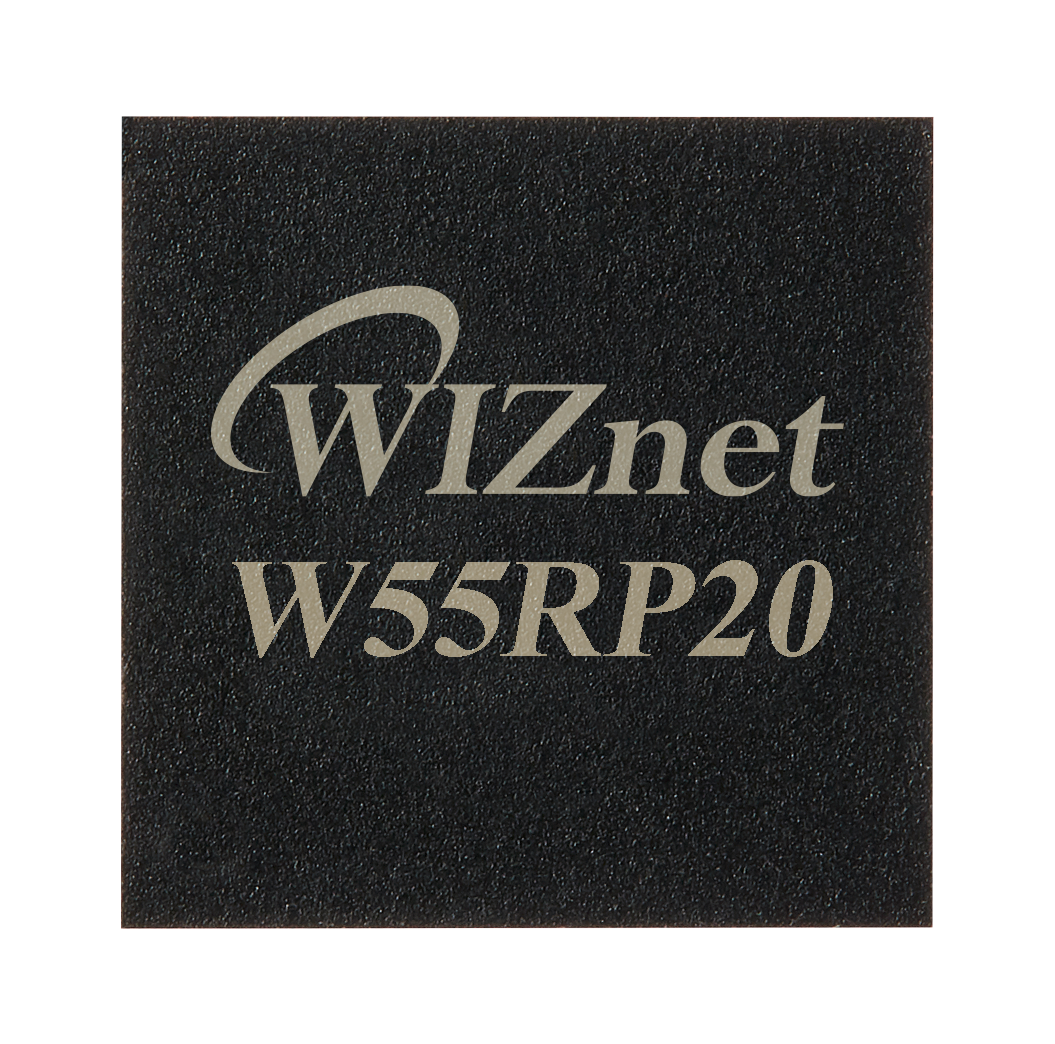
The only processor and network controller on PP-Ethernet-UART-HAT. QFN package laser marked with the WIZnet logo, W55RP20 and date code 2436, readable in the vendor product photograph next to the PP-E
📌 PP-Ethernet-UART-HAT, a 45 x 30 mm Module That Puts a 3.3 V Serial Port on Ethernet
PP-Ethernet-UART-HAT is the PLATYPUS module for a device that speaks only 3.3 V asynchronous serial and needs an IP address. PLATYPUS is an embedded module vendor in Hwaseong, Gyeonggi-do, Republic of Korea, whose store describes its business in four words: "Selling various embedded modules". Eleven modules sell directly from us-platypus.com under the tagline "Embedded Module Solution".
The product page names the chip in one sentence: "It is equipped with WIZnet's powerful Ethernet conversion chip, the W55RP20." The user manual adds that the configuration tool "is developed by WIZnet and is used to control the PP-Ethernet-UART-HAT module, which utilizes WIZnet's MCU W55RP20 and W55RP20-S2E firmware." Buyers get finished firmware rather than a blank board: "Since it comes preloaded with powerful firmware, everything is ready to go upon installation."
Vendor, Availability, and Price
PLATYPUS is the seller as well as the brand. The site footer gives representative Oriana, Korean business registration number 280-13-01788, mail-order registration 2025-Hwaseong Dongtan-1711, an address at 405, Corner One Smart Tower, Hwaseong-si, Gyeonggi-do, and contacts oriana@us-platypus.com and +82 70-7954-1214.
Checked on 27 August 2026, PP-Ethernet-UART-HAT sells directly rather than by quotation, listed at $17.20 with the product schema repeating a price of 17.2 in priceCurrency USD and an availability field of http://schema.org/InStock. The SKU carries no paid options at all, so the W55RP20 is the standard part rather than an upgrade, and the same module sells on the Japanese storefront jp.us-platypus.com at 2,600 yen.
Shipping is charged separately, 25.40 USD to each of the 32 overseas destinations in the store's shipping data and 3.00 USD inside Korea, with "Freight Collect via DHL account available" as the alternative. Larger orders move to email: "The unit price for mass production can be significantly reduced depending on the quantity." No tax treatment and no warranty period are stated, the store-level return policy field reads MerchantReturnNotPermitted across the same 33 countries, and the page timestamp records a last edit on 2 July 2026.
⚙️ What the W55RP20 Contributes, and How the Marking Confirms It
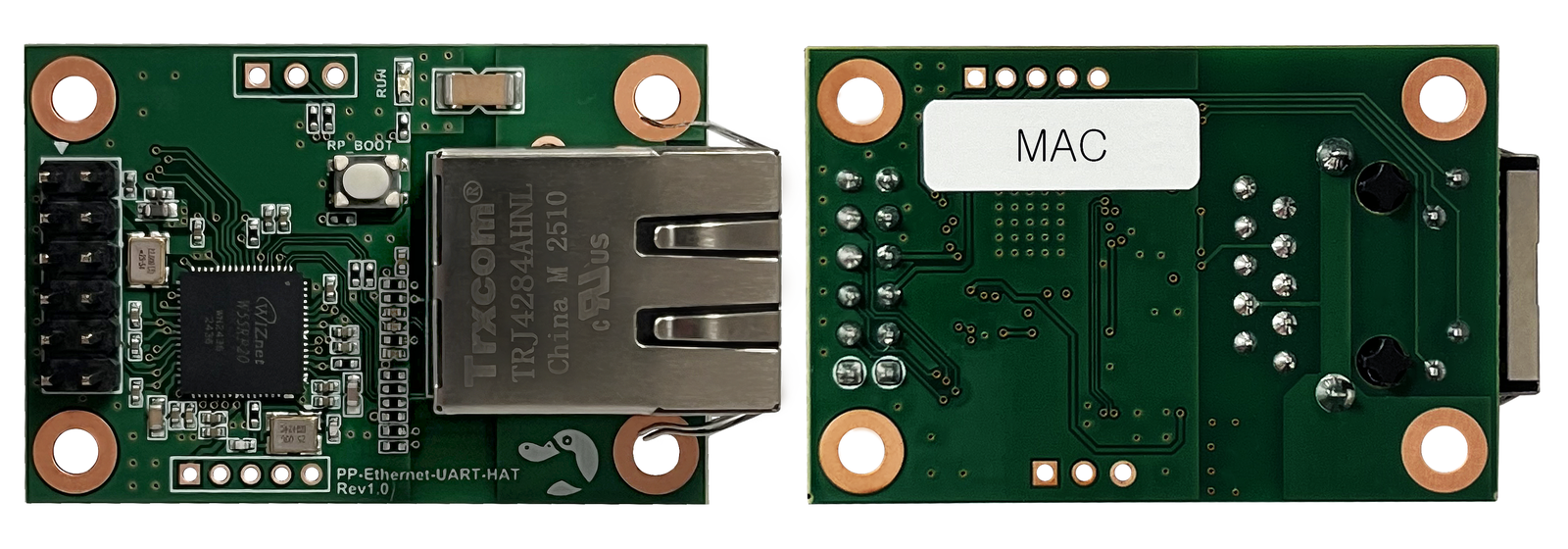
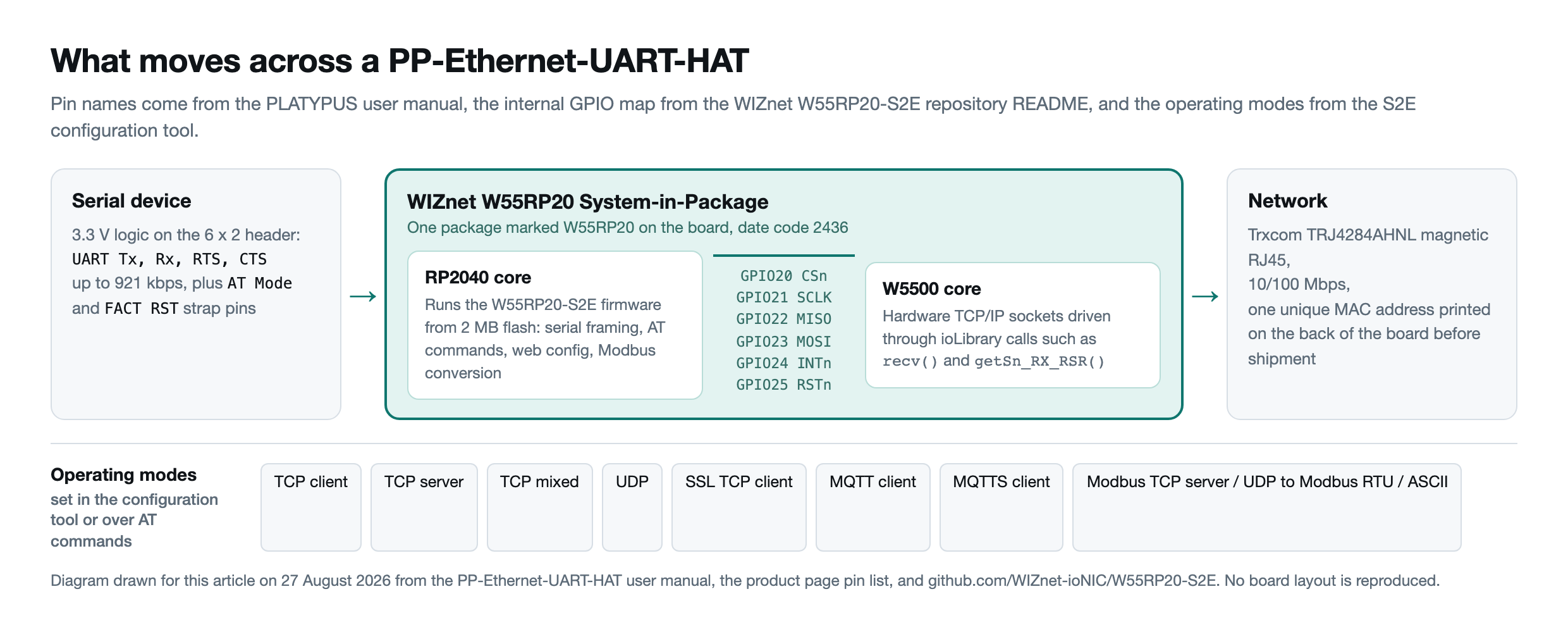
The W55RP20 is a WIZnet System-in-Package that, in WIZnet's words, "integrates WIZnet's W5500 Ethernet controller with the RP2040 microcontroller from Raspberry Pi", adding 2 MB of flash inside the same package. On PP-Ethernet-UART-HAT that single part is the entire compute and network subsystem: no separate MCU, no separate Ethernet controller, only the W55RP20, passive network circuitry and a Trxcom TRJ4284AHNL magnetic RJ45 jack.
With no schematic published, the vendor photograph at 1900 x 1600 pixels is sharp enough to read the package. The QFN part is laser marked with the WIZnet wave logo, the string W55RP20 and a lot code reading WM2436 above a repeated 2436, which in the usual year and week form is week 36 of 2024, and the silkscreen beside it reads PP-Ethernet-UART-HAT and Rev1.0.
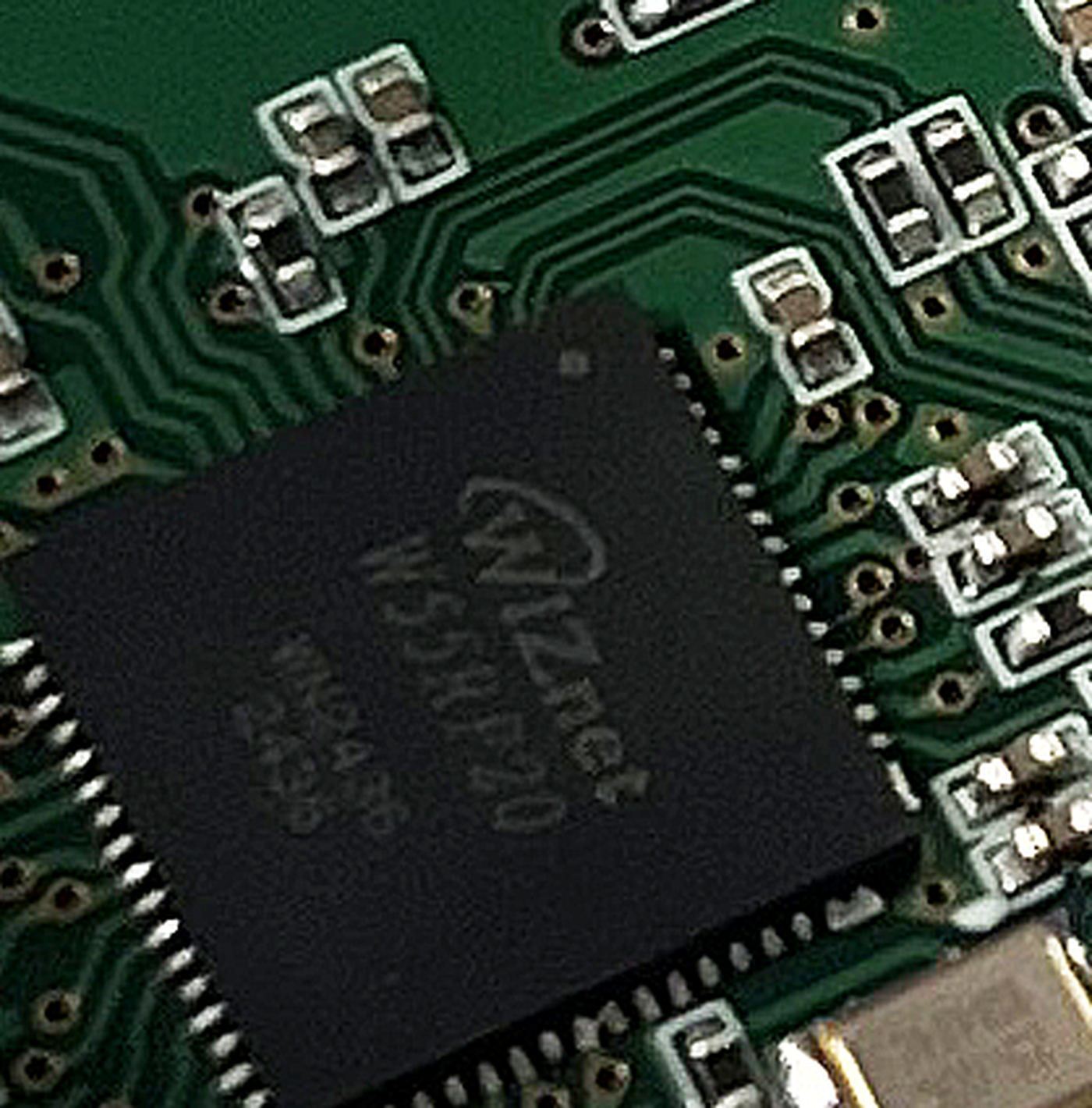
Inside the package the two dies talk over a fixed SPI link, documented in the W55RP20-S2E repository as GPIO20 for CSn, GPIO21 for SCLK, GPIO22 for MISO, GPIO23 for MOSI, GPIO24 for INTn and GPIO25 for RSTn. The firmware reaches the Ethernet side through WIZnet's ioLibrary socket calls rather than a software network stack, shown in port/app/modbus/src/mbtcp.c by getSn_RX_RSR(sock) for the pending byte count, then recv(sock, aucTCPBuf, len) or recvfrom(SOCK_DATA, ...).
Twelve Pins, and What Each One Decides
PP-Ethernet-UART-HAT brings its serial side out on a twelve pin header of two rows of six: 3.3 V and ground on both rows, UART Rx, RTS, Tx and CTS on one row, and nRST, FACT RST, AT Mode and a no-connect on the other. The manual adds an RP_BOOT switch on the board and separate SWD and USB pin groups on the two short edges, with serial running at up to 921 kbps and Ethernet at 10/100 Mbps.
Two header pins map onto named functions in the firmware, and WIZnet's repository defines HW_TRIG_PIN so that "when this pin is Low during a device reset, it enters AT Command Mode", which is the AT Mode pin, and FAC_RSTn_PIN where "holding Low for more than 5 seconds triggers a factory reset", which is FACT RST. The third strap, RP_BOOT, is the RP2040 boot select rather than a firmware pin.
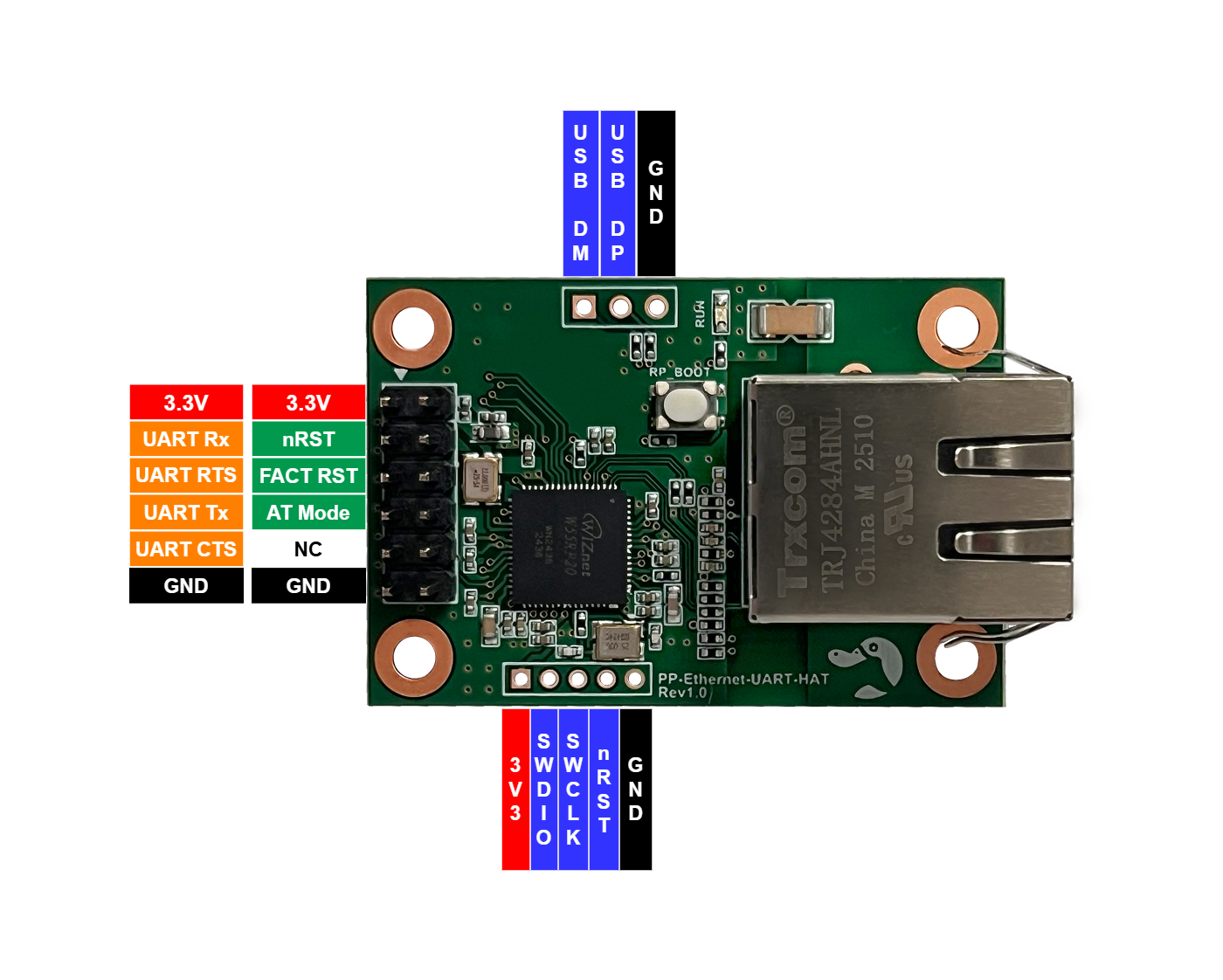
The manual fixes the outline at 45 mm by 30 mm, and no Raspberry Pi 40 pin connector appears anywhere in it, so HAT here is the vendor's own form factor name.
Seven Operating Modes and a Modbus Option, All Set Without Writing Firmware
The preloaded W55RP20-S2E firmware is set from the WIZnet S2E Configuration Tool, from a browser, or over the serial link, and PLATYPUS puts it simply: "You can control the module without any installation program. Control is possible via Serial/Ethernet." The serial route is terse by design, since the manual specifies that "each command consists of a 2-byte uppercase alphabetic string".
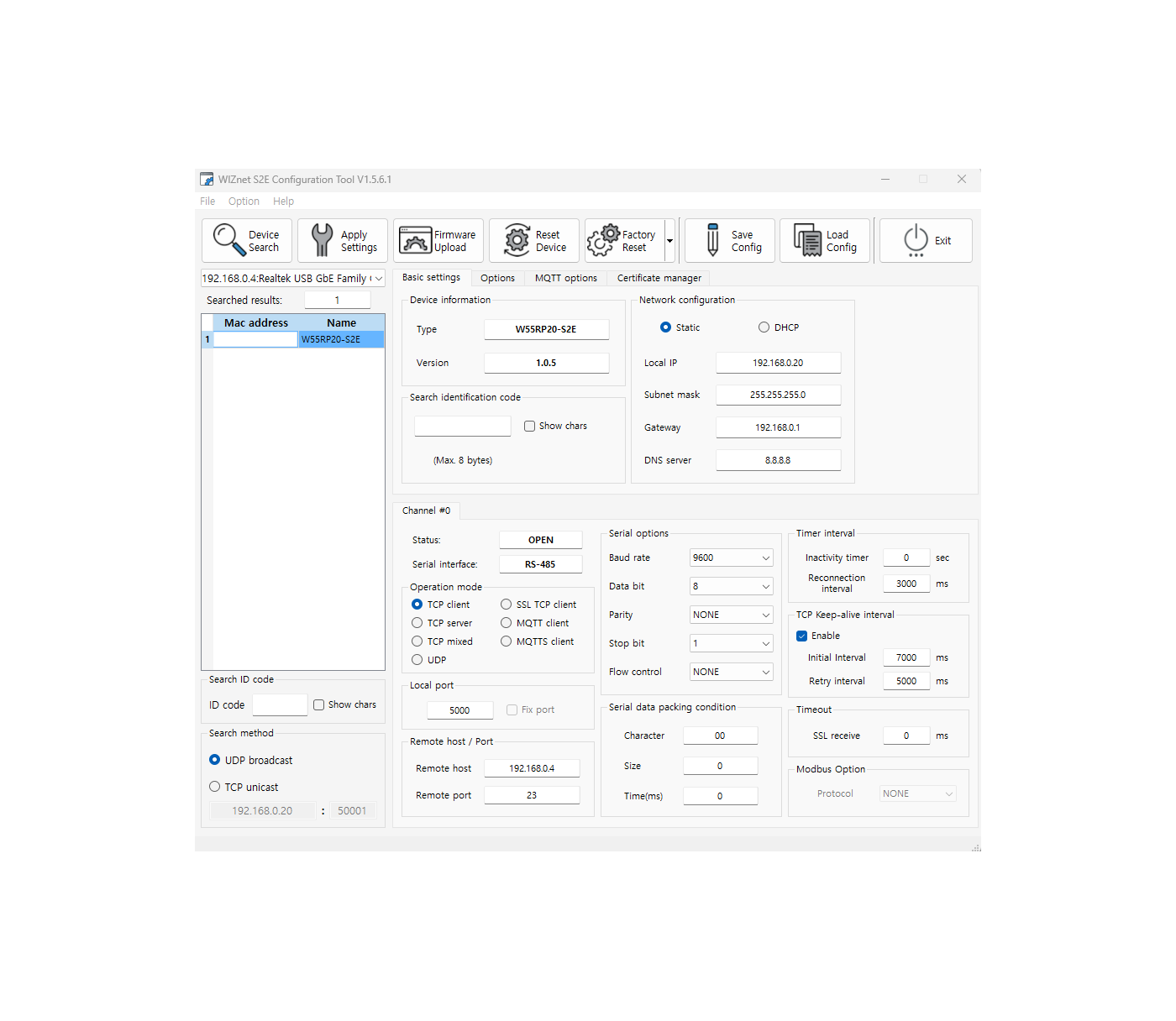
The configuration tool screenshot PLATYPUS publishes shows TCP client, TCP server, TCP mixed, UDP, SSL TCP client, MQTT client and MQTTS client, with a separate Modbus option below them. WIZnet's own guide states that "the W55RP20-S2E supports protocol conversion between Modbus TCP server/UDP and Modbus RTU/ASCII", which lets a Modbus RTU meter on the serial side answer a Modbus TCP poll from a SCADA host without changing the meter. Modbus needs configuration tool version 1.5.5 or higher, and the product page screenshot was taken with version 1.5.6.1.
Where This SKU Sits in the PLATYPUS Line
Seven of the eleven PLATYPUS modules name the W55RP20. PP-Ethernet-UART-HAT and PP-Ethernet-RS232-HAT are the only two whose pin lists include FACT RST and AT Mode, and neither offers PoE. PP-Ethernet-RS232, PP-Ethernet-RS232-PoE and PP-Ethernet-RS422/485 take the opposite trade: no FACT RST or AT Mode pin, but PHY link and TCP connection status pins and the note that "PoE modules can be installed to operate PoE".
| Module | Serial side | Serial speed on the page | PoE module option | Listed price, USD |
|---|---|---|---|---|
| PP-Ethernet-UART-HAT | UART, 3.3 V logic | up to 921 kbps | not mentioned | 17.20 |
| PP-Ethernet-UART-MINI | UART, strap selects TTL/RS-232 or RS-485/422 | up to 921 kbps | not mentioned | 16.90 |
| PP-Ethernet-RS232-HAT | RS-232 | up to 921 kbps | not mentioned | 18.00 |
| PP-Ethernet-Serial-WD | UART | up to 921 kbps | not mentioned | 23.00 |
| PP-Ethernet-RS232 | RS-232 | up to 921 kbps | listed | 22.20 |
| PP-Ethernet-RS232-PoE | RS-232 | up to 230 kbps | listed | 26.00 |
| PP-Ethernet-RS422/485 | RS-485 on one pair, RS-422 on two | up to 921 kbps | listed | 29.50 |
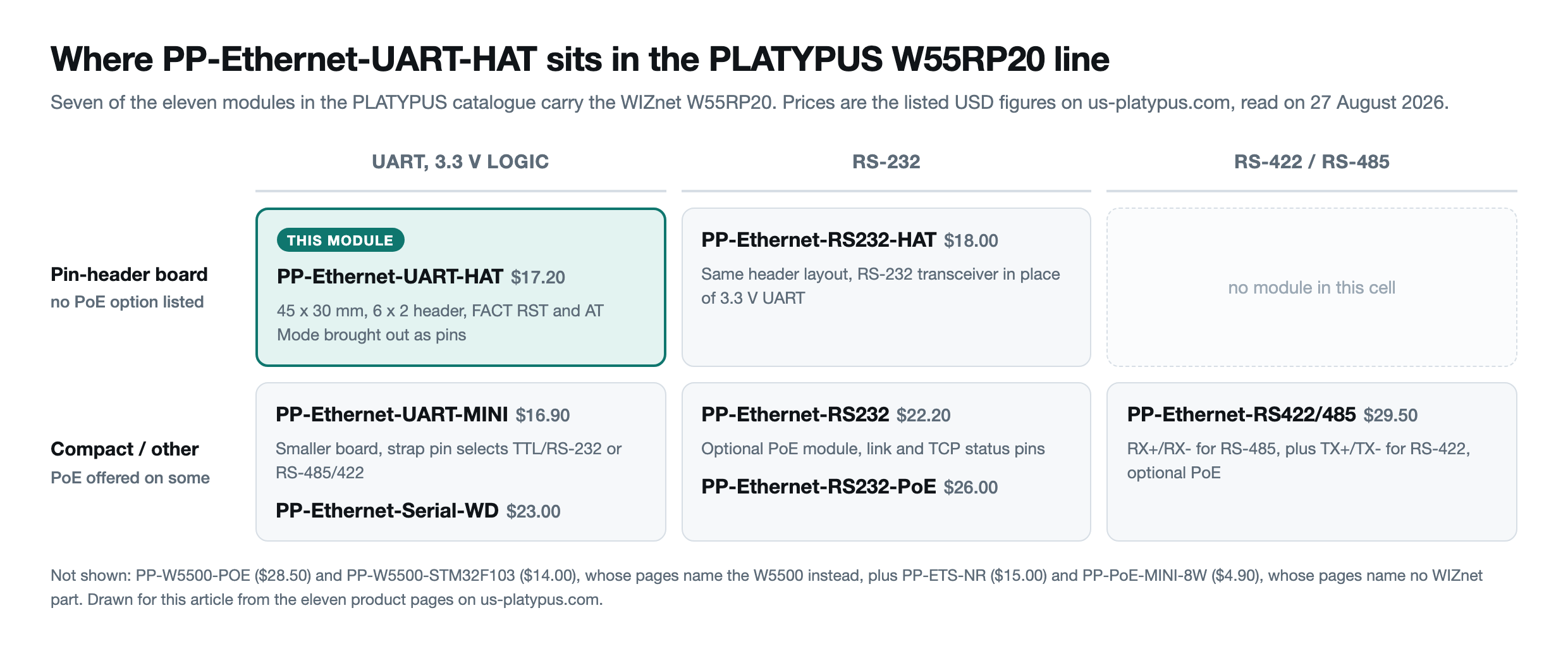
The other four PLATYPUS modules name the W5500 or no WIZnet chip at all.
Firmware Releases, Update Routes, and a Documentation Path That Moved
The firmware is public: W55RP20-S2E lives in WIZnet's repository at github.com/WIZnet-ioNIC/W55RP20-S2E under Apache-2.0, with 23 tagged releases from v1.0.1 on 6 September 2024 to v1.2.3 on 19 May 2026 and a last push on 25 August 2026. Release v1.2.2 fixed a Modbus RTU hang, its notes describing the case "When T35 fired inside the while(1) loop" where the receive routine exited "while leaving unread bytes in the ring buffer", and added TLS 1.3 with the AES-256-GCM-SHA384 and AES-128-GCM-SHA256 cipher suites. Release v1.2.3 fixed firmware updates attempted while data was still moving.
The v1.2.2 release of 16 April 2026 and v1.2.3 each carry a Bin_Files_W55RP20-S2E_Custom_Platypus bundle beside the generic W55RP20-S2E, W232N and IP20 bundles, the v1.2.3 archive holding nine files: Boot, App_linker and a merged image in .bin, .hex and .uf2 form. WIZnet publishes that bundle rather than the reseller, confirmation from the chip vendor's own side that PLATYPUS runs a named custom build.
Updating a shipped module works three ways in the manual: a .bin file through the configuration tool, which resets the device in about five seconds, a .uf2 file over USB after holding RP_BOOT during reset so the RPI-RP2 drive appears, or the SWD pads with a JTAG debugger.
The manual's own documentation links hit a dead end. Its six guides, for the configuration tool, AT commands, web configuration, MQTT, SSL and Modbus, point at docs.wiznet.io/Product/S2E-Module/Industrial/, and all six returned HTTP 404 when checked on 27 August 2026. The same pages are live under docs.wiznet.io/Product/Chip/MCU/Pre-programmed-MCU/W55RP20-S2E/ with identical slugs, so only the tree above them moved.
What the Sources Do Not Show
No supplier-external account of this SKU could be found: no verified buyer report, no installation photograph, no independent review, no forum thread. The product page carries no rating or review count, and the vendor's RESOURCES download board lists only the PP-Ethernet-RS232-HAT manual. The nearest third-party coverage is a LinuxGizmos article by Giorgio Mendoza dated 1 September 2025, about the sister PP-Ethernet-RS422/485 module.
Several other things are unpublished: no schematic, no bill of materials, and no source for whatever the PLATYPUS custom bundle changes. The product page claims industrial-grade operation from -40 to 85 degrees Celsius and ESD protection, but no test report or certificate accompanies either claim, and the cURus mark on the photographs belongs to the Trxcom RJ45 jack rather than to the module. No release date is given for the board itself: the chip date code reads 2024 and the product photographs were uploaded in November and December 2025.
Related WIZnet Maker Posts
How to Build UART Ethernet Conversion with WIZnet W55RP20 on PP-Ethernet-UART-MINI? covers the closest relative, the $16.90 MINI, which picks its electrical standard with strap pins where PP-Ethernet-UART-HAT commits to 3.3 V logic and spends header pins on AT Mode and FACT RST.
How to Build RS-232 Ethernet Conversion with WIZnet W55RP20 on PP-Ethernet-RS232-HAT? publishes the same interface pin list with a different electrical front end, showing how PLATYPUS reuses one pin convention and one firmware image across serial standards.
WIZnet Success Stories : Platypus RS485 to Ethernet Module records how the relationship between the two companies started, and PLATYPUS is the brand page.
❓ FAQ
Q. Which WIZnet chip is on PP-Ethernet-UART-HAT, and is it optional? The board carries a WIZnet W55RP20 as its only processor and network controller, standard rather than an option, since the product page offers no paid variants. The package marking W55RP20 with date code 2436 is readable in the vendor's own product photograph.
Q. How much does PP-Ethernet-UART-HAT cost and can it be bought directly? PP-Ethernet-UART-HAT is listed at 17.20 USD on us-platypus.com and at 2,600 yen on jp.us-platypus.com, in stock with Add to cart and Buy now active when checked on 27 August 2026.
Q. Does the module need custom firmware to do anything useful? No. PP-Ethernet-UART-HAT arrives with WIZnet's W55RP20-S2E firmware already loaded, and PLATYPUS states that "You only need to configure the IP using a tool, and it's ready for immediate use." The seven operation modes, TCP client through MQTTS client, and the Modbus conversion are all selected from settings rather than by rebuilding code.
Q. Can PP-Ethernet-UART-HAT act as a Modbus gateway between a serial meter and a SCADA host? Yes. WIZnet's guide states that the firmware converts between Modbus TCP server or UDP on the network side and Modbus RTU or ASCII on the serial side, under the configuration tool's Modbus option from tool version 1.5.5 onwards.
Q. Is PP-Ethernet-UART-HAT a Raspberry Pi HAT? No. The board measures 45 mm by 30 mm with 3 mm mounting holes on a 38 mm by 23 mm rectangle, and neither the product page nor the user manual mentions the Raspberry Pi 40 pin connector, so HAT is the vendor's own name for this outline.
-
PP-Ethernet-UART-HAT product page
Official PLATYPUS page: overview, feature list, interface pin list, front and back photographs and the configuration tool screenshot. Listed at 17.20 USD, in stock when checked on 27 August 2026

-
PP-Ethernet-UART-HAT purchase page
The cart URL named in the product schema, with quantity, destination country and the flat 25.40 USD international shipping rate
-
PP-Ethernet-UART-HAT User Manual
13 page PLATYPUS manual: interface specifications, 45 x 30 mm dimensions, AT command format, MQTT, SSL and Modbus setup, 2 MB flash memory map and the three firmware update routes
-
WIZnet W55RP20-S2E firmware repository
Apache-2.0 source of the preloaded firmware. 23 tagged releases from v1.0.1 on 6 September 2024 to v1.2.3 on 19 May 2026, including a Bin_Files_W55RP20-S2E_Custom_Platypus bundle from v1.2.2 onwards
-
WIZnet W55RP20
Documentation for the System-in-Package that combines the W5500 Ethernet controller, the RP2040 microcontroller and 2 MB of flash
-
W55RP20-S2E configuration tool guide
Live location of the guide the product page and manual link to. The older S2E-Module/Industrial path they point at returns HTTP 404 as of 27 August 2026
-
W55RP20-S2E Modbus connection guide
WIZnet guide for the Modbus TCP server or UDP to Modbus RTU or ASCII conversion, which needs configuration tool version 1.5.5 or higher
-
W55RP20-S2E AT command manual
Full list of the two byte uppercase commands used to configure the module over the serial link or the network
-
PLATYPUS product catalogue
All eleven PLATYPUS modules with prices, seven of which name the W55RP20 on their pages


