


WIZsms LTE SMS Gateway on W55RP20 Ethernet
W55RP20 HTTPS gateway sends SMS through an LTE modem.
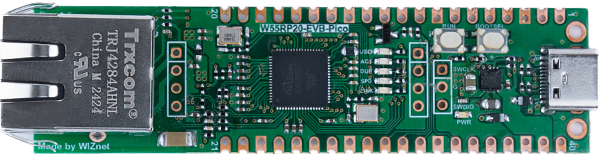
WIZnet - W55RP20-EVB-Pico
x 1


Arduino - Arduino IDE
x 1
W55RP20 as a Secure SMS Entry Point
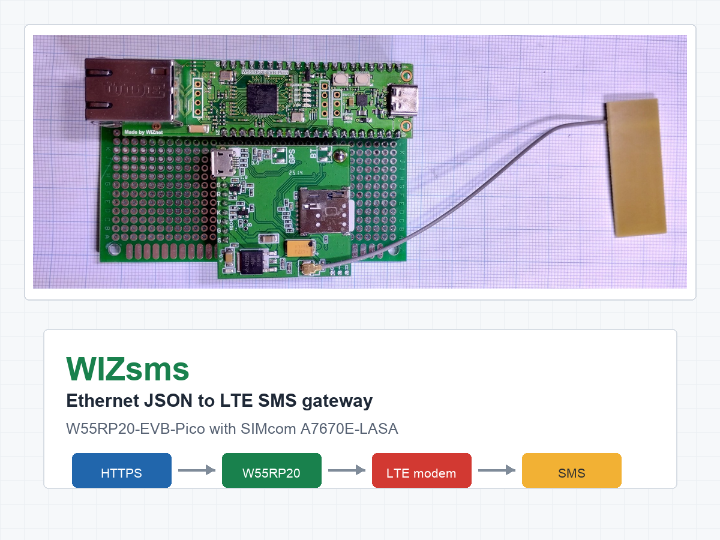
WIZsms is an Ethernet-connected LTE SMS gateway built with the WIZnet W55RP20-EVB-Pico and a SIMcom A7670E-LASA LTE module. It exposes a protected HTTPS JSON endpoint on the wired network, accepts a destination number and message body, and sends the message through the LTE modem as an SMS. The project is useful because it gives servers, monitoring tools, and equipment controllers a simple network API for SMS alerts without making each host handle a USB modem, AT commands, or cellular setup.
The repository frames the motivation around the transition away from legacy GSM equipment in Germany. Instead of building around an older GSM modem, WIZsms uses an LTE module and keeps the local integration straightforward: send an authenticated JSON request to the W55RP20 board, then let the gateway handle the cellular SMS path.
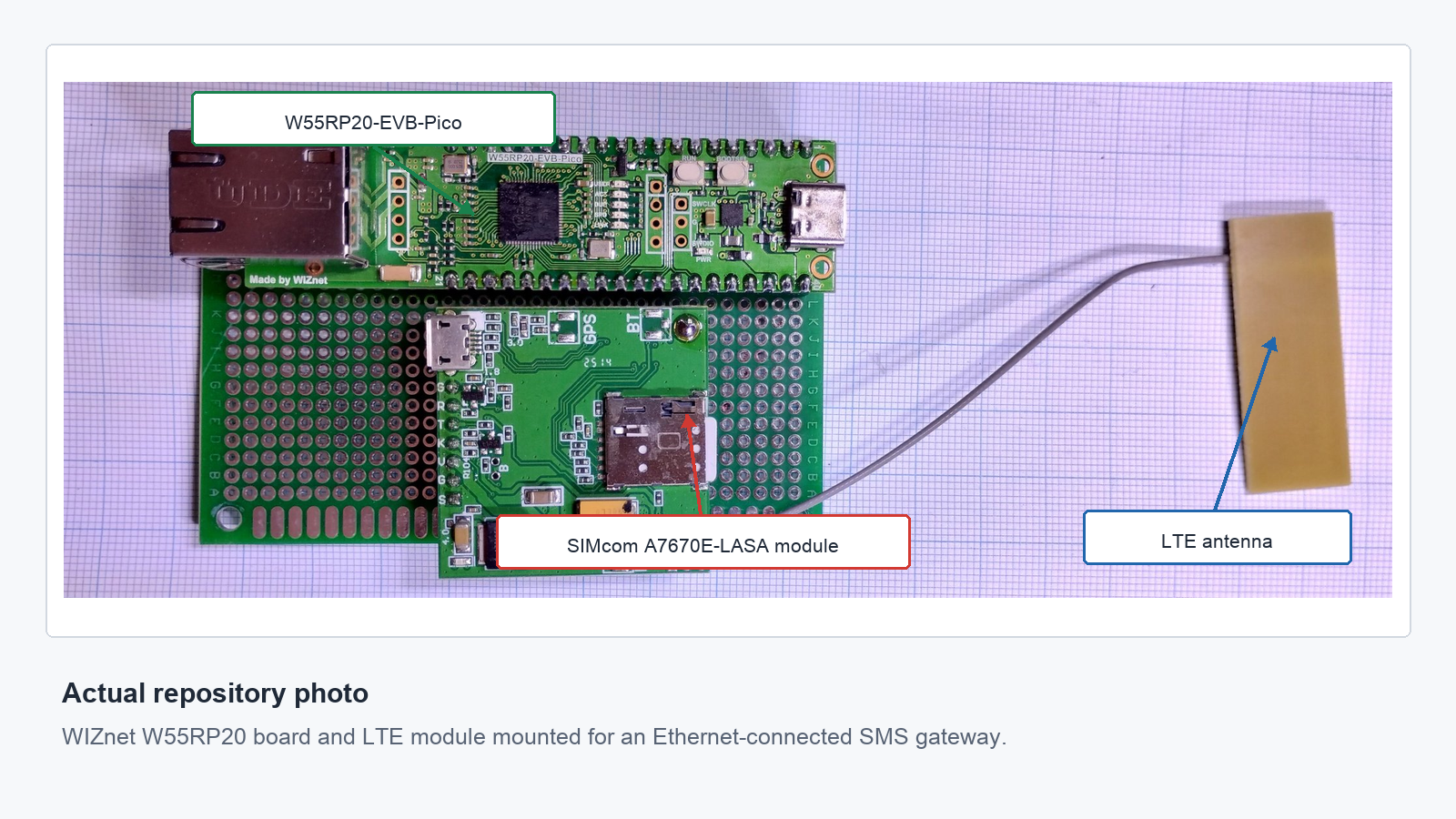
the W55RP20-EVB-Pico, SIMcom LTE module, and LTE antenna in the prototype assembly.
HTTPS JSON Request to LTE SMS
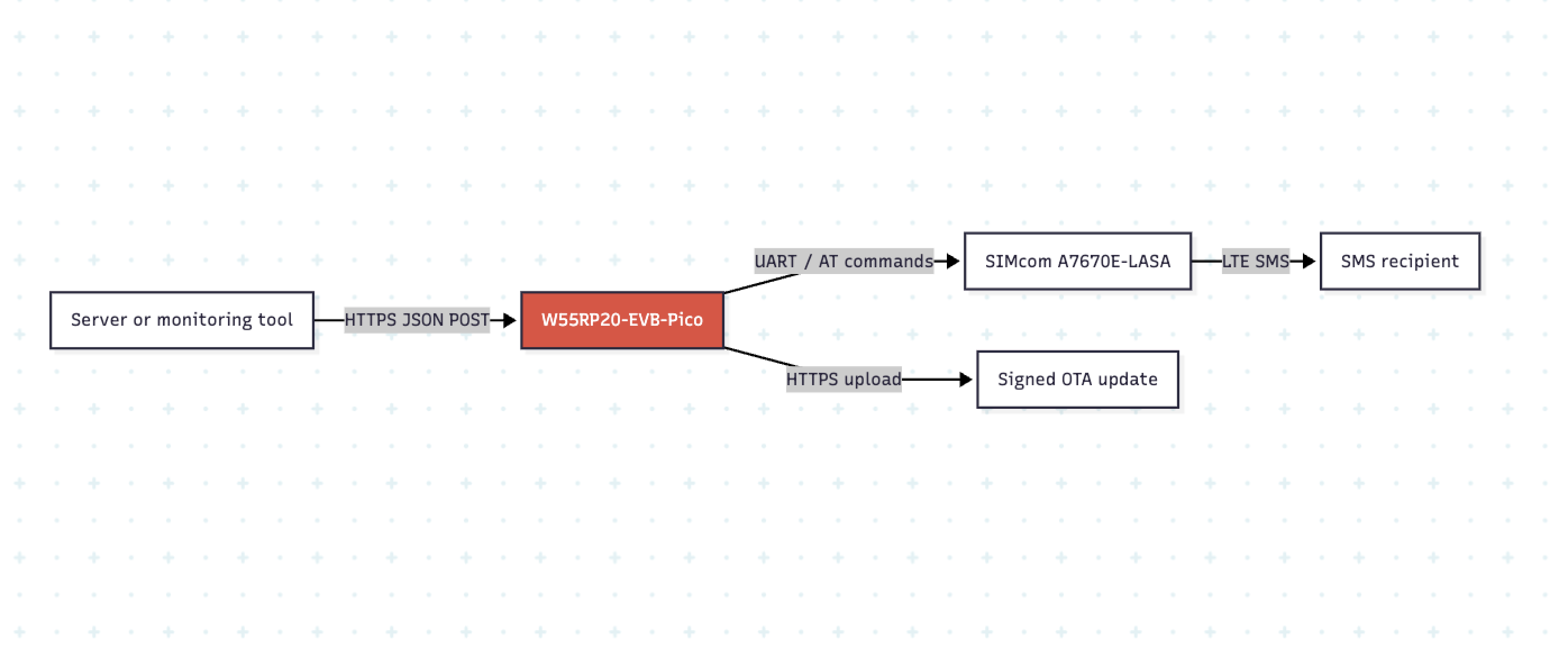
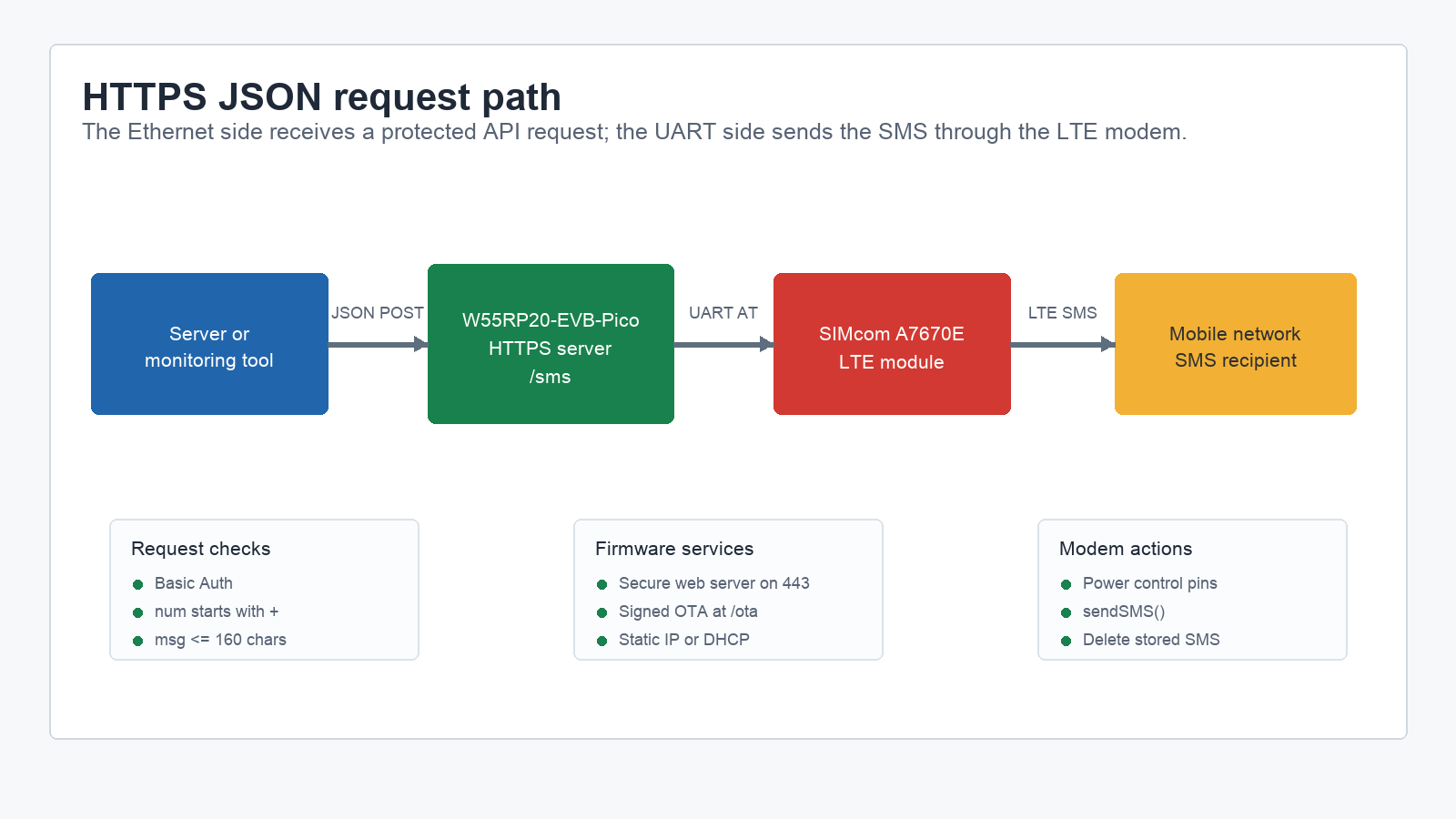
The data path is compact. A local application sends POST https://<IP>/sms with Basic Auth and a JSON body such as {"num":"+447937405250", "msg":"Hello World"}. The firmware checks that a request body exists, parses the JSON, verifies that the number starts with +, rejects a few common separators, limits the message to 160 characters, and then calls the modem library to send the SMS.
In WIZsms/WIZsms.ino, the Ethernet side is started through the W55RP20 Arduino-Pico networking class and a secure web server:
#include <W55RP20lwIP.h>
#include <WebServerSecure.h>
#include <HTTPUpdateServer.h>
#include <ArduinoJson.h>

Wiznet55rp20lwIP Ethernet(20);
WebServerSecure httpServer(443);
HTTPUpdateServerSecure httpUpdater;

void setup() {
  if (!useDHCP) {
    Ethernet.config(ip, gateway, subnet, myDns);
  }
  Ethernet.begin(mac);
That code path is the main WIZnet point in the project. The W55RP20 board is not just a power source for the modem. It is the network-facing controller that receives HTTPS requests, validates the API input, and exposes OTA update access.
W55RP20, UART, and Modem Control Pins
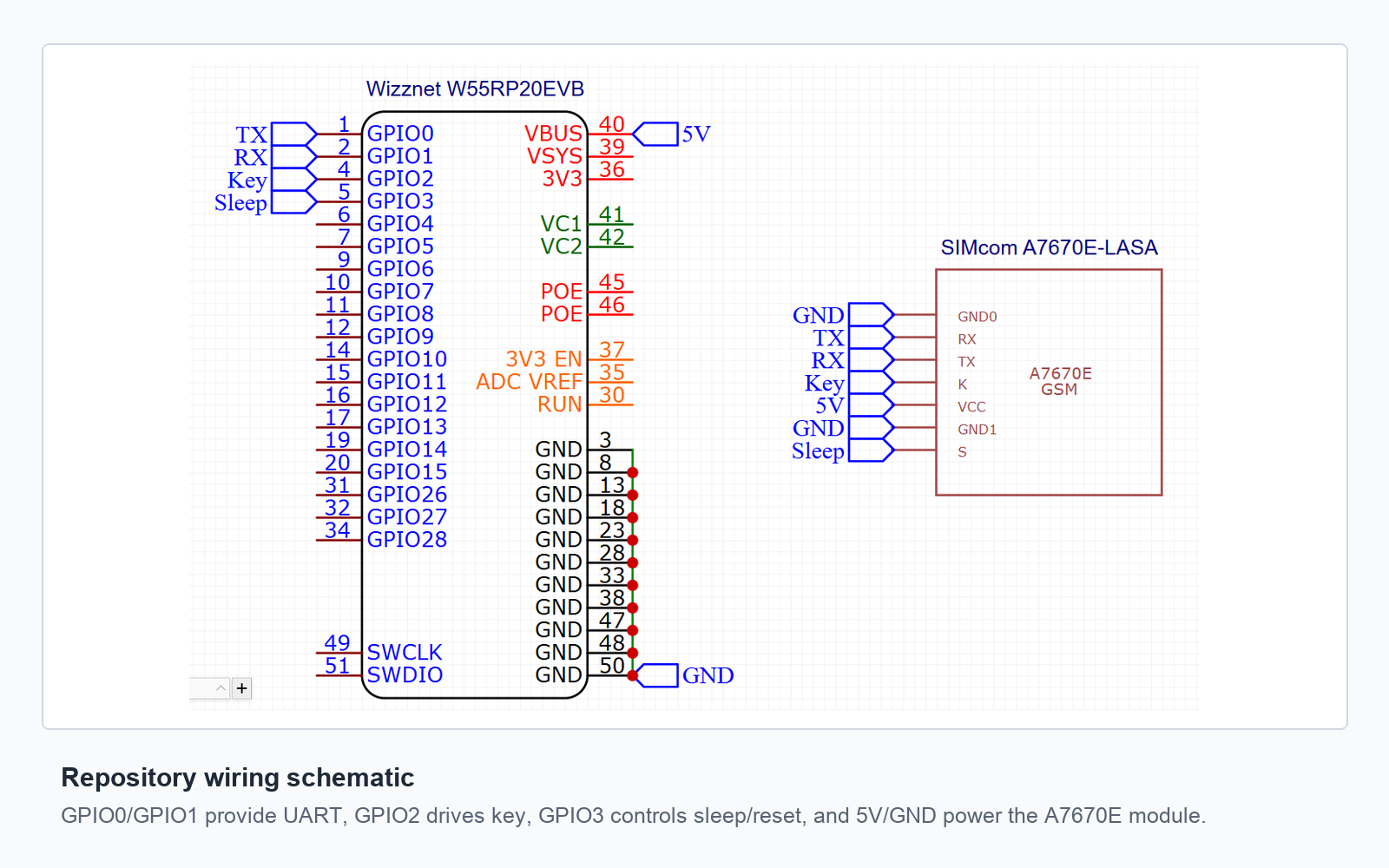
The repository includes a wiring schematic showing the connection between the W55RP20-EVB-Pico and the SIMcom module. GPIO0 and GPIO1 are used as UART TX/RX, GPIO2 is marked for the modem key line, GPIO3 is marked for sleep/reset control, and 5 V/GND provide module power. In the firmware, Serial1.begin(115200) starts the modem UART, modem.powerOn(Modem_PWRKEY) controls startup, and modem.begin(Serial1) checks that the module responds.
The code then configures the modem for LTE-focused operation. It sets an APN with modem.setNetworkSettings(F("hologram")), selects LTE-only mode with modem.setPreferredMode(38), enables sleep mode, checks RSSI, reads registration status, and finally turns the modem off until it is needed. When an SMS request arrives, sendSMS() can power the modem path, call modem.sendSMS(...), delete stored SMS messages from the modem, and switch the modem off again.
Signed OTA Updates on the Same Ethernet Port
WIZsms also includes an HTTPS OTA update path. The firmware creates a separate update route, /ota, with its own username and password. It installs a BearSSL signature verifier through Update.installSignature(&hash, &sign), so firmware images can be signed before upload.
The README documents an export-and-sign workflow: build the Arduino binary, sign it with signing.py and a private key, then upload the signed binary through the OTA web page. This is a useful feature for a gateway that may be installed near equipment instead of next to a developer's computer.
For real deployments, the default credentials, certificates, and keys in the repository should be replaced. The repository includes example key material and passwords for demonstration, which is helpful for setup but should not be reused on a production network.
Where This Gateway Fits
The most natural use case is alert delivery from a local system that already knows how to make HTTPS requests. A server, PLC-side monitoring bridge, UPS monitor, network watchdog, or home automation controller can submit a short JSON message and let WIZsms handle the mobile network side.
Because the interface is JSON over HTTPS, the gateway is easy to call from shell scripts, Python, Node.js, monitoring platforms, or existing webhooks. Because the outbound side is SMS, it can still reach people when email, chat, or app notifications are not the preferred alert path.
Current Scope and Limits
This is a focused Arduino project rather than a complete product firmware. It has one immediate SMS endpoint, one OTA update endpoint, fixed configuration constants in the sketch, and no message queue. The README suggests future additions such as NTP support, GPIO-triggered SMS sending, a scheduler, an SMS queue, and second-core offloading.
Those limits are reasonable for the current size of the repository. The value of WIZsms is that it demonstrates the complete path from wired Ethernet request to LTE SMS in a readable project that other makers can extend.
FAQ
What does WIZsms use the W55RP20-EVB-Pico for?
It uses the W55RP20-EVB-Pico as the Ethernet-connected controller. The firmware starts W55RP20 Ethernet, hosts an HTTPS server on port 443, accepts JSON SMS requests, and provides an OTA update page.
How does an application send an SMS through WIZsms?
An application sends an authenticated HTTPS POST request to /sms. The body is JSON with num for the destination number and msg for the SMS text, with the message limited to 160 characters.
Does WIZsms require Wi-Fi?
No. The visible firmware uses wired Ethernet on the W55RP20 side and LTE through the SIMcom modem for SMS delivery. Wi-Fi is not part of the documented runtime path.
What should be changed before using it outside a test network?
The default usernames, passwords, TLS certificate, and signing keys should be replaced. The APN should also be changed to match the SIM card and carrier.
Can this be reused for non-SMS alerts?
The Ethernet JSON endpoint and modem control pattern could be extended, but the current firmware focuses on sending SMS. The README lists possible future work such as scheduling, GPIO-triggered messages, and an SMS queue.


