


W55MH32X VS Code Starter for CMake and SWD Debug
VS Code and CMake starter template for WIZnet W55MH32 Cortex-M3 firmware.

WIZnet - W5500
x 1

W55MH32 Firmware Bring-Up in VS Code
w55mh32x_vscode_basic is a starter template for building bare-metal firmware for the WIZnet W55MH32L/Q Cortex-M3 MCU family from Visual Studio Code. Instead of demonstrating a finished sensor, gateway, or protocol application, the repository solves a first-step problem: it gathers the compiler, CMake presets, linker script, startup code, SPL/CMSIS files, and SWD debug settings needed to create a working W55MH32 firmware workspace.
That makes the project useful for developers evaluating W55MH32 because a large part of early embedded work is not application logic. It is getting the device header paths right, making the linker script match the MCU memory map, confirming that startup code reaches main(), and creating a repeatable build and debug flow. This repository focuses exactly on that foundation.
CMake and SWD Debug Flow for W55MH32
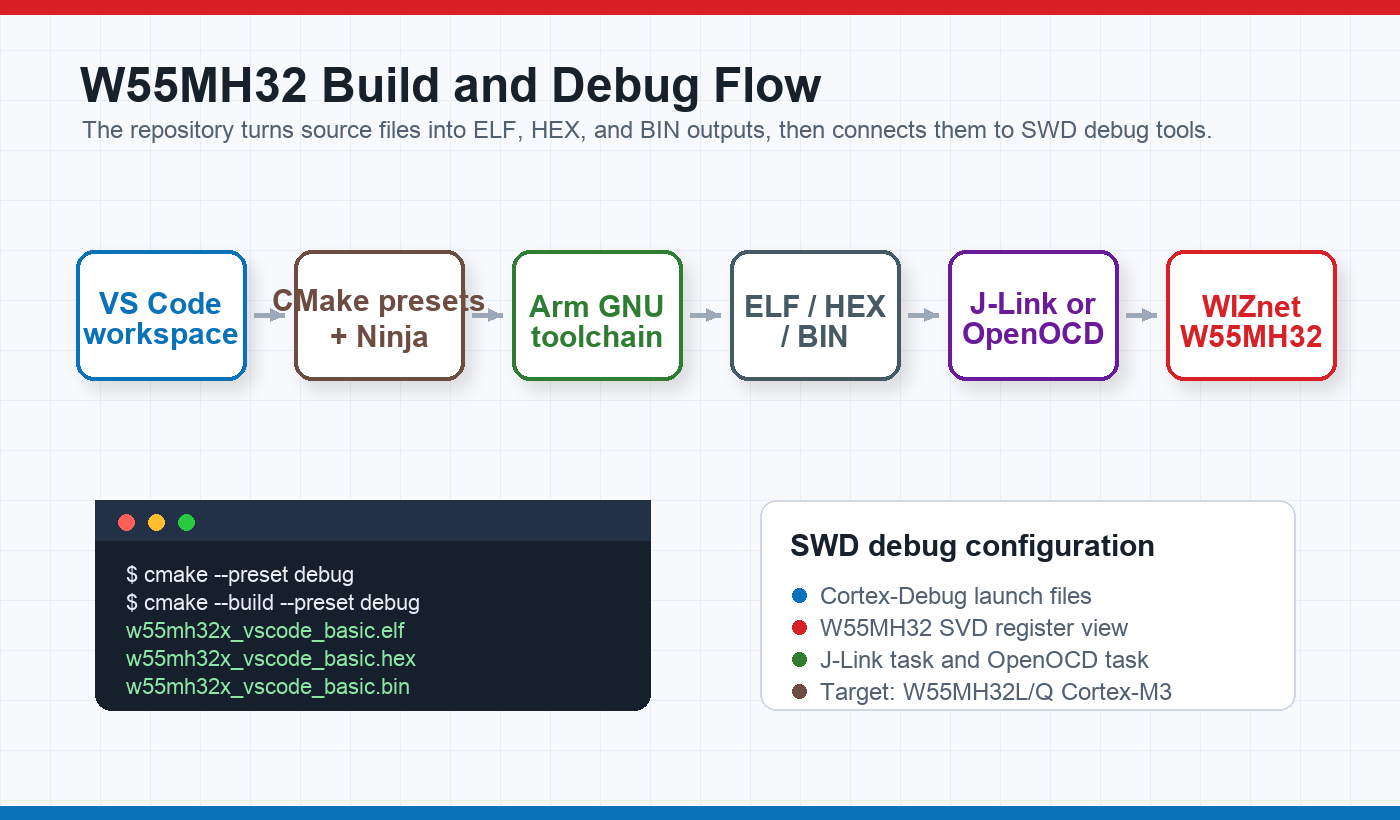
The build system is centered on CMake presets. CMakePresets.json defines debug and release presets using Ninja, while cmake/gcc-arm-none-eabi.cmake selects arm-none-eabi-gcc, g++, objcopy, and size. The root CMakeLists.txt builds w55mh32x_vscode_basic.elf, then emits .hex and .bin files after linking.
The VS Code side is also part of the value. .vscode/tasks.json maps configure, build, clean, flash with J-Link, and flash with OpenOCD into repeatable tasks. .vscode/launch.json adds Cortex-Debug launch entries for J-Link and OpenOCD plus CMSIS-DAP, both pointing at the W55MH32 SVD file included in the repository. This gives the project a clear path from source edit to build output to SWD debug session.
Vendor Driver Bundle and Application Scope
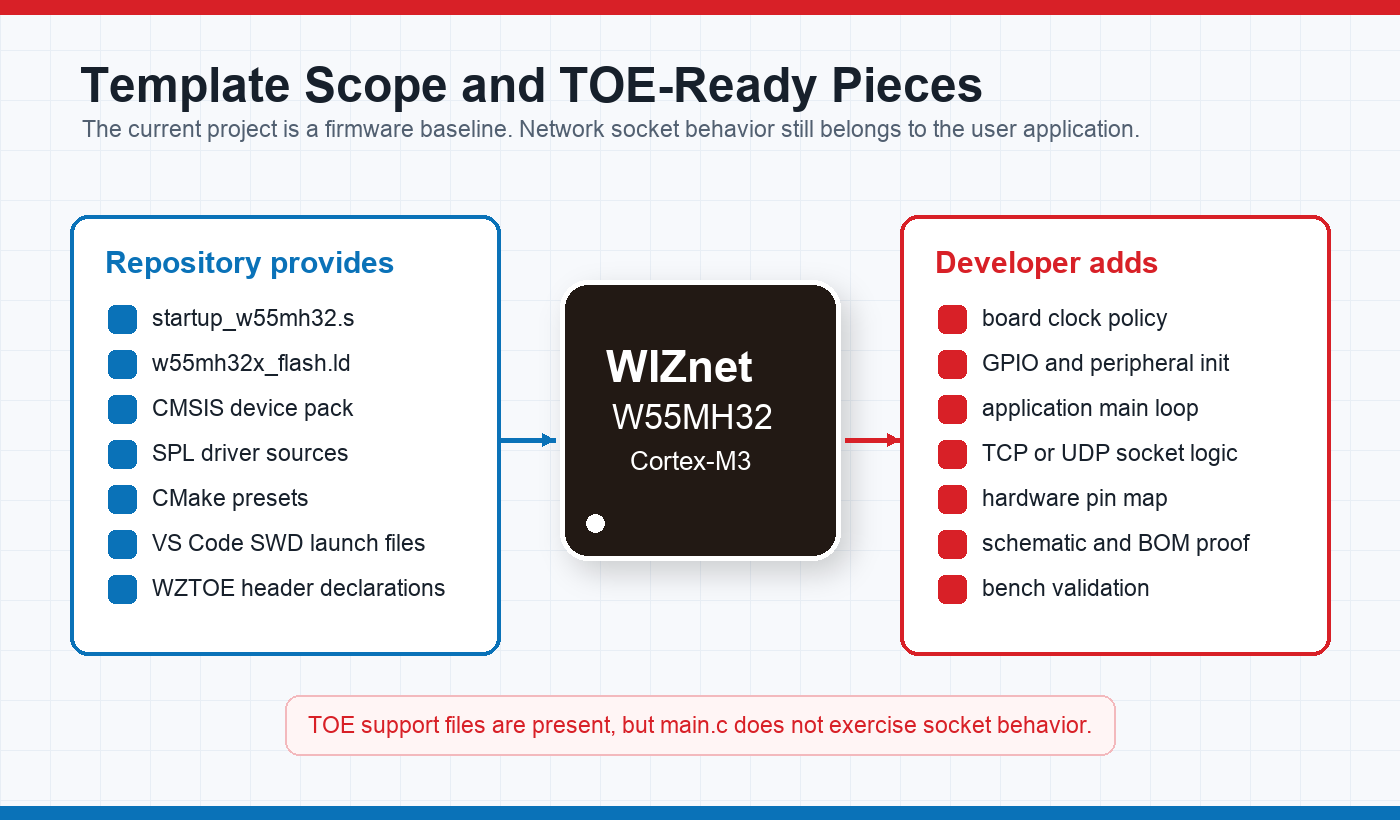
The repository separates application code and vendor code cleanly. Application files live under core/, while CMSIS and SPL files are stored under drivers/. The main application entry point in core/src/main.c is intentionally small: it runs the default system setup path, leaves a placeholder for board and peripheral initialization, and then enters the main loop. That is a good fit for a template because the developer can add their own board bring-up without first untangling a sample application.
The included W55MH32 driver headers also show where future Ethernet work would attach. core/inc/w55mh32_conf.h includes w55mh32_wztoe.h, and that vendor header exposes WZTOE common registers, socket register macros, TCP and UDP socket mode constants, and low-level register I/O function declarations. The repository also carries a prebuilt w55mh32_toe.lib. However, the current sample firmware does not initialize TOE or open a socket, so it should be understood as a TOE-ready development baseline rather than a network application example.
Reuse Value for W55MH32 Projects
This is a lightweight project, but it is still valuable because it captures the small decisions that often slow down first bring-up. The linker script defines flash and SRAM layout for W55MH32. The build files use Cortex-M3 flags such as -mcpu=cortex-m3, -mthumb, and soft-float ABI. The CMake target links the W55MH32 SPL bundle and keeps newlib syscall and heap stubs explicit, which is useful for bare-metal firmware where the standard library must not silently assume an operating system.
The current limits are clear. There is no schematic, BOM, PCB file, wiring guide, or application protocol. The repository is best treated as a starting workspace for W55MH32 firmware, not as a finished product. For makers and embedded developers, that can still be the most useful kind of example when the next step is writing their own GPIO, serial, Ethernet, or control logic on top of a known build and debug base.
FAQ
Q. What does this project provide for W55MH32 development?
A. It provides a VS Code and CMake starter workspace for WIZnet W55MH32L/Q bare-metal firmware. The repository includes startup code, linker script, CMSIS and SPL files, CMake presets, and debug task configuration.
Q2. Does it already implement an Ethernet application?
No. The application firmware is a skeleton and does not initialize the TOE block or open TCP/UDP sockets. The vendor WZTOE header and TOE library are included, so a developer can add Ethernet logic later.
Q3. Which build tools does it use?
The build flow uses CMake 3.22 or newer, Ninja, and the Arm GNU toolchain. The root CMake target produces an ELF file and then generates HEX and BIN images after linking.
Q4. How is debugging configured?
VS Code launch configurations are provided for Cortex-Debug with J-Link and OpenOCD plus CMSIS-DAP. Both configurations point to the included W55MH32 SVD file for register-aware debugging.
Q5. Can it be reused for another W55MH32 board?
Yes, as a starting point. A developer would still need to add the board-specific clock, GPIO, peripheral, and network initialization code because the repository does not include a specific board schematic or pin map.