


How to Control a Server with ESP32 and W5500 Ethernet?
ESP32 firmware uses W5500 Ethernet for local REST, MQTT, and Redfish control of a home server, router, and NAS from TV and web dashboards.

WIZnet - W5500
x 1

Wired Ethernet controller used with ESP32 over SPI
Overview
Velmurugan K L shares software, dashboard, and automation projects on GitHub, and Server_CTRL brings several of those interests together in one home-lab control stack. The project uses an ESP32 with a WIZnet W5500 Ethernet module to control a server, router, and NAS through local REST calls, MQTT commands, and Dell iDRAC Redfish requests.
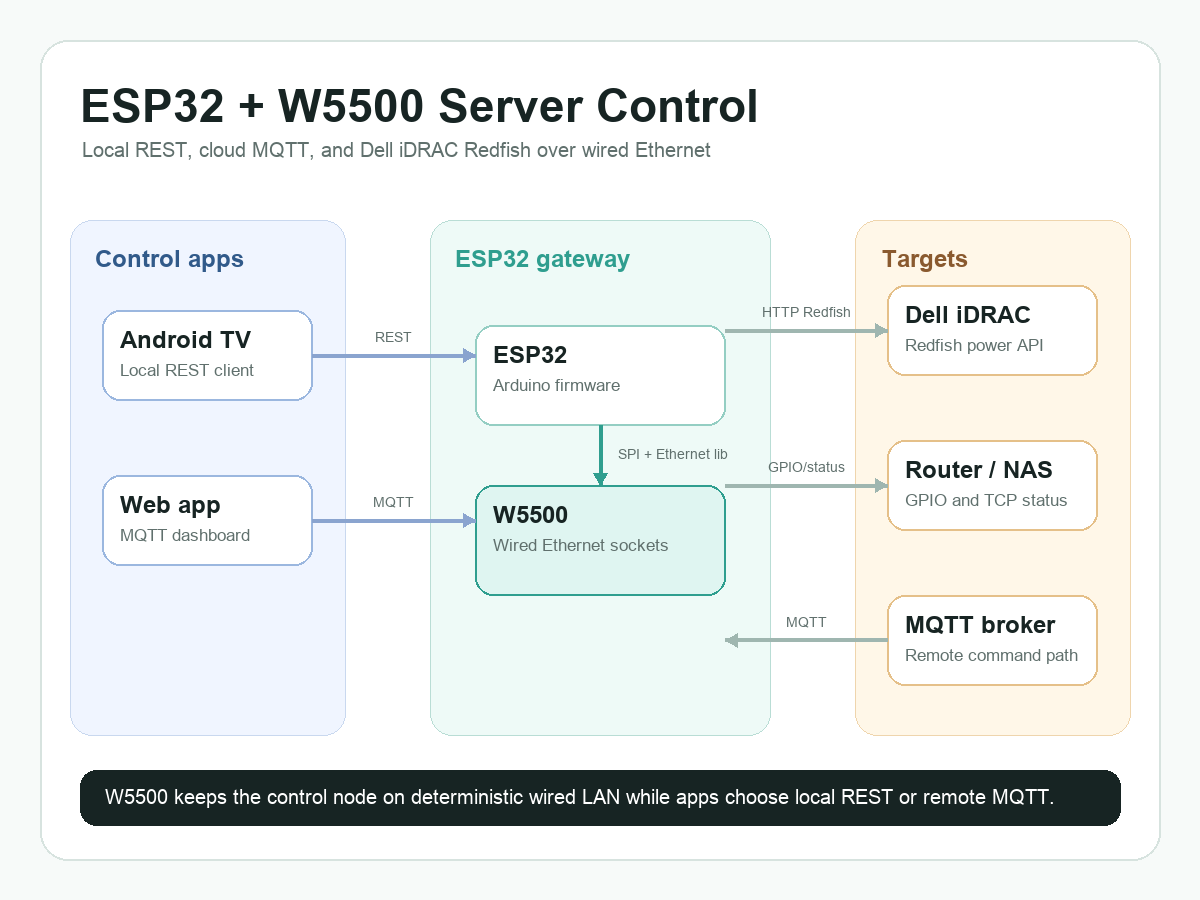
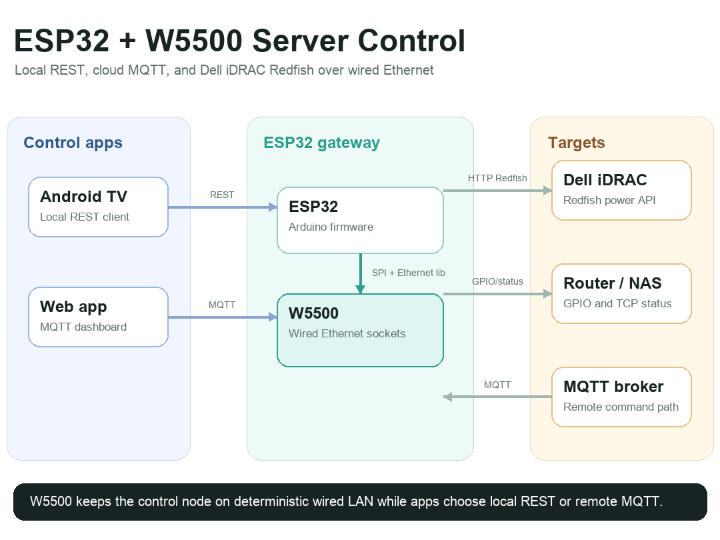
The repository is not just a single Arduino sketch. It includes ESP32 firmware, a React MQTT dashboard, an Android TV control app, and a small Express authentication backend. That makes it a useful reference for a wired control node where the microcontroller is reachable on the local LAN but can still receive remote commands through a broker.
System Configuration
The hardware side is centered on an ESP32 and a W5500 Ethernet module. In ESP32/ESP32.ino, the W5500 chip select is assigned to GPIO 5 with #define ETH_CS 5, then the firmware calls Ethernet.init(ETH_CS) and Ethernet.begin(mac). The sketch also calls WiFi.mode(WIFI_OFF) and btStop(), so the runtime network path is intentionally wired Ethernet.
The ESP32 firmware exposes three control surfaces:
- A local HTTP endpoint on port 80 through
EthernetServer server(80). - MQTT command and status topics through
PubSubClient mqttClient(ethClient). - Dell iDRAC Redfish HTTP requests through
EthernetClient.
The UI side is split. The Android TV app sends local REST requests to the ESP32. The React web dashboard connects to an MQTT broker and publishes command or status messages. The optional Express backend handles dashboard sign-in with JWT, but it does not replace the ESP32 firmware's own network logic.
System Architecture and Data Flow
The important design choice is that every network path still passes through the W5500 wired Ethernet interface. Local TV control, cloud-brokered MQTT control, and iDRAC HTTP calls share the same physical LAN connection instead of depending on ESP32 Wi-Fi.
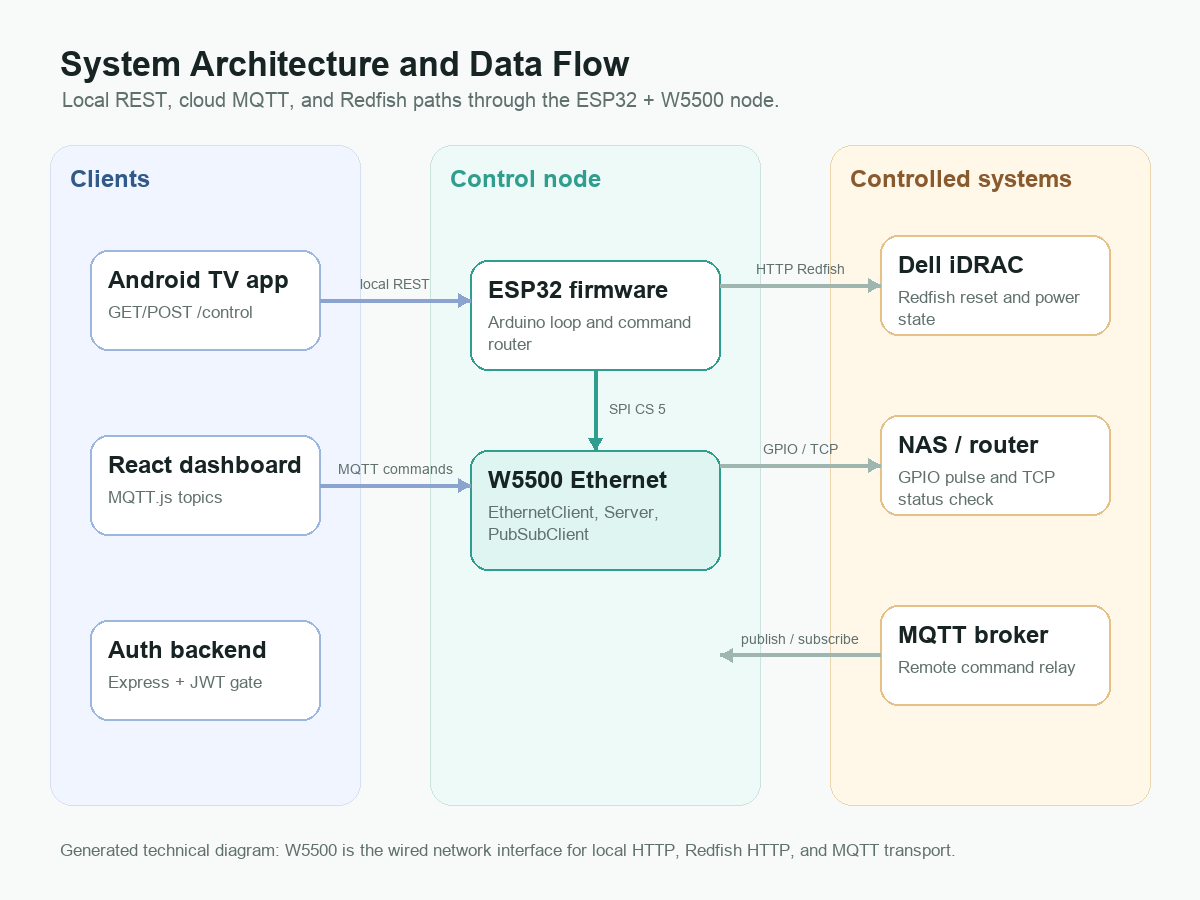
Local control starts in the Android TV app. httpHelper.java sends POST requests to /control and GET requests to /control?command=.... On the firmware side, rest.cpp reads the HTTP request from server.available(), extracts the command string, and passes it to handleCommand().
Remote control starts in the React dashboard. MQQT_WEB_DASHBOARD/src/App.jsx publishes status and power commands to environment-configured MQTT topics. The ESP32 subscribes to the corresponding topics in mqtt.cpp, receives payloads in mqttCallback(), and then either publishes a status response or calls the same handleCommand() path used by the REST API.
Command Handling
The command router in ESP32/command.cpp is the center of the firmware. NAS_ON and NAS_OFF call Redfish reset actions through sendRedfish("On") or sendRedfish("GracefulShutdown"). Router and main power commands toggle GPIO pins, and status requests use Redfish or a TCP connection test depending on the target.
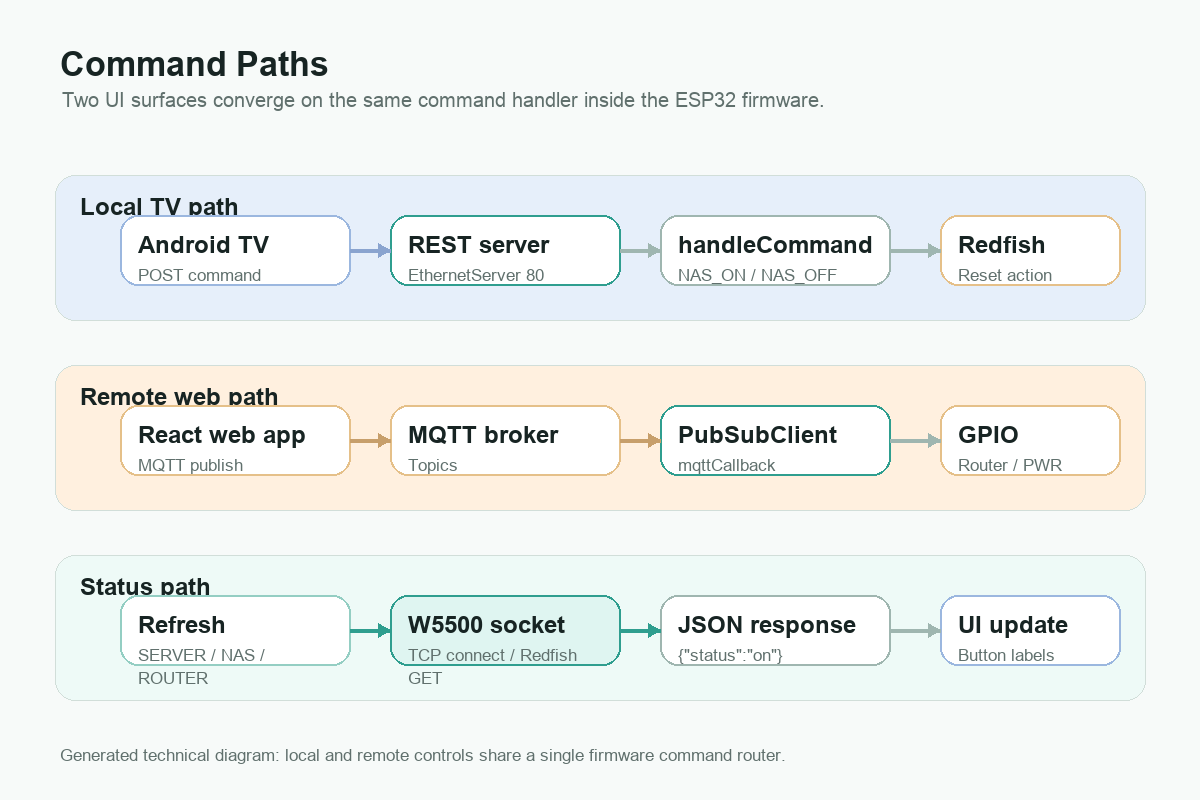
The Redfish implementation in ESP32/RedFish.cpp builds raw HTTP requests with EthernetClient. It targets Dell iDRAC paths such as /redfish/v1/Systems/System.Embedded.1/Actions/ComputerSystem.Reset and sends a JSON payload containing the selected reset type. getPowerState() requests the chassis path and searches the response body for PowerState.
This is simple and readable rather than a full Redfish client library. That simplicity is useful for a Maker project, but it also means users must adapt host names, credentials, timeouts, and response parsing for their own server model.
Role of the WIZnet Chip
The W5500 gives the ESP32 a wired Ethernet path for every important control function in this project. The code uses the Arduino Ethernet library, EthernetClient, EthernetServer, and PubSubClient over the Ethernet client. That means the ESP32 can keep its firmware focused on command routing, GPIO control, MQTT payloads, and Redfish request construction while the W5500 handles the wired network interface.
This matters because server and router control is often a local-infrastructure task. A wired link is easier to reason about than Wi-Fi when the control node is mounted near a router, switch, NAS, or server rack. In this repository, the author makes that preference explicit by disabling ESP32 Wi-Fi and Bluetooth during setup.
Current Scope and Limits
The project is best described as a practical prototype rather than a finished appliance. It demonstrates the firmware path, REST control, MQTT control, Redfish calls, a TV interface, and a web dashboard, but it still leaves deployment details to the user.
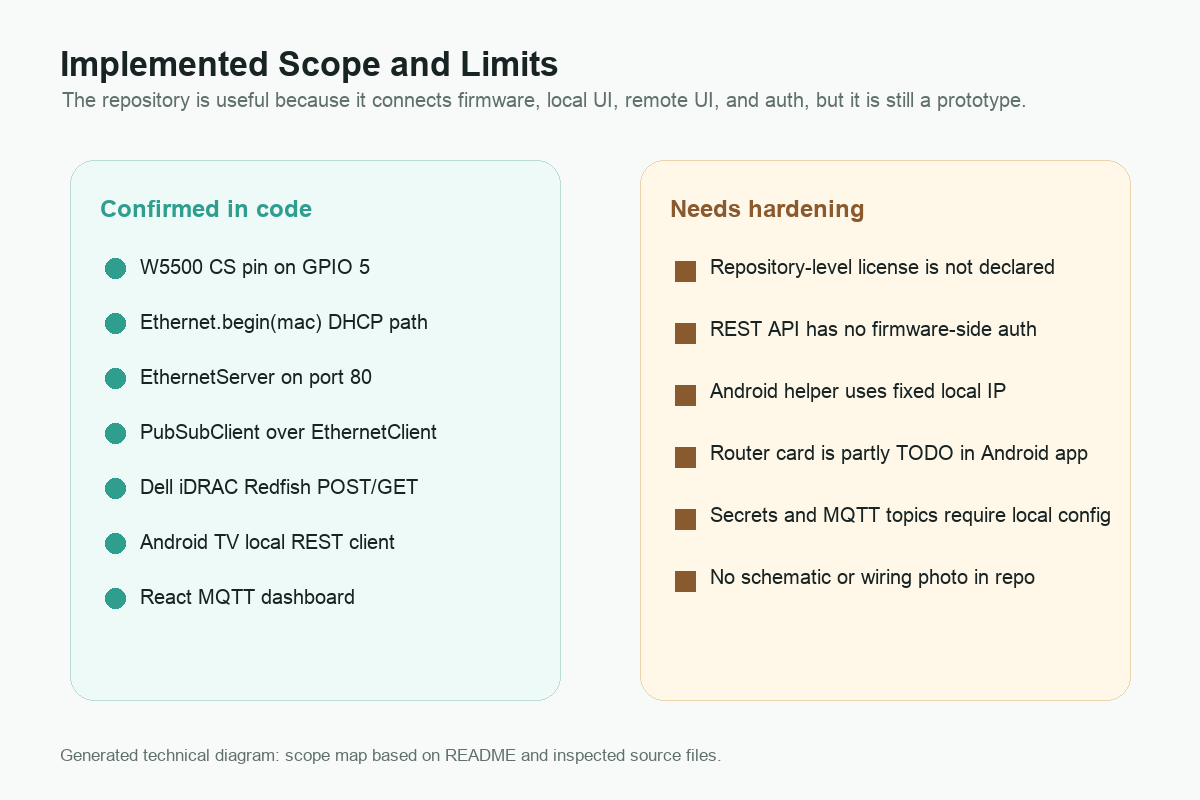
The strongest parts are the confirmed W5500 initialization, local HTTP server, MQTT callback, Redfish POST and GET functions, and TV or web command surfaces. The main limits are also clear: the repository does not include a schematic or wiring photo, the firmware-side REST endpoint has no authentication layer, the Android helper uses a fixed local IP address, and the Android router card is still marked as TODO in the code.
Those limits are acceptable for a Maker reference if they are stated plainly. The repo is valuable because it shows how an ESP32 plus W5500 can sit at the boundary between local hardware, server-management APIs, and remote dashboards.
Where It Fits
This pattern fits home-lab automation, small server-room control, private NAS management, router power cycling, and remote status checking. It is especially relevant where the controller can be placed on the same wired LAN as the target devices.
The project also shows a useful split between local and remote control. Local users can use the TV app directly on the LAN, while remote users can send MQTT commands through a broker. Both paths reach the same command handler, so the firmware does not need two separate control models.
Related WIZnet Maker Projects
- How to Build a Zigbee Smart Switch System with W5500 Ethernet Backhaul on ESP32-C3? also uses an ESP32-class controller, W5500 Ethernet, and MQTT as a control path. It focuses on Zigbee relay nodes, while Server_CTRL focuses on server, router, NAS, and Redfish operations.
- FireFly: Home Lighting project is another ESP32 and W5500 automation project with MQTT-native control. It is lighting-focused, while Server_CTRL is infrastructure-focused.
- W5500 + FreeRTOS based 8-channel industrial digital input module shows W5500 in a wired monitoring module. It is more industrial I/O oriented, but the shared idea is that Ethernet gives control devices a predictable network path.
FAQ
Q. What does this project use the W5500 for? It uses the W5500 as the ESP32's wired Ethernet interface for REST, MQTT, Redfish HTTP requests, and TCP status checks.
Q. Does the ESP32 use Wi-Fi at runtime? No. The inspected setup code calls btStop() and WiFi.mode(WIFI_OFF), then initializes Ethernet through the W5500 CS pin.
Q. Is this a complete product-ready server controller? Not yet. It is a working code reference with useful pieces, but users still need to add deployment-specific security, configuration, wiring, and testing.
Q. Why is Redfish important here? Redfish is the server-management API path used for Dell iDRAC power control. The firmware sends HTTP requests that trigger reset or power-state operations.
Q. Can the same pattern control other devices? Yes, if the device can be reached through HTTP, MQTT, GPIO, or a simple status check. The command router would need to be extended for each target.
The source repository, W5500 documentation, and library references are attached in the Documents panel.
한국어 (Korean)
개요
Velmurugan K L은 GitHub에서 소프트웨어, 대시보드, 자동화 프로젝트를 공유하는 메이커입니다. Server_CTRL은 ESP32와 WIZnet W5500 Ethernet 모듈을 사용해 로컬 REST, MQTT, Dell iDRAC Redfish 요청으로 서버, 라우터, NAS를 제어하는 홈랩 제어 스택입니다.
이 저장소는 Arduino 스케치 하나만 담고 있지 않습니다. ESP32 펌웨어, React MQTT 대시보드, Android TV 제어 앱, Express 인증 백엔드가 함께 들어 있습니다. 그래서 로컬 LAN에서는 직접 접근하고, 외부에서는 MQTT 브로커를 통해 명령을 전달하는 유선 제어 노드 예제로 볼 수 있습니다.
시스템 구성
하드웨어 중심은 ESP32와 W5500 Ethernet 모듈입니다. ESP32/ESP32.ino에서는 W5500 chip select를 GPIO 5로 지정하고, Ethernet.init(ETH_CS)와 Ethernet.begin(mac)을 호출합니다. 또한 WiFi.mode(WIFI_OFF)와 btStop()을 호출하므로 런타임 네트워크 경로는 유선 Ethernet입니다.
ESP32 펌웨어는 세 가지 제어 표면을 제공합니다.
EthernetServer server(80)기반 로컬 HTTP 엔드포인트PubSubClient mqttClient(ethClient)기반 MQTT 명령과 상태 토픽EthernetClient기반 Dell iDRAC Redfish HTTP 요청
UI는 두 갈래입니다. Android TV 앱은 ESP32에 로컬 REST 요청을 보냅니다. React 웹 대시보드는 MQTT 브로커에 연결해 명령과 상태 메시지를 주고받습니다. Express 백엔드는 대시보드 로그인용 JWT를 처리하지만, ESP32 펌웨어의 네트워크 동작 자체를 대체하지는 않습니다.
시스템 아키텍처와 데이터 흐름
중요한 설계 포인트는 모든 네트워크 경로가 W5500 유선 Ethernet 인터페이스를 통과한다는 점입니다. 로컬 TV 제어, 클라우드 브로커를 통한 MQTT 제어, iDRAC HTTP 호출이 ESP32 Wi-Fi가 아니라 같은 물리적 LAN 연결을 공유합니다.
로컬 제어는 Android TV 앱에서 시작됩니다. httpHelper.java는 /control로 POST 요청을 보내고 /control?command=...로 GET 요청을 보냅니다. 펌웨어 쪽의 rest.cpp는 server.available()에서 HTTP 요청을 읽고 명령 문자열을 추출한 뒤 handleCommand()로 전달합니다.
원격 제어는 React 대시보드에서 시작됩니다. MQQT_WEB_DASHBOARD/src/App.jsx는 환경 변수로 지정된 MQTT 토픽에 상태와 전원 명령을 발행합니다. ESP32는 mqtt.cpp에서 해당 토픽을 구독하고, mqttCallback()에서 payload를 받은 뒤 상태를 발행하거나 REST와 같은 handleCommand() 경로를 호출합니다.
명령 처리
ESP32/command.cpp의 명령 라우터가 펌웨어 중심입니다. NAS_ON과 NAS_OFF는 sendRedfish("On") 또는 sendRedfish("GracefulShutdown")을 호출합니다. 라우터와 메인 전원 명령은 GPIO 핀을 토글하고, 상태 요청은 대상에 따라 Redfish 또는 TCP 연결 테스트를 사용합니다.
ESP32/RedFish.cpp의 Redfish 구현은 EthernetClient로 직접 HTTP 요청을 구성합니다. /redfish/v1/Systems/System.Embedded.1/Actions/ComputerSystem.Reset 같은 Dell iDRAC 경로에 JSON payload를 보내고, getPowerState()는 chassis 경로를 요청한 뒤 응답 본문에서 PowerState를 찾습니다.
이 방식은 완전한 Redfish 클라이언트 라이브러리라기보다 단순하고 읽기 쉬운 구현입니다. 메이커 프로젝트로는 장점이지만, 실제 사용자는 서버 모델에 맞게 호스트, 인증 정보, timeout, 응답 파싱을 조정해야 합니다.
WIZnet 칩의 역할
W5500은 이 프로젝트의 주요 제어 기능에 유선 Ethernet 경로를 제공합니다. 코드는 Arduino Ethernet 라이브러리, EthernetClient, EthernetServer, EthernetClient 위의 PubSubClient를 사용합니다. 덕분에 ESP32 펌웨어는 명령 라우팅, GPIO 제어, MQTT payload, Redfish 요청 구성에 집중할 수 있고, W5500은 유선 네트워크 인터페이스 역할을 맡습니다.
서버와 라우터 제어는 보통 로컬 인프라 작업입니다. 제어 노드가 라우터, 스위치, NAS, 서버랙 근처에 설치된다면 Wi-Fi보다 유선 링크가 더 예측하기 쉽습니다. 이 저장소에서는 setup 코드에서 ESP32 Wi-Fi와 Bluetooth를 끄는 방식으로 그 선택이 명확히 드러납니다.
현재 범위와 한계
이 프로젝트는 완성된 제품이라기보다 실용적인 프로토타입에 가깝습니다. 펌웨어 경로, REST 제어, MQTT 제어, Redfish 호출, TV 인터페이스, 웹 대시보드를 보여주지만, 배포 세부 사항은 사용자가 직접 보완해야 합니다.
강점은 W5500 초기화, 로컬 HTTP 서버, MQTT callback, Redfish POST와 GET 함수, TV와 웹 명령 표면이 실제 코드로 확인된다는 점입니다. 한계도 분명합니다. 저장소에는 회로도나 배선 사진이 없고, 펌웨어 REST 엔드포인트에는 인증 계층이 없으며, Android helper는 고정 로컬 IP를 사용하고, Android 라우터 카드는 코드에서 TODO 상태입니다.
이 한계는 명확히 적어두면 메이커 레퍼런스로는 받아들일 수 있습니다. 이 저장소의 가치는 ESP32와 W5500이 로컬 하드웨어, 서버 관리 API, 원격 대시보드 사이의 경계 노드가 될 수 있음을 보여준다는 데 있습니다.
어디에 맞는가
이 패턴은 홈랩 자동화, 소형 서버룸 제어, 개인 NAS 관리, 라우터 전원 재시작, 원격 상태 확인에 잘 맞습니다. 특히 제어 장치를 대상 장비와 같은 유선 LAN에 둘 수 있을 때 의미가 큽니다.
또한 로컬 제어와 원격 제어를 나누는 방식도 참고할 만합니다. 로컬 사용자는 TV 앱으로 직접 LAN에서 제어하고, 원격 사용자는 MQTT 브로커를 통해 명령을 보냅니다. 두 경로가 같은 명령 처리기로 모이므로 펌웨어가 별도의 제어 모델을 두 개 유지할 필요가 없습니다.
관련 WIZnet Maker 프로젝트
- How to Build a Zigbee Smart Switch System with W5500 Ethernet Backhaul on ESP32-C3?는 ESP32 계열 컨트롤러, W5500 Ethernet, MQTT 제어 경로를 함께 사용합니다. 다만 이 프로젝트는 Zigbee 릴레이 노드에 초점을 두고, Server_CTRL은 서버, 라우터, NAS, Redfish 제어에 초점을 둡니다.
- FireFly: Home Lighting project도 ESP32와 W5500을 사용한 MQTT 기반 자동화 프로젝트입니다. FireFly는 조명 제어에 가깝고, Server_CTRL은 홈랩 인프라 제어에 가깝습니다.
- W5500 + FreeRTOS based 8-channel industrial digital input module은 W5500을 유선 모니터링 모듈에 적용한 사례입니다. 산업용 I/O 쪽에 더 가깝지만, 제어 장치에 예측 가능한 유선 네트워크 경로를 제공한다는 아이디어는 같습니다.
FAQ
이 프로젝트는 W5500을 어디에 사용하나요? W5500은 ESP32의 유선 Ethernet 인터페이스로 사용됩니다. REST, MQTT, Redfish HTTP 요청, TCP 상태 확인이 이 경로를 통과합니다.
ESP32가 런타임에 Wi-Fi를 사용하나요? 아닙니다. 확인한 setup 코드에서는 btStop()과 WiFi.mode(WIFI_OFF)를 호출한 뒤 W5500 CS 핀을 통해 Ethernet을 초기화합니다.
제품으로 바로 쓸 수 있는 서버 컨트롤러인가요? 아직은 아닙니다. 유용한 코드 조각을 가진 레퍼런스이지만, 실제 배포를 위해서는 보안, 설정, 배선, 테스트를 추가해야 합니다.
여기서 Redfish가 왜 중요한가요? Redfish는 Dell iDRAC 전원 제어를 위한 서버 관리 API 경로입니다. 펌웨어는 HTTP 요청을 보내 reset 또는 power-state 동작을 수행합니다.
같은 패턴으로 다른 장비도 제어할 수 있나요? 가능합니다. 대상 장비가 HTTP, MQTT, GPIO, 간단한 상태 확인 경로로 제어될 수 있다면 명령 라우터를 확장해 적용할 수 있습니다.
소스 저장소, W5500 문서, 라이브러리 참고 링크는 Documents 패널에 첨부했습니다.
-
Server_CTRL source repository
Original ESP32 firmware, Android TV app, React MQTT dashboard, and backend source

-
Server_CTRL README
Project overview and architecture description
-
WIZnet W5500 documentation
Official W5500 Ethernet controller documentation
-
Arduino Ethernet library
Arduino Ethernet library used with WIZnet Ethernet controllers


