



The W5100Sio-M module connects to the Huawei Cloud platform via the MQTT protocol.
The W5100Sio-M module connects to the Huawei Cloud platform via the MQTT protocol.
1. Introduction
MQTT (Message Queuing Telemetry Transport) is a lightweight, publish/subscribe-based message transmission protocol widely used in the Internet of Things (IoT) field, especially in environments with limited network bandwidth and device resources. Proposed by IBM in 1999, it is primarily used for device communication in remote monitoring and control systems. The MQTT protocol offers advantages such as low bandwidth, low power consumption, and low latency, making it particularly suitable for communication in embedded systems and IoT devices.
The W5100Sio-M is a high-performance SPI-to-Ethernet module from WIS, featuring the following characteristics:
Simple Design: Integrates MAC, PHY, 16KB buffer, and RJ45 Ethernet port. It connects directly to the main controller via a 4-wire SPI interface, operates on 3.3V power, and its compact size is suitable for embedded scenarios.
Easy to Use: Users no longer need to port complex TCP/IP protocol stacks to the MCU; they can directly develop based on application-layer data.
Abundant Resources: Provides a wealth of MCU application examples and hardware reference designs for direct use, significantly shortening development time. Hardware compatibility with the W5500io-M module facilitates solution development and iteration.
Wide Applications: Widely used in industrial control, smart grids, charging piles, security and fire protection, new energy, and energy storage.
Product Link: Product Details
2 Project Environment
2.1 Hardware Preparation
W5500io-M Module
STM32F103VCT6 Development Board
One Network Cable
Several DuPont Wires
Switch or Router
2.2 Software Environment
Example Link: https://www.w5500.com/w5100s.html
Feisichuang Serial Port Assistant
Huawei Cloud Server
Keil5
3 Hardware Connection and Solution
3.1 W5100S Hardware Connection
1. //W5100S_SCS ---> STM32_GPIOD7 /*W5100S Chip Select Pin*/
2. //W5100S_SCLK ---> STM32_GPIOB13 /*W5100S Clock Pin*/
3. //W5100S_MISO ---> STM32_GPIOB14 /*W5100S's MISO pin*/
4. //W5100S_MOSI ---> STM32_GPIOB15 /*W5100S's MOSI pin*/
5. //W5100S_RESET ---> STM32_GPIOD8 /*W5100S's RESET pin*/
6. //W5100S_INT ---> STM32_GPIOD9 /*W5100S's INT pin*/
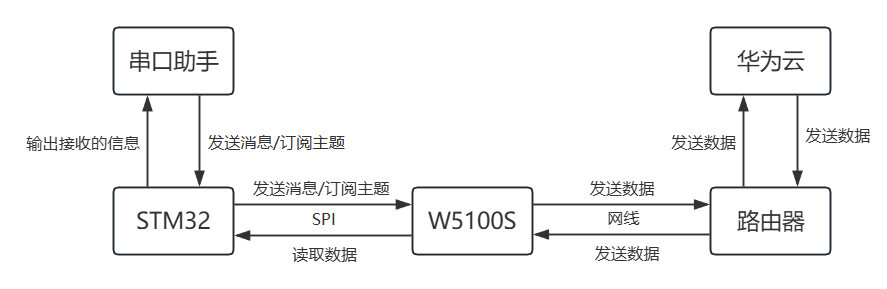
3.2 Solution Diagram
4. Registering a Huawei Cloud Account and Creating an Object Model
Account registration will not be detailed here. Below, we'll see how to create an object model.
4.1 Creating a Product
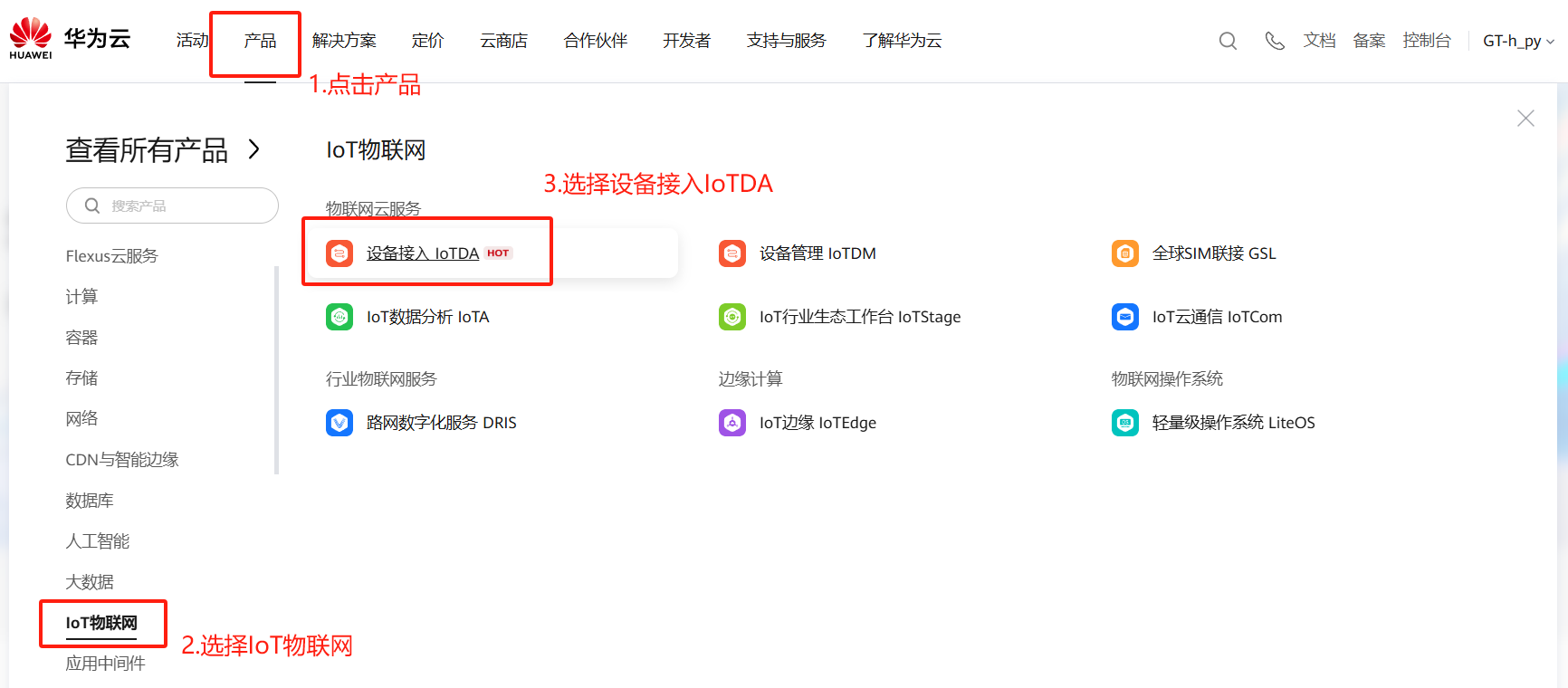
1. Products -> IoT -> Device Access IoTDA
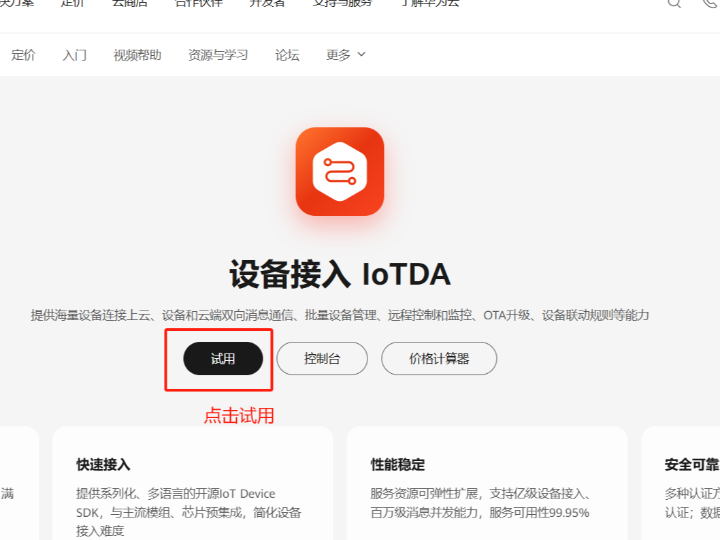
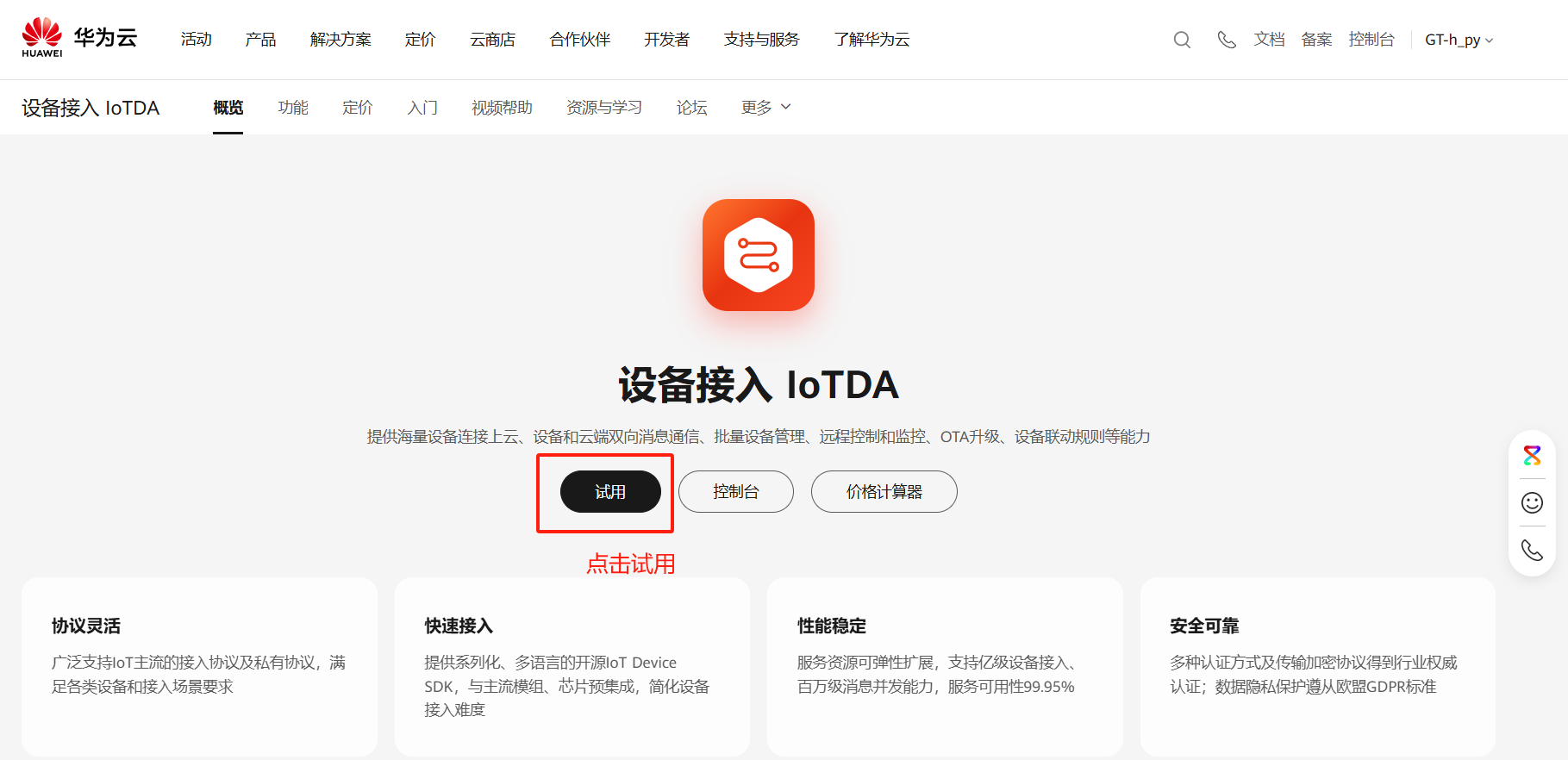
2. Click "Try"
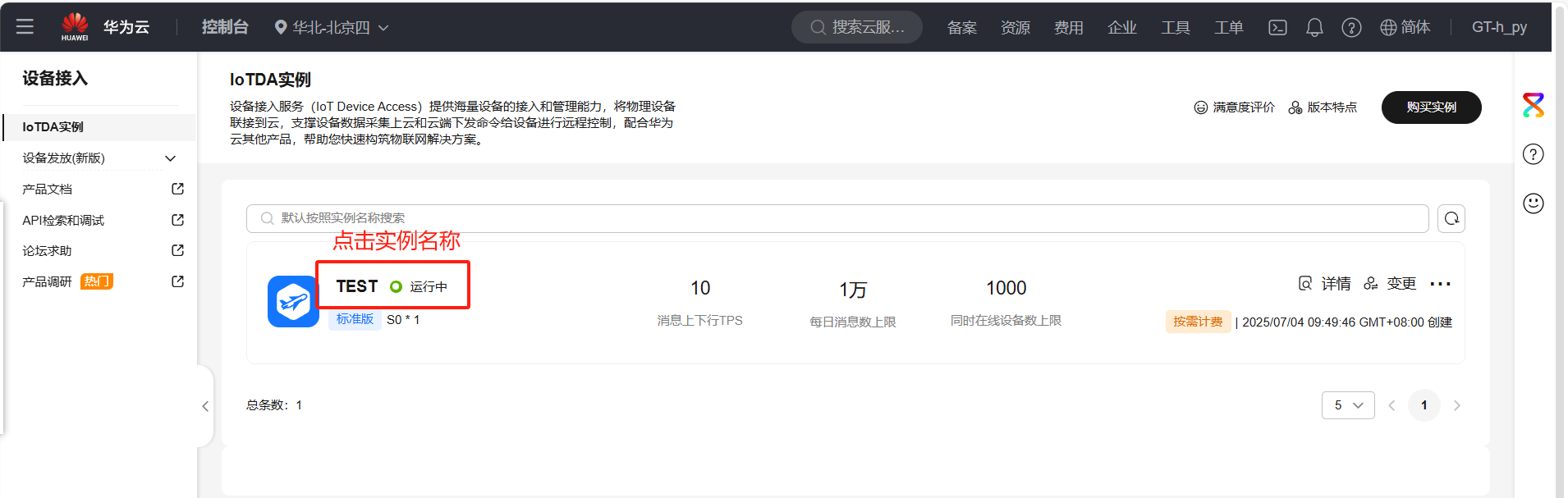
3. Click the instance name
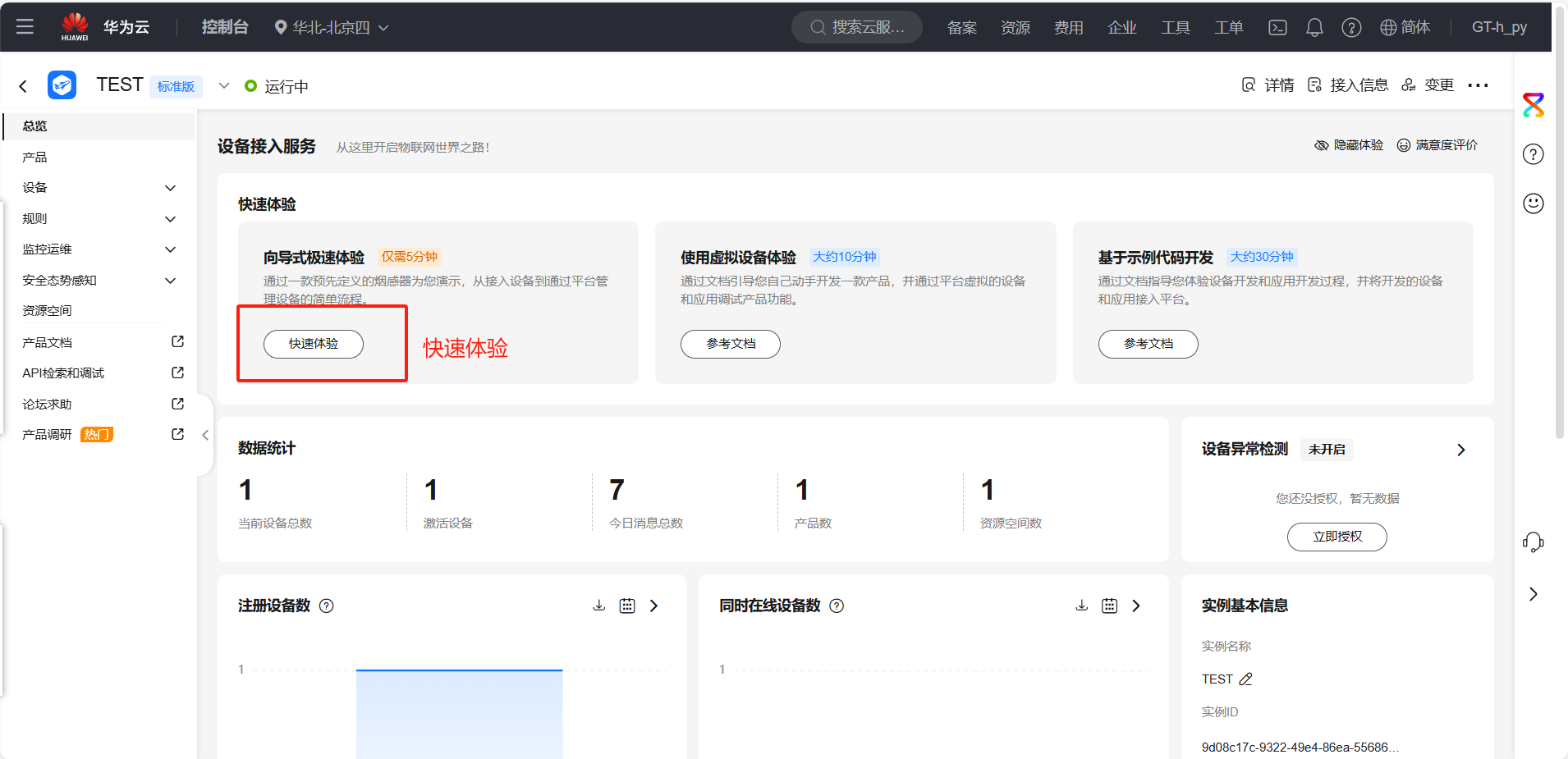
4. Quick Experience
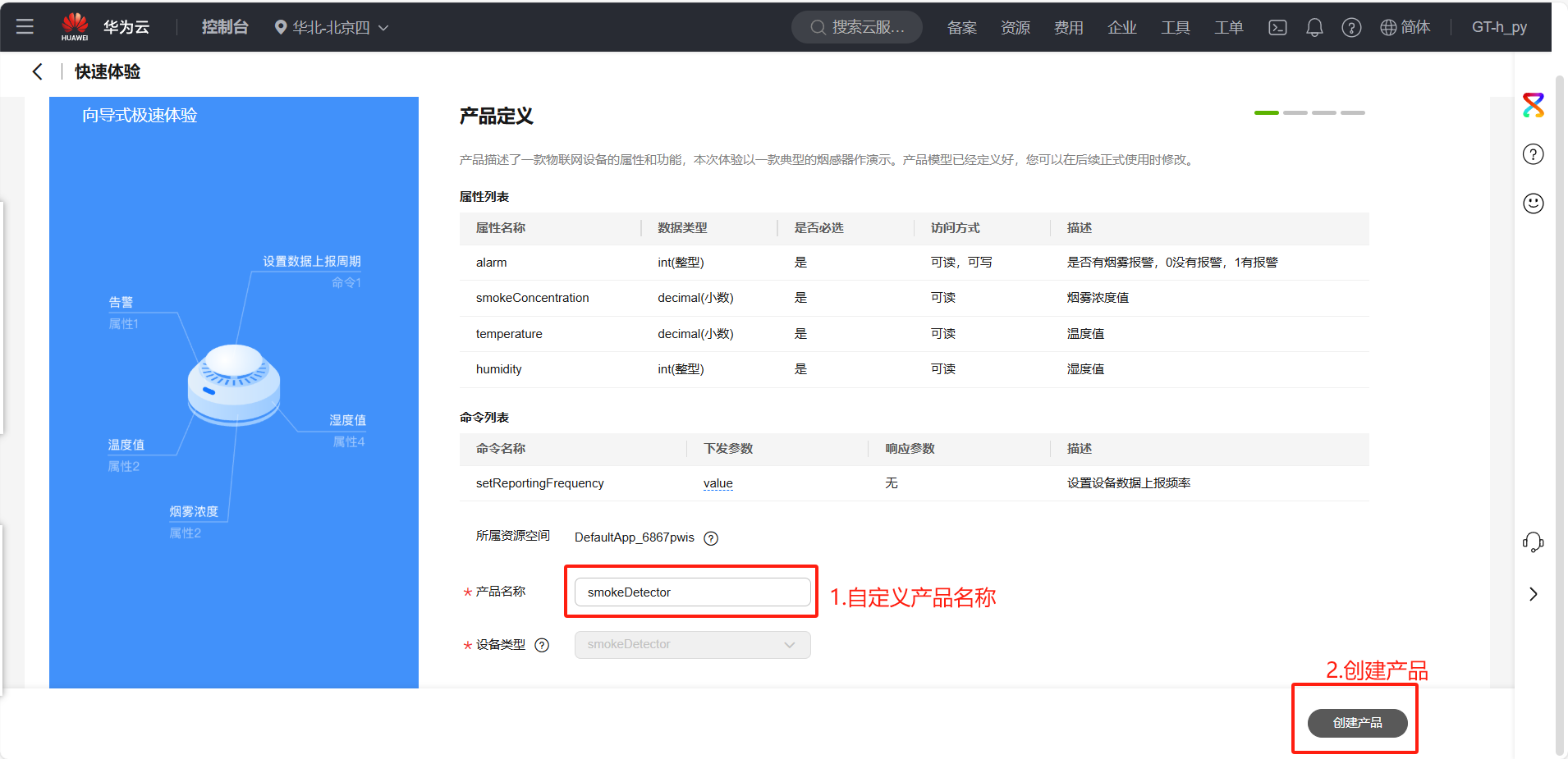
5. Product Definition
6. Register Device
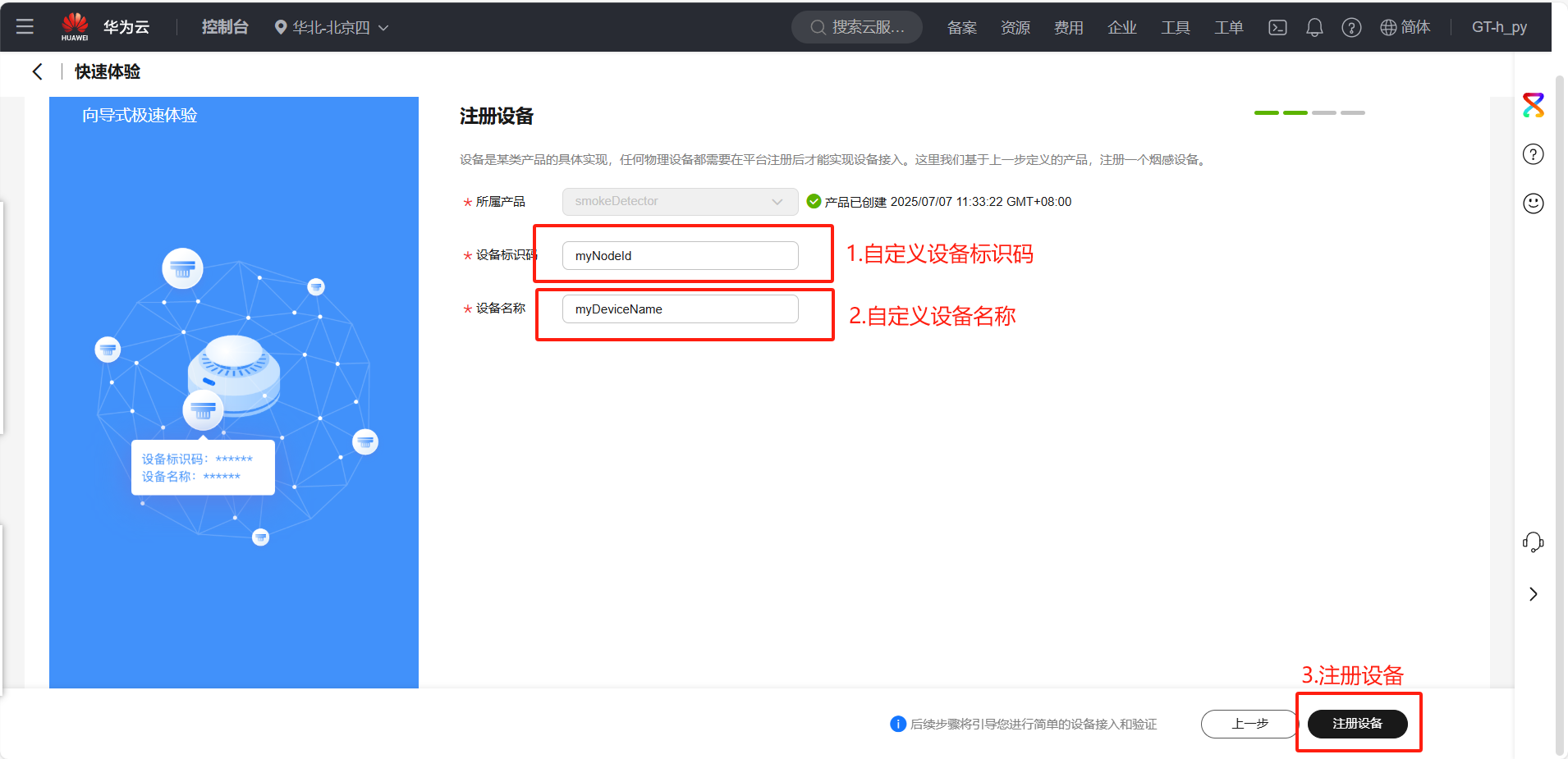
Subsequent verification steps are omitted here; simply click "Register Device". If you are interested, you can follow the instructions to complete the subsequent verification process.
4.2 Obtaining Device Connection Information
1. MQTT Connection Parameters
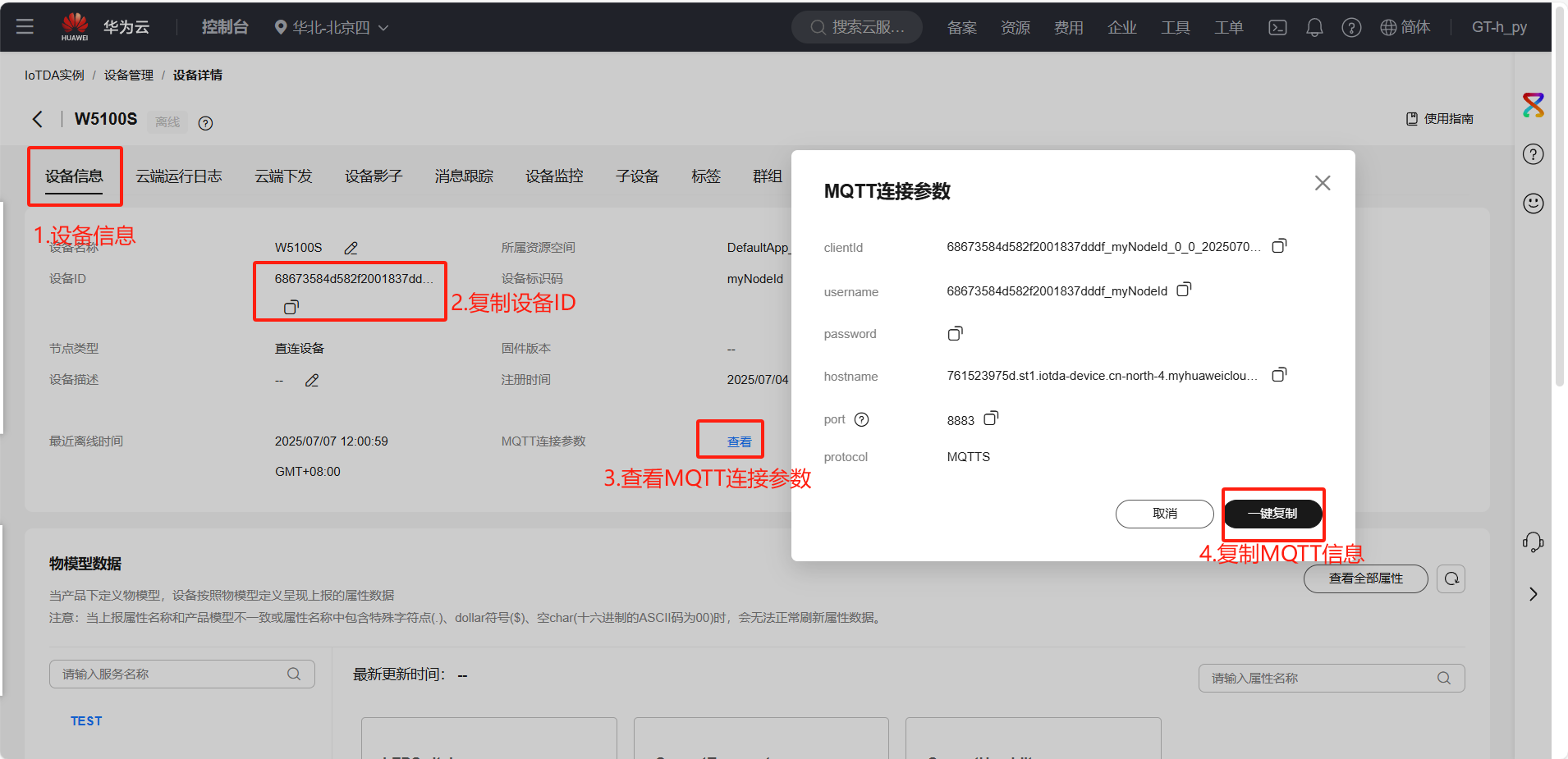
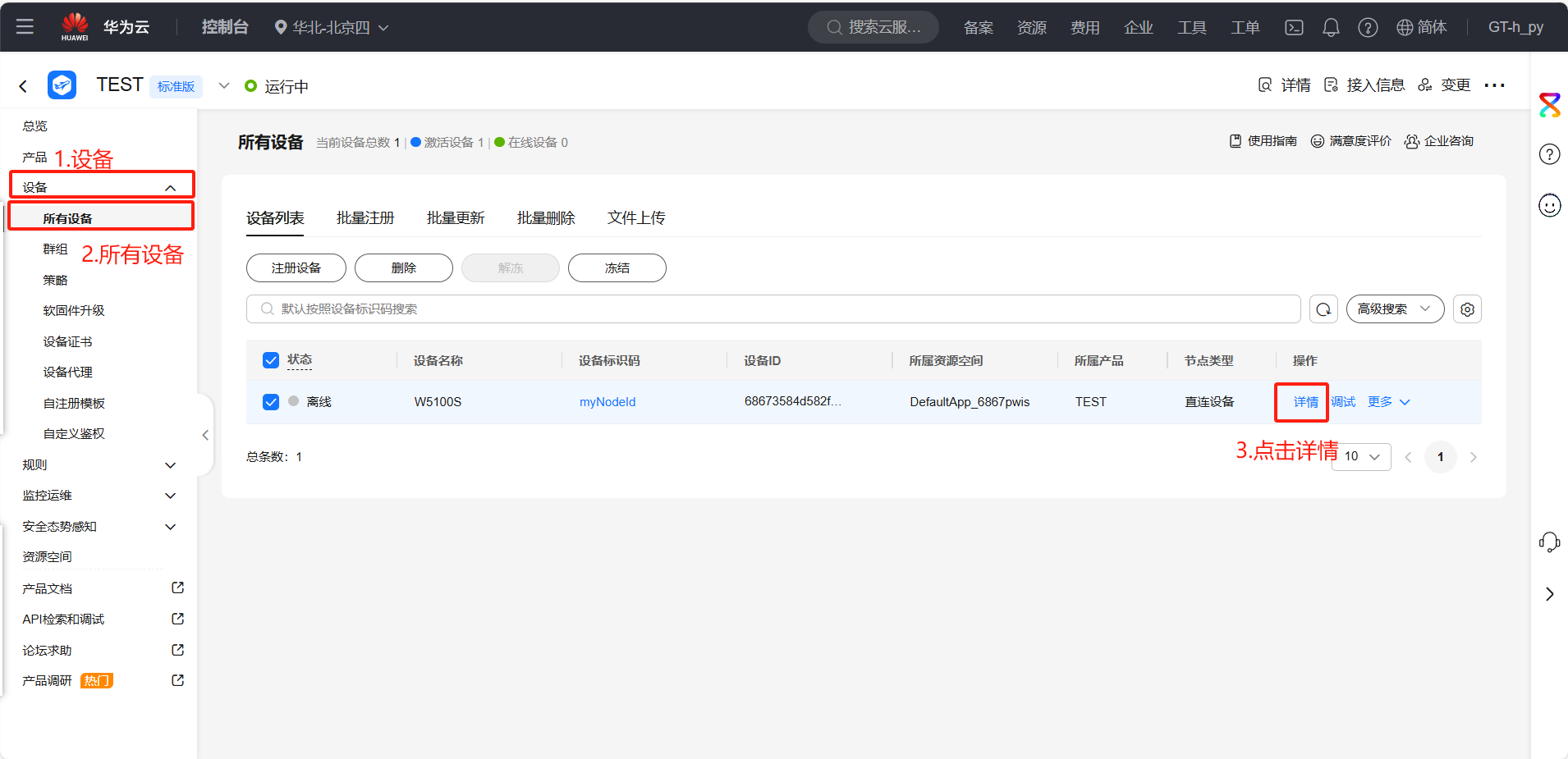
2. Communication Topic
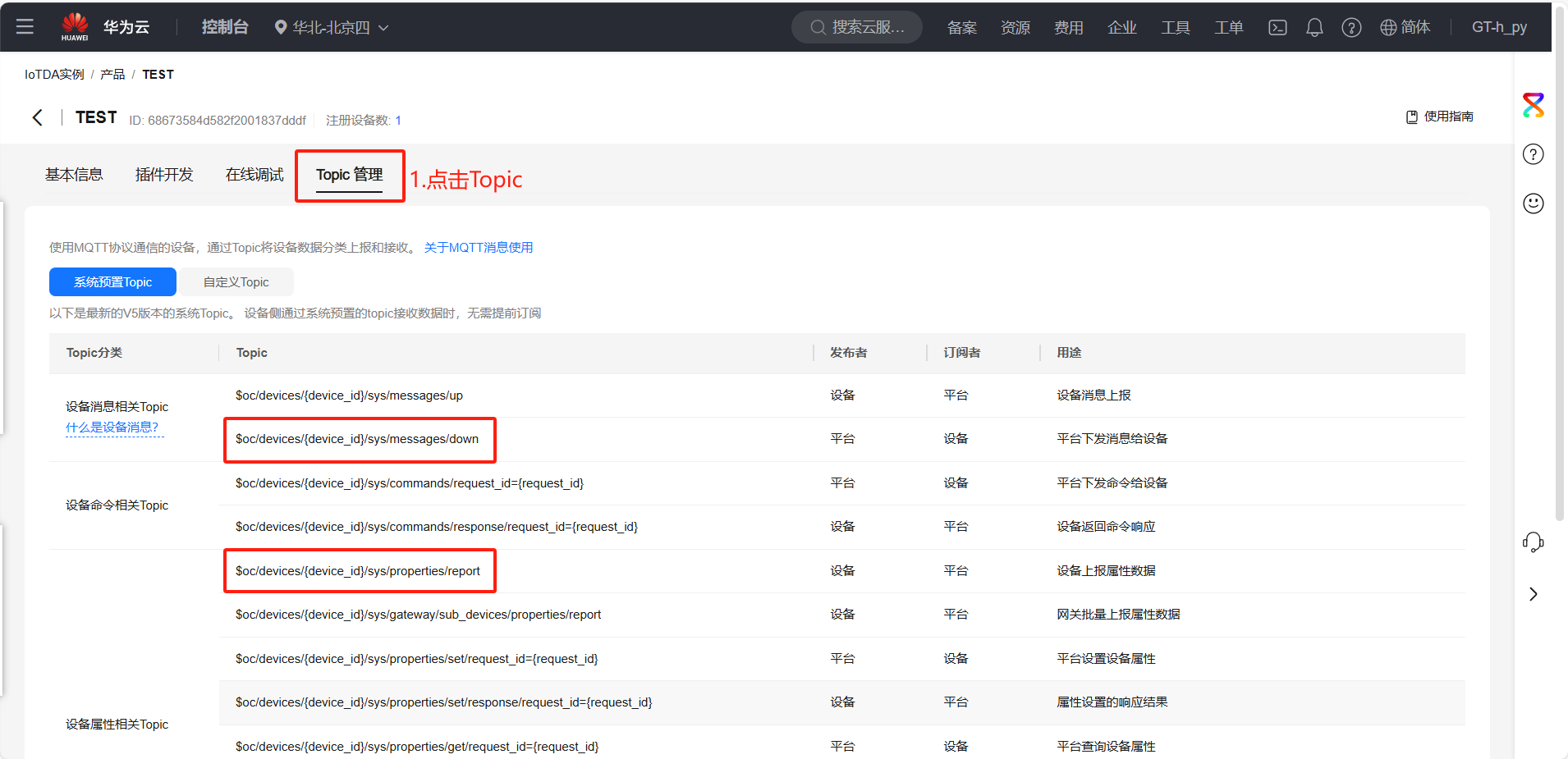
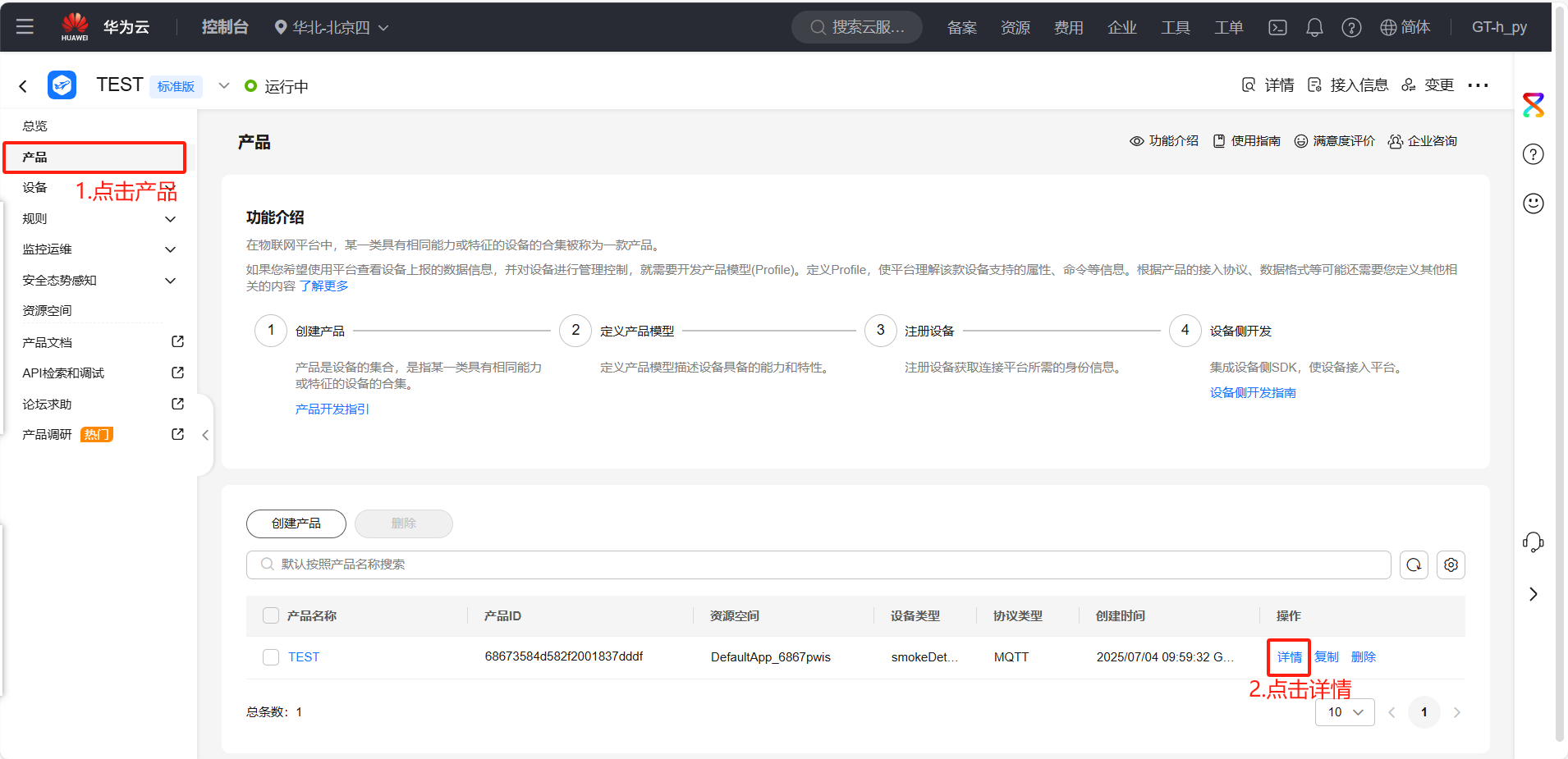
Subscription platform message topic:
$oc/devices/68673584d582f2001837dddf_myNodeId/sys/messages/down
Device message publishing topic:
$oc/devices/68673584d582f2001837dddf_myNodeId/sys/properties/report
Note: The {device_id} in the image needs to be replaced with your device's ID.
5. Example Modification
This example uses MQTT & Aliyun:
Locate the do_mqtt.c file and replace the parameters mentioned above with your own Huawei Cloud parameters. These parameters have been discussed above and can be replaced as needed.
//Define and initialize the MQTT connection parameter structure.
mqttconn mqtt_params = {
   .mqttHostUrl = "761523975d.st1.iotda-device.cn-north-4.myhuaweicloud.com",
   .server_ip = {0,},                                                                                                  /*Define the Connection Server IP*/
   .port = 1883,                                                                                       /*Define the connection service port number*/
   .clientid = "68673584d582f2001837dddf_myNodeId_0_0_2025070403", /*Define the client ID*/
   .username = "68673584d582f2001837dddf_myNodeId",                                                             /*Define the user name*/
   .passwd = "51313161193a797121bfde19d1a77e5e5712626835136c6829f4404489573f9f",                       /*Define user passwords*/
   .pubtopic = "$oc/devices/68673584d582f2001837dddf_myNodeId/sys/properties/report",                              /*Define the publication message*/
   .subtopic = "$oc/devices/68673584d582f2001837dddf_myNodeId/sys/messages/down",                             /*Define subscription messages*/
   .pubQoS = QOS0,                                                                                     /*Defines the class of service for publishing messages*/
};
First, send the data packet $oc/devices/68673584d582f2001837dddf_myNodeId/sys/messages/down to subscribe to the topic {device_id}. After successful subscription, receive the message SUCCESSS from the topic.
case SUB:
   {
       ret = MQTTSubscribe(&c, mqtt_params.subtopic, mqtt_params.subQoS, messageArrived); /* Subscribe to Topics */
       printf("Subscribing to %s\r\n", mqtt_params.subtopic);
       printf("Subscribed:%s\r\n\r\n", ret == SUCCESSS ? "success" : "failed");
       if (ret != SUCCESSS)
       {
           run_status = ERR;
       }
       else
       {
           run_status = PUB_MESSAGE;
       }
       break;
   }
Huawei Cloud IoT Platform requires the following format for device attribute reporting:
  {
       "services": [{
           "service_id": "TEST",   // 服务ID,在设备模型中定义的服务
           "properties": {
               "CurrentTemperature": 26   // 属性名和值
           }
       }]
   }
In this step, please ensure that the Service ID (Temperature) and Attribute Name (CurrentTemperature) are exactly the same as the product model you defined on Huawei Cloud (including capitalization). After successful publication, update the status to "Keep Connected".
 case PUB_MESSAGE:
   {
       pubmessage.qos = QOS0;
       pubmessage.payload = "{\"services\":[{\"service_id\":\"TEST\",\"properties\":{\"CurrentTemperature\":25.5,\"CurrentHumidity\":23.3,\"LEDSwitch\":true}}]}";
                pubmessage.payloadlen = strlen(pubmessage.payload);
       ret = MQTTPublish(&c, (char *)&(mqtt_params.pubtopic), &pubmessage); /* Publish message */
       if (ret != SUCCESSS)
       {
           run_status = ERR;
       }
       else
       {
           printf("publish:%s,%s\r\n\r\n", mqtt_params.pubtopic, (char *)pubmessage.payload);
           run_status = KEEPALIVE;
       }
       break;
   }
Find the `void json_decode(char *msg)` function and replace it with the following code.
void json_decode(char *msg)
{
   cJSON *jsondata = cJSON_Parse(msg);
   if (!jsondata) {
       printf("JSON parse fail.\n");
       return;
   }

   // 1. 先获取 "content" 对象
   cJSON *content = cJSON_GetObjectItem(jsondata, "content");
   if (!content) {
       printf("'content' not found.\n");
       cJSON_Delete(jsondata);
       return;
   }

   // 2. 从 "content" 中获取 "params"
   cJSON *params = cJSON_GetObjectItem(content, "params");
   if (!params) {
       printf("'params' not found.\n");
       cJSON_Delete(jsondata);
       return;
   }

   // 3. 从 "params" 中获取 "LEDSwitch"
   cJSON *LED = cJSON_GetObjectItem(params, "LEDSwitch");
   if (!LED) {
       printf("'LEDSwitch' not found.\n");
   } else {
       if (LED->valueint == 1) {
           printf("LED ON\r\n");
       } else {
           printf("LED OFF\r\n");
       }
   }

   cJSON_Delete(jsondata);
}
6. Execution Results
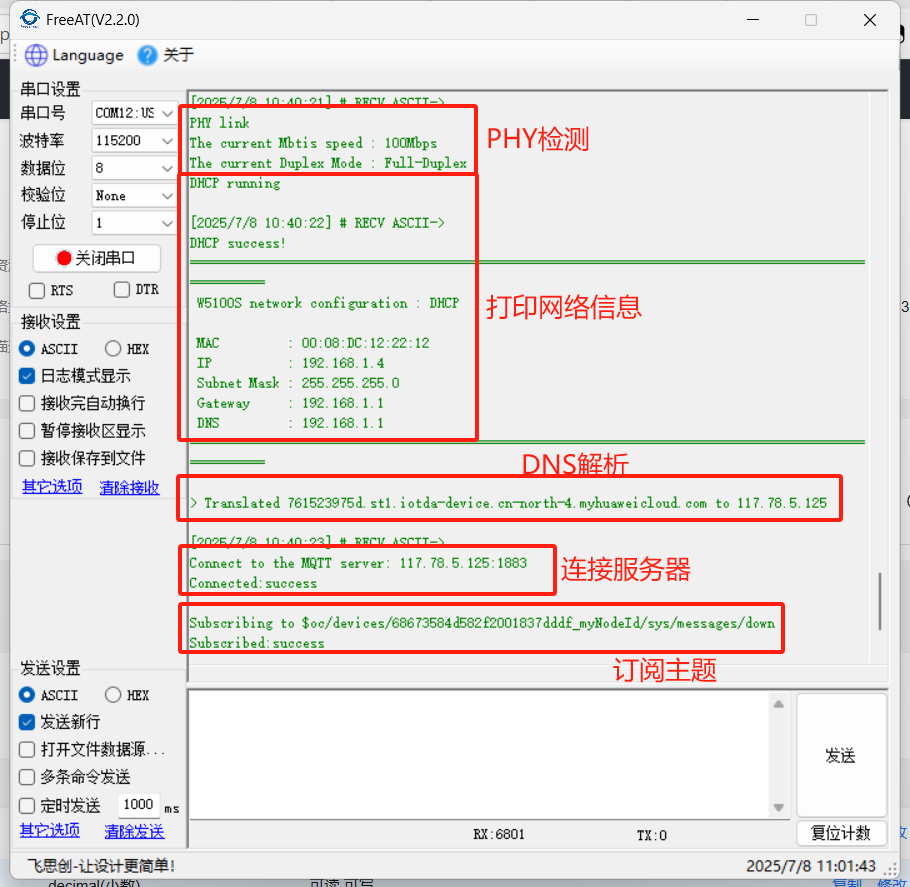
The code is then downloaded into the microcontroller. The serial port display is as follows: First, a PHY link check was performed, then network information was configured via DHCP, and finally, a loopback test was conducted by connecting to the MQTT server.
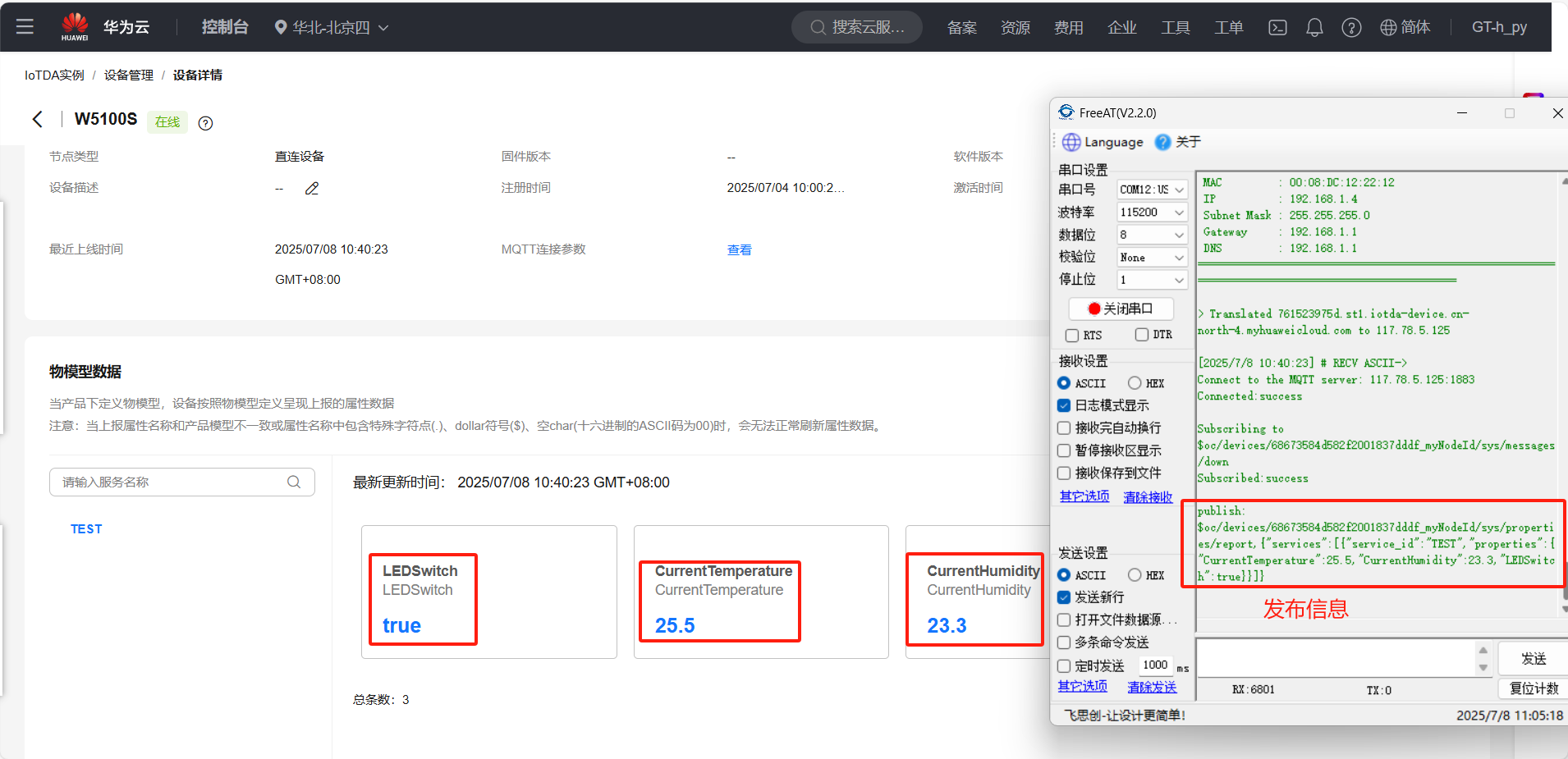
Next, the device sends information to the platform, which receives the information and refreshes in real time.
Next, online debugging is used on the Huawei Cloud platform to send JSON information.
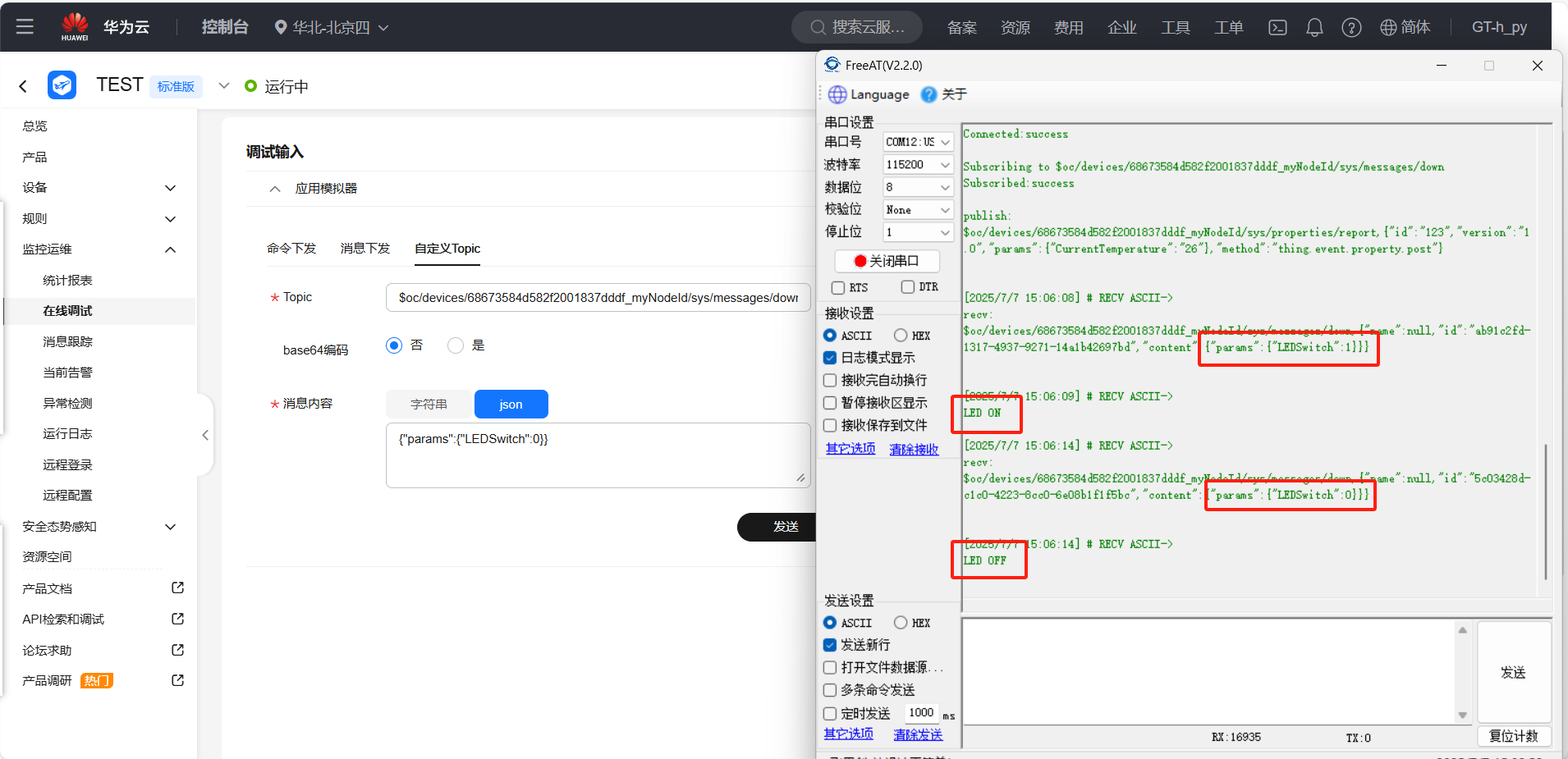
This shows that commands sent from the server can be correctly parsed and executed, indicating that data transmission is correct.
7. Summary
This article details how to connect to Huawei Cloud using the W5100Sio-M, including topic subscription and message publishing functions. Thank you for reading! If you have any questions about this article or would like to learn more about this product, please feel free to leave a message via private message or in the comments section. We will reply to you as soon as possible!
————————————————
Copyright Notice: This article is an original work by CSDN blogger "Playing with Ethernet," and is licensed under CC 4.0 BY-SA. Please include the original source link and this statement when reprinting.
Original Link: https://blog.csdn.net/2301_81684513/article/details/149243715