



MAC whitelist + ARP proactive detection: W5500's practical application of zero-trust network protect
MAC whitelist + ARP proactive detection: W5500's practical application of zero-trust network protection
1. Introduction
ARP (Address Resolution Protocol) is a fundamental network protocol used to dynamically resolve the MAC (physical hardware) address of a target device based on its IP address within the same local area network (LAN). It is a crucial component of the TCP/IP protocol stack for enabling direct communication between devices.
The core working principle of ARP revolves around the requester, the responder, and the ARP cache table. When a device needs to communicate with another device but only knows its IP address, it first queries its local ARP cache table. If no matching entry is found, the requester broadcasts an ARP request to the LAN. The device possessing the target IP (the responder), upon receiving the request, unicasts an ARP response containing its own MAC address. Upon receiving the response, the requester obtains the target MAC address, updates its cache table, and prepares for communication. This "broadcast request, unicast response" model efficiently maintains the dynamic mapping between IP and MAC addresses.
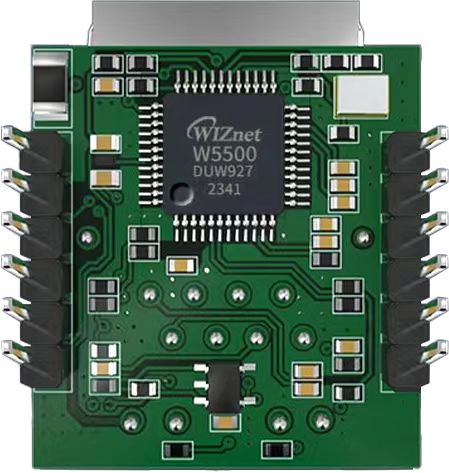
The W5500io-M is a high-performance SPI-to-Ethernet module from W5500io-M, featuring the following characteristics:
- Simple Design: Integrates MAC, PHY, 32KB buffer, and RJ45 Ethernet port. It connects directly to the main controller via a 4-wire SPI interface, operates on 3.3V power, and its compact size makes it suitable for embedded systems.
- Easy to Use: Users no longer need to port complex TCP/IP protocol stacks to the MCU; they can directly develop based on application-layer data.
- Abundant Resources: Provides rich MCU application examples and hardware reference designs for direct reference, significantly shortening development time. Hardware compatibility with the W5100Sio-M module facilitates solution development and iteration.
- Wide Applications: Widely used in industrial control, smart grids, charging piles, security and fire protection, new energy, and energy storage.
2 Project Environment
2.1 Hardware Environment
- W5500io-M
- STM32F103VCT6 EVB
- Network cable
- Several DuPont wires
- Switch
2.2 Software Environment
- Feisichuang Serial Port Assistant
- Example Link: https://www.w5500.com/w5500.html
- Development Environment: Keil uVision 5
3 Hardware Connection and Solution
3.3 W5500 Hardware Connection
//W5500_SCS ---> STM32_GPIOD7 /*W5500 chip select pin*/
 //W5500_SCLK ---> STM32_GPIOB13 /*W5500 clock pin*/
//W5500_MISO ---> STM32_GPIOB14 /*W5500 MISO pin*/
//W5500_MOSI ---> STM32_GPIOB15 /*MOSI pin of W5500*/
//W5500_RESET ---> STM32_GPIOD8 /*RESET pin of W5500*/
//W5500_INT ---> STM32_GPIOD9 /*INT pin of W5500*/
3.4 Scheme Diagram
4. Example Modification
First, download the ARP example program. We've already provided the download link above.

(1) First, open the arp.c file. We will add the device table size, whitelist structure and configuration below the header file.
// 定义设备表大小
#define MAX_DEVICES 100
static DeviceInfo device_table[MAX_DEVICES];
static uint8_t device_count = 0;

// 白名单结构
typedef struct {
   uint8_t mac[6];     // MAC地址
    char name[20];   // 设备名称
} WhitelistEntry;

// Flash参数定义
#define FLASH_SECTOR         FLASH_SECTOR_5       // 使用的Flash扇区
#define FLASH_USER_START_ADDR  0x08020000          // Flash起始地址
#define FLASH_USER_END_ADDR    0x0803FFFF          // Flash结束地址

// 白名单配置
#define MAX_WHITELIST 20
static WhitelistEntry whitelist[MAX_WHITELIST];
static uint8_t whitelist_count = 0;
(2) Add ARP function
/**
* @brief 初始化 ARP 模块
*/
void arp_init(void)
{
   memset(device_table, 0, sizeof(device_table));//清空设备表
   device_count = 0;//重置设备计数
   whitelist_count = 0;//重置白名单计数
   arp_init_whitelist(); // 从Flash加载白名单
   arp_succ_flag = 0;//清除 ARP 成功标志
}

/**
* @brief 添加设备到白名单
*/
void arp_add_to_whitelist(uint8_t *mac, const char *name) {
   if (whitelist_count < MAX_WHITELIST) {
       memcpy(whitelist[whitelist_count].mac, mac, 6);

       // 复制名称到定长数组
       strncpy(whitelist[whitelist_count].name, name, 19);
       whitelist[whitelist_count].name[19] = '\0';

       whitelist_count++;

       // 保存到Flash
       arp_save_whitelist_to_flash();
   }
}
(3) Save the ARP whitelist data in the current memory to the flash memory of the microcontroller.
HAL_StatusTypeDef arp_save_whitelist_to_flash(void) {
   // 1. 准备数据
   uint32_t data_size = 2 + (whitelist_count * sizeof(WhitelistEntry) / sizeof(uint32_t));
   uint32_t *flash_data = malloc(data_size * sizeof(uint32_t));

   // 2. 填充数据结构
   flash_data[0] = 0xDEADBEEF;
   flash_data[1] = whitelist_count; // 条目数量
   WhitelistEntry *entries = (WhitelistEntry*)(flash_data + 2);

   // 3. 擦除Flash扇区
   HAL_FLASH_Unlock();
   FLASH_EraseInitTypeDef erase = {
       .TypeErase = FLASH_TYPEERASE_SECTORS,
       .Sector = FLASH_SECTOR,
       .NbSectors = 1,
       .VoltageRange = FLASH_VOLTAGE_RANGE_3
   };
   HAL_FLASHEx_Erase(&erase, §or_error);

   // 4. 写入数据
   uint32_t addr = FLASH_USER_START_ADDR;
   for (uint32_t i = 0; i < data_size; i++) {
       HAL_FLASH_Program(FLASH_TYPEPROGRAM_WORD, addr, flash_data[i]);
       addr += 4;
   }

   // 5. 清理
   HAL_FLASH_Lock();
   free(flash_data);
}
(4) Read the ARP (Address Resolution Protocol) whitelist data from the microcontroller's Flash memory and load it into RAM for runtime use.
void arp_init_whitelist(void) {
   uint32_t *flash_data = (uint32_t*)FLASH_USER_START_ADDR;
   uint32_t magic = *flash_data; // 读取

   // 检查 (0xDEADBEEF)
   if (magic == 0xDEADBEEF) {
       whitelist_count = *(flash_data + 1); // 读取条目数量
               // 复制数据
       WhitelistEntry *flash_entries = (WhitelistEntry*)(flash_data + 2);
       for (uint8_t i = 0; i < whitelist_count; i++) {
           memcpy(&whitelist[i], &flash_entries[i], sizeof(WhitelistEntry));
       }
   } else {
       whitelist_count = 0;
   }
}
(5) Modify the ARP request function. In lines 27 to 32, print out the IP addresses that failed to be retrieved, and also print out the correct ones.
/**
* @brief 发送 ARP 请求
*/
void arp_request(uint8_t sn, uint16_t port, uint8_t *dest_ip)
{
   uint16_t i;
   uint8_t broadcast_addr[4] = {0xff, 0xff, 0xff, 0xff};

   for (i = 0; i < 6; i++) {
       pARPMSG.dst_mac[i] = 0xff;
       pARPMSG.tgt_mac[i] = 0x00;
       if (i < 4) {
           pARPMSG.tgt_ip[i] = dest_ip[i];
       }
   }

   getSHAR(pARPMSG.src_mac);
   getSHAR(pARPMSG.sender_mac);
   getSIPR(pARPMSG.sender_ip);
   pARPMSG.msg_type = htons(ARP_TYPE);
   pARPMSG.hw_type = htons(ETHER_TYPE);
   pARPMSG.pro_type = htons(PRO_TYPE);
   pARPMSG.hw_size = HW_SIZE;
   pARPMSG.pro_size = PRO_SIZE;
   pARPMSG.opcode = htons(ARP_REQUEST);

   if (sendto(sn, (uint8_t *)&pARPMSG, sizeof(pARPMSG), broadcast_addr, port) != sizeof(pARPMSG)) {
       printf("ARP request to %d.%d.%d.%d failed\r\n",
              dest_ip[0], dest_ip[1], dest_ip[2], dest_ip[3]);
   } else {
       printf("ARP request sent to %d.%d.%d.%d\r\n",
              dest_ip[0], dest_ip[1], dest_ip[2], dest_ip[3]);
   }
}
(6) Modify the ARP response function. Add a function to add the read MAC address to the device table on line 28, add a function to check if the MAC address is in the whitelist on line 37, and modify the printf function to print the discovered device MAC address on line 47.
/**
* @brief ARP 回复处理
*/
void arp_reply(uint8_t sn, uint8_t *buff, uint16_t rlen)
{
   uint8_t destip[4];
   uint16_t destport;
   uint8_t i;

   recvfrom(sn, (uint8_t *)buff, rlen, destip, &destport);

   if (buff[12] == ARP_TYPE_HI && buff[13] == ARP_TYPE_LO) {
       aAPRMSG = (ARPMSG *)buff;

       if (ntohs(aAPRMSG->opcode) == ARP_REPLY) {

           uint8_t match = 1;
           for (i = 0; i < 4; i++) {
               if (aAPRMSG->tgt_ip[i] != pARPMSG.sender_ip[i]) {
                   match = 0;
                   break;
               }
           }

           if (match) {
               arp_succ_flag = 1;

               // 添加到设备表
               if (device_count < MAX_DEVICES) {
                   DeviceInfo *dev = &device_table[device_count];

                   memcpy(dev->ip, aAPRMSG->sender_ip, 4);
                   memcpy(dev->mac, aAPRMSG->sender_mac, 6);
                   dev->valid = 1;

                   // 检查是否在白名单
                   dev->in_whitelist = 0;
                   for (uint8_t j = 0; j < whitelist_count; j++) {
                       if (memcmp(whitelist[j].mac, dev->mac, 6) == 0) {
                           dev->in_whitelist = 1;
                           break;
                       }
                   }

                   device_count++;

                   printf("Device found: %d.%d.%d.%d at %02X:%02X:%02X:%02X:%02X:%02X %s\r\n",
                          dev->ip[0], dev->ip[1], dev->ip[2], dev->ip[3],
                          dev->mac[0], dev->mac[1], dev->mac[2],
                          dev->mac[3], dev->mac[4], dev->mac[5],
                          dev->in_whitelist ? "(Whitelisted)" : "");
               }
           }
       }
   }
}
(7) Modify the do_arp query function, change the return value type from void to uint8_t, and return the execution result through the local variable result (0 = failure, 1 = success). Remove the infinite loop while(1) at the end of the original function that caused the program to block. Add an error code and print information immediately when the socket creation fails on line 12. Add a default branch on line 41 to handle unexpected socket states. Shorten the timeout threshold from about 5 seconds to 1 second on line 30 and add the target IP address to the timeout information. Add an explicit reset of the arp_succ_flag flag before sending the request on line 19.
uint8_t do_arp(uint8_t sn, uint8_t *buf, uint8_t *dest_ip)
{
   uint16_t rlen = 0;
   uint16_t local_port = 5000;
   uint16_t cnt = 0;
   uint8_t result = 0;

   switch (getSn_SR(sn)) {
       case SOCK_CLOSED:
           close(sn);
           if (socket(sn, Sn_MR_MACRAW, local_port, 0) != sn) {
               printf("Socket creation failed\r\n");
               return 0;
           }
           break;

       case SOCK_MACRAW:
           arp_request(sn, local_port, dest_ip);
           arp_succ_flag = 0;

           while (1) {
               if ((rlen = getSn_RX_RSR(sn)) > 0) {
                   arp_reply(sn, buf, rlen);
                   if (arp_succ_flag) {
                       result = 1;
                   }
                   break;
               }

               if (cnt > 200) { // 约 1 秒超时 (200*5ms=1000ms)
                   printf("ARP timeout for %d.%d.%d.%d\r\n",
                          dest_ip[0], dest_ip[1], dest_ip[2], dest_ip[3]);
                   break;
               }

               cnt++;
               wiz_user_delay_ms(5);
           }
           break;

       default:
           printf("Socket in unexpected state: %d\r\n", getSn_SR(sn));
           break;
   }

   return result;
}
(8) Add code to scan all active devices within the entire subnet.
/**
* @brief 扫描整个子网内的所有活跃设备
*
* @param sn        socket编号
* @param buf       接收数据缓冲区
* @param base_ip   子网基础IP(如192.168.1.0中的前三个字节)
*
* 功能说明:
* 1. 遍历子网内所有可能的IP地址(1-254)
* 2. 对每个IP发送ARP请求并等待响应
* 3. 将活跃设备信息存入设备表
* 4. 输出扫描进度和结果统计
*/
void arp_scan_subnet(uint8_t sn, uint8_t *buf, uint8_t *base_ip)
{
   uint8_t target_ip[4];
   memcpy(target_ip, base_ip, 4);

   printf("Starting subnet scan...\r\n");

   // 扫描 1-254 的 IP 地址(排除网络地址和广播地址)
   for (int i = 0; i <= 254; i++) {
       target_ip[3] = i;

       // 跳过自身IP,避免向本机发送ARP请求
       uint8_t my_ip[4];
       getSIPR(my_ip);
       if (memcmp(target_ip, my_ip, 4) == 0) {
           continue;
       }

       // 对当前IP执行ARP查询
       // do_arp会发送ARP请求并等待响应,成功时将设备信息存入device_table
       do_arp(sn, buf, target_ip);

       // 每扫描10个IP显示一次进度,避免频繁输出影响性能
       if (i % 10 == 0) {
           printf("Scanned %d/%d IPs...\r\n", i, 254);
       }
   }

   printf("Subnet scan complete. Found %d devices.\r\n", device_count);
}
(9) Add code for classifying and printing to network devices
/**
* @brief 分类打印扫描到的网络设备
*
* 功能说明:
* 1. 区分显示白名单内和白名单外的设备
* 2. 按规范格式输出IP和MAC地址
* 3. 统计并显示各类设备数量
*/
void arp_print_results(void)
{
   printf("\n=== Network Devices ===\n");

   // 打印白名单设备
   printf("Whitelisted Devices:\n");
   uint8_t whitelist_count = 0;
   for (int i = 0; i < device_count; i++) {
       if (device_table[i].in_whitelist && device_table[i].valid) {
           whitelist_count++;
           printf("  %d.%d.%d.%d - %02X:%02X:%02X:%02X:%02X:%02X\n",
                  device_table[i].ip[0], device_table[i].ip[1],
                  device_table[i].ip[2], device_table[i].ip[3],
                  device_table[i].mac[0], device_table[i].mac[1],
                  device_table[i].mac[2], device_table[i].mac[3],
                  device_table[i].mac[4], device_table[i].mac[5]);
       }
   }
   if (whitelist_count == 0) {
       printf("  No whitelisted devices found\n");
   }

   // 打印非白名单设备(潜在风险设备)
   printf("\nNon-Whitelisted Devices:\n");
   uint8_t non_whitelist_count = 0;
   for (int i = 0; i < device_count; i++) {
       if (!device_table[i].in_whitelist && device_table[i].valid) {
           non_whitelist_count++;
           printf("  %d.%d.%d.%d - %02X:%02X:%02X:%02X:%02X:%02X\n",
                  device_table[i].ip[0], device_table[i].ip[1],
                  device_table[i].ip[2], device_table[i].ip[3],
                  device_table[i].mac[0], device_table[i].mac[1],
                  device_table[i].mac[2], device_table[i].mac[3],
                  device_table[i].mac[4], device_table[i].mac[5]);
       }
   }
   if (non_whitelist_count == 0) {
       printf("  No non-whitelisted devices found\n");
   }

   printf("\nTotal devices: %d\n", device_count);
}
uint8_t arp_get_device_count(void)
{
   return device_count;
}
DeviceInfo *arp_get_device(uint8_t index)
{
   if (index < device_count) {
       return &device_table[index];
   }
   return NULL;
}
(10) We add function declarations and device information structures to arp.h
// 设备信息结构
typedef struct {
   uint8_t ip[4];      // IP地址
   uint8_t mac[6];     // MAC地址
   uint8_t in_whitelist; // 是否在白名单中
   uint8_t valid;      // 条目是否有效
} DeviceInfo;
/**
* @brief  初始化 ARP 模块
*/
void arp_init(void);

/**
* @brief  发送 arp 请求
* @param  sn: socket number
* @param  port: local socket port
* @param  dest_ip: ARP Destination IP address
*/
void arp_request(uint8_t sn, uint16_t port, uint8_t *dest_ip);

/**
* @brief  ARP 回复处理
* @param  sn: socket number
* @param  buff: 接收数据的缓存
* @param  rlen: 接收数据的长度
*/
void arp_reply(uint8_t sn, uint8_t *buff, uint16_t rlen);

/**
* @brief  执行 ARP 查询
* @param  sn: socket number
* @param  buf: 数据缓存
* @param  dest_ip: 目标 IP 地址
* @return 1 表示成功获取 MAC, 0 表示失败
*/
uint8_t do_arp(uint8_t sn, uint8_t *buf, uint8_t *dest_ip);

/**
* @brief  扫描整个子网
* @param  sn: socket number
* @param  buf: 数据缓存
* @param  base_ip: 基础 IP (如 192.168.2.x)
*/
void arp_scan_subnet(uint8_t sn, uint8_t *buf, uint8_t *base_ip);

/**
* @brief  添加设备到白名单
* @param  mac: MAC 地址
* @param  name: 设备名称
*/
void arp_add_to_whitelist(uint8_t *mac, const char *name);

/**
* @brief  打印扫描结果
*/
void arp_print_results(void);

/**
* @brief  获取设备数量
* @return 已发现的设备数量
*/
uint8_t arp_get_device_count(void);

/**
* @brief  获取设备信息
* @param  index: 设备索引 (0 到 arp_get_device_count()-1)
* @return 设备信息指针
*/
DeviceInfo *arp_get_device(uint8_t index);

#endif /* _ARP_H_ */
(11) In user_main.c, line 7 is modified to static IP, line 20 is added to initialize ARP function, line 22 is added to whitelist, line 25 is set to base IP address, line 27 is added to scan function initialization, line 29 is added to print result function. In the while loop, the function of re-scanning the specified subnet after resetting the ARP module every 60 seconds is implemented, and the scan results are displayed in categories to continuously monitor the connection status of network devices.
wiz_NetInfo default_net_info = {
   .mac = {0x00, 0x08, 0xdc, 0x12, 0x22, 0x12},
   .ip = {192, 168, 2, 100},  // 修改为 192.168.2.x 网段
   .gw = {192, 168, 2, 1},
   .sn = {255, 255, 255, 0},
   .dns = {8, 8, 8, 8},
   .dhcp = NETINFO_STATIC  // 使用静态 IP
};

static uint8_t ethernet_buf[ETHERNET_BUF_MAX_SIZE] = {0};

void user_run(void)
{
   printf("Starting network scanner...\r\n");
   // 初始化 WIZnet 芯片
   wizchip_initialize();
   // 配置网络
   network_init(ethernet_buf, &default_net_info);
   // 初始化 ARP 模块
   arp_init();
   // 添加白名单设备
   arp_add_to_whitelist((uint8_t[]){0x16, 0xE2, 0xAE, 0x24, 0x73, 0xFE}, "phone");
   arp_add_to_whitelist((uint8_t[]){0xA8, 0x41, 0xF4, 0x0D, 0x7B, 0xEA}, "computer");
   // 设置基础 IP (192.168.2.0)
   uint8_t base_ip[4] = {192, 168, 2, 0};
   // 扫描整个子网
   arp_scan_subnet(SOCKET_ID, ethernet_buf, base_ip);
   // 打印结果
   arp_print_results();
   // 主循环中可以定期重新扫描
   while (1) {
       printf("Rescanning network in 60 seconds...\r\n");
       wiz_user_delay_ms(60000);
       // 清除之前的扫描结果
       arp_init();
       // 重新扫描
       arp_scan_subnet(SOCKET_ID, ethernet_buf, base_ip);
       arp_print_results();
   }
}
5. Demonstration of Results
5.1 Start Scanning
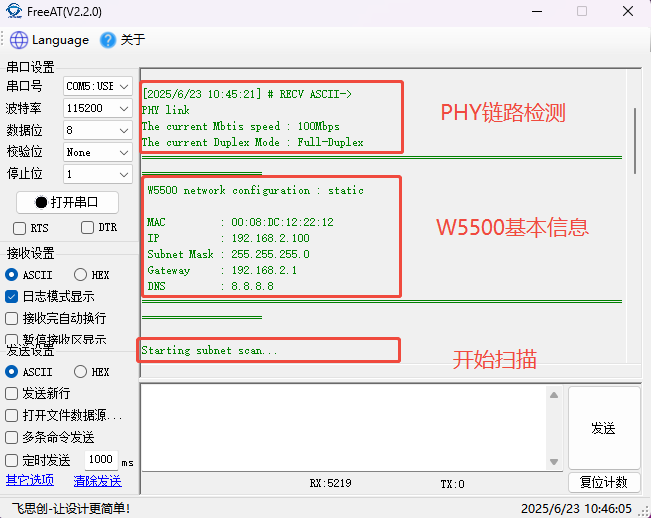
As shown in the serial port display below, the W5500 first establishes a PHY link connection, sets up the basic information of the W5500, and then begins scanning.
5.2 During the Scan
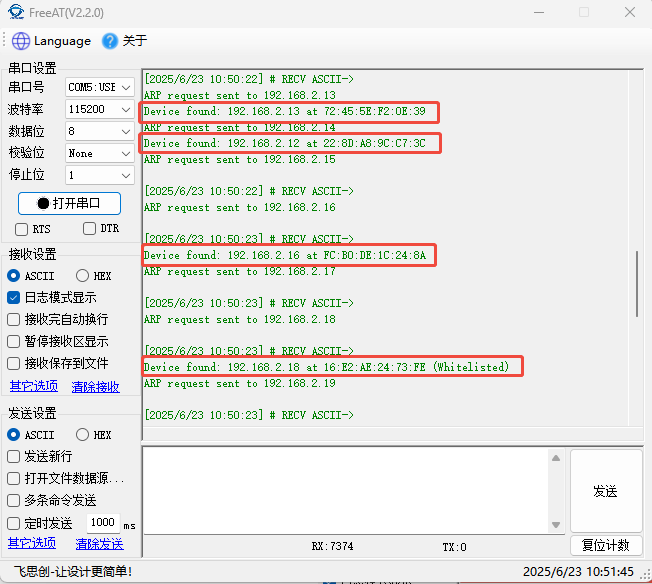
The scan is performed on this network segment. During the scan, MAC addresses are recorded, and it's also possible to see if a MAC address belongs to the whitelist.
5.3 Scan Complete
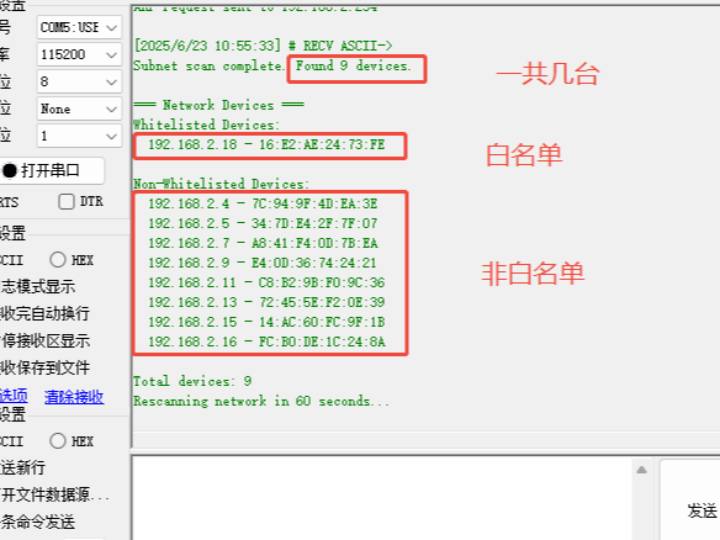
It can be found that there are a total of 9 devices in the local area network, only 1 of which is in the specified whitelist, while the other 8 are not in the whitelist. At this time, certain protective measures can be taken, such as buzzer alarms. If each relay controls one device, the relays of the whitelisted devices can be kept connected, while the relays of the other devices can be disconnected.

6. Summary
Through innovative ARP scanning technology, we achieved comprehensive device detection on the 192.168.2.* subnet. The system automatically stores the MAC address of each connected device and intelligently compares it with a preset whitelist, ultimately presenting a clearly categorized visual report: whitelisted devices are displayed with a security icon, while non-whitelisted devices are highlighted with a warning icon. This allows you to easily manage all connected devices on the network, accurately distinguish between trusted devices and potential risks, and achieve proactive defense and intelligent management of network security. Thank you for watching. If you have any questions about this article or would like to learn more about our products, please feel free to send us a private message or leave a comment. We will reply to you promptly!
————————————————
Copyright Notice: This article is an original work by CSDN blogger "Playing with Ethernet," licensed under CC 4.0 BY-SA. Please include the original source link and this statement when reprinting.
Original Link: https://blog.csdn.net/2301_81684513/article/details/148944604