



How to Build a W5500 TCP Client with STM32F10x?
This STM32F10x project builds a TCP client using the WIZnet W5500 Ethernet controller and WIZnet ioLibrary.
How to Build a W5500 TCP Client with STM32F10x?
Summary
This STM32F10x project builds a TCP client using the WIZnet W5500 Ethernet controller and WIZnet ioLibrary. The STM32F10x firmware initializes the W5500 platform layer, obtains network parameters through DHCP, uses socket 0 as a TCP client, connects to a remote TCP server, enables TCP keepalive, and echoes received data back to the server.
What the Project Does
The project is the second step in a W5500 validation sequence for STM32F10x. It reuses the earlier SPI, reset, timer, and DHCP initialization files, then adds a TCP client test layer. The W5500 client connects to a TCP server at 192.168.1.190:6000, receives data through W5500 socket 0, prints the received payload over UART, and sends the same payload back to the server. The article describes this as a test of configuring a TCP client after DHCP has provided the local network parameters.
The firmware flow is useful for both education and commercial bring-up. For education, it exposes the W5500 socket state machine directly: closed, initialized, connected, receive-ready, send, and close-wait. For commercial work, it provides a repeatable diagnostic pattern: verify the W5500 platform layer, acquire IP configuration, connect to a known server, enable keepalive, and confirm bidirectional TCP payload exchange.
Where WIZnet Fits
The WIZnet product used is W5500. In this project, W5500 provides the Ethernet MAC/PHY, hardwired TCP/IP stack, socket engine, and internal network buffers. The STM32F10x firmware communicates with W5500 over SPI through ioLibrary, while the W5500 socket layer handles the TCP client connection state and data movement.
W5500 is a good fit here because the lesson and bring-up target is TCP behavior, not software TCP/IP stack implementation. W5500 supports a hardwired TCP/IP stack, SPI up to 80 MHz, 8 independent sockets, and 32 KB internal Tx/Rx buffer memory. Those constraints map well to an STM32F10x TCP client that needs predictable Ethernet behavior without carrying the full TCP/IP stack in MCU firmware.
Compared with LwIP, the trade-off is control versus integration effort. LwIP is a software TCP/IP stack, so the MCU firmware owns stack integration, driver binding, timers, memory pools, and more network-state behavior. With W5500, the TCP socket model is provided by the chip, and the STM32F10x application drives it through socket APIs such as socket(), connect(), recv(), send(), disconnect(), and close().
Implementation Notes
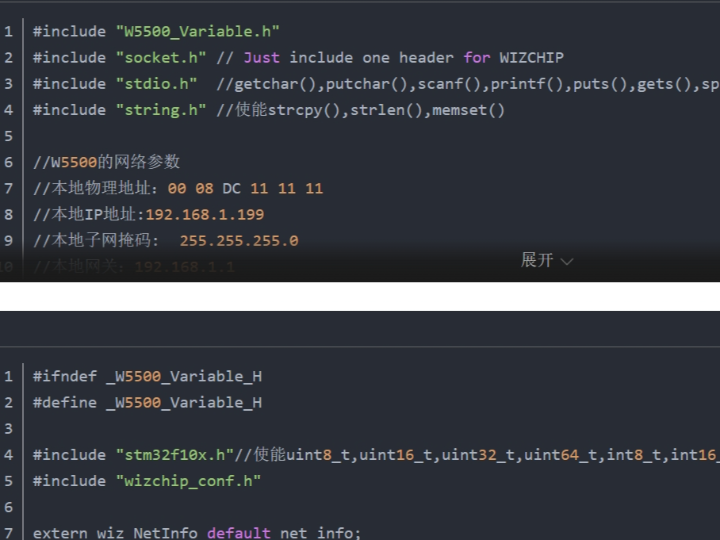
The article provides code sections rather than a full browsable source tree for every file. It also states that the SPI, reset, and TIM2 initialization files are reused from the previous step, so this article does not repeat the full STM32F10x SPI initialization code. The verified TCP client code is focused on W5500 variables, socket-state handling, and the main application loop.
W5500_Variable.c — network mode and remote TCP server target
wiz_NetInfo default_net_info = {
    {0x00, 0x08, 0xdc,0x11, 0x11, 0x11},
    {192, 168, 1, 199},
    {255,255,255,0},
    {192, 168, 1, 1},
    {8,8,8,8},
    NETINFO_DHCP};

uint16_t LocalPort0 = 5000;
uint8_t  dest_ip[4] = {192,168,1,190};
uint16_t dest_port = 6000;
This block defines the default W5500 network configuration and the TCP server endpoint. The local configuration is set to DHCP mode, while the TCP client target is fixed at 192.168.1.190:6000. That makes the test easy to reproduce in a classroom or production bench: DHCP validates LAN configuration, and the fixed server address validates TCP client behavior.
TestTcpClient.c — W5500 socket-0 TCP client state machine
switch(getSn_SR(sn))
{
    case SOCK_ESTABLISHED:
        if((size = getSn_RX_RSR(sn)) > 0) {
            ret = recv(sn, buf, size);
            ret = send(sn, buf, size);
        }
        break;

    case SOCK_INIT:
        ret = connect(sn, destip, destport);
        break;

    case SOCK_CLOSED:
        close(sn);
        ret = socket(sn, Sn_MR_TCP, any_port++, 0x00);
        break;
}
This is the core TCP client state machine. getSn_SR(sn) reads the W5500 socket status register. When the socket is closed, the firmware opens it in TCP mode. When initialized, it connects to the remote server. When established, it checks the receive-size register, reads incoming data with recv(), and sends the payload back with send(). This code exists to make W5500 socket transitions visible and testable instead of hiding TCP connection handling behind a larger framework.
main.c — DHCP-to-TCP transition and keepalive
wiz_timer_init();
wiz_spi_init();
wiz_rst_int_init();

wizchip_initialize();
network_init(ethernet_buf, &default_net_info);

setSn_KPALVTR(SOCKET0, 6); // 30s keepalive

while(1) {
    loop_TestTcpClient(SOCKET0, ethernet_buf, dest_ip, dest_port);
}
This main loop shows how the project moves from board bring-up to network operation. The firmware initializes the timer, SPI interface, W5500 reset/interrupt pins, W5500 core state, DHCP network configuration, and then repeatedly services the TCP client on socket 0. setSn_KPALVTR(SOCKET0, 6) enables W5500 TCP keepalive timing at 30 seconds because the register unit is 5 seconds.
Practical Tips / Pitfalls
- Do not reuse the sample MAC address in multiple boards. Duplicate MAC addresses can create ARP and DHCP conflicts on the same LAN.
- Keep socket ownership explicit. This project uses socket 0 for the TCP client, so avoid reusing socket 0 for DHCP or DNS at the same time in the final application.
- Confirm DHCP success before starting the TCP client. A failed or stale IP configuration can make the TCP state machine look broken even when socket code is correct.
- Treat
SOCK_CLOSE_WAITas a normal state. The peer may close first, and the firmware should calldisconnect()or recover cleanly. - Keepalive is not a replacement for application-level health checks. It helps detect dead TCP peers, but commercial devices should still define reconnect timing and payload-level timeout rules.
- Size the Ethernet buffer around the largest expected payload. The article uses a 2 KB buffer, which is clear for testing but may need adjustment for product traffic.
- For education, trace
getSn_SR(),getSn_RX_RSR(),recv(), andsend()in order. These four points explain most of the W5500 TCP client behavior.
FAQ
Q: Why use W5500 for this STM32F10x TCP client?
A: W5500 lets the STM32F10x use TCP sockets through a hardware TCP/IP engine instead of implementing the full TCP/IP stack in firmware. That keeps the example focused on socket state, connection behavior, receive buffers, send buffers, and keepalive handling.
Q: How does W5500 connect to the STM32F10x in this project?
A: The article reuses the platform files from the previous W5500 step, where SPI, reset, interrupt, and TIM2 support are initialized before W5500 operation. In this TCP client example, main.c calls wiz_spi_init(), wiz_rst_int_init(), wizchip_initialize(), and network_init() before socket 0 is used for TCP communication.
Q: What role does W5500 socket 0 play in this project?
A: Socket 0 is the TCP client socket. The firmware opens it in TCP mode, connects it to 192.168.1.190:6000, receives data from the server, prints the received payload, and sends the same payload back as a loopback-style TCP client test.
Q: Can beginners follow this project?
A: Yes, if they already understand basic STM32 GPIO, SPI, UART debugging, and IP addressing. It is a strong education example because the W5500 socket states are visible in the code, and the student can map each state to a real TCP client action.
Q: How does this compare with LwIP on STM32F10x?
A: LwIP gives more software control over the TCP/IP stack, but it also makes the MCU firmware responsible for stack integration, memory management, timers, and driver interaction. W5500 is narrower: the STM32F10x application controls a hardware socket engine over SPI, which simplifies TCP client bring-up and makes the state machine easier to teach and debug.
Source
Original article: CSDN, “测试W5500的第2步_使用ioLibrary库创建TCP客户端.” The article states that it follows the CC 4.0 BY-SA license.
Related source repository: WIZnet HK STM32F10x_W5500_Examples, which includes 3.TCP_Client along with DHCP, TCP server, UDP, DNS, HTTP, MQTT, Modbus TCP server, and other W5500 examples for STM32F10x.
Product reference: WIZnet W5500 product documentation for hardwired TCP/IP, SPI, sockets, Ethernet MAC/PHY, and internal buffer features.
Tags
#W5500 #WIZnet #STM32F10x #TCPClient #SPI #ioLibrary #Socket0 #TCPKeepalive #EmbeddedEthernet #Education #CommercialFirmware #LwIP
STM32F10x에서 W5500 TCP 클라이언트를 구축하는 방법
요약
이 STM32F10x 프로젝트는 WIZnet W5500 이더넷 컨트롤러와 WIZnet ioLibrary를 사용해 TCP 클라이언트를 구현합니다. STM32F10x 펌웨어는 W5500 플랫폼 계층을 초기화하고, DHCP로 네트워크 파라미터를 받은 뒤, 소켓 0을 TCP 클라이언트로 사용하여 원격 TCP 서버에 연결합니다. 또한 TCP keepalive를 활성화하고, 수신한 데이터를 다시 서버로 echo 전송합니다.
프로젝트가 하는 일
이 프로젝트는 STM32F10x에서 W5500을 검증하는 두 번째 단계입니다. 이전 단계의 SPI, 리셋, 타이머, DHCP 초기화 파일을 재사용하고, 여기에 TCP 클라이언트 테스트 계층을 추가합니다. W5500 클라이언트는 192.168.1.190:6000의 TCP 서버에 연결하고, W5500 소켓 0을 통해 데이터를 수신하며, 수신한 payload를 UART로 출력한 뒤 같은 데이터를 다시 서버로 전송합니다.
이 펌웨어 흐름은 교육용과 상용 bring-up 모두에 유용합니다. 교육용으로는 W5500 소켓 상태 머신을 직접 보여줍니다. 즉 closed, initialized, connected, receive-ready, send, close-wait 상태를 코드 흐름에서 확인할 수 있습니다. 상용 개발에서는 W5500 플랫폼 계층 검증, IP 설정 획득, 알려진 서버로의 연결, keepalive 활성화, 양방향 TCP payload 교환 확인이라는 반복 가능한 진단 패턴을 제공합니다.
WIZnet이 들어가는 위치
이 프로젝트에서 사용된 WIZnet 제품은 W5500입니다. W5500은 이더넷 MAC/PHY, 하드웨어 TCP/IP 스택, 소켓 엔진, 내부 네트워크 버퍼를 제공합니다. STM32F10x 펌웨어는 ioLibrary를 통해 SPI로 W5500과 통신하고, W5500의 소켓 계층은 TCP 클라이언트 연결 상태와 데이터 이동을 처리합니다.
이 프로젝트에서 W5500이 적합한 이유는 학습과 bring-up의 목표가 소프트웨어 TCP/IP 스택 구현이 아니라 TCP 동작 확인이기 때문입니다. W5500은 하드웨어 TCP/IP 스택, 최대 80 MHz SPI, 8개 독립 소켓, 32 KB 내부 Tx/Rx 버퍼 메모리를 제공합니다. 이러한 특성은 MCU 펌웨어에 전체 TCP/IP 스택을 넣지 않고도 예측 가능한 이더넷 동작을 구현해야 하는 STM32F10x TCP 클라이언트에 잘 맞습니다.
LwIP와 비교하면 핵심 차이는 제어 범위와 통합 부담입니다. LwIP는 소프트웨어 TCP/IP 스택이므로 MCU 펌웨어가 스택 통합, 드라이버 연결, 타이머, 메모리 풀, 네트워크 상태 처리를 직접 담당합니다. W5500을 사용하면 TCP 소켓 모델은 칩에서 제공되고, STM32F10x 애플리케이션은 socket(), connect(), recv(), send(), disconnect(), close() 같은 소켓 API를 통해 이를 제어합니다.
구현 참고 사항
원문은 모든 파일에 대한 전체 소스 트리를 제공하기보다는 코드 섹션 중심으로 설명합니다. 또한 SPI, 리셋, TIM2 초기화 파일은 이전 단계 예제를 재사용한다고 설명하므로, 이 글에서는 전체 STM32F10x SPI 초기화 코드를 반복하지 않습니다. 확인 가능한 TCP 클라이언트 코드는 W5500 변수, 소켓 상태 처리, 메인 애플리케이션 루프에 집중되어 있습니다.
W5500_Variable.c — 네트워크 모드와 원격 TCP 서버 대상
wiz_NetInfo default_net_info = {
    {0x00, 0x08, 0xdc,0x11, 0x11, 0x11},
    {192, 168, 1, 199},
    {255,255,255,0},
    {192, 168, 1, 1},
    {8,8,8,8},
    NETINFO_DHCP};

uint16_t LocalPort0 = 5000;
uint8_t  dest_ip[4] = {192,168,1,190};
uint16_t dest_port = 6000;
이 블록은 기본 W5500 네트워크 설정과 TCP 서버 endpoint를 정의합니다. 로컬 네트워크 설정은 DHCP 모드로 지정되어 있고, TCP 클라이언트 대상은 192.168.1.190:6000으로 고정되어 있습니다. 따라서 교실 실습이나 생산 테스트 벤치에서 재현하기 쉽습니다. DHCP는 LAN 설정을 검증하고, 고정 서버 주소는 TCP 클라이언트 동작을 검증합니다.
TestTcpClient.c — W5500 소켓 0 TCP 클라이언트 상태 머신
switch(getSn_SR(sn))
{
    case SOCK_ESTABLISHED:
        if((size = getSn_RX_RSR(sn)) > 0) {
            ret = recv(sn, buf, size);
            ret = send(sn, buf, size);
        }
        break;

    case SOCK_INIT:
        ret = connect(sn, destip, destport);
        break;

    case SOCK_CLOSED:
        close(sn);
        ret = socket(sn, Sn_MR_TCP, any_port++, 0x00);
        break;
}
이 부분이 TCP 클라이언트 상태 머신의 핵심입니다. getSn_SR(sn)은 W5500 소켓 상태 레지스터를 읽습니다. 소켓이 닫혀 있으면 펌웨어는 TCP 모드로 소켓을 열고, 초기화 상태가 되면 원격 서버에 연결합니다. 연결이 성립되면 수신 크기 레지스터를 확인하고, recv()로 수신 데이터를 읽은 뒤 send()로 다시 전송합니다. 이 코드는 TCP 연결 처리를 큰 프레임워크 뒤에 숨기지 않고, W5500 소켓 전이를 직접 관찰하고 테스트하기 위해 존재합니다.
main.c — DHCP 이후 TCP 전환 및 keepalive
wiz_timer_init();
wiz_spi_init();
wiz_rst_int_init();

wizchip_initialize();
network_init(ethernet_buf, &default_net_info);

setSn_KPALVTR(SOCKET0, 6); // 30s keepalive

while(1) {
    loop_TestTcpClient(SOCKET0, ethernet_buf, dest_ip, dest_port);
}
이 메인 루프는 보드 bring-up에서 실제 네트워크 동작으로 전환되는 흐름을 보여줍니다. 펌웨어는 타이머, SPI 인터페이스, W5500 리셋/인터럽트 핀, W5500 내부 상태, DHCP 기반 네트워크 설정을 초기화한 뒤, 소켓 0의 TCP 클라이언트를 반복적으로 처리합니다. setSn_KPALVTR(SOCKET0, 6)은 W5500 TCP keepalive 타이밍을 활성화합니다. 해당 레지스터의 단위가 5초이므로 값 6은 30초를 의미합니다.
실전 팁과 주의할 점
- 샘플 MAC 주소를 여러 보드에서 그대로 사용하지 않아야 합니다. 중복 MAC 주소는 같은 LAN에서 ARP 및 DHCP 충돌을 만들 수 있습니다.
- 소켓 소유권을 명확히 유지해야 합니다. 이 프로젝트는 소켓 0을 TCP 클라이언트로 사용하므로, 최종 애플리케이션에서 동시에 DHCP나 DNS에 소켓 0을 재사용하지 않아야 합니다.
- TCP 클라이언트를 시작하기 전에 DHCP 성공 여부를 확인해야 합니다. IP 설정이 실패했거나 오래된 값이면 TCP 상태 머신이 정상이어도 연결이 실패한 것처럼 보일 수 있습니다.
SOCK_CLOSE_WAIT는 정상적으로 발생할 수 있는 상태로 처리해야 합니다. 상대방이 먼저 연결을 닫을 수 있으므로, 펌웨어는disconnect()를 호출하거나 복구 절차를 수행해야 합니다.- Keepalive는 애플리케이션 수준의 상태 확인을 대체하지 않습니다. 죽은 TCP peer를 감지하는 데 도움이 되지만, 상용 장치에서는 재연결 타이밍과 payload 수준 timeout 규칙을 별도로 정의해야 합니다.
- Ethernet buffer 크기는 예상되는 최대 payload를 기준으로 정해야 합니다. 원문은 2 KB 버퍼를 사용하며 테스트에는 명확하지만, 제품 트래픽에 따라 조정이 필요할 수 있습니다.
- 교육용으로는
getSn_SR(),getSn_RX_RSR(),recv(),send()순서로 추적하는 것이 좋습니다. 이 네 지점만 따라가도 W5500 TCP 클라이언트 동작의 대부분을 설명할 수 있습니다.
FAQ
Q: 이 STM32F10x TCP 클라이언트에서 왜 W5500을 사용하나요?
A: W5500을 사용하면 STM32F10x가 전체 TCP/IP 스택을 펌웨어에서 직접 구현하지 않고도 하드웨어 TCP/IP 엔진을 통해 TCP 소켓을 사용할 수 있습니다. 따라서 예제의 초점은 소켓 상태, 연결 동작, 수신 버퍼, 송신 버퍼, keepalive 처리에 맞춰집니다.
Q: 이 프로젝트에서 W5500은 STM32F10x에 어떻게 연결되나요?
A: 이 글은 이전 W5500 단계의 플랫폼 파일을 재사용합니다. 해당 단계에서는 W5500 동작 전에 SPI, 리셋, 인터럽트, TIM2 지원을 초기화합니다. 이 TCP 클라이언트 예제의 main.c는 소켓 0을 TCP 통신에 사용하기 전에 wiz_spi_init(), wiz_rst_int_init(), wizchip_initialize(), network_init()을 호출합니다.
Q: 이 프로젝트에서 W5500 소켓 0은 어떤 역할을 하나요?
A: 소켓 0은 TCP 클라이언트 소켓입니다. 펌웨어는 소켓 0을 TCP 모드로 열고 192.168.1.190:6000에 연결한 뒤, 서버에서 데이터를 수신하고, 수신 payload를 출력하며, 같은 payload를 다시 전송하는 loopback 형태의 TCP 클라이언트 테스트를 수행합니다.
Q: 초보자도 따라할 수 있나요?
A: STM32 GPIO, SPI, UART 디버깅, IP 주소 개념을 기본적으로 이해하고 있다면 따라갈 수 있습니다. W5500 소켓 상태가 코드에 직접 드러나기 때문에, 각 상태를 실제 TCP 클라이언트 동작과 연결해 학습하기 좋은 교육용 예제입니다.
Q: STM32F10x에서 LwIP를 사용하는 방식과 비교하면 어떤 차이가 있나요?
A: LwIP는 TCP/IP 스택을 소프트웨어 수준에서 더 많이 제어할 수 있지만, MCU 펌웨어가 스택 통합, 메모리 관리, 타이머, 드라이버 연동을 책임져야 합니다. W5500은 더 좁은 구조입니다. STM32F10x 애플리케이션이 SPI로 하드웨어 소켓 엔진을 제어하므로 TCP 클라이언트 bring-up이 단순해지고, 상태 머신을 교육 및 디버깅하기 쉽습니다.
출처
Original article: CSDN, “测试W5500的第2步_使用ioLibrary库创建TCP客户端.” 원문 페이지 기준 CC 4.0 BY-SA 라이선스가 명시되어 있습니다.
https://blog.csdn.net/weixin_42550185/article/details/148085431?spm=1001.2014.3001.5502
Related source repository: WIZnet HK STM32F10x_W5500_Examples. DHCP, TCP Client, TCP Server, UDP, DNS, HTTP, MQTT, Modbus TCP Server 등 STM32F10x용 W5500 예제를 포함합니다.
https://gitee.com/wiznet-hk/STM32F10x_W5500_Examples
Product reference: WIZnet W5500 제품 문서. 하드웨어 TCP/IP, SPI, 소켓, Ethernet MAC/PHY, 내부 버퍼 기능 참고 자료입니다.
https://wiznet.io/products/ethernet-chips/w5500
태그
#W5500 #WIZnet #STM32F10x #TCPClient #SPI #ioLibrary #Socket0 #TCPKeepalive #EmbeddedEthernet #Education #CommercialFirmware #LwIP