



How Do You Bring Up Ethernet with a Static IP on W5500-EVB-Pico?
This article explains how to bring up Ethernet networking on the W5500-EVB-Pico using a static IP configuration.
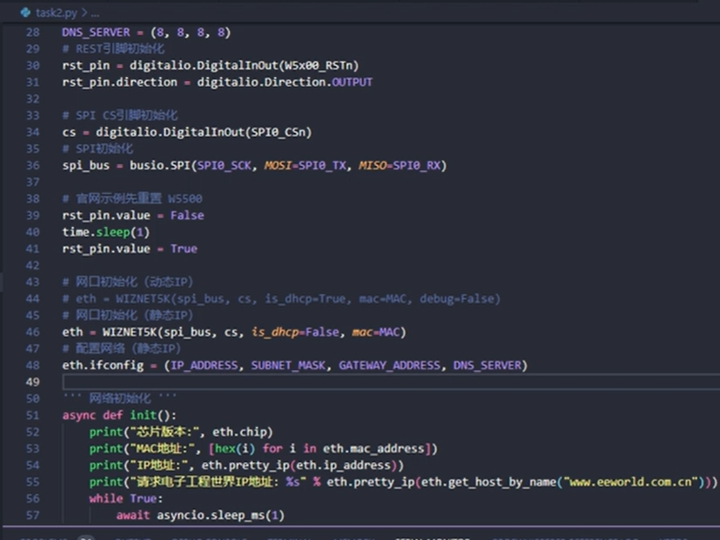
How Do You Bring Up Ethernet with a Static IP on W5500-EVB-Pico?
Network Initialization Flow, Register Setup, and Deterministic Link Establishment
(W5500-EVB-Pico에서 정적 IP로 이더넷을 초기화하면 어떻게 동작하는가?)
Summary (40–60 words)
This article explains how to bring up Ethernet networking on the W5500-EVB-Pico using a static IP configuration. By walking through hardware reset, SPI communication, register-level network setup, and link verification, it demonstrates how W5500’s hardware TCP/IP architecture enables deterministic and reliable network initialization for embedded and industrial systems.
1. Why Static IP Still Matters in Embedded Systems
In many industrial and field deployments, static IP addressing is preferred over DHCP because it provides:
Predictable device identity
Easier firewall and routing configuration
Faster boot-to-network time
Reduced dependency on network infrastructure
For devices such as:
Controllers
Gateways
Test instruments
Static IP simplifies both deployment and long-term maintenance.
2. W5500-EVB-Pico Hardware Overview
The W5500-EVB-Pico integrates:
RP2040 dual-core MCU
WIZnet W5500 Ethernet controller
SPI-based MCU ↔ Ethernet connection
Key architectural choice:
The RP2040 does not run a software TCP/IP stack.
All TCP/IP and ARP handling is offloaded to W5500 hardware.
This greatly simplifies the bring-up process.
3. Network Bring-Up Architecture
End-to-End Bring-Up Flow
Each step must complete correctly before moving to the next.
4. Hardware Reset and SPI Readiness
Reset Sequence
Before any register access:
Assert W5500 RESET low
Hold for the minimum specified time
Release RESET and wait for stabilization
Why this matters:
Internal state machines are reset
PHY and socket logic start cleanly
Prevents undefined startup behavior
Only after reset should SPI transactions begin.
5. Static IP Configuration (Register-Level View)
Static IP bring-up requires configuring common registers in the W5500.
Required Parameters
MAC address
IPv4 address
Subnet mask
Gateway address
These values are written via SPI into W5500 common registers.
Important point:
Until these registers are set, the device is not “on the network,” even if the link LED is on.
6. SPI Communication Discipline
Each SPI transaction to W5500 follows a strict format:
Address (block + offset)
Control byte (R/W, block select, mode)
Data bytes
Critical rule:
Chip Select (CS) must remain asserted for the entire SPI frame.
Violating this rule causes:
Partial register writes
Corrupted network configuration
“Link up but not reachable” symptoms
7. Verifying Network Bring-Up
After static IP configuration, verification proceeds in layers.
Layer 1: PHY Link
Ethernet cable connected
Link LED active
This only confirms physical connectivity.
Layer 2: IP Presence
Device responds to ping
ARP resolution succeeds
At this stage:
W5500 is correctly configured
Network parameters are valid
Layer 3: Socket Readiness
Although no sockets are opened yet:
The W5500 is ready to accept TCP/UDP socket commands
Application-level networking can begin
8. Why Static IP Bring-Up Is Deterministic on W5500
With W5500:
No DHCP negotiation delay
No background IP state machine
No retry storms
Bring-up time is dominated by:
MCU boot time
Reset delay
SPI register writes
This determinism is valuable in:
Power-cycled industrial systems
Time-sensitive equipment
Automated test environments
9. Common Bring-Up Failures and Root Causes
❌ Link LED on, but ping fails
Cause:
IP or gateway registers not configured
Subnet mismatch
❌ SPI reads return invalid values
Cause:
CS timing violation
SPI mode mismatch
❌ Network works intermittently after reset
Cause:
Reset timing too short
Registers written before W5500 ready
Most issues occur before any socket is opened.
10. Field Deployment Considerations
For real deployments:
Use unique MAC addresses
Document static IP assignments
Validate network reachability at boot
Avoid hard-coded assumptions about gateway availability
Static IP combined with W5500 provides:
Predictable behavior
Easy diagnostics
Long-term stability
11. Why W5500-EVB-Pico Is Ideal for Bring-Up Demos
Clear hardware partitioning
No hidden software TCP/IP stack
Register-level visibility
Easy packet capture and analysis
This makes it an excellent reference platform for:
Learning Ethernet bring-up
Prototyping industrial devices
Debugging network initialization issues
12. Key Takeaway
On W5500-EVB-Pico, static IP network bring-up is a finite, deterministic sequence of reset, SPI configuration, and register setup—not a probabilistic networking process.
When this sequence is respected:
The device becomes reachable immediately
Network behavior is predictable
Application development starts on a solid foundation
FAQ (Engineer-Focused)
Q1. Does W5500 require DHCP for basic networking?
No. Static IP works fully without DHCP.
Q2. Is the PHY link enough to confirm network readiness?
No. IP-level testing is required.
Q3. Can this run without an RTOS?
Yes. Bring-up is RTOS-independent.
Q4. How long does bring-up take?
Typically milliseconds after reset.
Q5. Is this suitable for production devices?
Yes, especially in fixed networks.
Source
Bilibili video: BV1yx4y1y71b
WIZnet W5500 Datasheet
W5500-EVB-Pico documentation
Tags
W5500, W5500-EVB-Pico, RP2040, Static IP, Network Bring-Up, Embedded Ethernet, Industrial IoT
🇰🇷 한국어 번역 (1:1 Full Translation)
W5500-EVB-Pico에서 정적 IP로 이더넷을 초기화하면 어떻게 동작하는가?
네트워크 브링업 절차, 레지스터 설정, 결정적 링크 형성
요약
본 문서는 WIZnet W5500-EVB-Pico에서 정적 IP를 사용해 이더넷 네트워크를 초기화하는 과정을 설명한다. 하드웨어 리셋, SPI 통신, 네트워크 레지스터 설정, 링크 검증 절차를 통해 하드웨어 TCP/IP 구조가 임베디드 시스템에서 결정적이고 안정적인 네트워크 브링업을 어떻게 가능하게 하는지 보여준다.
1. 정적 IP가 여전히 중요한 이유
산업 현장에서는
예측 가능한 네트워크가 필요하다.
2. 시스템 아키텍처
3. 브링업 순서
리셋 → SPI → 레지스터 → 링크
4. 흔한 오류
IP 미설정
CS 타이밍 오류
리셋 지연 부족
5. 핵심 메시지
W5500의 네트워크 초기화는 순서를 지키는 공정이다.
태그
W5500, EVB-Pico, 정적 IP, 네트워크 브링업, 임베디드 이더넷