I'm very happy to have the opportunity to participate in this FOLLOW ME event. Through this event, I learned the basic usage of the W5500-EVB-Pico, and the learning outcomes are summarized below:
Follow me第4期-总结视频-Follow me第4期 总结视频-EEWORLD大学堂
I. Task and Hardware Introduction
The motherboard for this task is the W5500-EVB-Pico, which offers the ease of use of the RP2040, is highly compatible with MPY, CPY, and Arduino, and also features a W5500 Ethernet port, enabling convenient Ethernet connection for network application development.
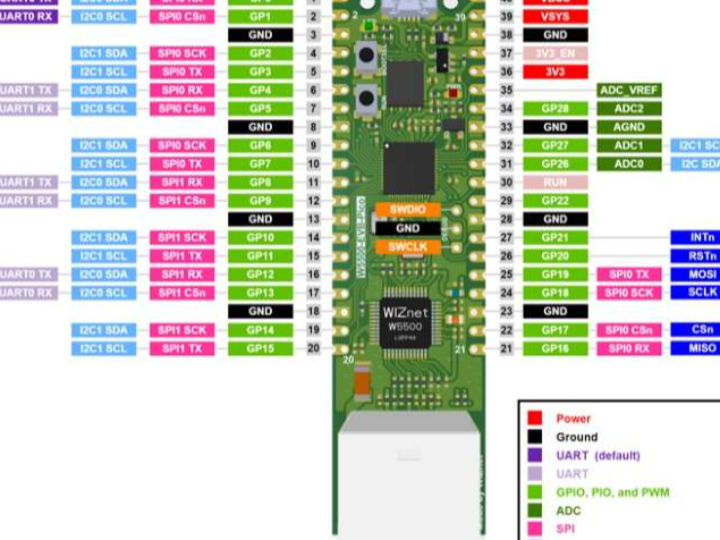
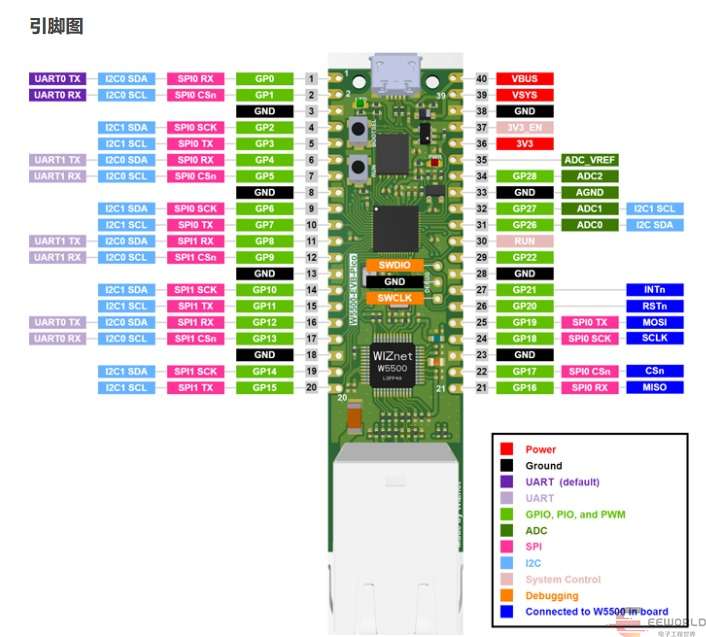
Motherboard Introduction:
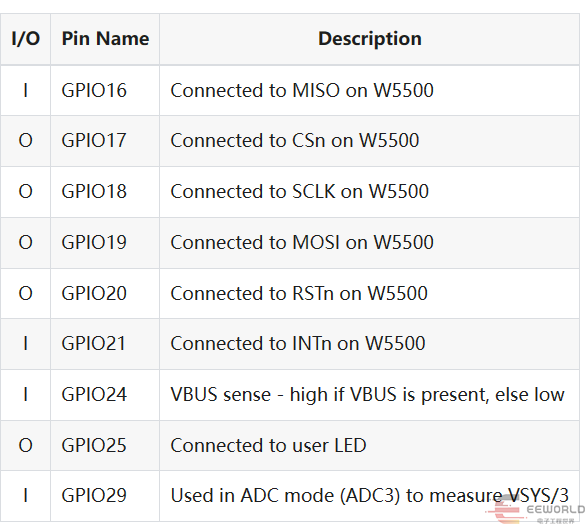
The onboard W5500 and LEDs occupy some of the following I/O:
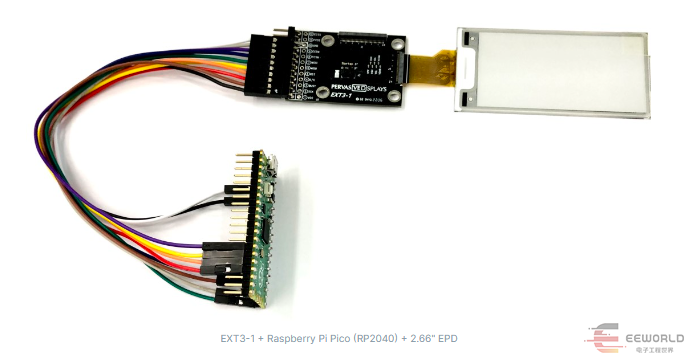
Based on recommendations from forum members, this activity uses the pervasivedisplays e-paper display and adapter board as the display kit. pervasivedisplays has detailed instructions for using the Raspberry Pi pico; key points are extracted here, and others can be found at the official website link.
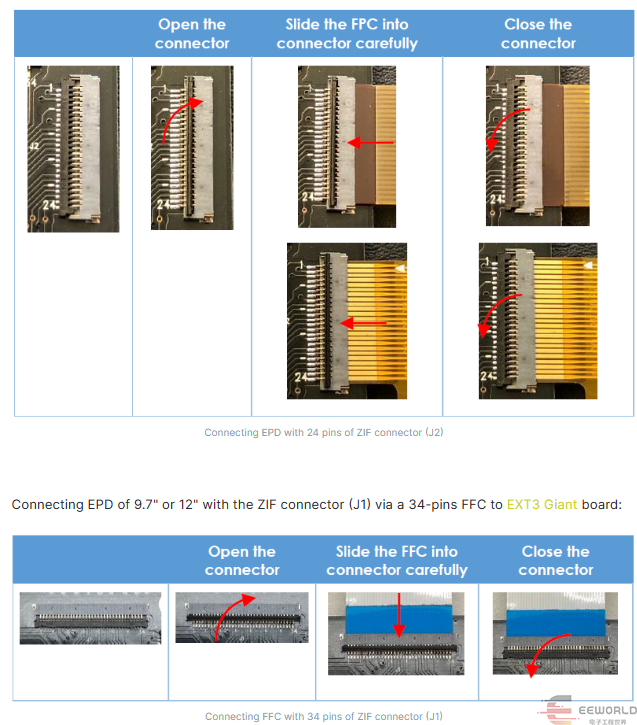
1. Connect the display screen to the adapter board.
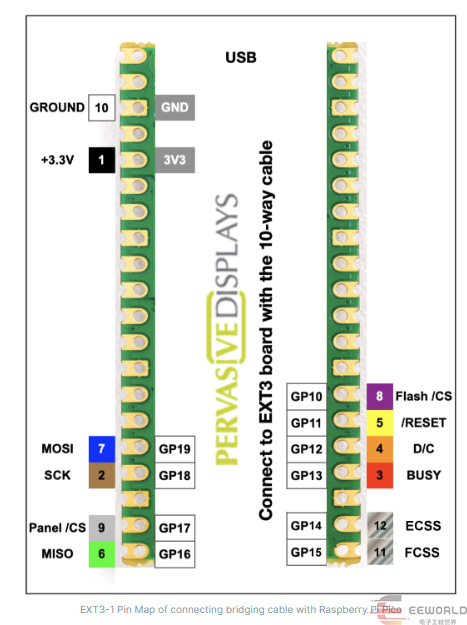
2. Connect the adapter board to the PICO connector.
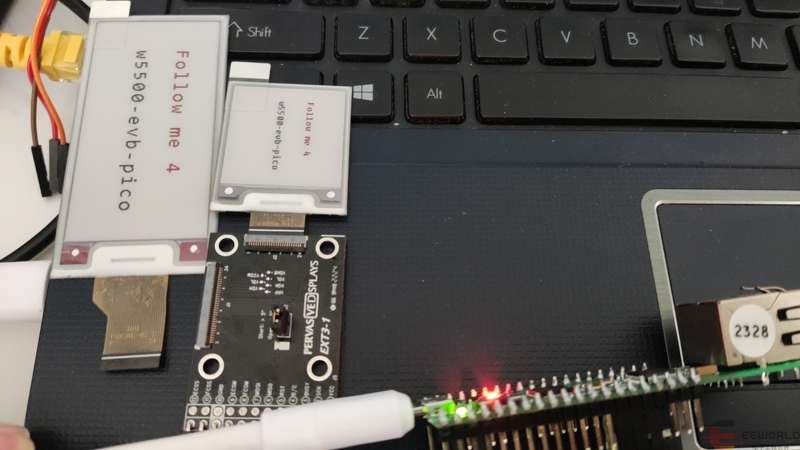
3. The effect after connection.
II. Task Implementation and Results Demonstration
1. Development Environment Setup: BLINK drives the LCD display (if not available, use serial port HelloWorld).
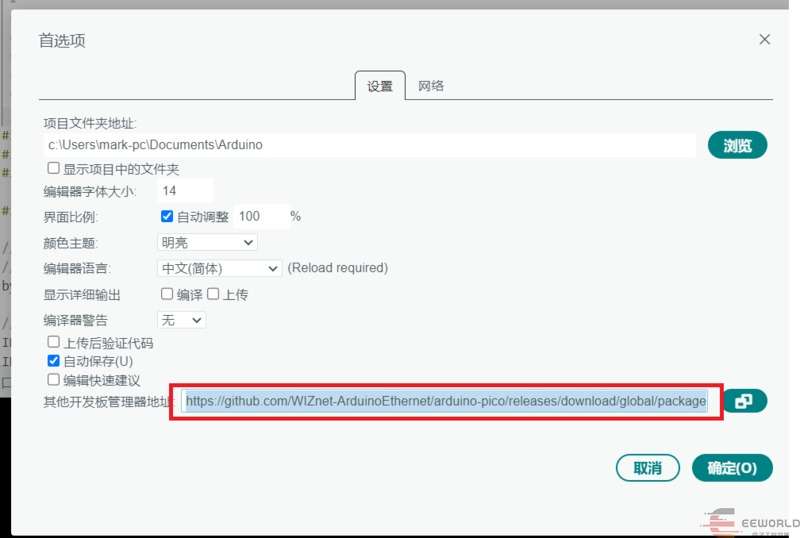
1) The development environment uses Arduino, requiring the installation of a third-party platform support library:
1) The development environment is Arduino. A third-party platform support library needs to be installed: https://github.com/WIZnet-ArduinoEthernet/arduino-pico/releases/download/global/package_rp2040-ethernet_index.json. To install, go to File -> Preferences -> Other board management address and enter the information.
2) Install the W5500-EVB-Pico support library:
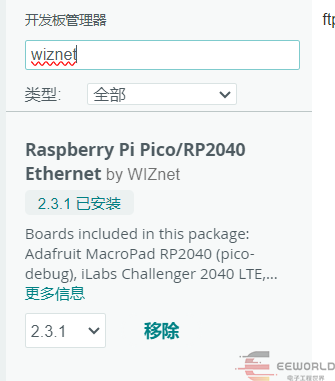
Tools -> Options -> Development Board Manager. Search for "wiznet" and then select the development board.
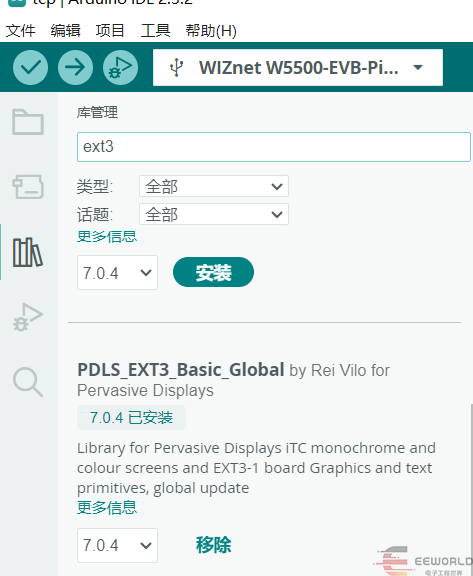
Additionally, for e-paper screens, you can install the official Arduino driver. Search for "ext3" in Tools -> Library Management to find and install it.
3) Core code:
// SDK
#include <Arduino.h>
// Screen
#include "PDLS_EXT3_Basic_Global.h"
#include "hV_HAL_Peripherals.h"
// Configuration
#include "hV_Configuration.h"
// #define EPD_EXT3_266
#define EPD_EXT3_154
#ifdef EPD_EXT3_266
// // Define variables and constants for 2.66 296x152
Screen_EPD_EXT3 epd(eScreen_EPD_EXT3_266, boardRaspberryPiPico_RP2040);
#define LINE1_POS 40, 30
#define LINE2_POS 40, 80
#define FONT Font_Terminal16x24
#endif
#ifdef EPD_EXT3_154
// // Define variables and constants for 1.54 152 x 152
Screen_EPD_EXT3 epd(eScreen_EPD_EXT3_154, boardRaspberryPiPico_RP2040);
#define LINE1_POS 20, 40
#define LINE2_POS 20, 80
#define FONT Font_Terminal8x12
#endif
// Utilities
///
/// @brief  Wait with countdown
/// @param second duration, s
///
void wait(uint8_t second)
{
   for (uint8_t i = second; i > 0; i--)
   {
       Serial.print(formatString(" > %i  \r\n", i));
       delay(1000);
   }
   Serial.print("         \r\n");
}

// Add setup code
///
/// @brief  Setup
///
void setup()
{
   Serial.begin(115200);
   delay(500);
   pinMode(LED_BUILTIN, OUTPUT);
   Serial.println("begin... ");
   epd.begin();
   Serial.println("Characters... ");
   epd.clear();

   epd.setOrientation(1);//set orientation
   epd.selectFont(FONT);
   epd.gText(LINE1_POS, "Follow me 4", myColours.red);
   epd.gText(LINE2_POS, "w5500-evb-pico", myColours.black);
   epd.flush();
   wait(8);
}
// Add loop code
///
/// @brief Loop, empty
///
void loop()
{
   Serial.print("Follow me 4\n");
   digitalWrite(LED_BUILTIN, HIGH);
   delay(1000);
   digitalWrite(LED_BUILTIN, LOW);
   delay(1000);
}
4) Effect demonstration:
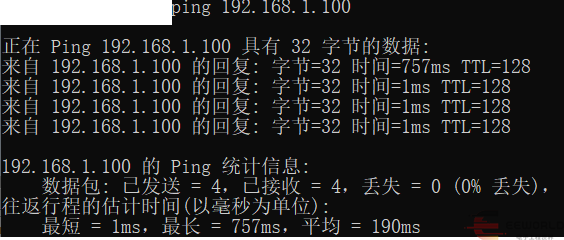
2. Basic Task 1: Complete the initialization of the W5500 main control board (static IP configuration) and ensure it can be pinged by computers on the local area network (LAN). Simultaneously, the W5500 should be able to ping websites on the internet. Capture ping packets from the local PC using packet capture software (Wireshark, Sniffer, etc.), display and analyze them.
1) Core Code:
LAN ping
#include <SPI.h>
#include <Ethernet.h>
#include <Arduino.h>
// 网卡mac地址
byte mac[] = { 0xAE, 0x5D, 0x10, 0x75, 0x88, 0xAD };
// 静态ip地址、DNS服务、网关、子网掩码
// byte ip[] = { 192, 168, 1, 188 };
IPAddress ip(192, 168, 1, 100);
IPAddress dns(192, 168, 1, 1);
IPAddress gateway(192, 168, 1, 1);
IPAddress subnet(255, 255, 255, 0);
void setup() {
 // 配置串口
 Serial.begin(115200);
 delay(500);
 // 静态IP设置
 Ethernet.init(17);
 Ethernet.begin(mac, ip, dns, gateway, subnet);
}
void loop() {
 Serial.print("RP2040 IP address: ");
 Serial.println(Ethernet.localIP());
 delay(5000);
}
Internet ping
#include <SPI.h>
#include <Ethernet.h>
#include <Dns.h>
// 网卡mac地址
byte mac[] = { 0xAE, 0x5D, 0x10, 0x75, 0x88, 0xAD };
// 静态ip地址、DNS服务、网关、子网掩码
// byte ip[] = { 192, 168, 1, 188 };
IPAddress ip(192, 168, 1, 100);
IPAddress dns(192, 168, 1, 1);
IPAddress gateway(192, 168, 1, 1);
IPAddress subnet(255, 255, 255, 0);
DNSClient dnClient;
IPAddress dstip;
void setup() {
 // 配置串口
 Serial.begin(115200);
 delay(500);
 // 静态IP设置
 Ethernet.init(17);
 Ethernet.begin(mac, ip, dns, gateway, subnet);
}
void loop() {
 Serial.print("RP2040 IP address: ");
 Serial.println(Ethernet.localIP());
 dnClient.begin(Ethernet.dnsServerIP());
 const char domains[3][20] = { "www.eeworld.com.cn", "www.digikey.cn", "www.digikey.com" };
 for (int i = 0; i < 3; i++) {
   if (dnClient.getHostByName(domains[i], dstip) == 1) {
     Serial.print(domains[i]);
     Serial.print(" = ");
     Serial.println(dstip);
   } else Serial.println(F("dns lookup failed"));
 }
 delay(5000);
}
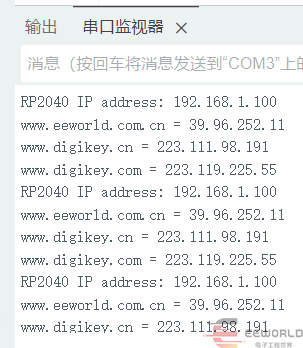
2) Effect demonstration:
3) Packet Capture Analysis:
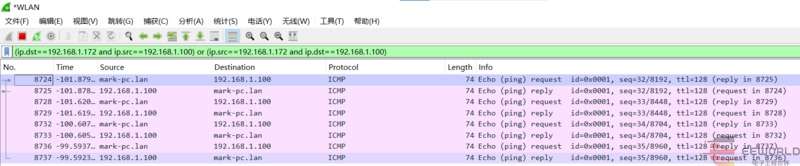
Open Wireshark, select the network card sharing the same network as the development board, and set the filter criteria as follows:
(ip.dst==192.168.1.172 and ip.src==192.168.1.100) or (ip.src==192.168.1.172 and ip.dst==192.168.1.100)
You can filter the messages between the PC and pico, and see four sets of messages corresponding to the four communications after the ping command was executed:
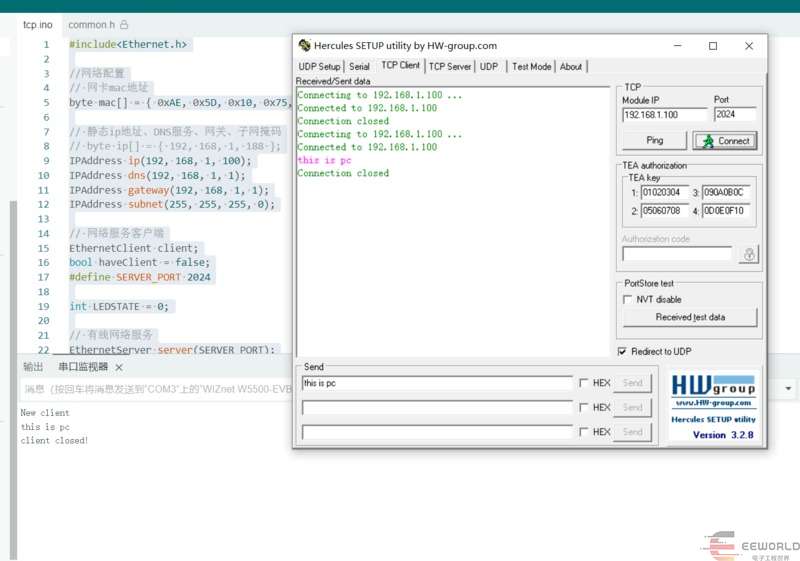
3. Basic Task Two: The main control board establishes a TCP/IP or UDP server. Local area network PCs connect using TCP/IP or UDP clients and send data. After receiving the data, the main control board displays it on the LCD screen (or prints it via serial port if there is no LCD). Capture the interactive messages using packet capture software, display and analyze them. (Choose either TCP or UDP, or both.)
1. TCP Server Core Code:
#include<Ethernet.h>
//网络配置
// 网卡mac地址
byte mac[] = { 0xAE, 0x5D, 0x10, 0x75, 0x88, 0xAD };
// 静态ip地址、DNS服务、网关、子网掩码
// byte ip[] = { 192, 168, 1, 188 };
IPAddress ip(192, 168, 1, 100);
IPAddress dns(192, 168, 1, 1);
IPAddress gateway(192, 168, 1, 1);
IPAddress subnet(255, 255, 255, 0);
// 网络服务客户端
EthernetClient client;
bool haveClient = false;
#define SERVER_PORT 2024
int LEDSTATE = 0;
// 有线网络服务
EthernetServer server(SERVER_PORT);
void setup() {
 // 配置串口
 Serial.begin(115200);
 delay(500);
 pinMode(LED_BUILTIN,OUTPUT);
 digitalWrite(LED_BUILTIN,LEDSTATE);

// 静态IP设置
 Ethernet.init(17);
 Ethernet.begin(mac, ip, dns, gateway, subnet);
 Serial.println("TCP server Begin @ 192.168.1.100:2024\n");
 server.begin();
}
void loop() {
   // 处理客户端连接
   if (!haveClient) {
       // 检查新连接
       client = server.available();
       if (client) {
           haveClient = true;
           Serial.println("New client");
           while (client.connected()){
             if (client.available()){
               String buff = client.readStringUntil('\r');
               Serial.println(buff);
               if (LEDSTATE){
                   LEDSTATE=0;
               }else{
                   LEDSTATE=1;
               }
               digitalWrite(LED_BUILTIN,LEDSTATE);
             }
           }
       }
   } else if ((!client.connected()) && haveClient) {
       client.stop();
       client = EthernetClient();
       haveClient = false;
       Serial.println("client closed!");
   }
}
2) TCP communication performance:
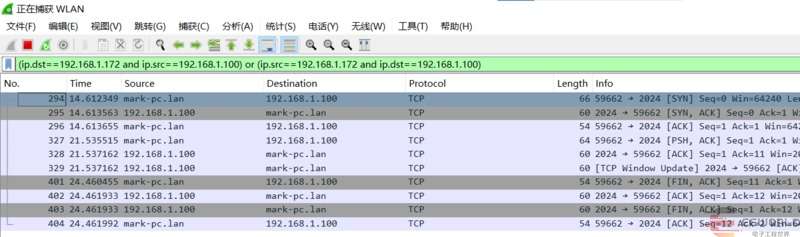
3) TCP packet capture analysis:
We can see the process from TCP handshake connection to data transmission and then to the handshake termination:
4. Advanced Task: Synchronize time from an NTP server (note the parsing of the data exchange format) and display the time on a monitor (serial port).
1) Install the support library. Arduino has an NTP support library; you can search for NTPClient to download it.
2) Core code:
Note that the standard time synchronization result differs from Beijing time by 8 hours. An 8*60*60s compensation is required to obtain Beijing time.
#include <NTPClient.h>    //NTP库
#include <Ethernet.h>
//网络配置
// 网卡mac地址
byte mac[] = { 0xAE, 0x5D, 0x10, 0x75, 0x88, 0xAD };
// 静态ip地址、DNS服务、网关、子网掩码
// byte ip[] = { 192, 168, 1, 188 };
IPAddress ip(192, 168, 1, 100);
IPAddress dns(192, 168, 1, 1);
IPAddress gateway(192, 168, 1, 1);
IPAddress subnet(255, 255, 255, 0);

EthernetUDP ntpUDP;
long timeOffSet=60*60*8;
NTPClient timeClient(ntpUDP,timeOffSet); // NTP获取时间

void setup() {
// 静态IP设置
 Ethernet.init(17);
 Ethernet.begin(mac, ip, dns, gateway, subnet);
 delay(80000);
 //等待网络配置
 timeClient.begin();

}
char buffer[100];
void loop() {
   timeClient.update();
   Serial.print(timeClient.getFormattedTime());
   Serial.print("\n");
   delay(1000);
}
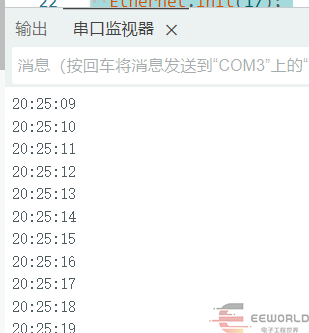
3) Effect demonstration:
5. Final Task Two: Build a simple FTP file server using external storage, capable of uploading and downloading files normally.
Originally, I wanted to implement FTP using Arduino but failed repeatedly, so I had to switch to an MPP implementation.
1) Core Code:
 import gc
import uos
import time
import socket
import network
from time import localtime
from machine import Pin, SPI
from micropython import const

_LED_PIN = const(25) # 绿色 LED 引脚
_SPI_SPEED = const(2_000_000) # SPI 速率
_MOSI_PIN = const(19) # SPI MOSI 引脚
_MISO_PIN = const(16) # SPI MISO 引脚
_SCK_PIN = const(18) # SPI SCK 引脚
_CS_PIN = const(17) # SPI CS 引脚
_RST_PIN = const(20) # SPI RESET 引脚
FTP_ROOT_PATH = const("/ftp") # FTP 根目录
month_name = ["", "Jan", "Feb", "Mar", "Apr", "May", "Jun", "Jul", "Aug", "Sep", "Oct", "Nov", "Dec"]
# SPI 定义
spi=SPI(0, _SPI_SPEED, mosi=Pin(_MOSI_PIN), miso=Pin(_MISO_PIN), sck=Pin(_SCK_PIN))
nic = None
""" W5500 初始化 """
def w5500_start():
   global nic
   # 网口初始化
   nic = network.WIZNET5K(spi, Pin(_CS_PIN), Pin(_RST_PIN)) #spi,cs,reset pin
   nic.active(True)
   # 配置网络
   nic.ifconfig(('192.168.1.100','255.255.255.0','192.168.1.1','192.168.1.1'))
   while not nic.isconnected():
       time.sleep(1)
       print(nic.regs())

   print("IP地址:  %s" %nic.ifconfig()[0])
   print("子网掩码: %s" %nic.ifconfig()[1])
   print("网关:    %s" %nic.ifconfig()[2])
   print("DNS:     %s" %nic.ifconfig()[3])

""" 响应文件列表请求 """
def send_list_data(path, dataclient, full):
   try: # whether path is a directory name
       for fname in uos.listdir(path):
           dataclient.sendall(make_description(path, fname, full))
   except: # path may be a file name or pattern
       pattern = path.split("/")[-1]
       path = path[:-(len(pattern) + 1)]
       if path == "": path = "/"
       for fname in uos.listdir(path):
           if fncmp(fname, pattern) == True:
               dataclient.sendall(make_description(path, fname, full))
""" 列出目录详情 """
def make_description(path, fname, full):
   if full:
       stat = uos.stat(get_absolute_path(path,fname))
       file_permissions = "drwxr-xr-x" if (stat[0] & 0o170000 == 0o040000) else "-rw-r--r--"
       file_size = stat[6]
       tm = localtime(stat[7])
       if tm[0] != localtime()[0]:
           description = "{}    1 owner group {:>10} {} {:2} {:>5} {}\r\n".format(
               file_permissions, file_size, month_name[tm[1]], tm[2], tm[0], fname)
       else:
           description = "{}    1 owner group {:>10} {} {:2} {:02}:{:02} {}\r\n".format(
               file_permissions, file_size, month_name[tm[1]], tm[2], tm[3], tm[4], fname)
   else:
       description = fname + "\r\n"
   return description
""" 发送文件数据 """
def send_file_data(path, dataclient):
   try:
       with open(path, "rb") as file:
           chunk = file.read(512)
           print("chunk 0: ", len(chunk))
           while len(chunk) > 0:
               print("chunk: ", len(chunk))
               dataclient.sendall(chunk)
               chunk = file.read(512)
   except Exception as err:
       print("error: ", err.args, err.value, err.errno)

""" 保存文件上传数据 """
def save_file_data(path, dataclient, mode):
   with open(path, mode) as file:
       chunk = dataclient.read(512)
       while len(chunk) > 0:
           file.write(chunk)
           chunk = dataclient.read(512)
""" 获取文件绝对路径 """
def get_absolute_path(cwd, payload):
   # Just a few special cases "..", "." and ""
   # If payload start's with /, set cwd to /
   # and consider the remainder a relative path
   if payload.startswith('/'):
       cwd = "/"
   for token in payload.split("/"):
       if token == '..':
           if cwd != '/':
               cwd = '/'.join(cwd.split('/')[:-1])
               if cwd == '':
                   cwd = '/'
       elif token != '.' and token != '':
           if cwd == '/':
               cwd += token
           else:
               cwd = cwd + '/' + token
   return cwd

""" 文件名比较 """
def fncmp(fname, pattern):
   pi = 0
   si = 0
   while pi < len(pattern) and si < len(fname):
       if (fname[si] == pattern[pi]) or (pattern[pi] == '?'):
           si += 1
           pi += 1
       else:
           if pattern[pi] == '*': # recurse
               if (pi + 1) == len(pattern):
                   return True
               while si < len(fname):
                   if fncmp(fname[si:], pattern[pi+1:]) == True:
                       return True
                   else:
                       si += 1
               return False
           else:
               return False
   if pi == len(pattern.rstrip("*"))  and si == len(fname):
       return True
   else:
       return False
""" 启动FTP服务 """
def ftpserver():
   DATA_PORT = 13333
   ftpsocket = socket.socket(socket.AF_INET, socket.SOCK_STREAM)
   datasocket = socket.socket(socket.AF_INET, socket.SOCK_STREAM)
   ftpsocket.setsockopt(socket.SOL_SOCKET, socket.SO_REUSEADDR, 1)
   datasocket.setsockopt(socket.SOL_SOCKET, socket.SO_REUSEADDR, 1)
   ftpsocket.bind(socket.getaddrinfo("0.0.0.0", 21)[0][4])
   datasocket.bind(socket.getaddrinfo("0.0.0.0", DATA_PORT)[0][4])
   ftpsocket.listen(1)
   datasocket.listen(1)
   datasocket.settimeout(10)

   print("FTP服务启动成功!监听端口:21");
   msg_250_OK = '250 OK\r\n'
   msg_550_fail = '550 Failed\r\n'
   try:
       dataclient = None
       fromname = None
       while True:
           cl, remote_addr = ftpsocket.accept()
           cl.settimeout(300)
           cwd = FTP_ROOT_PATH
           try:
               print("新的FTP连接来自: %s:%s" %(remote_addr[0], remote_addr[1]))
               cl.sendall("220 Welcome! This is the W5500_EVB_PICO!\r\n")
               while True:
                   gc.collect()
                   data = cl.readline().decode("utf-8").rstrip("\r\n")
                   if len(data) <= 0:
                       print("Client disappeared")
                       break

                   command = data.split(" ")[0].upper()
                   payload = data[len(command):].lstrip()
                   path = get_absolute_path(cwd, payload)

                   print("命令={}, 参数={}, 路径={}".format(command, payload, path))

                   if command == "USER":
                       cl.sendall("230 Logged in.\r\n")
                   elif command == "SYST":
                       cl.sendall("215 UNIX Type: L8\r\n")
                   elif command == "NOOP":
                       cl.sendall("200 OK\r\n")
                   elif command == "FEAT":
                       cl.sendall("211 no-features\r\n")
                   elif command == "PWD":
                       cl.sendall('257 "{}"\r\n'.format(cwd))
                   elif command == "CWD":
                       try:
                           files = uos.listdir(path)
                           cwd = path
                           cl.sendall(msg_250_OK)
                       except:
                           cl.sendall(msg_550_fail)
                   elif command == "CDUP":
                       cwd = get_absolute_path(cwd, "..")
                       cl.sendall(msg_250_OK)
                   elif command == "TYPE":
                       # probably should switch between binary and not
                       cl.sendall('200 Transfer mode set\r\n')
                   elif command == "SIZE":
                       try:
                           size = uos.stat(path)[6]
                           cl.sendall('213 {}\r\n'.format(size))
                       except:
                           cl.sendall(msg_550_fail)
                   elif command == "QUIT":
                       cl.sendall('221 Bye.\r\n')
                       break
                   elif command == "PASV":
                       addr = nic.ifconfig()[0]
                       cl.sendall('227 Entering Passive Mode ({},{},{}).\r\n'.format(
                           addr.replace('.',','), DATA_PORT>>8, DATA_PORT%256))
                       dataclient, data_addr = datasocket.accept()
                       print("新的FTP数据连接来自: %s:%s" %(data_addr[0], data_addr[1]))
                   elif command == "LIST" or command == "NLST":
                       if not payload.startswith("-"):
                           place = path
                       else:
                           place = cwd
                       try:
                           send_list_data(place, dataclient, command == "LIST" or payload == "-l")
                           cl.sendall("150 Here comes the directory listing.\r\n")
                           cl.sendall("226 Listed.\r\n")
                       except:
                           cl.sendall(msg_550_fail)
                       if dataclient is not None:
                           dataclient.close()
                           dataclient = None
                   elif command == "RETR":
                       try:
                           send_file_data(path, dataclient)
                           cl.sendall("150 Opening data connection.\r\n")
                           cl.sendall("226 Transfer complete.\r\n")
                       except:
                           cl.sendall(msg_550_fail)
                       if dataclient is not None:
                           dataclient.close()
                           dataclient = None
                   elif command == "STOR":
                       try:
                           cl.sendall("150 Ok to send data.\r\n")
                           save_file_data(path, dataclient, "wb")
                           cl.sendall("226 Transfer complete.\r\n")
                       except:
                           cl.sendall(msg_550_fail)
                       if dataclient is not None:
                           dataclient.close()
                           dataclient = None
                   elif command == "APPE":
                       try:
                           cl.sendall("150 Ok to send data.\r\n")
                           save_file_data(path, dataclient, "a")
                           cl.sendall("226 Transfer complete.\r\n")
                       except:
                           cl.sendall(msg_550_fail)
                       if dataclient is not None:
                           dataclient.close()
                           dataclient = None
                   elif command == "DELE":
                       try:
                           uos.remove(path)
                           cl.sendall(msg_250_OK)
                       except:
                           cl.sendall(msg_550_fail)
                   elif command == "RMD":
                       try:
                           uos.rmdir(path)
                           cl.sendall(msg_250_OK)
                       except:
                           cl.sendall(msg_550_fail)
                   elif command == "MKD":
                       try:
                           uos.mkdir(path)
                           cl.sendall(msg_250_OK)
                       except:
                           cl.sendall(msg_550_fail)
                   elif command == "RNFR":
                           fromname = path
                           cl.sendall("350 Rename from\r\n")
                   elif command == "RNTO":
                           if fromname is not None:
                               try:
                                   uos.rename(fromname, path)
                                   cl.sendall(msg_250_OK)
                               except:
                                   cl.sendall(msg_550_fail)
                           else:
                               cl.sendall(msg_550_fail)
                           fromname = None
                   else:
                       cl.sendall("502 Unsupported command.\r\n")
                       # print("Unsupported command {} with payload {}".format(command, payload))
           except Exception as err:
               print(err)
           finally:
               cl.close()
               cl = None
   finally:
       datasocket.close()
       ftpsocket.close()
       if dataclient is not None:
           dataclient.close()

if __name__ == "__main__":
   print("run in main")
   w5500_start() # 初始化网络
   ftpserver()  # 运行 FTP Server
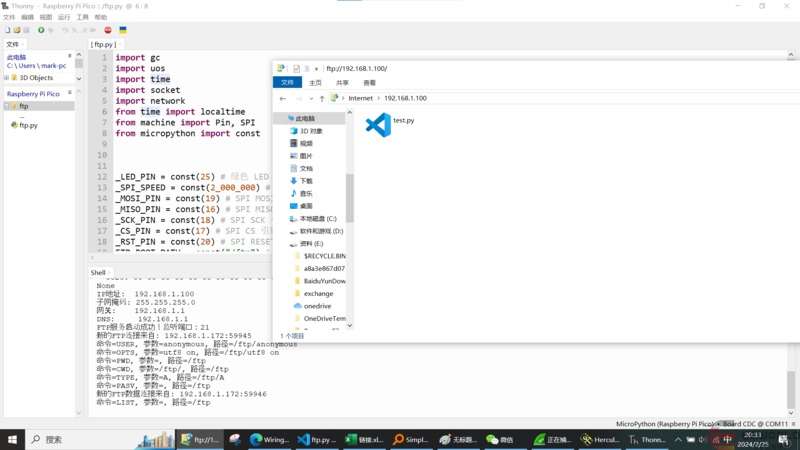
2) Effect demonstration:
III. Task Source Code
https://download.eeworld.com.cn/detail/eew_gz8e7C/631389
Supplementary Content (2024-03-01 19:11): IV. Reflections and Suggestions: Through completing this task, I gained an introduction to using the Arduino IDE and deepened my understanding of Ethernet network communication. Thanks to eeworld and Dejie for providing this opportunity; I look forward to participating again next time!