



VFD Clock with SNMP and NTP
VFD Clock with SNMP and NTP
Overview
This project introduces a custom VFD network clock built with Ethernet connectivity, NTP time synchronization, SNMP monitoring, HTTP status access, and temperature sensing.
The project was created to solve common problems found in ordinary clocks. Many clocks drift over time, require manual adjustment, do not handle daylight saving time properly, or are difficult to read clearly. To address these issues, this project uses network-based time synchronization and a bright VFD display.
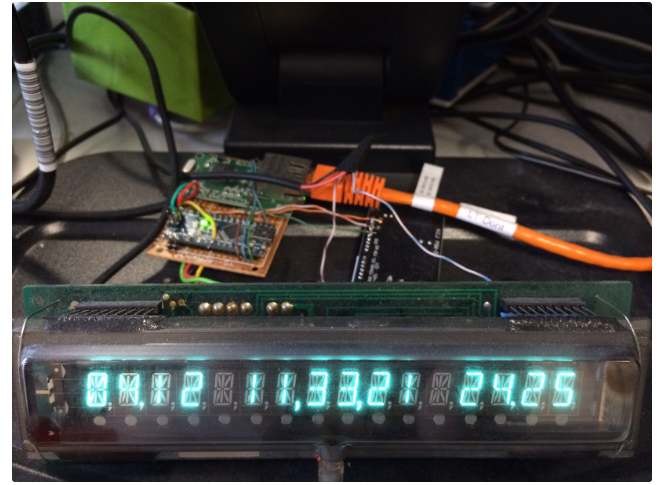
The original version uses a salvaged VFD display, an Arduino-compatible controller, a WizNet5100 Ethernet board, and a Dallas 1-Wire temperature sensor.
By using Ethernet and NTP, the clock can automatically set the correct time without buttons or manual configuration. It also provides device status and sensor data through HTTP and SNMP, allowing the clock to be monitored remotely.
Background
A clock should be simple, accurate, and easy to read.
However, many standalone clocks have practical limitations:
Time drift over long periods
Manual setup after power loss
Incorrect daylight saving time handling
Poor readability
No remote monitoring
No network-based status access
This project was developed as a custom solution to these problems.
Instead of building a simple standalone clock, the project connects the clock to the network. The clock receives its IP address through DHCP, synchronizes time through NTP, displays time and temperature on a VFD display, and exposes system information through HTTP and SNMP.
This makes the clock both practical as a display device and useful as a small network-connected monitoring device.
Solution
The clock combines a VFD display, microcontroller, Ethernet connectivity, NTP synchronization, SNMP monitoring, HTTP status page, and temperature sensing.
The basic structure can be described as follows:
Dallas 1-Wire Temperature Sensor
        |
Arduino-Compatible Controller
        |
WizNet5100 Ethernet Board
        |
Ethernet Network
        |
NTP Server / HTTP Client / SNMP Monitoring System
        |
VFD Display
The controller manages the display, reads the temperature sensor, communicates with the Ethernet board, obtains time from an NTP server, and provides monitoring data through HTTP and SNMP.
The VFD display shows the current date, time, and temperature.
The Ethernet connection allows the clock to be configured automatically through DHCP and synchronized through NTP.
Why Ethernet?
Ethernet is useful in this project because the clock needs reliable network access for time synchronization and monitoring.
1. Automatic Time Synchronization
The clock uses NTP to set the correct time automatically.
This removes the need for buttons or manual time setting. Once connected to the network, the clock can retrieve the correct time and keep itself synchronized.
2. DHCP-Based Network Setup
The device uses DHCP, so it can automatically obtain network settings when connected to a network.
This makes the clock close to plug-and-play. The user does not need to manually configure IP address, gateway, or DNS settings.
3. Remote Monitoring
The clock provides information through HTTP and SNMP.
This allows the user to check device status, uptime, date, time, hostname, and temperature remotely.
4. SNMP Integration
SNMP allows the clock to be monitored using standard network monitoring tools.
The project includes SNMP support for system information and temperature monitoring. This makes it possible to graph temperature values over time using monitoring software such as Cacti.
Main Features
VFD Display
The project uses a salvaged VFD display from an old fruit machine.
The original display is a 16-character, 14-segment display with serial input.
VFD displays are bright, readable, and visually distinctive, making them suitable for a clock that needs to be clearly visible.
Arduino-Compatible Controller
The original version uses an Arduino-compatible controller as the main control board.
The controller handles display output, network communication, temperature reading, NTP synchronization, HTTP server operation, and SNMP handling.
WizNet5100 Ethernet Board
The original Ethernet connectivity is provided by a WizNet5100 board.
The Ethernet board allows the clock to connect to a wired network, obtain an IP address through DHCP, synchronize time using NTP, and expose data through HTTP and SNMP.
NTP Time Synchronization
The clock sets its time through NTP.
This means the clock does not need manual time setting and can remain accurate over long periods.
The project also handles daylight saving time automatically by checking and applying the correct adjustment.
Dallas 1-Wire Temperature Sensor
The clock includes a Dallas 1-Wire temperature sensor.
The measured temperature is shown on the VFD display and can also be accessed remotely through SNMP.
HTTP Server
The clock includes a simple HTTP server.
The web page shows useful information such as current time, date, uptime, network information, and detected 1-Wire sensor information.
SNMP Server
The project includes SNMP support.
The clock exposes system information through SNMP, including standard system OIDs such as uptime.
It also includes an OID for temperature monitoring, allowing the temperature data to be collected and graphed by external monitoring software.
DHCP Hostname Handling
The project uses DHCP for automatic network configuration.
The author also modified the DHCP library to retrieve the hostname from the DHCP response. This hostname is then used as the device name in the SNMP system OID.
This makes the device easier to identify in a network monitoring environment.
System Operation
The clock operates as a network-connected time and temperature display.
A typical operation flow is:
The clock powers on.
The Ethernet board connects to the network.
The clock receives network configuration through DHCP.
The clock retrieves time from an NTP server.
The controller updates the VFD display.
The temperature sensor is read through 1-Wire.
Time, date, and temperature are shown on the display.
HTTP access provides status information.
SNMP access provides system and temperature data for monitoring.
This allows the device to work as both a clock and a small environmental monitoring node.
Display Output
The VFD display shows key information in a compact format.
The original output includes:
Date
Time
Temperature
The goal is to provide the most useful information on one clear and readable display.
In the updated version, the display format was simplified to improve readability. The day is shown as text, seconds were removed, and a flashing colon is used between hours and minutes, similar to a conventional digital clock.
SNMP Monitoring
SNMP is one of the most important features of this project.
The clock supports SNMP so that it can be monitored like a network device.
The available SNMP information includes:
Device name
Uptime
Location
Contact
Temperature
Standard system information
The temperature value can be collected by monitoring tools and graphed over time.
This turns the clock into more than just a display device. It also becomes a small network monitoring endpoint.
HTTP Monitoring
In addition to SNMP, the clock also provides an HTTP interface.
The HTTP page displays device information such as:
Current time
Current date
Uptime
DHCP information
Hostname
1-Wire sensor address
Temperature data
This makes it easy to check the clock status from a web browser without using a dedicated SNMP tool.
Hardware Architecture
The original hardware design includes the following components:
Salvaged VFD display
Arduino-compatible controller
WizNet5100 Ethernet board
Dallas 1-Wire temperature probe
DC-DC power module
12V wall adapter
The VFD display requires 12V power.
The controller and Ethernet board use regulated lower voltages generated by the DC-DC module.
The basic power and control structure can be described as follows:
12V Power Adapter
        |
DC-DC Power Module
        |
5V for Controller
3.3V for Ethernet Board
12V for VFD Display

Controller
        |
VFD Display
Temperature Sensor
WizNet5100 Ethernet Board
Updated Version
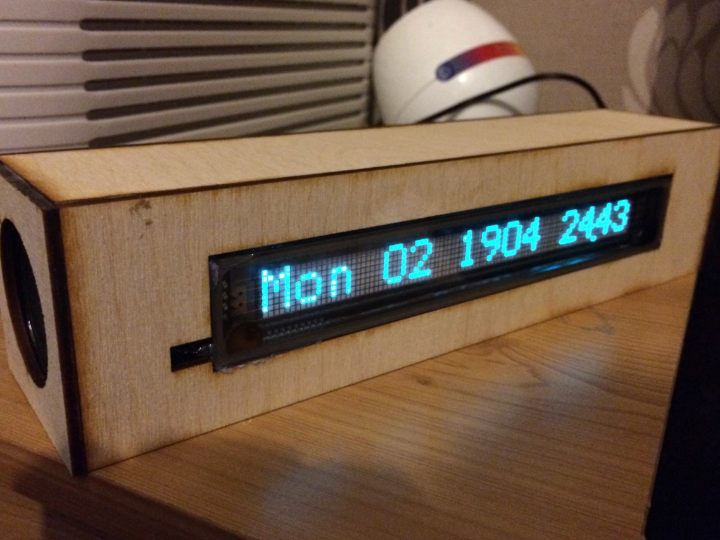
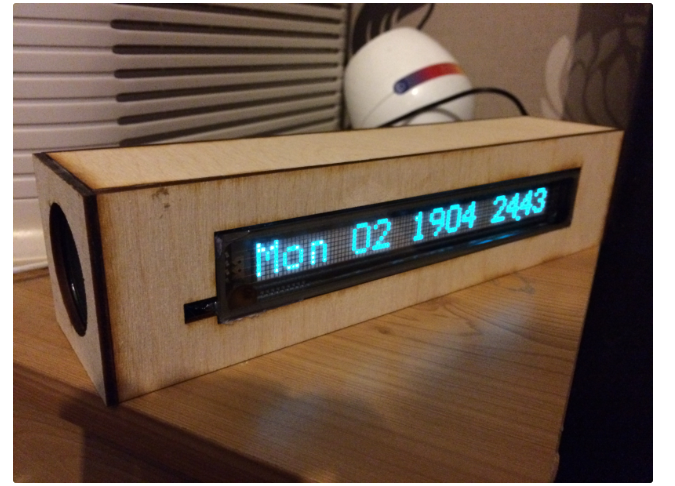
In a later update, the project was modified with a new VFD display and a laser-cut wooden enclosure.
The updated version also added a Bluetooth audio module and stereo speakers.
The Bluetooth module is connected internally through serial communication. Since the clock has no physical buttons, SNMP is used to send remote control commands to the Bluetooth module.
Through SNMP, the user can remotely send commands such as track control, volume control, or pairing commands. When commands are sent, a confirmation briefly appears on the VFD display.
The updated version also changed the display format to make it easier to read.
Auto-Dimming
The project includes a time-based brightness adjustment concept.
Instead of using a light sensor, the display brightness is adjusted based on time.
For example:
At night, the display dims to minimum brightness.
In the morning, the display returns to full brightness.
This makes the clock more comfortable to use in a bedroom or dark environment.
The author also considered making dimming times configurable through SNMP, but decided that too much configuration would make the clock unnecessarily complex.
Applications
This project can be used as a reference for many network-connected display and monitoring applications, including:
NTP-based clocks
VFD display projects
Network-connected desk clocks
Temperature monitoring displays
SNMP-enabled embedded devices
HTTP status display devices
Small environmental monitoring nodes
Network monitoring experiments
Ethernet-based Arduino projects
Smart display systems
The same structure can also be adapted for other embedded devices that need accurate time, network monitoring, or remote status access.
Benefits
This VFD clock provides several practical benefits.
Accurate Time
The clock uses NTP, so it does not require manual adjustment and avoids long-term drift.
Automatic Network Configuration
DHCP allows the clock to join the network without manual IP configuration.
Clear Display
The VFD display provides a bright and readable output for time, date, and temperature.
Remote Monitoring
HTTP and SNMP allow the user to check clock status and temperature remotely.
Temperature Graphing
SNMP makes it possible to collect temperature data periodically and graph it using monitoring tools.
Flexible Embedded Design
The project combines display control, Ethernet networking, time synchronization, sensor reading, and remote monitoring in one compact system.
Conclusion
This project is a practical example of a network-connected VFD clock with NTP, SNMP, HTTP, and temperature monitoring.
By using a WizNet5100 Ethernet board, the clock can connect to a wired network, obtain configuration through DHCP, synchronize time through NTP, and provide monitoring data through HTTP and SNMP.
The VFD display makes the clock easy to read, while the Dallas 1-Wire sensor adds temperature monitoring capability.
The project demonstrates how a clock can become more than a simple time display. With Ethernet, NTP, SNMP, and HTTP, it becomes a small network-aware monitoring device that can display information locally and provide data remotely.
Q1: What is this project?
A1:
This project is a custom VFD network clock with NTP time synchronization, SNMP monitoring, HTTP status access, and temperature sensing.
Q2: Which WIZnet product is used?
A2:
The original version uses a WizNet5100 Ethernet board for wired network connectivity.
Q3: Why is NTP used?
A3:
NTP is used to automatically set and maintain the correct time without manual adjustment.
Q4: What does the clock display?
A4:
The clock displays time, date, and temperature on a VFD display.
Q5: What is SNMP used for?
A5:
SNMP is used to expose system information and temperature data to network monitoring software.
Q6: What is HTTP used for?
A6:
HTTP is used to provide a simple web page showing device status, time, date, uptime, network information, and sensor data.
Q7: What sensor is used?
A7:
The project uses a Dallas 1-Wire temperature sensor.
Q8: What applications can use this design?
A8:
This design can be used for NTP clocks, VFD display projects, temperature monitoring, SNMP-enabled embedded devices, HTTP status displays, and small network-connected monitoring systems.