



Raspberry Pi Pico LAN Tester
Raspberry Pi Pico LAN Tester
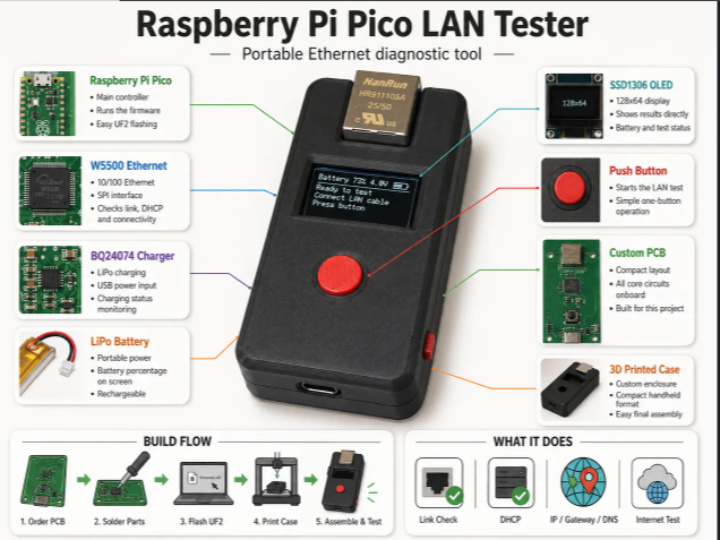
Overview
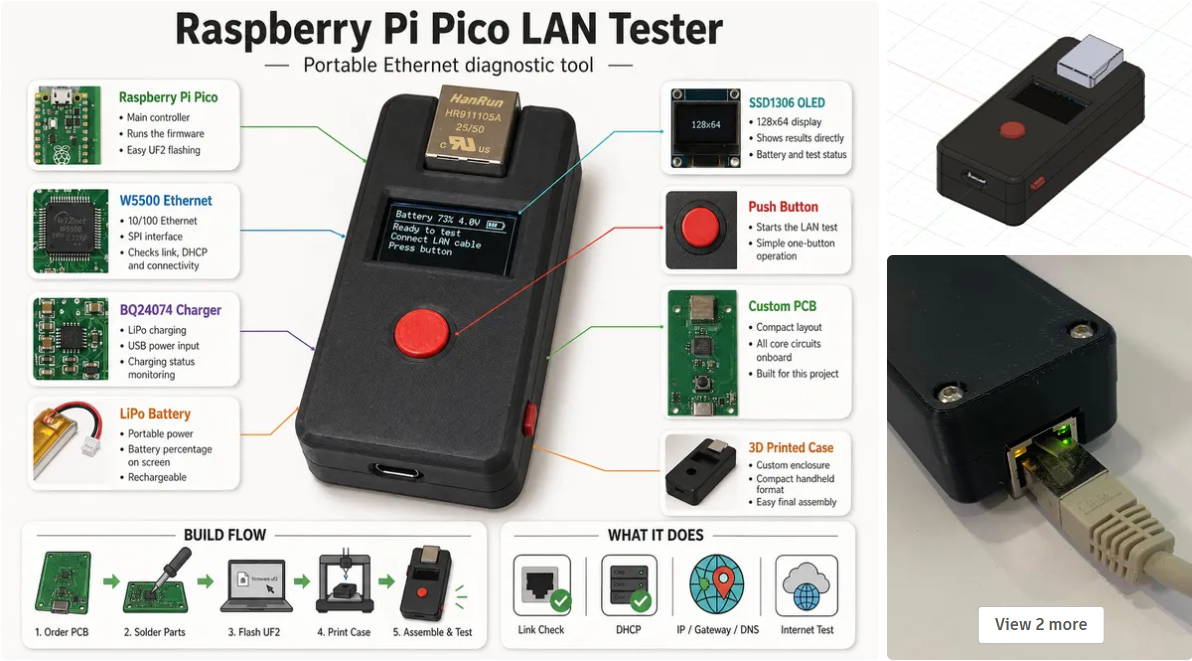
When installing or troubleshooting Ethernet equipment, it is often necessary to quickly check whether a LAN port is actually working.
Normally, this requires a laptop or a dedicated network tester. A user may need to connect a cable, check the physical link, confirm DHCP operation, verify the assigned IP address, and test basic internet connectivity.
The Portable Raspberry Pi Pico LAN Tester project provides a compact and practical solution for this task.
This project uses a Raspberry Pi Pico, WIZnet W5500 Ethernet controller, SSD1306 OLED display, LiPo battery charging circuit, custom PCB, and 3D-printed enclosure to create a small handheld Ethernet diagnostic tool.
With this tester, users can connect an Ethernet cable and quickly check:
- Ethernet link status
- DHCP operation
- Assigned IP address
- Gateway information
- DNS server information
- Basic internet connectivity
- Battery voltage and charging status
The key component of this project is the W5500.
By using the W5500 Ethernet controller, the Raspberry Pi Pico can perform wired Ethernet communication through a simple SPI interface without requiring a built-in Ethernet peripheral or complex software TCP/IP implementation.
Background
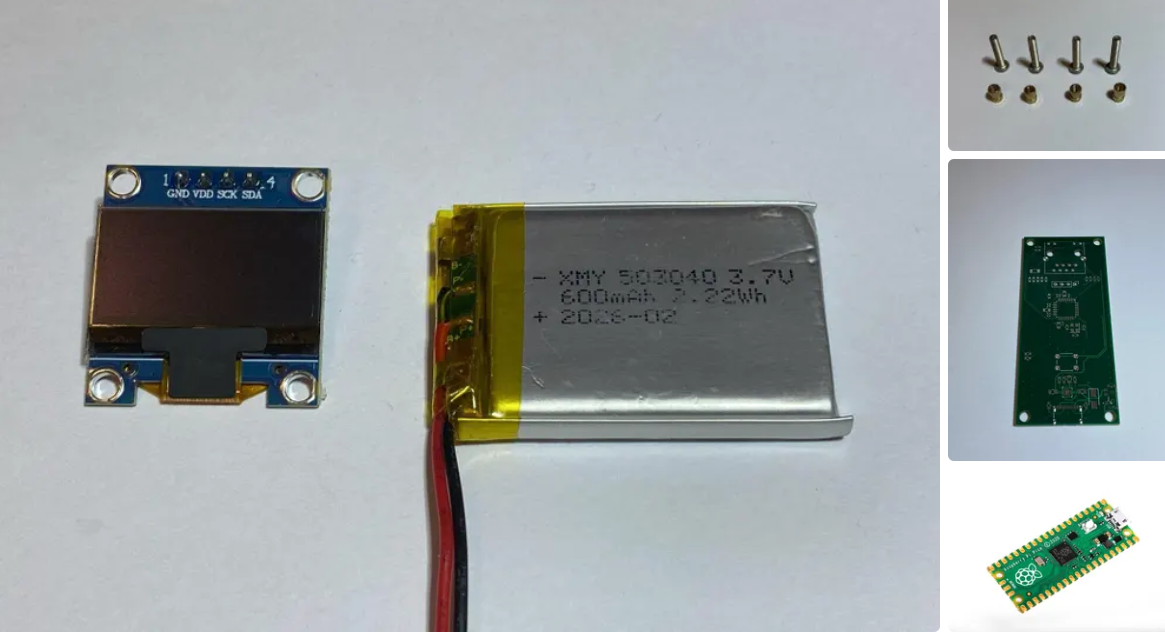
Ethernet is still widely used in industrial systems, office networks, smart buildings, network installations, and embedded IoT devices because it provides stable and reliable wired communication.
However, during installation or maintenance, it is not always convenient to use a laptop just to check whether a LAN port is working.
Common tasks include:
- Checking whether the Ethernet link is active
- Verifying whether DHCP assigns an IP address
- Confirming gateway and DNS information
- Testing whether the network has internet access
- Identifying possible cable or port issues
For simple field diagnostics, a small dedicated device can be much more convenient than carrying a laptop.
This is where an MCU-based Ethernet tester becomes useful.
The Raspberry Pi Pico is compact, low-cost, and easy to program, but it does not include native Ethernet hardware. To add reliable wired Ethernet connectivity, this project uses WIZnet’s W5500 Ethernet controller.
Solution
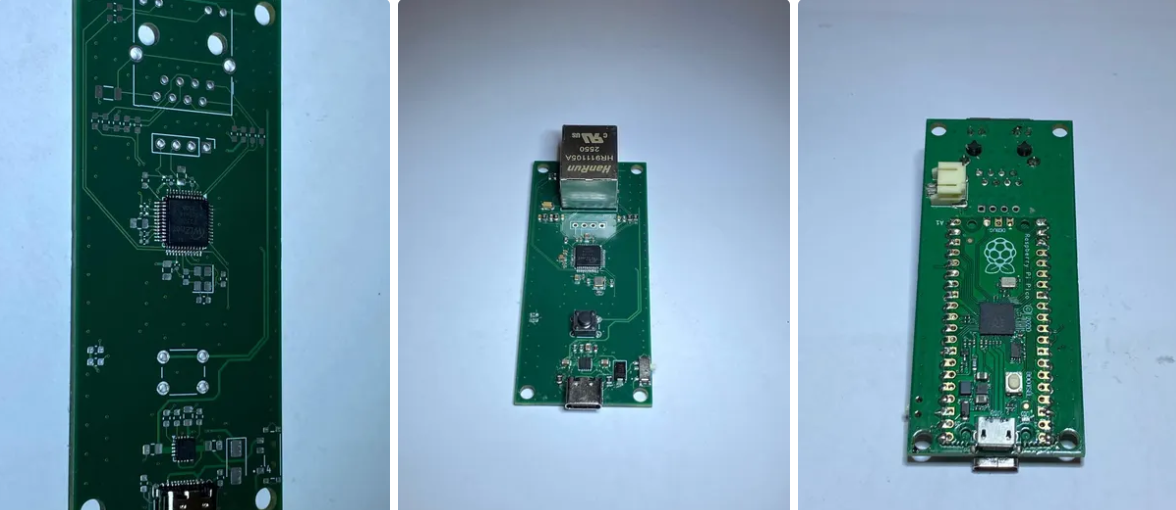
The Portable Raspberry Pi Pico LAN Tester combines a small MCU platform with a dedicated Ethernet controller.
The Raspberry Pi Pico handles the main control logic, display output, button input, and system status monitoring. The W5500 handles Ethernet communication.
When the user connects an Ethernet cable and starts the test, the device checks the network step by step:
- Detects Ethernet physical link status
- Requests network configuration using DHCP
- Displays IP address, gateway, and DNS server
- Performs a simple internet connectivity check
- Shows the result on the OLED display
This makes it possible to quickly confirm whether an Ethernet port is usable without opening a laptop or running manual network commands.
The project also includes a custom PCB and 3D-printed enclosure, making it suitable as a portable handheld tool.
Why W5500?
The W5500 Ethernet controller plays the central role in this project.
W5500 is a hardwired TCP/IP Ethernet controller from WIZnet. It integrates the TCP/IP stack, 10/100 Ethernet MAC, and Ethernet PHY into a single chip.
This provides several important advantages for embedded Ethernet designs.
1. Simple SPI Interface
The W5500 communicates with the host MCU through SPI.
This allows microcontrollers such as Raspberry Pi Pico to use Ethernet even though they do not have a built-in Ethernet MAC or PHY.
Because SPI is widely supported by most MCUs, W5500 can be easily added to many embedded platforms.
2. Hardware TCP/IP Stack
One of the biggest advantages of W5500 is its hardwired TCP/IP stack.
Instead of requiring the MCU to process the entire TCP/IP stack in software, W5500 handles major network protocol operations internally.
This reduces:
- Firmware complexity
- MCU CPU load
- RAM usage
- Network implementation effort
As a result, the Raspberry Pi Pico can focus on the application logic, OLED display, button control, and battery status monitoring.
3. Integrated Ethernet MAC and PHY
The W5500 includes both Ethernet MAC and PHY.
This simplifies hardware design because the system does not need a separate Ethernet MAC or external PHY device.
For compact embedded products, this integration is especially valuable because it reduces board complexity and makes the design easier to reproduce.
4. Reliable Wired Connectivity
For a LAN tester, stable wired communication is essential.
The purpose of the device is to verify Ethernet connectivity, so the Ethernet controller must provide reliable link detection and network communication.
By using W5500, the tester can provide a stable wired Ethernet interface suitable for field diagnostics.
System Architecture
The system can be divided into three main parts:
- Raspberry Pi Pico
- W5500 Ethernet controller
- OLED display and power management circuit
The Raspberry Pi Pico acts as the main controller. It runs the firmware, communicates with the W5500 through SPI, controls the OLED display, reads user input, and monitors battery information.
The W5500 provides Ethernet connectivity. It manages the Ethernet interface and handles TCP/IP communication using its hardwired TCP/IP engine.
The OLED display provides a simple user interface. It shows the current test status and network information such as IP address, gateway, DNS server, and test result.
The typical operation flow is:
- User connects an Ethernet cable
- Pico initializes the W5500
- W5500 checks the Ethernet link
- Device requests an IP address using DHCP
- Network information is displayed on the OLED
- Device performs a simple internet connectivity test
- Final result is shown to the user
This structure clearly separates the roles of the MCU and the Ethernet controller.
The Pico handles the user interface and control flow, while the W5500 handles Ethernet communication.
Hardware Components
This project is built using the following main components:
- Raspberry Pi Pico
- WIZnet W5500 Ethernet controller
- SSD1306 128x64 OLED display
- LiPo battery
- Battery charging circuit
- Custom PCB
- 3D-printed enclosure
The Raspberry Pi Pico provides the main processing platform.
The W5500 adds wired Ethernet connectivity over SPI.
The SSD1306 OLED display shows the test results in a compact format.
The LiPo battery and charging circuit make the device portable.
The custom PCB and 3D-printed enclosure turn the prototype into a practical handheld tool.
Main Features
The Portable Raspberry Pi Pico LAN Tester provides the following features:
- W5500 Ethernet controller over SPI
- SSD1306 128x64 OLED display
- One-button LAN test
- Ethernet link check
- DHCP check
- Internet connectivity check
- IP address display
- Gateway display
- DNS server display
- Battery voltage monitoring
- Charging status display
- Custom PCB design
- 3D-printed enclosure
These features make the device useful for quick Ethernet diagnostics in offices, labs, installation sites, and embedded development environments.
How It Works
The tester performs a simple but useful diagnostic sequence.
First, the device checks whether an Ethernet cable is connected and whether the physical link is active. This confirms that the LAN port and cable have basic electrical connectivity.
Next, the device requests an IP address using DHCP. If DHCP succeeds, it means the tester can communicate with the network infrastructure and receive valid network configuration.
After that, the assigned IP address, gateway, and DNS server are displayed on the OLED screen. This allows the user to quickly confirm whether the network configuration looks correct.
Finally, the tester performs a simple internet connectivity check. This helps determine whether the network is limited to local access or has external connectivity.
All of these steps are displayed through the OLED interface, making the device simple and easy to use.
Benefits
By combining Raspberry Pi Pico with the W5500 Ethernet controller, this project achieves several benefits:
- Compact handheld Ethernet tester
- No laptop required for basic LAN diagnostics
- Stable wired Ethernet communication
- Simple MCU interface through SPI
- Reduced firmware complexity using W5500 hardwired TCP/IP
- Portable operation with battery power
- Easy-to-read OLED status display
- Practical design with custom PCB and enclosure
This makes the project a useful reference for anyone who wants to build small Ethernet-enabled diagnostic tools or embedded network devices.
Applications
This project can be used or extended for various applications, including:
- LAN port testing
- Ethernet cable checking
- DHCP verification
- Network installation support
- Field maintenance tools
- Embedded Ethernet diagnostics
- Industrial network checking
- IoT device installation support
The same W5500-based architecture can also be reused in other embedded devices that require reliable wired network connectivity.
Conclusion
The Portable Raspberry Pi Pico LAN Tester is a practical example of how W5500 can be used in compact embedded Ethernet applications.
By adding W5500 to the Raspberry Pi Pico, the project enables Ethernet link detection, DHCP testing, IP information display, and basic internet connectivity checking in a small handheld device.
The W5500 is especially important because it provides a hardwired TCP/IP stack, integrated Ethernet MAC and PHY, and a simple SPI interface. This allows the host MCU to implement Ethernet features without the burden of a full software TCP/IP stack.
As a result, the Raspberry Pi Pico can focus on application logic and user interface control, while the W5500 handles reliable wired Ethernet communication.
This project clearly demonstrates how W5500 can turn a small MCU-based board into a useful Ethernet diagnostic tool. It is a strong reference for developers who want to build portable network testers, industrial maintenance tools, IoT gateways, or other embedded products that require stable Ethernet connectivity.
Q1: Why use W5500 with Raspberry Pi Pico?
A1:
Raspberry Pi Pico does not include built-in Ethernet hardware.
The W5500 adds wired Ethernet connectivity through a simple SPI interface.
Key benefits:
- Adds Ethernet to non-Ethernet MCUs
- Uses SPI interface
- Provides hardwired TCP/IP processing
- Reduces MCU workload
- Simplifies firmware development
This makes W5500 a suitable Ethernet solution for Raspberry Pi Pico-based projects.
Q2: What does the LAN tester check?
A2:
The tester checks basic Ethernet network conditions.
It can check:
- Physical Ethernet link
- DHCP operation
- Assigned IP address
- Gateway address
- DNS server address
- Basic internet connectivity
- Battery voltage and charging status
This helps users quickly confirm whether a LAN port is working properly.
Q3: Why is W5500 useful for embedded Ethernet devices?
A3:
W5500 is useful because it integrates the TCP/IP stack, Ethernet MAC, and Ethernet PHY into a single chip.
Advantages:
- Hardware TCP/IP stack
- Integrated MAC and PHY
- SPI communication with MCU
- Reduced firmware complexity
- Stable wired Ethernet connection
This makes it ideal for compact embedded devices that need reliable Ethernet connectivity.
Q4: Can this project work without a laptop?
A4:
Yes.
The purpose of this project is to perform basic LAN diagnostics without using a laptop.
The user can connect the Ethernet cable directly to the tester and check the network status on the OLED display.
This is useful for field work, installation, maintenance, and quick troubleshooting.
Q5: What other projects can be built using the same W5500 architecture?
A5:
The same W5500-based structure can be reused for many embedded Ethernet applications.
Examples include:
- Portable LAN testers
- Industrial Ethernet monitors
- IoT gateways
- Sensor data loggers
- Network status displays
- Cable test tools
- Remote monitoring devices
Because W5500 handles Ethernet communication, developers can focus more on the application features.