---
title: "Network/internet outage monitor using WIZnet WS5100S-EVB-Pico"
url: "https://maker.wiznet.io/russel2512/contest/internet-outage-monitor/"
markdown_url: "https://maker.wiznet.io/russel2512/contest/internet-outage-monitor/md"
type: "Contests"
author: "russel2512"
author_url: "https://maker.wiznet.io/russel2512/"
original_author: "russel2512"
published: "2022-01-21"
language: "en"
hardware: ["WIZnet W5100S-EVB-Pico", "Red LED", "Green LED", "330 ohm resistor", "Breadboard", "Micro USB cable", "Ethernet cable", "Raspberry Pi"]
likes: 0
views: 1914
comments: 2
source: "WIZnet Makers (https://maker.wiznet.io/)"
---
# Network/internet outage monitor using WIZnet WS5100S-EVB-Pico
> Network/internet outage monitor using WIZnet WS5100S-EVB-Pico
Original author: russel2512
## Components
- **WIZnet W5100S-EVB-Pico** x 1 ([docs](https://docs.wiznet.io/Product/Chip/Ethernet/W5100S/w5100s-evb-pico))
- **Red LED** x 1
- **Green LED** x 1
- **330 ohm resistor** x 2
- **Breadboard** x 1: assorted connectors
- **Micro USB cable** x 1
- **Ethernet cable** x 1
- **Raspberry Pi** x 1: optional
- Software: **Mosquitto Broker**: deployed on RPi or other device
- Software: **Node-RED**: deployed on RPi ([docs](https://nodered.org/))
- Software: **thonny.org Thonny**: Editor ([docs](https://github.com/thonny/thonny/wiki))
## Documents and links
- [Node Red import.txt](https://github.com/russel2512/Net_monitor/blob/main/Node%20Red%20import.txt) (code): Import into Node Red
- [Node Red import.txt](https://github.com/russel2512/Net_monitor/blob/main/Node%20Red%20import.txt) (code): Import into Node Red
- [Node Red import.txt](https://github.com/russel2512/Net_monitor) (code): Copy the text in the text file to the clipboard. Import into Node Red
- [Node Red import.txt](https://github.com/russel2512/Net_monitor) (code): Copy the text in the text file to the clipboard. Import into Node Red.
- [code.py](http://maker.wiznet.io/wp-content/uploads/2022/04/code.py) (code): Auto start on powerup
- [WIZnet_monitor.py](http://maker.wiznet.io/wp-content/uploads/2022/04/WIZnet_monitor-1.py) (code): Same code as code.py
- [circuit diagram](http://maker.wiznet.io/wp-content/uploads/2022/04/circuit.jpg) (schematics): WS5100S-EVB-Pico and LEDs circuit diagram
- Normal operation: Status LEDs are circled
- Ethernet cable disconnected: Status LEDs are circled
- Network issue: Status LEDs are circled
- Node Red Startup
- Node Red cable error
- Node Red Network error
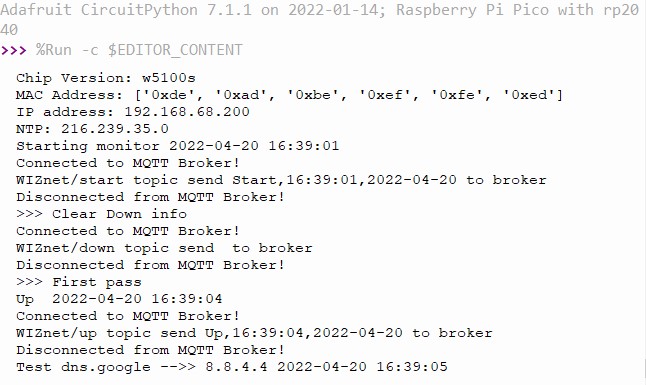
- Serial port - Normal operation: Starting monitoring
- Serial port - Ethernet cable disconnected: Cable disconnected and reconnected
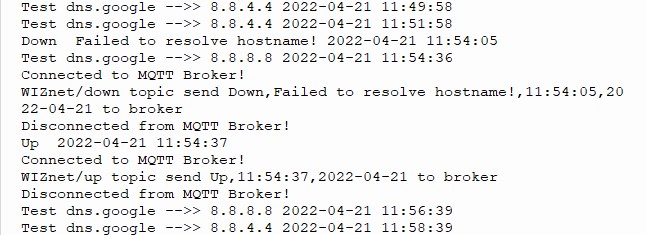
- Serial port - Network issue: Network/Internet issue and resolved
- [Node Red outage.log](http://maker.wiznet.io/wp-content/uploads/2022/04/outage.log): Running log updated by Node Red on the Raspberry Pi
## Article
**Network/internet outage monitor using WIZnet WS5100S-EVB-Pico**
This project uses a WIZnet WS5100S-EVB-Pico attached to a spare Ethernet port on a local router and is used to monitor the Network/Internet for outages. The project was designed after chasing and tracking multiple home Internet outages. I needed times and dates for my Internet provider to track down an ongoing issue I had last year. It did turn out that the issue was the cable coming off of the junction box outside my house. I wanted a device that would sit passively and monitor my network/internet 24/7. The design is a starting point for a more elaborate monitoring device. Please see **Future enhancements** at the end of the project. I was lucky(?) enough to have an outage in the middle of the night during programming and testing. The monitor did detect and report the outage. I wrote the program after going through all the CircuitPython examples. I borrowed and modified code from may of them. Hope you enjoy and get inspired by the project.
**The program will:**
- Detect the Ethernet cable unplugged from the WS5100S or the Ethernet port on the router
- Detect Network or Internet outages
- Light LEDs to indicate connection ok, cable disconnected and Network/Internet outages
- Display tracking information through the serial port
- Publish program start time, up time and outage time MQTT messages to a broker
- I used a Raspberry Pi as the broker and Node Red to post the information and write to a log
```
```
**Design:**
- The program is written in CircuitPython. Thronny was used as the editor.
- Program file name is code.py. This allows the program to autostart on powerup. **Note ?** *the program will fail to start if the Ethernet cable is not plugged in*.
- The program will try to resolve a **.com** URL. I used **dns.google**. The program was also tested with my router URL.
- The board and external green LEDs will be on during good connections.
- If the program can’t resolve the URL, the external green LED will turn off and the red external LED will turn on.
- If the Ethernet cable becomes unplugged, both the external and internal green LEDs will turn off and the external red LED will turn on.
- The program will check the URL every 2 minutes and if there is an outage, it will check every 30 seconds to determine if the outage has cleared.
- All information will be displayed on the serial port.
- Program start time, up time and outage time will be published as MQTT messages to a broker. **Note ?** *outage time can not be sent until the network is back up*.
- Use a Raspberry Pi for the MQTT broker. Use Node Red for data presentation and logging of program start time, up time and outage time. **Note ? ***a broker must be available to the program to publish MQTT messages. If one isn't available, remark all publish calls in the program*.
**Circuit diagram:**
[](https://user-images.githubusercontent.com/13513067/164536405-280b8052-20c9-4218-bf58-c11763f9d29a.jpg)
**GitHub -** [russel2512/Net_monitor (github.com)](https://github.com/russel2512/Net_monitor)
```
```
**Deployment:**
This is an overview of the project deployment. You should have a general knowledge of RP2040. Information can be found at??and?.
This project was developed with CircuitPython 7.1.1 deployed on the WS5100S. A good reference can be found at?. Version 7.1.1 of CircuitPython (adafruit-circuitpython-raspberry_pi_pico-en_US-7.1.1.uf2) can be found here:?
Install Thonny IDE to program the WS5100S. It can be found here:?.?**MU does not need to be installed.**
Test CircuitPython with the WS5100S using the Blink example program.
**Library deployment steps:**
- Create?**lib**?folder on the board.
- Download and copy the following libraries from??to lib.
- adafruit_bus_device
- adafruit_io
- adafruit_minimqtt
- adafruit_wiznet5k
- adafruit_wsgi
- adafruit_requests.py
- One more library needs to be copied to the lib folder.
- Download adafruit-circuitpython-bundle-7.x-mpy-20220413.zip from?, upzip the file and copy adafruit_datetime.mpy to lib.
Copy the monitor code from?.
- code.py (autorun)
- WIZnet_monitor.py (same as code.py, but does not autorun)
Connect the LEDs per the circuit diagram found in the GitHub project.
Setup a Raspberry Pi (Node Red is optional).
- For information on Raspberry Pi deployment, see?.
- For information on Mosquitto MQTT broker, see?.
- For information on Node Red, see?.
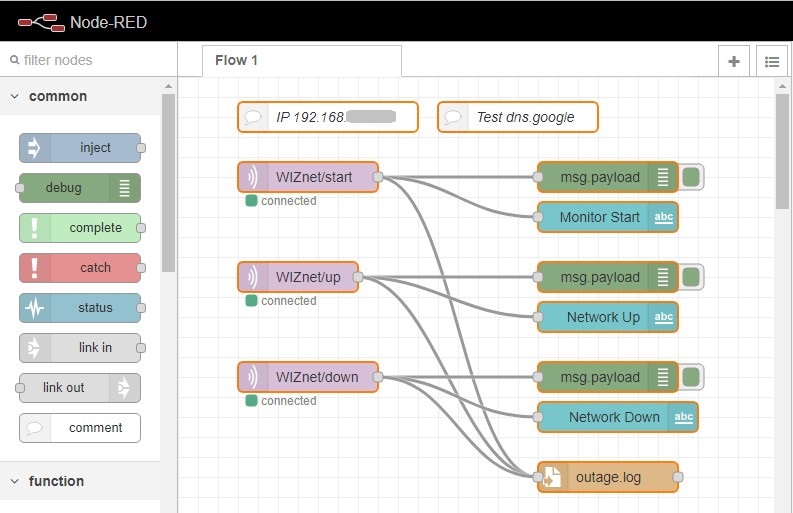
- Import the text from?**Node Red import.txt** into Node Red. You may need to modify MQTT broker information. Server - 'localhost' works ok in my configuration.
- Change the username and password.? These will need to be change in both the code and Node Red.
- username="rpi-pico"
- password="wiznet"
- [](https://user-images.githubusercontent.com/13513067/165227980-88bef4be-f135-4114-8fc6-52981cab1f86.jpg)
Final changes to the programs (code.py and WIZnet_monitor.py)
- Change the MQTT ip adress to the broker.
- Change IP_ADDRESS if the device is on a different subnet or if 192.168.68.200 conflicts with device on your network.
**For the program to work correctly, a MQTT broker must be available or it will fail. A broker can be deployed on almost any device. If you don't have a broker available, you can go through the code and remark out all the MQTT calls.**
```
```
**YouTube video of board/program operation - **
```
```
**Serial Port display inforamtion with screen shots of LED status:Normal operation**
[](https://user-images.githubusercontent.com/13513067/164374059-c697ab57-2236-4d6c-88a4-2cc02c4e4b33.jpg)

**Ethernet cable disconnected**
[](https://user-images.githubusercontent.com/13513067/164374786-9ac5ba63-d854-4d15-9d8a-aa1767f951eb.jpg)

**Network issue**
[](https://user-images.githubusercontent.com/13513067/164514162-cff9395a-c566-405b-92af-02572847e671.jpg)

**Node Red screen shots:Startup**?[](https://user-images.githubusercontent.com/13513067/164322109-1e07b24e-673f-4efc-bfd3-1f850cb42d0b.jpg)
**Cable error**?[](https://user-images.githubusercontent.com/13513067/164322256-e4e98656-07a6-48fe-b4a3-0dadf79e46de.jpg)
**Network error**?[](https://user-images.githubusercontent.com/13513067/164326331-28622515-88e5-42c9-9d5f-08bc062cb3c7.jpg)
```
```
** Future enhancements:** These are just ‘blue sky’ ideas. Some may not be valid or work. The biggest ‘got ya’ is the fact that the down/up information can’t be sent to the broker until the network is backup. This means the data will always cause a notification after the outage.
- Break up data for better data handling (ie, filling JASON fields and adding to databases)
- Deploy MQTT broker on PC and or Phone
- Use IFFT to send phone or text notifications
- Calculate downtime in the program or in Node Red
- Send Start, Up and Down data to external collection (ie ThingSpeak)
- Send notifications to a phone or PC directly from Node Red
- Add code to monitor multiple URLs, this could be used to monitor multiple servers or internal network devices (must have URLs)
- Change LEDs to a small display.
- Design a circuit board for the project.
- Design a 3D printed case.
---
Source: https://maker.wiznet.io/russel2512/contest/internet-outage-monitor/