---
title: "Moving to a RTOS on the RP2040"
url: "https://maker.wiznet.io/matthew/projects/moving-to-a-rtos-on-the-rp2040/"
markdown_url: "https://maker.wiznet.io/matthew/projects/moving-to-a-rtos-on-the-rp2040/md"
type: "UCC: User Created Content"
author: "Martijn Braam"
author_url: "https://blog.brixit.nl/moving-to-a-rtos-on-the-rp2040/"
editor: "WIZnet"
editor_url: "https://maker.wiznet.io/"
original_author: "Martijn Braam"
original_url: "https://blog.brixit.nl/moving-to-a-rtos-on-the-rp2040/"
published: "2025-12-04"
language: "en"
likes: 0
views: 470
comments: 0
source: "WIZnet Makers (https://maker.wiznet.io/)"
---
# Moving to a RTOS on the RP2040
> As projects get more complicated the tooling has to improve. Outgrowing the arduino-ide is easy on the Pi Pico with the excelent pico-sdk but what if things get
Original author: Martijn Braam (source: https://blog.brixit.nl/moving-to-a-rtos-on-the-rp2040/)
## Article
**(+ RP2040 Video Control Joystick with W5500 Ethernet)**
## 1. Introduction
This project is a real-world story of **when bare-metal on the RP2040 stops being fun** and you begin to seriously consider an RTOS.
The hardware is a **video control joystick** built around a Raspberry Pi Pico (RP2040) plus:
- RS-485 transceiver for PTZ cameras
- A **WIZnet W5500 Ethernet module** to talk to an ATEM video switcher
- A 4-axis joystick, nine RGB buttons, and an OLED display
The software must simultaneously:
- Draw a smooth UI
- Poll buttons and joystick
- Send VISCA commands over RS-485 to PTZ cameras
- Keep the **network stack alive** (DHCP, mDNS/DNS-SD, ATEM UDP protocol) on top of W5500
The blog post **“Moving to a RTOS on the RP2040”** walks through trying **FreeRTOS, NuttX, and Zephyr** on this real device, asking:
> **“At what point does this kind of project really need an RTOS?”**
---
## 2. What this project is
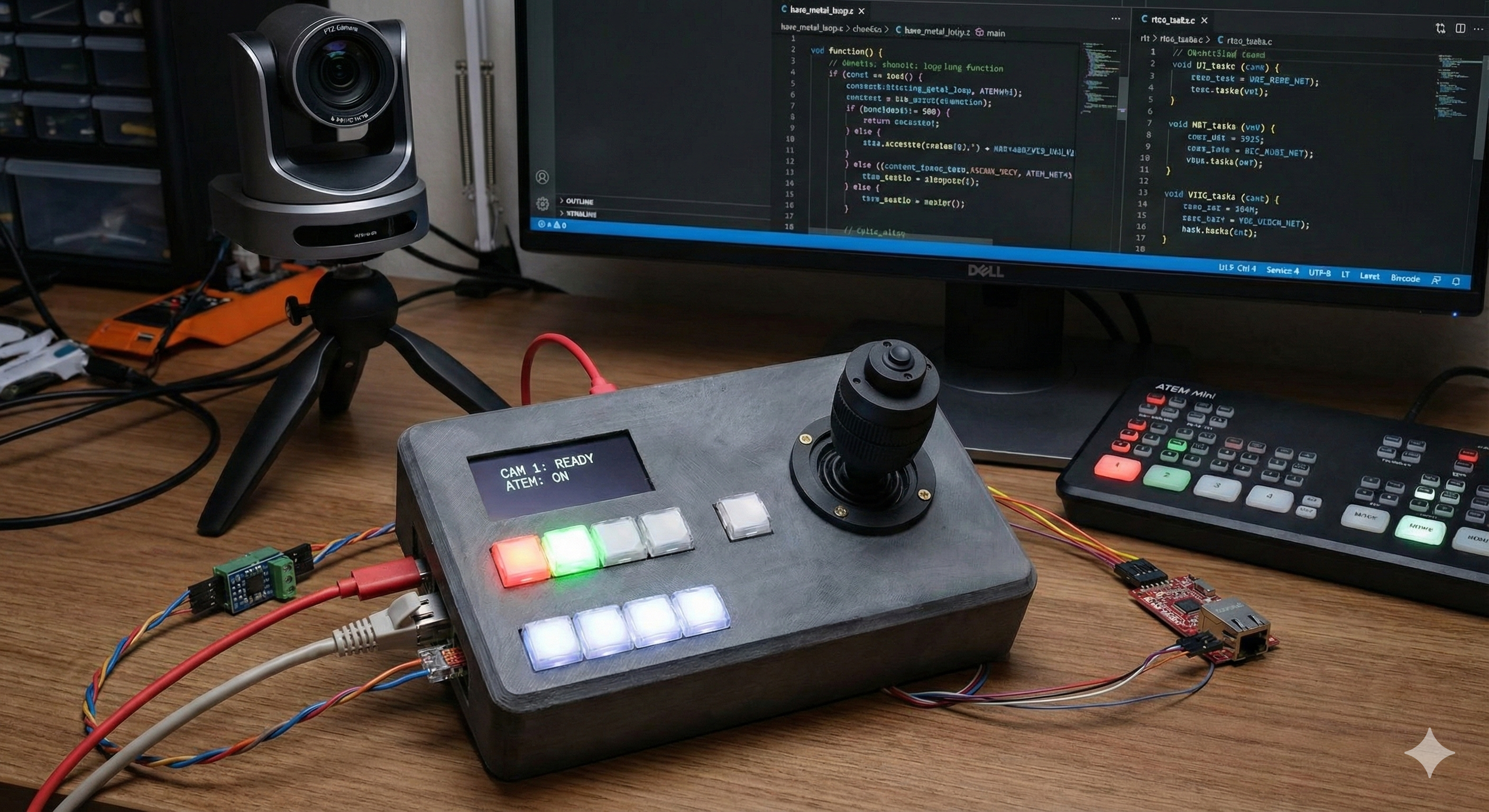
(기존 제품 이미지와 AI툴을 이용하여 만든 이미지입니다. )
### 2.1 The article: “Moving to a RTOS on the RP2040”
Martijn Braam’s article is essentially a **three-RTOS field report** for the RP2040.
He experiments with:
** 1.FreeRTOS**
- Split the application into tasks: buttons, LEDs, network, DHCP, mDNS, ATEM, VISCA…
- Quickly runs into “task explosion” and painful debugging (including `printf` misbehaving), but concludes FreeRTOS is still the most realistic fit for his setup.
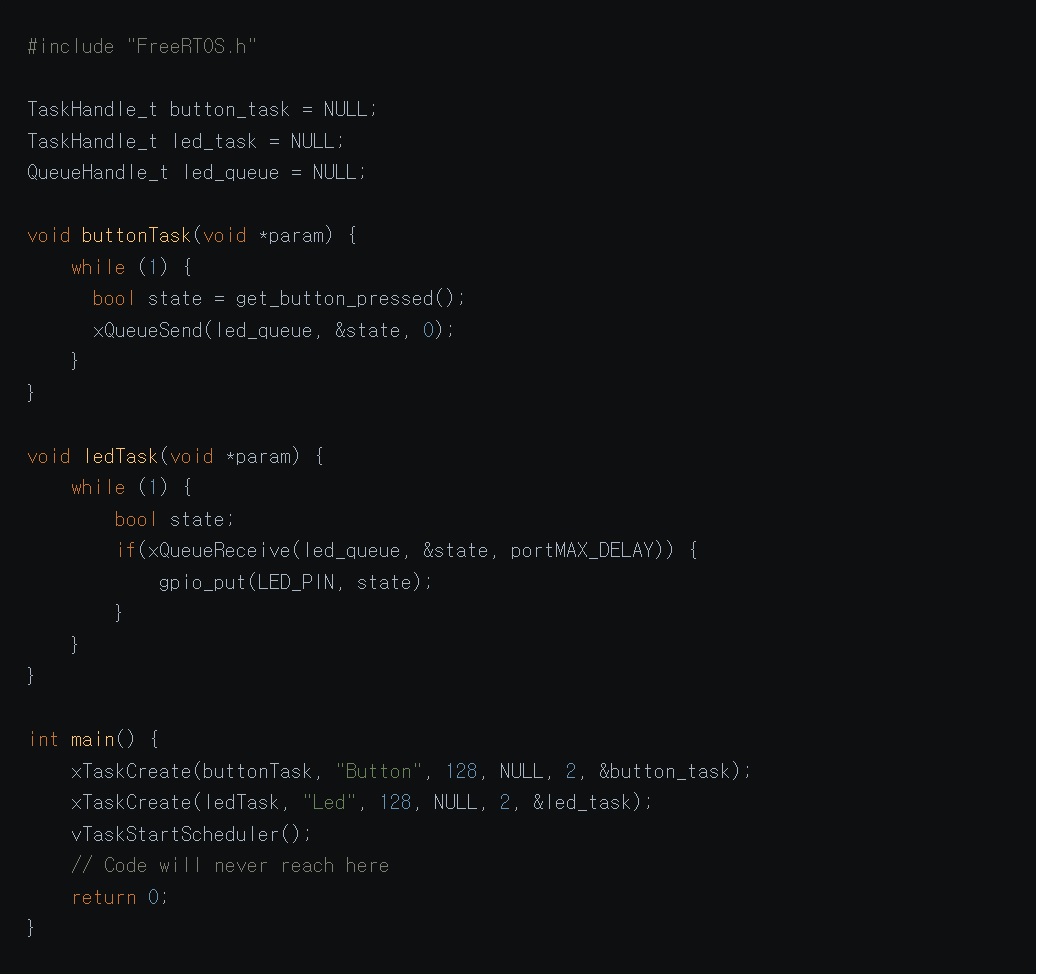
출처:
** 2.Apache NuttX**
- Feels like “a tiny Unix”: shell, `/dev/i2c0` style device files, Kconfig/menuconfig for driver and pin selection.
- Initially thinks I²C doesn’t work, later realizes it was a configuration mistake and corrects himself in the post.
** 3.Zephyr**
- Impressed by the tooling, but cloning and installing a **multi-gigabyte SDK plus toolchains and QEMU** feels very heavy for one Pico-based joystick.
The post ends with a pragmatic stance:
FreeRTOS integrates into his existing Pico toolchain the most smoothly, so that’s where he decides to invest more time.
### 2.2 The PCB: Video control joystick
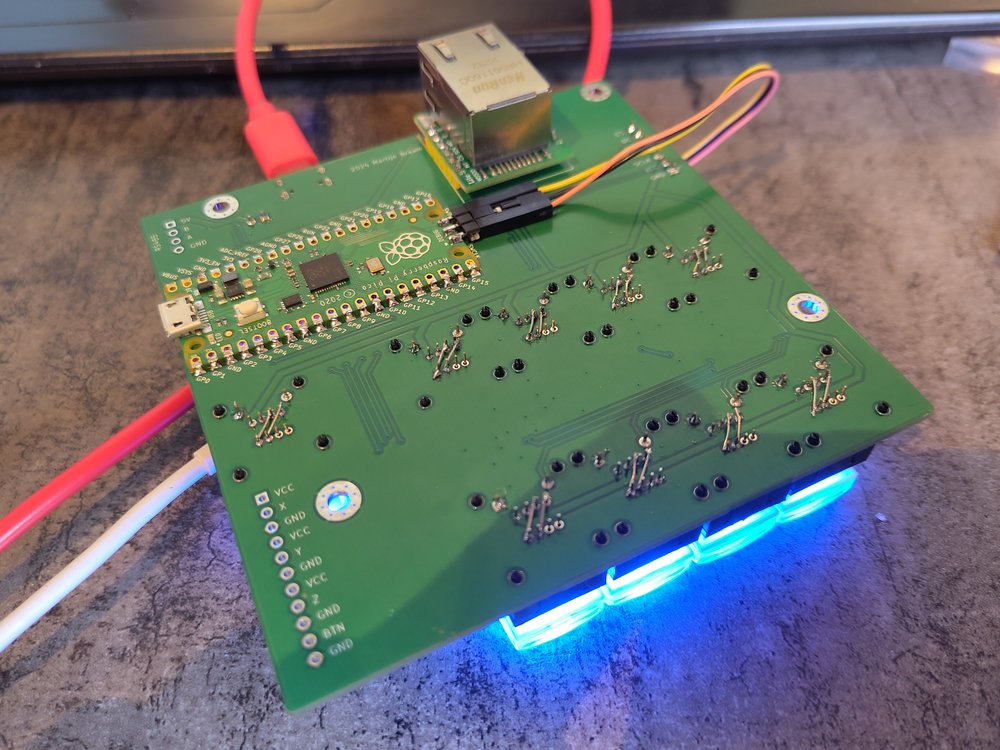
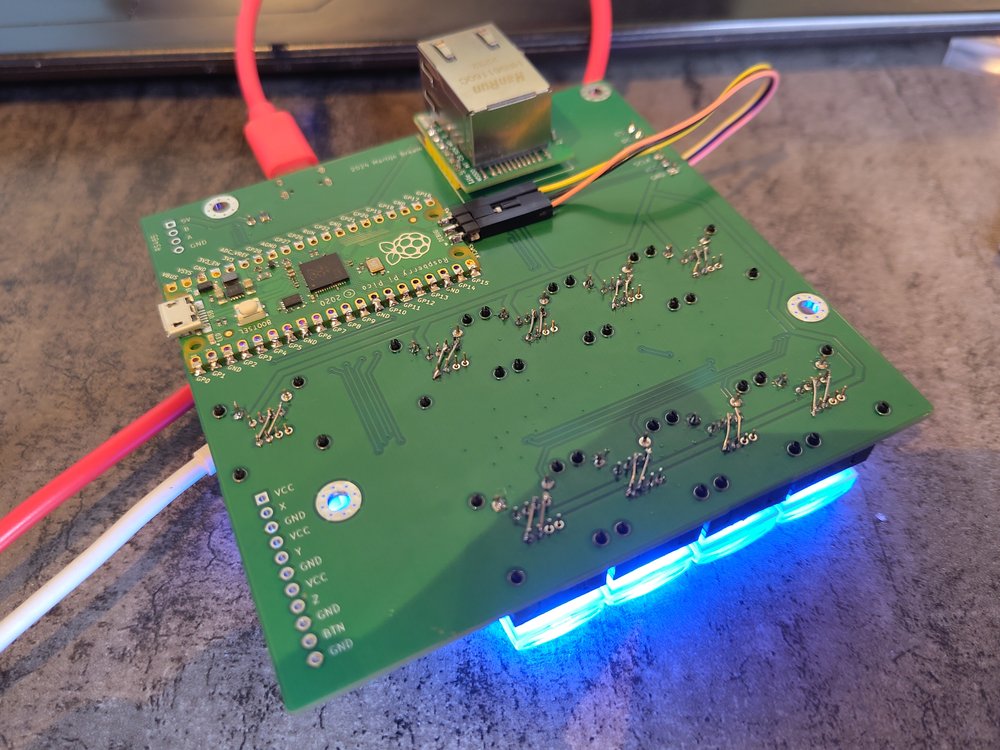
출처:

출처 PCB:
The PCB shared on PCBWay is the **actual controller hardware** used in the article.
Key points from the project page:
- **Use case**: a desk controller for **PTZ cameras + ATEM video switcher** in a live-video environment.
- **Core components**:
- Raspberry Pi Pico (RP2040 module)
- TP8485E RS-485 transceiver
- **WIZnet W5500 Ethernet module** for ATEM control
- 9 RGB backlit buttons and a 4-axis joystick
- 2.42" OLED display for status and UI
- PCBWay description notes that, via RS-485 and Ethernet, the controller can talk to almost any PTZ camera and ATEM switcher, and that the Pico is fast enough to update button LEDs with live/preview states from the switcher.
In other words: the RTOS article isn’t hypothetical—**this board is the pressure-test** for each RTOS.
---
## 3. Original language, author & audience
### 3.1 Language & platform
- The article is written in **English** and published on the **BrixIT** blog (Electronics section).
- The PCB is shared as a **PCBWay community project**, with Gerbers, BOM and case files available.
### 3.2 Author: Martijn Braam
- Martijn Braam is a **Dutch software developer**, known in the Linux world—especially for his early and ongoing work on **postmarketOS**.
- In interviews he describes himself as:
> “a software developer from the Netherlands… involved in the postmarketOS project since the very start in 2017.”
- His GitHub / GitLab / YouTube accounts show a long history of work on PinePhone, PineTab and other mobile-Linux hardware, so this **RP2040 + W5500 joystick** is very much in character: embedded systems, networking, Linux-adjacent.
### 3.3 Where this content “lands” (influence & reach)
The post escaped the blog and moved into the wider tech community:
- **OSNews** picked it up as a feature link about choosing an RTOS on the RP2040.
- It has been shared on **Hacker News, Reddit and GeekNews**, often with the framing: **“Good write-up on FreeRTOS vs NuttX vs Zephyr on RP2040.”**
- In the **NuttX community**, the article is referenced in a discussion about making the SDK easier for newcomers.
Because of that, the article has turned into a **reference piece** for embedded developers wondering, “Is it time to move my Pico project to an RTOS?”
---
## 4. Software side — why an RTOS here?
From the article, the “job list” for this one RP2040 is:
- Render a **smooth UI** on the OLED
- Read joystick and 9 RGB buttons (with debouncing)
- Send **VISCA commands** over RS-485 to PTZ cameras
- Run the **network stack on W5500**:
- DHCP lease handling
- mDNS / DNS-SD discovery of the ATEM switcher
- ATEM UDP protocol with strict timeouts and buffer limits
The original pico-sdk setup looked like:
- Core 1 → W5500 networking + DHCP
- Core 0 → UI, buttons, joystick, camera control
As more features were layered on, timing and state handling became fragile—**everything depended on the main loop never being “busy” too long.**
The RTOS experiments show:
- FreeRTOS: good integration but easy to fall into “too many tasks, not enough structure” if you’re not disciplined.
- NuttX: very nice Unix-like model (shell, `/dev`, Kconfig), but configuration mistakes can be subtle and the system is heavier.
- Zephyr: powerful but “overkill” for a single RP2040 joystick, given the large SDK and tooling download.
The takeaway is not “one RTOS to rule them all” but:
> **As soon as you’re juggling UI + Ethernet + serial + timing-sensitive protocols on the RP2040,**
> you should at least **consider** an RTOS, or you’ll eventually reinvent one badly.
---
## 5. Hardware side — video control joystick layout
From the PCB and description:
- **MCU**: Raspberry Pi Pico (RP2040)
- **Inputs**:
- R400B-M4 4-axis joystick for pan/tilt/zoom/focus
- 9x RGB pushbuttons (live/preview/aux, etc.)
- **Comms**:
- TP8485E RS-485 transceiver → PTZ camera control (VISCA and similar)
- **WIZnet W5500 Ethernet module** → ATEM switcher control & status over UDP
- **Display**: 2.42″ OLED for menus, camera info and status.
- **Mechanical**:
- Pico on the back side of the PCB; USB-C and BOOTSEL routed to the front panel
- FreeCAD case file shared (`joystick_Case_v2.FCStd`) so other makers can print their own enclosure
On the network side, W5500 handles **all Ethernet PHY + TCP/UDP/IP**, while the RTOS on RP2040 keeps all the higher-level tasks (ATEM protocol, UI, camera control) responsive.
---
## 6. Why this matters (WIZnet & maker perspective)
** 1.A grounded answer to “Do I need an RTOS on RP2040?”**
This isn’t a synthetic benchmark—it’s a real controller with **UI + RS-485 + W5500 Ethernet + multiple protocols**. The article shows where bare-metal starts to creak and how each RTOS feels in practice.
** 2.A concrete RP2040 + W5500 + RTOS pattern**
The joystick is effectively a template for projects that need:
- deterministic Ethernet (via W5500),
- a non-trivial UI,
- and multiple time-sensitive I/O paths.
** 3.Community impact & reproducibility**
- The post has been circulated on OSNews, HN, Reddit and more, and is now a go-to link when people ask about RTOSes on Pico.
- Because the PCB is shared on PCBWay, others can **build the exact same hardware**, flash their own RTOS experiments, and compare notes.
---
## 7. Quick reproduce (for readers who want to try it)
**Hardware**
1. Open the PCBWay project “Video control joystick” and download Gerbers/BOM/case files.
2. Assemble with a Raspberry Pi Pico, W5500 module, TP8485E RS-485 transceiver, RGB buttons, joystick and OLED display.
**Software / RTOS experiments**
1. Start from a pico-sdk project and integrate **FreeRTOS** (or follow the article’s steps for NuttX/Zephyr).
2. Split work into tasks for UI, buttons, RS-485 VISCA, and W5500 networking (DHCP, mDNS, ATEM UDP).
3. Observe where each RTOS helps—or gets in the way—compared to a simple dual-core bare-metal loop.
## 1. Introduction
**본 컨텐츠는**
Martijn Braam이 자신의 블로그에 쓴 글 **“Moving to a RTOS on the RP2040”**와
그 글 속에서 실제로 사용하는 하드웨어인 **Video control joystick PCB** 를 함께 다룹니다.
이 조이스틱은
**Raspberry Pi Pico(RP2040)**,
**RS-485 트랜시버(TP8485E)**,
**WIZnet W5500 Ethernet 모듈**,
9개의 RGB 버튼과 조이스틱, OLED 디스플레이
로 구성된 **라이브 비디오 장비용 컨트롤 패널**이고, PTZ 카메라(VISCA)와 ATEM 영상 스위처를 동시에 제어하도록 설계돼 있습니다.
문제는 **소프트웨어 복잡도**였습니다.
디스플레이에 부드러운 UI를 그려야 하고,
RS-485로 PTZ 카메라에 VISCA 명령을 보내야 하고,
버튼 입력을 처리해야 하고,
DHCP·mDNS·ATEM UDP 프로토콜까지 포함한 **네트워크 스택을 항상 살아있게** 유지해야 합니다.
기존 pico-sdk 기반 “코어 0 = UI, 코어 1 = W5500 네트워크” 구조로는 점점 감당이 안 되자,
결국 **RTOS로 갈아타 보기**로 한 이야기입니다.
---
## 2. What this project is
### 2-1. 블로그 글: “Moving to a RTOS on the RP2040”
글의 핵심은 **3가지 RTOS 비교 체험기**입니다.
**FreeRTOS** – pico-sdk 안에도 들어 있지만, 튜토리얼을 따라 새로 가져와 사용.
버튼·LED·네트워크·DHCP·mDNS·ATEM·VISCA 각각을 **태스크로 쪼갰다가**,
printf가 멈춰버리고 디버깅이 지옥이 되는 바람에 코드베이스가 엉망이 된 경험을 솔직하게 적습니다.
**Apache NuttX** – “마치 마이크로 컨트롤러용 리눅스”처럼 느끼는 OS.
nsh 쉘에서 `uname`, `i2c` 같은 명령을 직접 실행해 보고,
`/dev/i2c0` 같은 디바이스 파일, Kconfig/menuconfig 기반 핀/드라이버 설정 방식이 마음에 들었다고 평가합니다.
다만 초기에 I²C 설정을 삐끗해 “안 된다”고 썼다가, 나중에 설정 실수였다고 정정하기도 합니다.
**Zephyr** – “첫 명령부터 5GB Git 리포를 받는” 헤비급 RTOS.
전 아키텍처용 HAL을 통째로 끌어오고, 자체 툴체인·QEMU·OpenOCD까지 설치하도록 요구하는 점에서 **과도하게 복잡하다**고 느낍니다.
결론적으로는,
> “내 환경에 비교적 자연스럽게 통합할 수 있는 건 FreeRTOS뿐이라,
> 결국 FreeRTOS에 더 시간을 써 보겠다”
라는 방향으로 글을 마무리합니다.
### 2-2. PCB: Video control joystick
PCBWay에 공개된 **Video control joystick** 보드는 이 글에 등장하는 바로 그 하드웨어입니다.
**용도**: 라이브 비디오 제작 환경에서 **PTZ 카메라 + ATEM 스위처**를 제어하는 하드웨어 패널.
**주요 구성**:
Raspberry Pi Pico(RP2040 모듈)
RS-485용 TP8485E 트랜시버
**Wiznet W5500 Ethernet 모듈** (ATEM 스위처와 통신)
9개의 RGB 버튼 (방송용 스위처 스타일 키캡)
4축 조이스틱 (PTZ 팬/틸트/줌/포커스)
2.42" OLED 디스플레이
PCBWay 설명에 따르면,
> “RS-485와 Ethernet 연결로 거의 모든 PTZ 카메라를 제어할 수 있고, Pi Pico는 ATEM 프로토콜을 처리해 버튼 LED에 현재 live/preview 카메라 상태를 반영하기에 충분히 빠르다”
RTOS 글에서 예시로 드는 “**조이스틱 + 9 RGB 버튼 + OLED + RS-485 + W5500**” 하드웨어가 바로 이 PCB입니다.
---
## 3. Original Language & Author / Community
### 3-1. 언어 & 플랫폼
글은 **영어**로 작성된 블로그 포스트이며, BrixIT 블로그의 Electronics 섹션에 실려 있습니다.
PCB는 **PCBWay 커뮤니티 프로젝트**로 공유되어, Gerber/BOM/케이스 파일까지 다운로드 할 수 있습니다.
### 3-2. 저자: Martijn Braam
BrixIT 블로그 프로필에 **“I do computer stuff”**라고 본인을 소개하는 네덜란드 개발자.
**postmarketOS**(리눅스 폰 OS) 초기부터 핵심 기여자로 활동했으며, 인터뷰에서
**“I’m Martijn, a software developer from the Netherlands. I’ve been involved in the postmarketOS project since the very start in 2017.”** 라고 자신을 밝힙니다.
GitHub/GitLab/YouTube에서도 MartijnBraam 계정으로 활발히 활동하고, PinePhone/PineTab 등 모바일 리눅스 하드웨어 관련 작업과 영상으로 잘 알려져 있습니다.
### 3-3. 어디서 파급력이 있나?
이 글은 단순히 개인 블로그에만 머무르지 않았습니다.
**OSNews**에서 기사화
OSNews는 이 글을 인용하며 “FreeRTOS, NuttX, Zephyr를 저울질하는 프로젝트”로 소개합니다.
**Hacker News / Reddit / Mastodon / GeekNews**
Hacker News·Reddit의 /r/hackernews, 한국 GeekNews 등에서 링크가 공유되어 **“RP2040에서 RTOS 선택기”**로 회자되었습니다.
NuttX 커뮤니티 메일링 리스트에서는 이 글을 언급하며 “NuttX에도 더 친절한 SDK가 필요하다”는 논의를 하기도 했습니다.
→ 결과적으로, 이 글은 **“RP2040에서 FreeRTOS / NuttX / Zephyr 중 뭘 써야 하나?”를 고민하는 개발자들에게 많이 인용되는 레퍼런스**가 되었습니다.
---
## 4. Software Side — 왜 RTOS가 필요했나?
Martijn이 bare-metal + pico-sdk에서 RTOS로 넘어가려 한 이유는, 글에 직접 정리되어 있습니다.
해야 할 일:
**디스플레이 UI**를 부드럽게 그리기
RS-485로 **VISCA 명령을 주기적으로 송신**
버튼 스캔 및 디바운스
**네트워크 스택 유지:**
DHCP 리스 갱신
mDNS/DNS-SD로 ATEM 스위처 자동 탐색
W5500 버퍼 제한을 고려하며 ATEM UDP 패킷 송수신 (타임아웃이 매우 짧음)
초기 버전은
코어 1 → W5500 네트워크 처리 + DHCP
코어 0 → UI/버튼/조이스틱
처럼 나누어 구현했지만, 점점 **타이밍·상태 관리가 꼬이기 시작**합니다.
그래서 “스케줄러 + 태스크 간 통신”을 제공하는 RTOS로 넘어가면서,
FreeRTOS에서는 buttonTask, ledTask, networkTask, dhcpTask, mdnsTask, atemTask, viscaTask 등 **태스크 폭발**을 경험하고, printf 문제가 겹쳐 디버깅 지옥을 맛봅니다.
NuttX에서는 shell과 /dev 파일, Kconfig 기반 핀 설정에 감탄하지만, 설정 실수로 I²C가 안 되면서 “유닉스풍 OS가 꼭 행복한 것만은 아니다”를 깨닫습니다.
Zephyr는 5GB Git fetch + 거대한 SDK 설치 요구로 “이건 내 프로젝트 규모에 비해 너무 무겁다”는 판단을 내립니다.
이 과정 자체가 **RP2040 + 네트워크 + UI + 주변장치가 섞인 프로젝트가 RTOS를 필요로 하는 순간**을 아주 잘 보여줍니다.
---
## 5. Hardware Side — Video control joystick 구조
PCBWay 페이지와 블로그를 종합하면, 하드웨어는 대략 이런 구조입니다.
**MCU**: Raspberry Pi Pico (RP2040)
**입력**:
R400B-M4 4축 조이스틱 (팬/틸트/줌/포커스)
9x RGB 버튼 (방송용 스위처 스타일)
**통신**:
TP8485E RS-485 → PTZ 카메라 제어 (VISCA 등)
**W5500 Ethernet 모듈** → ATEM 스위처 제어 및 상태 수신
**표시**: 2.42" OLED 디스플레이 (카메라 상태·UI)
**기구**:
Pi Pico는 PCB 뒷면에 납땜, USB-C·BOOTSEL를 전면 케이스에 맞게 연장
케이스용 FreeCAD 파일 공유 (joystick_Case_v2.FCStd)
네트워크 측에서는
DHCP로 IP를 얻고,
mDNS/DNS-SD로 ATEM 스위처를 찾고,
ATEM 프로토콜 특성상 **W5500 버퍼보다 큰 패킷과 짧은 타임아웃**을 다뤄야 해서,
RTOS 없이 처리하기엔 꽤 빡센 워크로드임을 글에서 강조합니다.
---
## 6. Why this matters (WIZnet & Maker 관점)
**“언제 RTOS를 써야 하는가?”에 대한 현실적인 사례**
단순 블링킹 LED가 아니라,
UI + RS-485 + 이더넷(W5500) + 프로토콜 스택이 섞인 실제 프로젝트에서
FreeRTOS / NuttX / Zephyr를 직접 써보고 **장단점을 솔직하게 기록**했습니다.
**RP2040 + W5500 + RTOS 삼각 조합**
W5500 모듈은 ATEM 스위처와의 UDP 통신, DHCP, mDNS 등 “네트워크의 모든 것”을 담당합니다.
RTOS 위에서 W5500을 돌리며, RP2040 듀얼 코어와 함께 **저렴하지만 제법 복잡한 비디오 제어 패널**을 구현하는 레퍼런스로 쓸 수 있습니다.
**커뮤니티 파급력**
OSNews, Hacker News, Mastodon, GeekNews 등 여러 커뮤니티에서 이 글을 인용하며,
“비슷한 프로젝트에서 RTOS 선택할 때 참고하라”는 의견이 많이 나왔습니다.
PCBWay의 공유 프로젝트로써, 같은 하드웨어를 그대로 주문해 따라 해볼 수 있다는 점도 큽니다.
---
## 7. Quick Reproduce (요약 가이드)
**하드웨어 쪽**
PCBWay에서 **Video control joystick** 프로젝트를 열고,
Gerber / BOM / 케이스 파일을 내려받아 제작.
Pi Pico, W5500 모듈, TP8485E, RGB 버튼, 조이스틱, OLED 등 부품을 준비해 조립.
**소프트웨어/RTOS 실험 쪽**
RP2040 + pico-sdk 프로젝트를 만들고,
본문에서 소개한 것처럼 FreeRTOS를 통합하거나,
NuttX/Zephyr 튜토리얼을 따라가며 **Martijn이 겪은 동일한 장단점**을 직접 체험해볼 수 있습니다.
네트워크 태스크를
DHCP, mDNS, ATEM 프로토콜, W5500 버퍼 관리
로 나눠 보고, RTOS의 큐/태스크 모델이 bare-metal보다 어떤 차이를 만들어 내는지 탐구해 보세요.
---
Source: https://maker.wiznet.io/matthew/projects/moving-to-a-rtos-on-the-rp2040/