---
title: "ESP-Miner-LAN"
url: "https://maker.wiznet.io/matthew/projects/esp-miner-lan/"
markdown_url: "https://maker.wiznet.io/matthew/projects/esp-miner-lan/md"
type: "UCC: User Created Content"
author: "CryptoIceMLH"
author_url: "https://github.com/CryptoIceMLH/ESP-Miner-LAN"
editor: "WIZnet"
editor_url: "https://maker.wiznet.io/"
original_author: "CryptoIceMLH"
original_url: "https://github.com/CryptoIceMLH/ESP-Miner-LAN"
published: "2025-11-13"
language: "en"
likes: 0
views: 2463
comments: 0
source: "WIZnet Makers (https://maker.wiznet.io/)"
---
# ESP-Miner-LAN
> ESP-Miner-LAN turns ESP32-S3 Bitaxe miners into hardwired LAN miners with a W5500 module, adding stable LAN/WiFi networking and 24/7 mining reliability.
Original author: CryptoIceMLH (source: https://github.com/CryptoIceMLH/ESP-Miner-LAN)
## Article
## Introduction
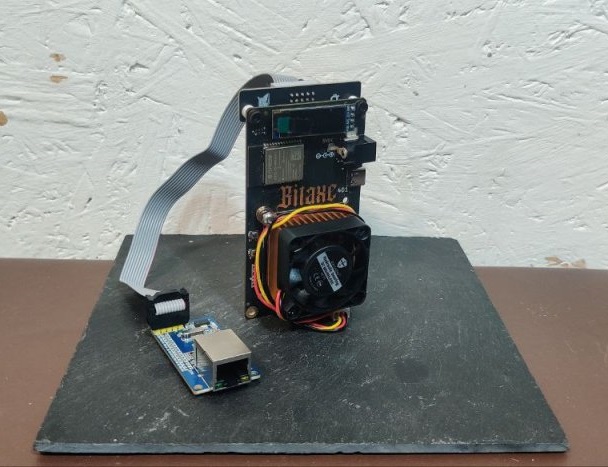
This project is a custom firmware that upgrades **ESP32-S3–based Bitcoin ASIC miners (Bitaxe family)** from **WiFi-only** devices into **LAN-capable miners** using a **WIZnet W5500 Ethernet** controller.
Based on the original **ESP-Miner (bitaxeorg) v2.10.1**, it integrates the ESP-IDF Ethernet driver and W5500 to create a **dual-network stack (LAN + WiFi)**, with a clear policy:
> If a W5500 is detected and correctly configured, **Ethernet is preferred**.
> Otherwise, it gracefully falls back to **WiFi**.
This content doesn’t just say “you can add LAN.” It shows:
why W5500 was chosen,
how it is wired to the ESP32-S3,
where it hooks into the ESP-Miner mining loop, and
how this work sits at the center of a small but very active hardware/community ecosystem.
---
Original Image:
## Overview
At a glance, **ESP-Miner-LAN**:
is **based on ESP-Miner v2.10.1**,
targets **Bitaxe 6xx/8xx boards, NerdAxe, and other ESP32-S3 Bitcoin ASIC designs**,
keeps the original:
**mining loop** (Stratum client),
**web dashboard (AxeOS)**,
and extends the network layer with:
**WiFi support (unchanged)**, plus
**W5500 Ethernet support**, with automatic **LAN-first, WiFi-fallback** behavior.
In short, it’s **the same miner and same UI**, but with a **much stronger, wired network path** beneath it.
---
## Original Language & Author / Community
**Language / Repository**
GitHub: `CryptoIceMLH/ESP-Miner-LAN`
Language: English
License: GPL-3.0
**Author & Organization**
GitHub handle: **CryptoIceMLH (CryptoICE)**
States clearly in the README that this is a **LAN-enabled fork of ESP-Miner v2.10.1**.
Links to **Molon Labe Holdings** and a BTC donation address.
**Molon Labe Holdings**
Tagline: *“Sovereign ₿itcoin Tech Innovator”*
Focus areas:
**SolarBit** — solar-powered solo mining
**ImmergeAxe** — advanced thermal/immersion management for miners
**BTC-Node-Satellite / BitSatRelay** — satellite/mesh-style Bitcoin node connectivity
In practice: a small, highly hands-on R&D studio obsessed with “self-sovereign Bitcoin infrastructure.”
**X (Twitter) & Discord**

X: **@MolonLabeVC (https://x.com/MolonLabeVC)**
Follower count: **over ~3,000 followers (thousands-level)**.
Regularly posts about Bitaxe LAN mods, SolarBit, ImmergeAxe, giveaways (e.g., Bitaxe LAN adapters), and ongoing R&D.

Discord: **“BTC Tech Nerd Army!” (https://discord.com/channels/1297481882740588617/1426146248301215774)**
Frequently promoted on X as the go-to place for:
Bitaxe / ESP-Miner-LAN support
Solar mining experiments
Satellite/mesh node experiments
Live tests, R&D feedback, tuning tips
Effectively functions as a **live lab** where hardware, firmware, and real-world PoW experiments meet.
So, while ESP-Miner-LAN is “just a GitHub repo,” it also sits at the center of a **small but influential ecosystem** of people actually running and hacking on this hardware.
---
## How It Works — Architecture & Code Mechanics
### 1. High-Level Architecture
Internally, ESP-Miner-LAN follows the classic ESP-Miner layering, with **Ethernet added at the platform layer**:
**ASIC Driver Layer**
Controls the SHA-256 ASIC(s) on the Bitaxe board (e.g., BM1366): registers, clock, voltage, board revision quirks.
The `config-xxx.csv` files (102/201/601/800x, etc.) contain per-board manufacturing parameters and are merged into the firmware image via `merge_bin*.sh`.
**Stratum Network Layer**
Speaks **Stratum** over TCP to a mining pool or solo node:
fetches jobs (block header templates),
dispatches them to the ASIC worker,
submits valid hashes as shares.
This layer largely doesn’t care whether the network underneath is **WiFi** or **Ethernet**; it just uses the TCP/IP stack exposed by ESP-IDF/lwIP.
**Network / Platform Layer (WiFi + Ethernet)**
Initializes:
ESP32-S3 **WiFi** stack, and
ESP-IDF **Ethernet** driver for **W5500**.
Uses event callbacks to track:
link-up / link-down,
IP acquisition events (DHCP or static).
Policy:
If W5500 Ethernet links up and gets an IP → **use LAN as primary**.
If not → **fallback to WiFi**.
**Web UI Layer (AxeOS)**
A built-in HTTP server providing the **AxeOS** dashboard:
hash rate & temperature monitoring,
pool/node configuration,
clock/voltage tuning,
advanced settings.
Whether the miner is on WiFi or W5500 Ethernet, the user experience is the same: **open a browser to the IP and use AxeOS**.
---
### 2. W5500 ↔ ESP32-S3 Wiring
From the README’s **W5500 Ethernet Module Wiring Guide**:
**Wiring (ESP32-S3 ↔ W5500 via SPI)**
MOSI → GPIO 40
MISO → GPIO 39
SCLK → GPIO 41
CS → GPIO 42
VCC → 5V
GND → GND
**SPI Configuration**
Bus: **HSPI (SPI2)**
Clock: **20 MHz**
Mode: **SPI Mode 0 (CPOL=0, CPHA=0)**
No dedicated IRQ pin — runs in **polling mode**.
**BAP Pin Conflict (BitAxe Access Protocol)**
GPIO 39/40 are shared between:
W5500 SPI (MISO/MOSI) and
the **BAP UART (RX/TX)**.
With the default pin map you **cannot use W5500 and BAP simultaneously**.
If you need both, you must:
reassign pins via `idf.py menuconfig`, and
adjust the physical wiring to match.
---
### 3. W5500 on ESP-IDF + lwIP
ESP-Miner-LAN uses the **official ESP-IDF W5500 Ethernet driver**.
In `idf.py menuconfig` →
**Component config → Ethernet W5500 Configuration** you set:
`ENABLE_ETHERNET = y`
`W5500_SPI_MOSI/MISO/SCLK/CS = 40/39/41/42`
`W5500_SPI_CLOCK_MHZ = 20`
`W5500_USE_DHCP = y` (recommended default)
Under the hood, the flow is the standard ESP-IDF W5500 pattern:
Initialize SPI2 (HSPI) with `spi_bus_initialize()`.
Create W5500 MAC + PHY objects via `esp_eth_mac_new_w5500()` / `esp_eth_phy_new_w5500()`.
Call `esp_eth_driver_install()` and attach an **Ethernet netif** via `esp_netif_new()` + `esp_netif_attach()`.
If DHCP is enabled, start the DHCP client (`esp_netif_dhcpc_start()`).
When `IP_EVENT_ETH_GOT_IP` fires:
mark Ethernet as “ready,”
register that netif as the current interface for Stratum and the AxeOS web server.
For **Static IP**:
Disable `W5500_USE_DHCP`, then:
either configure IP via the AxeOS web UI, or
edit IP settings directly in `ethernet_w5500.c` (or the equivalent network config code).
Result: W5500 is presented to the rest of the firmware as a **standard lwIP network interface**, and higher-level code (mining/web) doesn’t need to know if it’s WiFi or wired.
---
## Why W5500?
### 1. Best Fit for ESP32-S3 + Ethernet
ESP32-S3 **does not include an internal Ethernet MAC**.
To get wired LAN you must either:
use an **SPI Ethernet controller** (like W5500), or
add an external MAC+PHY over RMII/MII (more complex hardware + firmware).
W5500 bundles **MAC + PHY + TCP/IP stack** into a single chip, and:
connects to ESP32-S3 via a simple SPI bus,
dramatically reduces PCB complexity, BOM size, and bring-up pain.
From a hardware developer’s perspective, for an ESP32-S3 Bitaxe, the choice is natural:
> “If we want wired Ethernet without turning the board into a monster,
> SPI + W5500 is the cleanest option.”
### 2. Network Characteristics That Match Mining
Mining is a **24/7 workload** where network reliability and predictability matter:
WiFi is vulnerable to interference, AP reboots, signal fading, and environmental changes.
**Wired Ethernet + hardware TCP/IP (W5500)** provides:
more stable latency and jitter,
offloaded packet handling (less CPU noise on the ESP32-S3),
fewer moving parts in the critical path.
This aligns directly with the project’s ethos. As MolonLabeVC puts it on X:
> “WiFi is for normies. Real miners hardwire.”
If you care about **self-sovereign, dependable uptime**, LAN + W5500 is a very logical choice.
### 3. ESP-IDF Support + Module / Product Ecosystem
ESP-IDF **officially supports W5500 Ethernet**, with:
examples,
driver code,
netif integration.
Hardware-wise, there is an abundance of:
generic W5500 modules, and
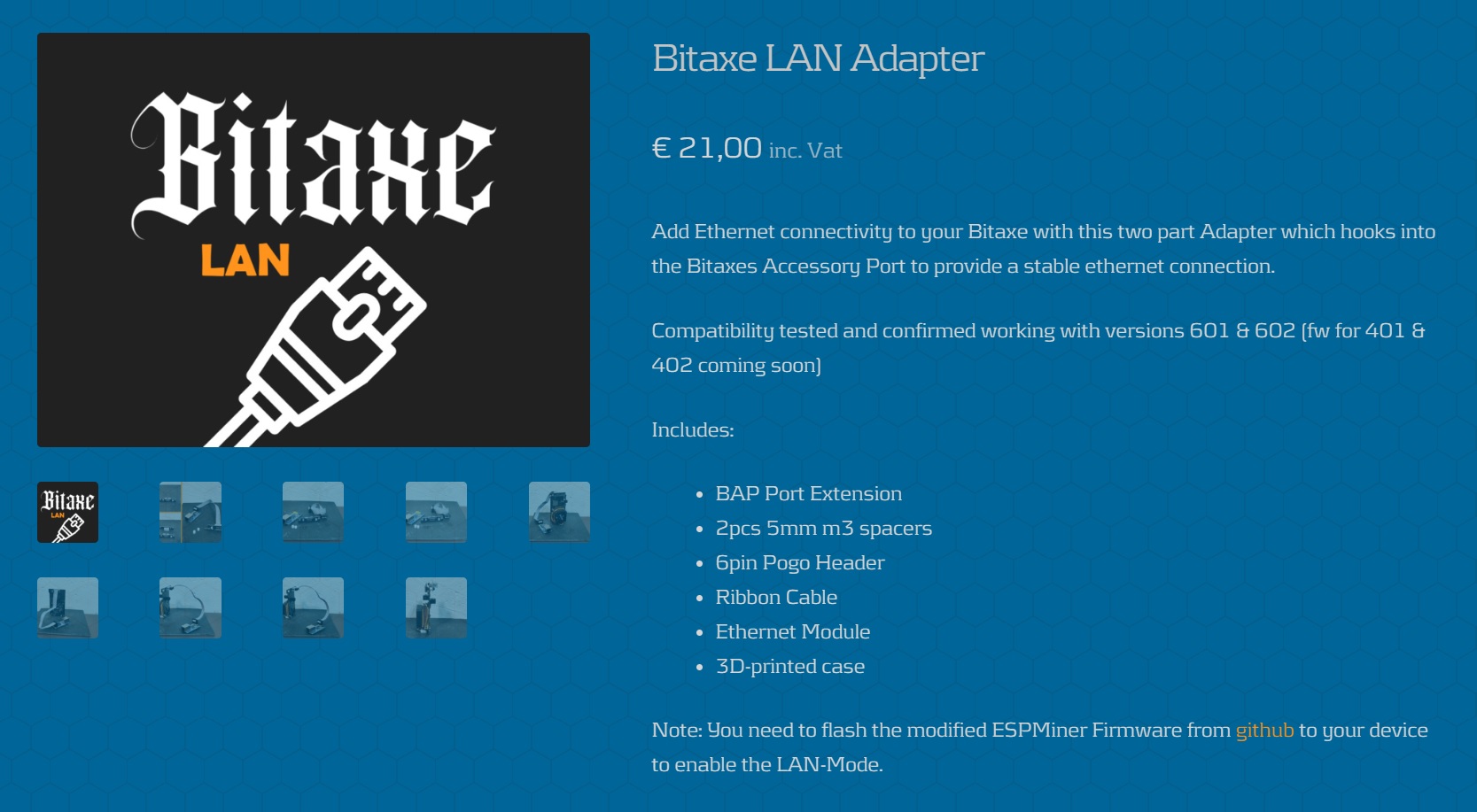
dedicated products like the **GoBrrr Bitaxe LAN Adapter** designed specifically for Bitaxe.
This makes it easy to form a full pipeline:
> open-source firmware (ESP-Miner-LAN)
> ↔ ready-made W5500 hardware (Bitaxe LAN Adapter)
> ↔ community tuning/support (BTC Tech Nerd Army Discord).
### 4. Product & UX Story
The **GoBrrr Bitaxe LAN Adapter** essentially wraps W5500 into a:
Bitaxe-form-factor board with:
W5500 Ethernet,
ribbon cable,
a neat 3D-printed case.
For a user, the UX becomes:
Plug the LAN adapter into the Bitaxe,
Flash **ESP-Miner-LAN**,
Connect Ethernet, and you have a **“Bitaxe LAN”**.
W5500’s modularity and mature ecosystem help turn what could be a complex integration into a **simple upgrade kit story**.
---
## Where This Project Has Impact
Original Image:
**LAN Reference for the Bitaxe / ESP-Miner Ecosystem**
ESP-Miner-LAN acts as a **de facto reference** for adding LAN to:
Bitaxe 6xx/8xx boards,
NerdAxe / NerdQaxe,
and similar ESP32-S3 ASIC designs.
Since it shares structure with ESP-Miner, other forks can easily borrow ideas from this code.
**Open-Source ↔ Hardware ↔ Community Feedback Loop**
GitHub: ESP-Miner-LAN firmware
Hardware: GoBrrr Bitaxe LAN Adapter
Community: BTC Tech Nerd Army Discord
This creates a tight feedback loop where users can:
read the code,
buy a LAN adapter,
and get tuning/support in real time.
**A “Real-World” W5500 Case Study for WIZnet Makers**
Beyond simple Ethernet demos, this project covers:
ESP-IDF Ethernet integration,
DHCP vs static IP setups,
GPIO conflicts,
power budgeting,
and actual 24/7 deployment.
It’s an excellent **real-world example** of how W5500 can be used in a production-like environment, not just in lab exercises.
---
## Quick Reproduce (Checklist)
**Hardware**
Supported Bitaxe board (e.g., 601/602/8xx).
W5500 Ethernet module or **GoBrrr Bitaxe LAN Adapter**.
**Wiring (ESP32-S3 ↔ W5500)**
MOSI: GPIO 40
MISO: GPIO 39
SCLK: GPIO 41
CS: GPIO 42
Power: 5V & GND
Keep SPI lines short (≤15 cm), twisted pairs recommended.
**Firmware Build**
Run `idf.py menuconfig` → **Ethernet W5500 Configuration**:
`ENABLE_ETHERNET = Y`
`W5500_USE_DHCP = Y` (or set static later)
SPI pins & clock verified.
Build & flash:
```plaintext
idf.py build
idf.py flash
```
**Bring-Up & Test**
Check your router’s DHCP table or use AxeOS to find the IP.
With Ethernet plugged in: confirm the miner runs over W5500 LAN.
Unplug Ethernet: confirm it falls back to WiFi and stays mining.
---
## Introduction
본 프로젝트는 **ESP32-S3 기반 비트코인 ASIC 마이너(Bitaxe 계열)**에
**WIZnet W5500 Ethernet**을 더해,
기존의 **WiFi-only 채굴기**를 **유선 LAN을 우선 사용하는 채굴기**로 진화시키는 펌웨어입니다.
원작인 **ESP-Miner(bitaxeorg)** 펌웨어(v2.10.1)를 기반으로 하되,
ESP-IDF의 Ethernet 드라이버와 W5500을 연결해 **LAN + WiFi 듀얼 네트워크 구조**를 만들고,
W5500이 연결·설정되어 있으면 **자동으로 LAN을 우선 사용**하도록 설계되어 있습니다.
이 컨텐츠는 단순히 “LAN도 됩니다” 수준을 넘어서,
왜 W5500을 선택했는지,
ESP32-S3와 어떤 구조로 붙어 있는지,
채굴 루프(ESP-Miner)의 어디에 LAN이 끼어드는지,
그리고 이 작업을 중심으로 **어떤 커뮤니티/제품 생태계가 형성되어 있는지**
까지 한 번에 보여주는, 꽤 밀도 높은 실전 사례입니다.
---
## Overview
ESP-Miner-LAN은 다음과 같은 특징을 가진 프로젝트입니다:
기반: **ESP-Miner v2.10.1** (bitaxeorg)
대상 하드웨어: Bitaxe 6xx/8xx 계열, NerdAxe, 기타 ESP32-S3 기반 비트코인 ASIC 보드
네트워크:
기존 **WiFi** 채굴 유지
**W5500 Ethernet**을 추가해 LAN 지원
W5500이 정상 연결되면 **LAN 우선, 실패 시 WiFi 폴백**
UI: ESP-Miner 계열 공통 **웹 대시보드(AxeOS)** 그대로 사용
요약하자면, **채굴 로직과 UI는 그대로 두고, 네트워크 레이어만 W5500으로 강화한 브랜치**입니다.
---
## Original Language & Author / Community
**언어 / 리포지터리**
GitHub: `CryptoIceMLH/ESP-Miner-LAN`
언어: 영어
라이선스: GPL-3.0
**저자 및 조직**
GitHub 핸들 **CryptoIceMLH (CryptoICE)**
README에서 “ESP-Miner v2.10.1 기반 LAN 버전”임을 명시
프로젝트 사이트로 **Molon Labe Holdings**를 링크
**Molon Labe Holdings**
모토: *“Sovereign ₿itcoin Tech Innovator”*
주요 활동:
태양광 기반 솔로 마이닝 **SolarBit**
침지/열 관리 솔루션 **ImmergeAxe**
위성·메시 기반 BTC 노드 통신 등
성격: “말보다 PoW”를 중시하는, 자기 주권 비트코인 인프라 R&D 스튜디오
**X (Twitter) & Discord 커뮤니티**
X: **@MolonLabeVC**
팔로워: **3,000명에 가까운(2,800+ 수준의)** BTC·하드웨어·마이닝 관심 유저
Bitaxe LAN Mod, SolarBit, ImmergeAxe, LAN 어댑터 기브어웨이, 실험 결과 등을 꾸준히 공유
Discord: **“BTC Tech Nerd Army!”**
X에서 반복적으로 초대하는 기술 커뮤니티
Bitaxe/ESP-Miner-LAN, 태양광, 위성 노드 등
**하드웨어·펌웨어 튜닝, 라이브 테스트, R&D 피드백**이 활발히 오가는 곳
→ 그래서 이 프로젝트는
**개인 프로젝트이면서 동시에, 수천 명의 팔로워와 활발한 Discord를 거점으로 하는 “작은 생태계의 중심 펌웨어”**라고 볼 수 있습니다.
---
## How It Works — 코드/구조 관점
### 1) 전체 구조
ESP-Miner-LAN의 내부 구조는 크게 네 레이어로 나눌 수 있습니다.
**ASIC 드라이버 레이어**
SHA-256 ASIC(예: BM1366)의 레지스터, 주파수, 전압, 보드 리비전별 특성을 관리
루트에 있는 `config-xxx.csv` 파일들이 각 보드에 대한 제조 설정값을 담고,
`merge_bin*.sh` 스크립트로 펌웨어 바이너리와 병합되어 플래시에 기록됩니다.
**Stratum 네트워크 레이어**
풀/노드와 TCP(Stratum 프로토콜)로 통신
Job(작업)을 받아 ASIC 워커에게 전달하고,
유효 해시 결과를 share로 제출
이 레이어는 **“네트워크가 WiFi냐 LAN이냐”를 거의 모른 채**,
아래에서 올라온 lwIP 소켓 인터페이스만 씁니다.
**네트워크/플랫폼 레이어 (WiFi + Ethernet)**
ESP32-S3의 **WiFi 스택**과
ESP-IDF **W5500 Ethernet 드라이버**를 초기화
이벤트 기반으로:
어떤 인터페이스가 먼저 링크업/IP 획득을 했는지 확인
W5500(Ethernet)이 정상 동작하면 **LAN을 메인 인터페이스로 사용**
그렇지 않은 경우 WiFi로 폴백
**웹 UI (AxeOS)**
HTTP 서버로 동작하는 웹 대시보드
해시율/온도/풀 주소/클럭·전압 등 설정
LAN이든 WiFi든, 결국 같은 IP 스택 위에서 동일 UI가 떠 있기 때문에
사용자는 “접속 IP”만 신경 쓰면 됩니다.
---
### 2) W5500 + ESP32-S3 연결
**하드웨어 배선**
MOSI → GPIO 40
MISO → GPIO 39
SCLK → GPIO 41
CS → GPIO 42
VCC → 5V
GND → GND
**SPI 설정**
버스: HSPI(SPI2)
클록: 20MHz
모드: SPI Mode 0
IRQ 핀 없이, polling 방식으로 동작
**핀 충돌 (BAP와 공유)**
GPIO 39/40은 W5500 SPI와 **BAP(Bitaxe Access Protocol) UART**가 공유되는 핀
기본 핀맵에서는 W5500과 BAP를 동시에 사용할 수 없고,
둘 다 쓰려면 `menuconfig`에서 핀을 재매핑하고, 하드웨어 배선도 수정해야 합니다.
---
### 3) ESP-IDF + lwIP 위에서의 W5500 동작
ESP-Miner-LAN은 ESP-IDF가 제공하는 **공식 W5500 Ethernet 드라이버**를 사용합니다.
`idf.py menuconfig` →
**Component config → Ethernet W5500 Configuration**에서:
ENABLE_ETHERNET = y
W5500_SPI_MOSI/MISO/SCLK/CS = 40/39/41/42
W5500_SPI_CLOCK_MHZ = 20
W5500_USE_DHCP = y (기본, DHCP 권장)
대략적인 초기화 플로우는 다음과 같습니다.
`spi_bus_initialize()`로 SPI2(HSPI) 초기화
`esp_eth_mac_new_w5500()` / `esp_eth_phy_new_w5500()`로 MAC/PHY 객체 생성
`esp_eth_driver_install()` 후
`esp_netif_new()` + `esp_netif_attach()`로 **ETH용 netif** 생성
DHCP 사용 시 `esp_netif_dhcpc_start()`로 IP 할당
`IP_EVENT_ETH_GOT_IP` 이벤트에서
“Ethernet이 준비되었다”는 플래그를 세우고
Stratum/웹 서버가 사용할 인터페이스로 등록
Static IP를 쓰고 싶다면
`W5500_USE_DHCP`를 끄고,
AxeOS 웹 UI 또는 `ethernet_w5500.c` 내부 코드에서 IP를 직접 설정하는 방식으로 변형할 수 있습니다.
즉, W5500은 **ESP-IDF Ethernet 드라이버를 통해 lwIP netif로 추상화**되고,
상위 채굴/웹 코드는 “WiFi냐 LAN이냐”를 거의 의식하지 않고 동일한 TCP/IP 레이어를 사용합니다.
---
## Why W5500? — 이 프로젝트가 W5500을 선택한 이유
### 1) ESP32-S3와 가장 잘 맞는 유선 이더넷 솔루션
ESP32-S3에는 **내장 Ethernet MAC이 없음**
유선 LAN을 쓰려면
SPI 이더넷 컨트롤러(W5500 등)를 쓰거나
외부 MAC+PHY + RMII/MII로 무거운 구성을 해야 함
W5500은
MAC + PHY + TCP/IP를 **한 칩에 통합**하고
ESP32-S3와는 SPI 4선 + CS만 연결하면 되므로
**회로 난이도, 부품 수, 디버깅 비용을 크게 줄여줍니다.**
### 2) 채굴 워크로드에 잘 맞는 네트워크 특성
채굴은 **24/7 장시간 동작**,
네트워크 끊김이나 jitter가 share 제출에 직접 영향을 줌
WiFi는 간섭/재부팅/신호 약화 등 변수가 많고,
**유선 LAN + 하드와이어드 TCP/IP(W5500)**은
레이턴시·지터가 더 일정하고
MCU 쪽 네트워크 처리 부하가 줄어
**채굴기 입장에서 훨씬 예측 가능한 동작**을 제공합니다.
MolonLabeVC가 자주 말하듯,
> “WiFi is for normies. Real miners hardwire.”
라는 철학이, W5500 + Bitaxe LAN 선택에 그대로 반영되어 있습니다.
### 3) ESP-IDF 공식 지원 + 모듈/제품 생태계
ESP-IDF가 W5500 드라이버·예제를 공식 제공 →
펌웨어 쪽에서 **재사용 가능 코드**가 이미 존재
하드웨어 쪽에는
범용 W5500 모듈,
Bitaxe 전용 **GoBrrr Bitaxe LAN Adapter** 같은 상용 제품까지 있어
“**오픈소스 펌웨어 ↔ 하드웨어 키트 ↔ 커뮤니티 지원**”의 파이프라인을 만들기 쉽습니다.
---
## Where This Project Has Impact
**Bitaxe / ESP-Miner 생태계의 LAN 레퍼런스**
Bitaxe 6xx/8xx, NerdAxe, NerdQaxe 등 다양한 보드에 LAN 기능을 붙이는 **대표 참고 펌웨어** 역할
ESP-Miner 원본과 구조를 공유하므로, 다른 포크에서도 쉽게 아이디어를 가져다 쓸 수 있음
**오픈소스 코드 ↔ 상용 어댑터 ↔ 커뮤니티의 선순환**
GitHub(ESP-Miner-LAN)
GoBrrr Bitaxe LAN Adapter(제품)
BTC Tech Nerd Army Discord(지원/튜닝/라이브 테스트)
로 이어지는 선순환 구조
**WIZnet Maker 관점에서의 “실전 교과서”**
ESP-IDF W5500 연동,
DHCP/Static 구성,
GPIO 충돌 처리,
전력 예산,
24/7 채굴 운용까지 포함한 **진짜 운영 코드**
“Hello, Ethernet” 예제가 아니라 **현장에서 쓰이는 W5500 프로젝트**를 보고 싶을 때 딱 좋은 UCC
---
## Quick Reproduce (요약 체크리스트)
**하드웨어**
지원되는 Bitaxe 보드(예: 601/602/800x)
W5500 모듈 또는 GoBrrr Bitaxe LAN Adapter
**배선 (ESP32-S3 ↔ W5500)**
MOSI: GPIO 40 / MISO: 39 / SCLK: 41 / CS: 42 / 5V & GND
15cm 이하 배선, 트위스트 페어 권장
**펌웨어 빌드**
`idf.py menuconfig` → Ethernet W5500 설정
ENABLE_ETHERNET=Y, W5500_USE_DHCP=Y 확인
`idf.py build` → `idf.py flash`
**동작 확인**
라우터에서 IP 확인 또는 AxeOS 웹 UI 접속
LAN 연결 시 Ethernet 사용, 미연결 시 WiFi 폴백 여부 테스트
---
---
Source: https://maker.wiznet.io/matthew/projects/esp-miner-lan/