---
title: "AdiNexus V2.0 Elite"
url: "https://maker.wiznet.io/mason/resellers/adinexus-v2-0-elite/"
markdown_url: "https://maker.wiznet.io/mason/resellers/adinexus-v2-0-elite/md"
type: "VAR: Value-Added Reseller Products"
author: "AdiNexus"
author_url: "https://adinexus.com/portfolio-items/adinexus-v2-0-elite/"
editor: "WIZnet"
editor_url: "https://maker.wiznet.io/"
original_author: "AdiNexus"
original_url: "https://adinexus.com/portfolio-items/adinexus-v2-0-elite/"
published: "2026-10-22"
language: "en"
tags: ["W5500"]
hardware: ["WIZnet W5500"]
likes: 0
views: 2
comments: 0
source: "WIZnet Makers (https://maker.wiznet.io/)"
---
# AdiNexus V2.0 Elite
> AdiNexus V2.0 Elite
Original author: AdiNexus (source: https://adinexus.com/portfolio-items/adinexus-v2-0-elite/)
## Components
- **WIZnet W5500** x 1 ([docs](https://docs.wiznet.io/Product/Chip/Ethernet/W5500))
WIZnet parts: W5500 ([Datasheet](https://docs.wiznet.io/Product/Chip/Ethernet/W5500/datasheet?utm_source=maker&utm_medium=project&utm_campaign=w5500), [product hub](https://maker.wiznet.io/products/w5500/))
## Article
## 1. 프로젝트 개요
**AdiNexus V2.0 ELITE**는 인도의 AdiInfi IT Solutions에서 개발한 산업용 IoT 게이트웨이입니다. 공장 설비의 PLC, 센서, 계측기에서 데이터를 수집하고, 서로 다른 산업용 통신 프로토콜을 변환하여 SCADA 및 클라우드 시스템과 연결하는 역할을 합니다.
AdiNexus는 단순한 데이터 전송 장치가 아니라 산업 현장에서 필요한 **프로토콜 변환, 엣지 데이터 처리, 원격 모니터링 및 장치 관리 기능**을 제공합니다.
### AdiNexus가 제공하는 주요 서비스
AdiNexus 제품군은 다음과 같은 산업용 통신 및 관리 솔루션을 제공합니다.
| 서비스 | 주요 기능 |
| --- | --- |
| **Industrial IoT Gateway** | PLC, 센서, 계측기의 데이터를 수집하여 SCADA 또는 클라우드로 전달 |
| **Protocol Router** | Modbus, OPC UA, BACnet, MQTT 간 데이터 변환 및 전달 |
| **Edge Processing** | 데이터 필터링, 로컬 버퍼링, 알람 조건 처리 |
| **Industrial VPN** | AdiRMS-VPN과 연동하여 원격 설비에 보안 접속 |
| **Gateway Management** | AdiNexusFT를 이용한 네트워크 설정, 진단, 로그 조회 및 펌웨어 업데이트 |
또한 AdiNexus는 동일 제조사의 모니터링 플랫폼과 연동할 수 있습니다.
**AdiCloudX:** 클라우드 기반 SCADA 플랫폼으로 실시간 데이터 시각화, 알람, 이력 관리 및 분석 기능을 제공합니다.
**AdiLogiX:** 공장 내부 서버에 설치하는 On-Premise SCADA 플랫폼으로 설비 감시, 공정 제어 및 데이터 관리를 지원합니다.
따라서 기존 설비를 교체하지 않고도 산업 현장의 데이터를 상위 모니터링 시스템과 통합하는 데 활용할 수 있습니다.
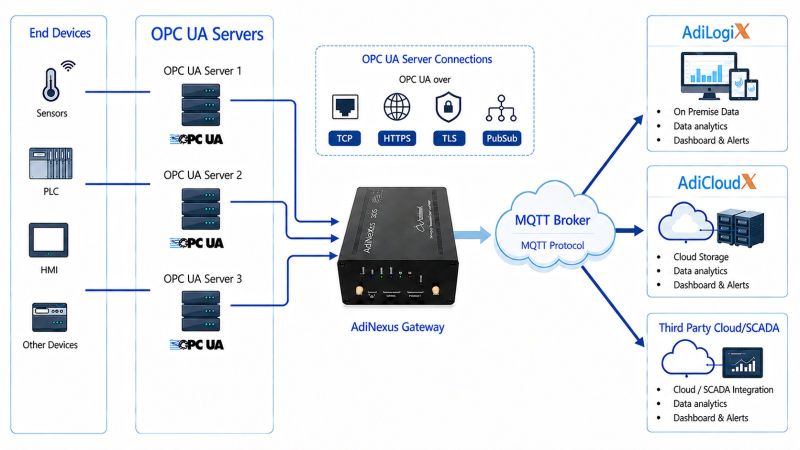
이미지 출처 :
### 이 게이트웨이는 구체적으로 어디에 사용되나요?
AdiNexus V2.0 ELITE는 주로 산업 설비의 제어반 내부 또는 현장 네트워크와 상위 관리망이 만나는 지점에 설치할 수 있습니다.
대표적인 적용 사례는 다음과 같습니다.
| 적용 분야 | 구체적인 사용 예 |
| --- | --- |
| 스마트 팩토리 | 생산 설비의 PLC에서 가동 상태, 생산량, 알람 데이터를 수집하여 모니터링 |
| 상하수도 시설 | 펌프, 수위 센서, 유량계 데이터를 원격 감시 시스템으로 전송 |
| 에너지 관리 | 전력 계측기의 사용량 데이터를 수집하여 에너지 분석 시스템과 연결 |
| 빌딩 자동화 | HVAC, 조명, 공조 설비의 Modbus/BACnet 데이터를 BMS와 연동 |
| 원격 산업 설비 | 현장 데이터를 중앙 시스템으로 전달하고 VPN을 통한 원격 진단 지원 |
예를 들어 공장에 여러 대의 PLC가 설치되어 있지만, 회사의 클라우드 시스템은 MQTT로 데이터를 수신한다고 가정해 보겠습니다.
이때 AdiNexus는 PLC에서 Modbus TCP로 데이터를 읽고, 필요한 값을 MQTT 메시지로 변환하여 클라우드 서버로 전달할 수 있습니다.
### 왜 Ethernet 포트를 2개 사용하나요?
**AdiNexus V2.0 ELITE의 듀얼 Ethernet 구성은 산업용 설비 네트워크와 상위 네트워크를 각각 연결하기 위한 것입니다.**
제조사는 두 Ethernet 포트를 Modbus TCP 통신 또는 WAN/인터넷 연결용으로 설정할 수 있다고 설명합니다. 대표적인 구성에서는 한쪽을 PLC 통신에, 다른 쪽을 인터넷이나 상위 시스템 연결에 사용합니다.
| Ethernet 포트 | 대표적인 연결 대상 | 역할 |
| --- | --- | --- |
| Port 1 — 현장 설비망 | PLC, 산업용 계측기, 컨트롤러 | Modbus TCP를 통한 현장 데이터 수집 |
| Port 2 — 상위 네트워크 | 사내 IT망, SCADA 서버, 클라우드 연결망 | 수집 데이터 전송 및 원격 관리 |
이러한 구조는 다음과 같은 이점이 있습니다.
**네트워크 분리:** PLC가 연결된 설비망과 인터넷에 연결되는 상위망을 서로 다른 네트워크 인터페이스로 구성할 수 있습니다.
**통신 관리:** Modbus 폴링 트래픽과 클라우드 데이터 전송 트래픽을 서로 다른 경로로 처리할 수 있습니다.
**기존 설비 활용:** 외부 네트워크에 직접 연결하기 어려운 PLC도 게이트웨이를 통해 필요한 데이터를 전송할 수 있습니다.
## 2. 프로젝트 주요 기능과 데이터 흐름
AdiNexus V2.0 ELITE는 ESP32 기반 펌웨어와 FreeRTOS를 사용하며, 산업용 통신과 데이터 처리를 위한 인터페이스를 제공합니다.
| 구성 요소 | 사양 및 역할 |
| --- | --- |
| 프로세서 | ESP32 기반, 240 MHz 듀얼 코어 |
| 운영체제 | FreeRTOS |
| Ethernet | 2 × RJ45 |
| RS485 | Modbus RTU/ASCII 연결 |
| 무선 통신 | Wi-Fi, Bluetooth/BLE |
| 저장장치 | MicroSD, 최대 64 GB |
| 전원 | 9–36 V DC |
| 디지털 입력 | 2채널 |
게이트웨이는 현장 장치에서 데이터를 수집한 뒤 레지스터 매핑, 필터링, 알람 조건 처리 등을 수행합니다.
외부 네트워크가 일시적으로 중단되더라도 로컬 버퍼링과 저장 기능을 활용할 수 있으며, 통신이 복구되면 저장 데이터를 재전송하는 기능도 제공합니다.
## 3. WIZnet W5500의 역할
AdiNexusFT 공식 문서에는 두 가지 Ethernet 인터페이스가 명시되어 있습니다.
| 인터페이스 | 적용 범위 |
| --- | --- |
| LAN8720 (RMII) | AdiNexus 전체 모델 |
| WIZnet W5500 (SPI) | V2.0 ELITE 모델 |
따라서 **W5500이 AdiNexus V2.0 ELITE의 Ethernet 구성에 사용된다는 점은 제조사 문서에서 확인할 수 있습니다.** 다만 실제 구매한 장치의 하드웨어 구성과 연결 상태는 확인해야 합니다.
W5500은 하드웨어 TCP/IP 스택을 내장한 이더넷 컨트롤러로, 다음 기능을 제공합니다.
TCP, UDP 및 IPv4 하드웨어 처리
독립적인 하드웨어 소켓 8개
총 32 KB의 내부 송수신 버퍼
SPI 인터페이스 지원
### 산업용 게이트웨이에 W5500을 사용하는 이유
산업용 게이트웨이는 네트워크 통신뿐 아니라 Modbus 레지스터 처리, MQTT 메시지 생성, 데이터 변환 및 알람 평가를 함께 수행합니다.
W5500은 TCP/IP 처리 작업의 일부를 하드웨어로 분리하기 때문에 ESP32가 애플리케이션 처리에 사용할 자원을 확보하는 데 도움이 됩니다.
특히 여러 네트워크 서비스를 운영하는 임베디드 시스템에서 TCP/IP 스택 구현 부담을 줄일 수 있다는 점이 기술적인 장점입니다.
다만 W5500이 모든 산업용 프로토콜을 직접 처리하는 것은 아닙니다. Modbus 데이터 해석과 MQTT 메시지 생성 등의 상위 기능은 ESP32 펌웨어에서 수행해야 합니다.
## 4. 펌웨어 및 프로토콜 구현
### 산업용 프로토콜 처리
AdiNexus V2.0 ELITE는 다음과 같은 프로토콜을 지원합니다.
| 프로토콜 | 기능 |
| --- | --- |
| Modbus RTU/TCP | PLC 및 센서 데이터 수집, 레지스터 매핑 |
| MQTT | 데이터 발행·구독 및 TLS 기반 통신 |
| OPC UA | Client/Server를 통한 산업용 데이터 교환 |
| BACnet | 빌딩 자동화 시스템과 데이터 연동 |
예를 들어 Modbus TCP로 연결된 PLC에서 온도와 압력 데이터를 수집하고, 이를 MQTT 메시지로 변환하여 AdiCloudX에 전송할 수 있습니다.
### W5500 네트워크 설정
제조사의 Android 애플리케이션인 AdiNexusFT를 사용하면 W5500 네트워크를 설정할 수 있습니다.
게이트웨이를 BLE 설정 모드로 전환합니다.
AdiNexusFT로 장치에 연결합니다.
`Ethernet SPI (W5500)` 설정 화면을 엽니다.
DHCP 또는 Static IP를 선택합니다.
설정을 적용한 후 재시작된 게이트웨이의 네트워크 상태를 확인합니다.
AdiNexusFT는 Ethernet 연결 상태, IP 주소, 펌웨어 버전, MQTT 연결 상태 및 장치 로그도 확인할 수 있도록 지원합니다.
**구현 확인 범위:** 현재 공개 자료에서는 ESP32와 W5500을 연결하는 실제 SPI 핀 배치, 드라이버 소스 코드 및 소켓 할당 방식이 확인되지 않습니다. 따라서 특정 프로토콜이 어느 Ethernet 컨트롤러를 사용하는지는 단정하기 어렵습니다.
## 5. 실제 적용 시 고려사항
**네트워크 구성:** PLC 통신망과 상위 네트워크를 분리할 경우 IP 주소, 서브넷 및 라우팅 정책을 먼저 설계하시는 것이 좋습니다.
**W5500 소켓 관리:** 동시에 연결할 TCP/UDP 세션 수와 송수신 버퍼 사용량을 고려해야 합니다.
**Modbus 폴링 주기:** PLC 응답시간과 레지스터 개수를 고려하여 불필요한 반복 통신을 줄이는 것이 중요합니다.
**보안 설정:** 상위 네트워크와 연결할 때는 접근 제어, TLS 및 VPN 구성을 확인해야 합니다.
**장애 복구:** 통신 중단 후 데이터 저장, 연결 재수립 및 재전송 동작을 검증하는 것이 좋습니다.
## 6. FAQ
**Q1. AdiNexus V2.0 ELITE에서 W5500을 사용하는 이유는 무엇인가요?**
W5500은 TCP/IP 통신과 소켓 관리를 하드웨어로 처리합니다. 이를 통해 ESP32가 산업용 프로토콜 처리와 데이터 변환에 더 많은 연산 자원을 활용할 수 있습니다. 다만 실제 성능 개선 수치는 공개되지 않았습니다.
**Q2. W5500은 ESP32와 어떻게 연결되나요?**
SPI 인터페이스를 통해 연결됩니다. 일반적으로 SCK, MOSI, MISO, CS 신호를 사용하며, AdiNexus 보드의 구체적인 GPIO 배정은 공개되지 않았습니다.
**Q3. 이 프로젝트에서 W5500은 어떤 역할을 담당하나요?**
W5500은 유선 Ethernet 연결과 TCP/UDP 데이터 송수신을 담당하는 컨트롤러입니다. Modbus 레지스터 해석, MQTT 메시지 구성 및 프로토콜 변환은 상위 펌웨어에서 처리합니다.
**Q4. 초보자도 W5500 네트워크를 설정할 수 있나요?**
네. AdiNexusFT를 사용하면 펌웨어 코드를 수정하지 않고 DHCP 또는 고정 IP를 설정할 수 있습니다. 다만 직접 드라이버를 개발하려면 ESP32, SPI 및 TCP/IP에 대한 기본 지식이 필요합니다.
**Q5. Ethernet 포트가 하나인 게이트웨이보다 두 개인 구성이 필요한 이유는 무엇인가요?**
단일 Ethernet 구성에서는 PLC 통신과 상위 시스템 연결을 하나의 네트워크 경로로 처리해야 할 수 있습니다. 반면 두 포트를 사용하면 설비망과 상위망을 별도 인터페이스로 구성할 수 있어 네트워크 정책과 통신 경로를 관리하기가 편리합니다. 단, 실제 네트워크 격리 및 접근 제어는 별도로 설정해야 합니다.
## 1. Project Overview
**AdiNexus V2.0 ELITE** is an industrial IoT gateway developed by AdiInfi IT Solutions, an India-based company. It collects data from PLCs, sensors, and measuring instruments in industrial facilities, converts between different industrial communication protocols, and connects them to SCADA and cloud systems.
Beyond simple data transmission, AdiNexus provides **protocol conversion, edge data processing, remote monitoring, and device management** capabilities required in industrial environments.
### Key Services Provided by AdiNexus
The AdiNexus product family offers the following industrial communication and management solutions.
| Service | Key Features |
| --- | --- |
| **Industrial IoT Gateway** | Collects data from PLCs, sensors, and measuring instruments and forwards it to SCADA or cloud systems |
| **Protocol Router** | Converts and transfers data between Modbus, OPC UA, BACnet, and MQTT |
| **Edge Processing** | Provides data filtering, local buffering, and alarm condition processing |
| **Industrial VPN** | Enables secure remote access to industrial equipment through integration with AdiRMS-VPN |
| **Gateway Management** | Supports network configuration, diagnostics, log monitoring, and firmware updates through AdiNexusFT |
AdiNexus can also integrate with monitoring platforms developed by the same manufacturer.
**AdiCloudX:** A cloud-based SCADA platform that provides real-time data visualization, alarms, historical data management, and analytics.
**AdiLogiX:** An on-premises SCADA platform installed on local factory servers, supporting equipment monitoring, process control, and data management.
These capabilities allow industrial facilities to integrate existing equipment with higher-level monitoring systems without replacing their current infrastructure.

Image source:
### Where Is This Gateway Used?
AdiNexus V2.0 ELITE can be installed inside industrial control cabinets or at network connection points between field equipment and higher-level management systems.
Typical applications include:
| Application | Example Use Case |
| --- | --- |
| Smart Factory | Collecting and monitoring operating status, production output, and alarm data from PLCs |
| Water and Wastewater Treatment | Transmitting data from pumps, water level sensors, and flow meters to remote monitoring systems |
| Energy Management | Collecting electricity consumption data from power meters and connecting it to energy analytics systems |
| Building Automation | Integrating Modbus/BACnet data from HVAC, lighting, and air conditioning equipment with Building Management Systems (BMS) |
| Remote Industrial Facilities | Transmitting field data to centralized systems and supporting remote diagnostics through VPN connections |
For example, consider a factory with multiple PLCs where the company's cloud system receives data through MQTT.
In this case, AdiNexus can read data from the PLCs using Modbus TCP, convert the required values into MQTT messages, and transmit them to the cloud server.
### Why Does It Use Two Ethernet Ports?
**The dual Ethernet architecture of AdiNexus V2.0 ELITE is designed to connect industrial equipment networks and higher-level networks through separate interfaces.**
According to the manufacturer, both Ethernet ports can be configured for Modbus TCP communication or WAN/Internet connectivity. In a typical configuration, one port connects to PLCs while the other connects to the internet or an upper-level management system.
| Ethernet Port | Typical Connected Devices | Role |
| --- | --- | --- |
| Port 1 — Field Network | PLCs, industrial measuring instruments, controllers | Collecting field data through Modbus TCP |
| Port 2 — Upper-Level Network | Corporate IT networks, SCADA servers, cloud networks | Transmitting collected data and supporting remote management |
This architecture provides several practical advantages.
**Network Separation:** The industrial network connected to PLCs and the upper-level network connected to the internet can be configured through separate network interfaces.
**Communication Management:** Modbus polling traffic and cloud data transmission traffic can be handled through different network paths.
**Existing Equipment Integration:** PLCs that cannot be directly connected to external networks can still transmit the required data through the gateway.
## 2. Key Features and Data Flow
AdiNexus V2.0 ELITE uses ESP32-based firmware and FreeRTOS, providing interfaces for industrial communication and data processing.
| Component | Specification and Role |
| --- | --- |
| Processor | ESP32-based, 240 MHz dual-core |
| Operating System | FreeRTOS |
| Ethernet | 2 × RJ45 |
| RS485 | Modbus RTU/ASCII communication |
| Wireless Communication | Wi-Fi, Bluetooth/BLE |
| Storage | MicroSD, up to 64 GB |
| Power Supply | 9–36 V DC |
| Digital Inputs | 2 channels |
The gateway collects data from field devices and performs operations such as register mapping, filtering, and alarm condition processing.
Even if the external network becomes temporarily unavailable, the gateway can use its local buffering and storage capabilities. Once communication is restored, it can retransmit the stored data.
## 3. Role of the WIZnet W5500
The official AdiNexusFT documentation identifies two Ethernet interfaces.
| Interface | Applicable Models |
| --- | --- |
| LAN8720 (RMII) | All AdiNexus models |
| WIZnet W5500 (SPI) | V2.0 ELITE model |
Therefore, **the manufacturer's documentation confirms that the W5500 is used in the Ethernet architecture of AdiNexus V2.0 ELITE.** However, the actual hardware configuration and connectivity of a purchased device should be verified.
The W5500 is an Ethernet controller with a built-in hardware TCP/IP stack. It provides the following features:
Hardware processing of TCP, UDP, and IPv4
8 independent hardware sockets
32 KB of internal transmit/receive buffer memory
SPI interface support
### Why Use the W5500 in an Industrial Gateway?
An industrial gateway performs more than network communication. It also handles Modbus register processing, MQTT message generation, data conversion, and alarm evaluation.
The W5500 offloads part of the TCP/IP processing to dedicated hardware, helping the ESP32 preserve computational resources for application-level tasks.
This architecture is particularly useful in embedded systems running multiple network services because it reduces the software overhead associated with implementing and managing the TCP/IP stack.
However, the W5500 does not directly process all industrial communication protocols. Higher-level functions, such as Modbus data interpretation and MQTT message generation, must be handled by the ESP32 firmware.
## 4. Firmware and Protocol Implementation
### Industrial Protocol Processing
AdiNexus V2.0 ELITE supports the following communication protocols.
| Protocol | Function |
| --- | --- |
| Modbus RTU/TCP | PLC and sensor data acquisition, register mapping |
| MQTT | Data publishing/subscribing and TLS-based communication |
| OPC UA | Industrial data exchange through Client/Server communication |
| BACnet | Data integration with building automation systems |
For example, the gateway can collect temperature and pressure data from a PLC connected through Modbus TCP, convert the values into MQTT messages, and transmit them to AdiCloudX.
### W5500 Network Configuration
The W5500 network can be configured using AdiNexusFT, the manufacturer's Android application.
Switch the gateway to BLE configuration mode.
Connect to the device using AdiNexusFT.
Open the `Ethernet SPI (W5500)` configuration screen.
Select DHCP or Static IP.
Apply the settings and verify the network status after the gateway restarts.
AdiNexusFT also supports monitoring Ethernet connection status, IP addresses, firmware versions, MQTT connection status, and device logs.
**Implementation Details:** Publicly available documentation does not disclose the actual SPI pin assignments between the ESP32 and W5500, the driver source code, or the socket allocation mechanism. Therefore, it is not possible to definitively identify which Ethernet controller is assigned to each communication protocol.
## 5. Practical Considerations
**Network Configuration:** When separating the PLC communication network from the upper-level network, IP addressing, subnet configuration, and routing policies should be planned in advance.
**W5500 Socket Management:** The number of simultaneous TCP/UDP sessions and transmit/receive buffer usage should be considered when designing network connections.
**Modbus Polling Interval:** Polling intervals should be configured according to PLC response times and the number of registers to minimize unnecessary communication traffic.
**Security Configuration:** Access control, TLS, and VPN configurations should be reviewed when connecting the gateway to upper-level networks.
**Failure Recovery:** Data storage, connection re-establishment, and retransmission behavior should be tested following communication interruptions.
## 6. FAQ
**Q1. Why does AdiNexus V2.0 ELITE use the W5500?**
The W5500 handles TCP/IP communication and socket management in hardware. This allows the ESP32 to allocate more computational resources to industrial protocol processing and data conversion. However, the manufacturer has not published specific performance improvement figures.
**Q2. How is the W5500 connected to the ESP32?**
The W5500 connects to the ESP32 through an SPI interface. It typically uses SCK, MOSI, MISO, and CS signals. However, the specific GPIO assignments on the AdiNexus board have not been publicly disclosed.
**Q3. What role does the W5500 play in this project?**
The W5500 serves as an Ethernet controller responsible for wired network connectivity and TCP/UDP data transmission. Higher-level functions, including Modbus register interpretation, MQTT message generation, and protocol conversion, are handled by the firmware.
**Q4. Can beginners configure the W5500 network?**
Yes. AdiNexusFT allows users to configure DHCP or static IP settings without modifying the firmware source code. However, developers who want to create or modify the driver directly should have basic knowledge of ESP32, SPI, and TCP/IP networking.
**Q5. Why use a dual Ethernet gateway instead of a single Ethernet gateway?**
With a single Ethernet interface, PLC communication and upper-level system connectivity may need to share the same network path. In contrast, a dual Ethernet configuration allows the field network and upper-level network to operate through separate interfaces, making network policies and communication paths easier to manage. However, network isolation and access control must still be configured separately.
---
Source: https://maker.wiznet.io/mason/resellers/adinexus-v2-0-elite/