---
title: "LabVIEW TCP/IP Read with Wiznet 5500 EVB Pico via TCP/IP"
url: "https://maker.wiznet.io/mason/projects/labview-tcp-ip-read-with-wiznet-5500-evb-pico-via-tcp-ip/"
markdown_url: "https://maker.wiznet.io/mason/projects/labview-tcp-ip-read-with-wiznet-5500-evb-pico-via-tcp-ip/md"
type: "UCC: User Created Content"
author: "themadgreek"
author_url: "https://forums.ni.com/t5/LabVIEW/LabVIEW-TCP-IP-Read-with-Wiznet-5500-EVB-Pico-via-TCP-IP/td-p/4285775"
editor: "WIZnet"
editor_url: "https://maker.wiznet.io/"
original_author: "themadgreek"
original_url: "https://forums.ni.com/t5/LabVIEW/LabVIEW-TCP-IP-Read-with-Wiznet-5500-EVB-Pico-via-TCP-IP/td-p/4285775"
published: "2026-01-26"
language: "en"
tags: ["W5500"]
hardware: ["WIZnet W5500-EVB-Pico"]
likes: 0
views: 949
comments: 0
source: "WIZnet Makers (https://maker.wiznet.io/)"
---
# LabVIEW TCP/IP Read with Wiznet 5500 EVB Pico via TCP/IP
> LabVIEW TCP/IP Read with Wiznet 5500 EVB Pico via TCP/IP
Original author: themadgreek (source: https://forums.ni.com/t5/LabVIEW/LabVIEW-TCP-IP-Read-with-Wiznet-5500-EVB-Pico-via-TCP-IP/td-p/4285775)
## Components
- **WIZnet W5500-EVB-Pico** x 1 ([docs](https://docs.wiznet.io/Product/Chip/Ethernet/W5500/w5500-evb-pico))
## Article
## 프로젝트 개요
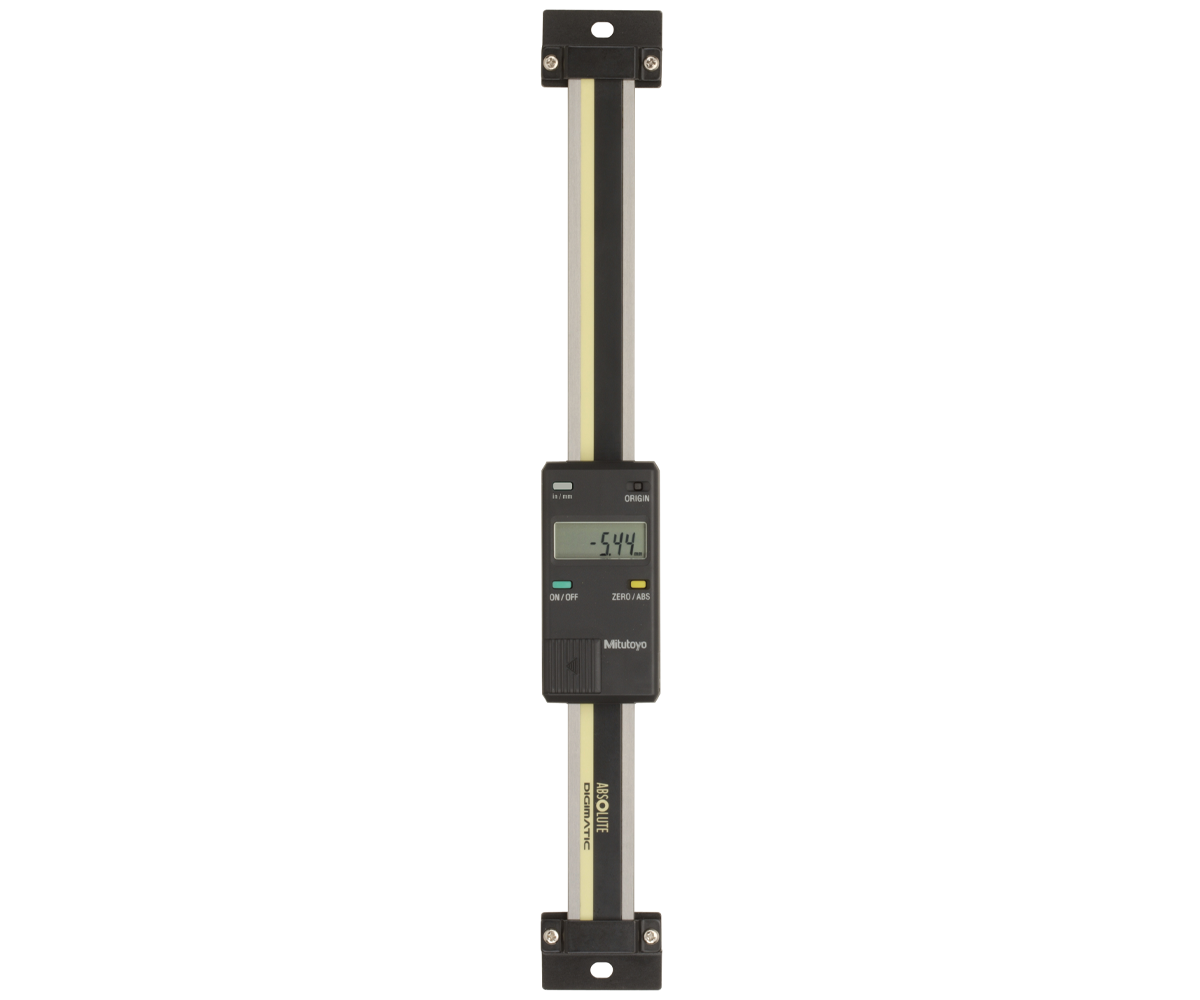
디지털 저울/게이지의 거리 측정값을 RP2040에서 읽어 한 줄(개행) 레코드로 만들고, W5500-EVB-Pico의 하드웨어 TCP/IP로 로컬 LAN에 TCP 스트리밍한 뒤 LabVIEW가 클라이언트로 수신·파싱·로깅하는 산업용 계측 데이터 파이프라인을 정리합니다.
이미지 출처 :
---
## 1) 한눈에 보는 전체 구조
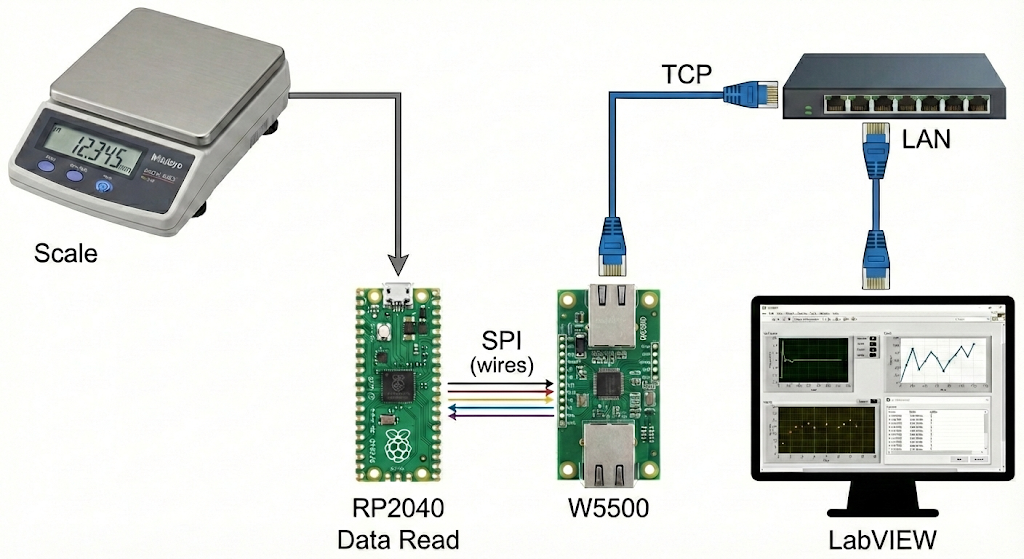
**[디지털 저울/게이지] → RP2040(값 읽기/정규화) → W5500(SPI) → 유선 LAN(TCP) → LabVIEW(수집·로깅)현장단(장치)**: 측정값을 “네트워크로 내보내는 센서 게이트웨이”
**PC단(LabVIEW)**: 수신한 데이터를 “저장/표시/알람”하는 로거(HMI)
이미지 출처 : AI 생성
---
## 2) 데이터는 어떤 형태로 보내야 읽기 쉬울까?
계측 로깅에서 제일 중요한 건 “데이터가 끊어지는 기준(레코드 경계)”입니다.
가장 관리가 쉬운 방식은 **한 줄 = 한 측정값(개행으로 끝)** 입니다.
권장 레코드 예시:
`SEQ=1024,TS=17321ms,VAL=123.456,UNIT=mm,STAT=OK\n`
**필드 의미**
`SEQ`: 누락/중복 감지
`TS`: 장치 기준 시간(PC 로그와 비교 가능)
`VAL/UNIT`: 측정값/단위
`STAT`: 안정/오류/오버레인지 같은 상태
---
## 3) W5500-EVB-Pico가 하는 일 (왜 쓰나?)
이 프로젝트에서 W5500의 역할은 “랜선 연결”을 넘어서 **TCP/IP 처리를 하드웨어로 맡아주는 것**입니다.
**Hardwired TCP/IP**: MCU가 소프트웨어 TCP/IP 스택 부담을 크게 줄임
**8 하드웨어 소켓 + 내부 버퍼(총 32KB)**: 스트리밍과 확장(예: 모니터 PC 추가)에 유리
**SPI 인터페이스**: MCU와 연결이 단순해 유지보수성이 좋음
→ 산업/계측 로깅에서 원하는 “장시간 안정 운전 + 예측 가능한 동작”에 잘 맞습니다.
---
## 4) LabVIEW는 무엇을 하면 되나? (역할만 깔끔하게)
LabVIEW는 **TCP 클라이언트 로거**로 동작하면 됩니다.
**TCP Open Connection** (장치 IP, PORT)
**수신 루프**
들어오는 문자열을 내부 버퍼에 누적
`\n` 기준으로 “완성된 한 줄”씩 꺼내기
`VAL/UNIT/STAT/SEQ` 파싱
TDMS/CSV/DB에 저장 + 차트 표시 + 알람
**TCP Close**
TCP Read 자체는 “스트림에서 바이트를 읽는 함수”라서, 계측 로깅에선 보통 **라인(개행) 기반으로 레코드를 분리**하는 구조가 운영에 튼튼합니다.
---
## 5) 운영 확장(Industrial IoT에서 자주 필요한 것)
**고정 IP(또는 DHCP 예약)**: 라인 장비는 주소가 바뀌면 운영이 힘듦
**Heartbeat 레코드**: 예) `HB,TS=...,STAT=OK\n` (연결/장치 상태 감시)
**장비 추적성**: `DEVICE_ID`, `FW_VER`, `CAL_REV` 같은 필드 추가
**다중 PC 구성**: 로거 1대 + 모니터 1대(필요 시)로 확장
---
## WIZnet 중심 FAQ (5개)
### Q1. 왜 W5500를 쓰면 계측 로깅이 쉬워지나요?
W5500는 TCP/IP를 칩 내부에서 처리하는 Hardwired 방식이라, MCU가 네트워크 스택을 크게 떠안지 않아도 됩니다. 결과적으로 펌웨어는 “측정값 읽기/필터링/레코드 생성”에 집중하고, 네트워크는 W5500가 담당하는 구조가 됩니다. 장시간 스트리밍에서 유지보수 포인트가 줄어드는 것이 실무 장점입니다. ([docs.wiznet.io](https://docs.wiznet.io/assets/files/W5500_ds_v110k-8a79ea6cf98a804f93c7deb2398cb53f.pdf?utm_source=chatgpt.com))
### Q2. LabVIEW는 어떻게 연결하나요?
LabVIEW는 장치의 IP와 포트로 **TCP Open Connection**을 열고, Read로 데이터 스트림을 받습니다. 장치(W5500-EVB-Pico)는 TCP 서버로 동작하며 LAN 스위치/라우터에 유선으로 연결됩니다. 운영 환경에서는 고정 IP 또는 DHCP 예약으로 주소를 고정해두면 유지보수가 쉬워집니다. ([ni.com](https://www.ni.com/ko/support/documentation/supplemental/06/basic-tcp-ip-communication-in-labview.html?utm_source=chatgpt.com))
### Q3. 이 구조에서 W5500의 구체적 역할은 뭔가요?
RP2040가 SPI로 레코드를 전달하면, W5500가 TCP 세션 유지, 전송 제어, 내부 버퍼링 등 네트워크 관련 처리를 하드웨어로 수행합니다. 즉 “측정값 생성”과 “네트워크 전송”이 분리되어, 계측 루프가 네트워크 이벤트에 덜 흔들리게 설계할 수 있습니다. ([docs.wiznet.io](https://docs.wiznet.io/assets/files/W5500_ds_v110k-8a79ea6cf98a804f93c7deb2398cb53f.pdf?utm_source=chatgpt.com))
### Q4. 초보자가 구현할 때 가장 중요한 포인트는 무엇인가요?
가장 중요한 포인트는 “레코드 경계”입니다. TCP는 바이트 스트림이라, 한 측정값이 쪼개져 오거나 붙어서 올 수 있습니다. 그래서 장치가 `\n`으로 끝나는 1-Line 레코드를 보내도록 만들고, LabVIEW가 내부 버퍼에서 `\n` 기준으로 한 줄씩 꺼내 파싱하면 구현이 쉬워지고 운영도 안정적입니다. ([ni.com](https://www.ni.com/docs/en-US/bundle/labview-api-ref/page/functions/tcp-read.html?utm_source=chatgpt.com))
### Q5. Wi-Fi(ESP32)나 ENC28J60 대신 W5500를 선택하면 어떤 차이가 있나요?
Wi-Fi는 배선이 편하지만 전파 환경에 따라 지연/품질 변동이 커질 수 있어 장시간 로깅에서 변수가 늘 수 있습니다. ENC28J60는 보통 MAC/PHY 중심이라 MCU가 TCP/IP 스택 부담을 더 지는 쪽으로 가기 쉽습니다. W5500는 Hardwired TCP/IP로 MCU 부담을 줄이고, 유선 LAN 기반이라 산업/계측 환경에서 “예측 가능하게” 운영하기 좋습니다. ([wiznet.hk](https://www.wiznet.hk/en/ethernet-controller/12-w5500.html?utm_source=chatgpt.com))
## Project Overview
This article summarizes an industrial measurement data pipeline where **distance readings from a Mitutoyo-style digital scale/gauge** are captured by an **RP2040**, formatted into **single-line (newline-terminated) records**, streamed over **TCP on a local LAN** using the **W5500-EVB-Pico’s hardwired TCP/IP**, and then **received, parsed, and logged by LabVIEW** acting as a TCP client.

**Image source:**
---
## 1) System Architecture at a Glance
**[Digital scale/gauge] → RP2040 (read + normalize) → W5500 (SPI) → Wired LAN (TCP) → LabVIEW (collect + log)Device side (edge gateway):** Converts measurement output into network-ready records and streams them over Ethernet.
**PC side (LabVIEW):** Works as a logger/HMI—**stores, visualizes, and alarms** on incoming measurements.

**Image source:** AI-generated
---
## 2) What Data Format Makes Logging Easy?
In measurement logging, the most important design choice is the **record boundary**—how you define where one measurement ends and the next begins.
The simplest and most maintainable approach is:
**One line = one measurement (ends with a newline).**
### Recommended record example
`SEQ=1024,TS=17321ms,VAL=123.456,UNIT=mm,STAT=OK\n`
### Field meanings
**SEQ:** Detects missing/duplicate samples (useful for reliability checks)
**TS:** Device-side timestamp (can be compared with PC-side timestamps)
**VAL / UNIT:** Measurement value and unit
**STAT:** Status such as stable/unstable/error/overrange
---
## 3) What Does the W5500-EVB-Pico Do (and Why Use It)?
In this project, the W5500’s job is more than “just Ethernet.” It **offloads TCP/IP processing in hardware**, which simplifies firmware and improves long-run stability.
**Hardwired TCP/IP:** Greatly reduces the MCU burden of running a full software TCP/IP stack
**8 hardware sockets + internal buffer (total 32KB):** Good for streaming and future expansion (e.g., adding a monitoring PC)
**SPI interface:** Simple MCU integration and easier maintenance
→ This matches what industrial measurement logging typically needs: **stable long-duration operation and predictable behavior**.
---
## 4) What Should LabVIEW Do? (Clean Role Definition)
LabVIEW should behave as a **TCP client logger**.
### Basic flow
**TCP Open Connection** (device IP, port)
**Receive loop**
Accumulate incoming bytes into an internal buffer
Extract **complete lines** using `\n` as the delimiter
Parse `VAL/UNIT/STAT/SEQ`
Save to **TDMS/CSV/DB** + display charts + trigger alarms
**TCP Close**
Because **TCP Read returns a byte stream**, the most robust logging pattern is to **separate records using newline-delimited lines** rather than assuming packet-sized messages.
---
## 5) Operational Extensions Common in Industrial IoT
**Static IP (or DHCP reservation):** If device IP changes, operations and maintenance become painful
**Heartbeat record:** e.g., `HB,TS=...,STAT=OK\n` for connection/device health monitoring
**Traceability fields:** Add `DEVICE_ID`, `FW_VER`, `CAL_REV` for auditability and calibration tracking
**Multi-PC setup:** Expand from 1 logger PC to “1 logger + 1 monitor” (if needed)
---
## WIZnet-Focused FAQ (5)
### Q1. Why does using W5500 make measurement logging easier?
The W5500 processes TCP/IP inside the chip (hardwired TCP/IP), so the MCU doesn’t need to carry as much networking complexity. That lets firmware focus on measurement tasks—reading values, filtering, and generating well-formed records—while W5500 handles reliable Ethernet communication. In long-running streams, fewer moving parts typically means fewer maintenance points.
### Q2. How does LabVIEW connect to the device?
LabVIEW opens a TCP connection to the device’s **IP address and port** using **TCP Open Connection**, then receives data with **TCP Read**. The W5500-EVB-Pico acts as a **TCP server** on the wired LAN (through a switch/router). In real deployments, it’s best to keep addressing stable via a static IP or DHCP reservation so your LabVIEW application doesn’t require frequent reconfiguration.
### Q3. What is W5500’s specific role in this architecture?
The RP2040 builds measurement records and transfers them via SPI. The W5500 then performs network-facing work in hardware—maintaining TCP sessions, handling transmit/receive buffering, and managing socket-level networking behavior. This separation helps prevent networking details from interfering with time-sensitive measurement acquisition and record generation.
### Q4. What is the single most important implementation point for beginners?
**Record boundaries.** TCP is a byte stream, so a “single measurement” can arrive split across reads—or multiple measurements can arrive merged. If the device sends **newline-terminated 1-line records**, LabVIEW can buffer incoming data and reliably parse one complete measurement at a time by splitting on `\n`. This makes the system easier to implement and much more stable in operation.
### Q5. How does W5500 compare to Wi-Fi (ESP32) or ENC28J60 for this use case?
Wi-Fi can be convenient, but RF conditions can introduce more variability in latency and reliability—especially over long runs or in noisy industrial environments. ENC28J60 is often used as a lower-cost Ethernet option, but it typically pushes more TCP/IP stack responsibility onto the MCU. W5500’s hardwired TCP/IP reduces MCU load and—combined with wired LAN—tends to deliver more predictable behavior for industrial measurement logging.
---
Source: https://maker.wiznet.io/mason/projects/labview-tcp-ip-read-with-wiznet-5500-evb-pico-via-tcp-ip/