---
title: "HTTP post & get examples"
url: "https://maker.wiznet.io/forum/12529"
markdown_url: "https://maker.wiznet.io/forum/12529/md"
type: "Forum topic"
category: "Ethernet Chips"
author: "ToasTer86"
created: "2017-10-24T13:17:32+09:00"
last_activity: "2018-05-06T19:41:32+09:00"
language: "en"
views: 3804
replies: 4
source: "WIZnet Makers forum (https://maker.wiznet.io/forum/)"
---
# HTTP post & get examples
## Question
Asked by ToasTer86 on 2017-10-24 in Ethernet Chips.
Dear Wiznet,
I would like to create a HTTP post & get message to a server. I am using the Wiznet5100 with ioLibrary.
How would I start with this using the HTTP library included. I just want to create a HTTP post to so I can test my http functionality.
Thanks a lot for any help,
Mark
## Replies
### Reply 1 by irina, 2017-10-25
Hi, Mark.
 ToasTer86:
> I would like to create a HTTP post & get message to a server.
Please refer to the following link for the implementation of the HTTP client.
[How to use http client with W5100](https://forum.wiznet.io/t/topic/3251) [W5100](https://maker.wiznet.io/c/tcp-ip-chip/w5100/15)
> Hi. I want to use http client with W5100. I found ioLibrary which includes drivers and application protocol libraries [GitHub - Wiznet/ioLibrary_Driver: ioLibrary_Driver can be used for the application design of WIZnet TCP/IP chips as W5500, W5300, W5200, W5100 W5100S.](https://github.com/Wiznet/ioLibrary_Driver) But, it does not support http client. Do I have to implement it myself? Please let me know if you have the solution.
### Reply 2 by ToasTer86, 2017-10-25 (in reply to reply 1)
thanks for your help:
I implemented your library and studied the main.c
Right now I am connecting to a site that can take on HTTP requests :
So I am using the following variables to connect :
> uint8_t Domain_name = “[httpbin.org](http://httpbin.org)”;
> uint8_t URI = “/ip”;
> uint8_t flag_sent_http_request = DISABLE;
> uint8_t back_end_ip[4] = {54, 225, 177, 165};
> uint16_t len = 0, i = 0;
It is opening a socket and gives me a message of opening the socket and sending the message:
> HTTP CLIENT: source_port = 52214
> HTTP CLIENT: SOCKOPEN
> HTTP CLIENT: CONNECTED TO - 54.225.177.165 : 80
but the trigger for receiving is never set by the:
> httpc_connection_handler();
So the trigger for the below code is never met:
> ```
if(httpc_isReceived > 0)
{
len = httpc_recv(g_recv_buf, httpc_isReceived);
printf(" >> HTTP Response - Received len: %d\r\n", len);
for(i = 0; i < len; i++) printf("%c", g_recv_buf[i]);
printf("\r\n");
}
```
This is while on wireshark I can see TCP packets going both way.
192.168.137.176 is my wiznet 5100 ethernetshield on a nRF52840 (nordic semiconductor)
54.225.177.165 is the website I am sending requests to
[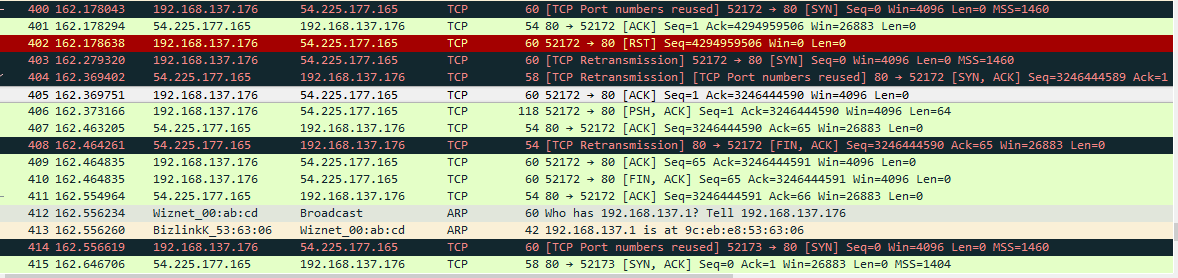 image1178×278 30.8 KB](https://maker.wiznet.io/forum_uploads/wiznet/original/2X/8/8edb334f27748b6e9f7874ac7eb3aa95941a2b5a.png)
Can you please help me with the library, I should note I am using the w5100. So in the httpClient.H I changed the board from w7500 to W5100.
Thanks for any help.
### Reply 3 by ToasTer86, 2017-10-26
Well I am little further with the issue.
It seems the request I am sending out is not correct:
[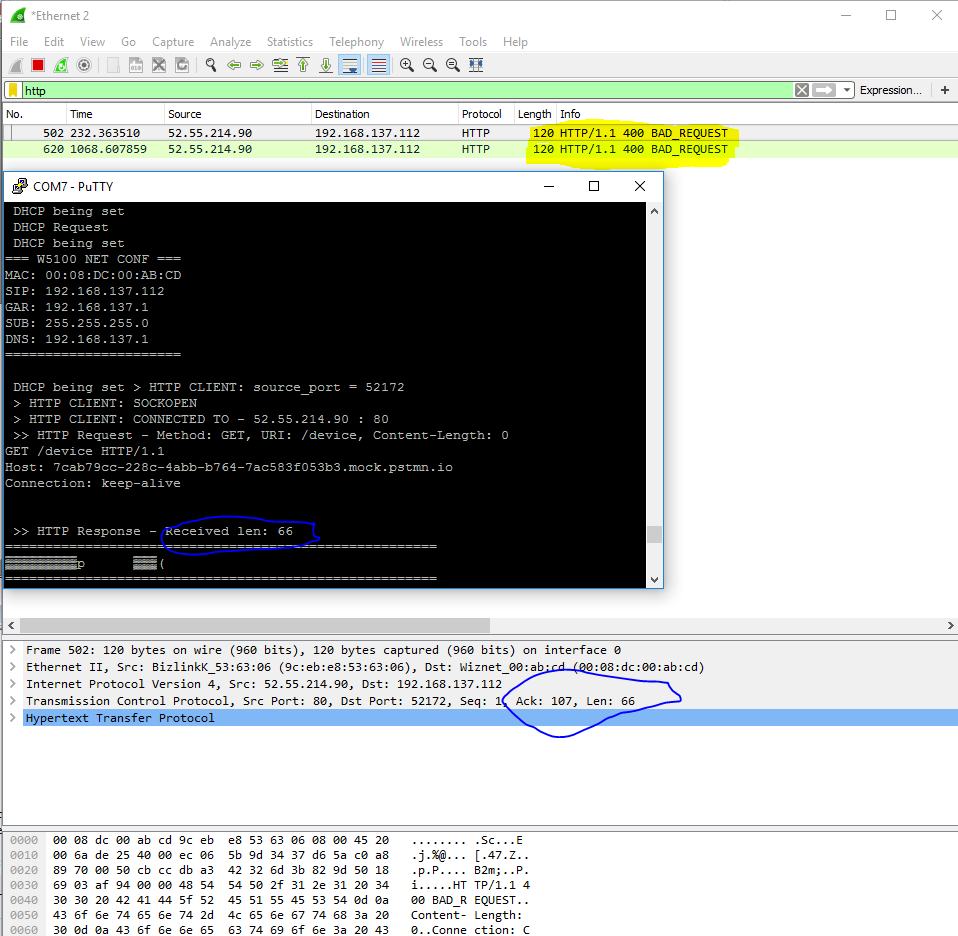 image958×936 48.1 KB](https://maker.wiznet.io/forum_uploads/wiznet/original/2X/d/d84d52910f453719d0f7f31f82e1cfbfef56febb.png)
Anyone have an idea what I am doing wrong, or another site that I can send HTTP GET to ?
Thanks
### Reply 4 by Fritz.Pomm, 2018-05-06
also I need to know this answer. Please help.
---
Source: https://maker.wiznet.io/forum/12529