---
title: "IoT tcp application by using BSD socket"
url: "https://maker.wiznet.io/WIZnet/projects/iot-tcp-application-by-using-bsd-socket/"
markdown_url: "https://maker.wiznet.io/WIZnet/projects/iot-tcp-application-by-using-bsd-socket/md"
type: "UCC: User Created Content"
author: "bingdo72"
author_url: "https://www.instructables.com/Convert-ioLibrary-into-BSD-socket-style-on-WIZwki-/"
editor: "WIZnet"
editor_url: "https://maker.wiznet.io/"
original_author: "bingdo72"
original_url: "https://www.instructables.com/Convert-ioLibrary-into-BSD-socket-style-on-WIZwki-/"
published: "2023-04-26"
language: "en"
hardware: ["WIZnet WIZwiki-W7500"]
likes: 1
views: 227
comments: 0
source: "WIZnet Makers (https://maker.wiznet.io/)"
---
# IoT tcp application by using BSD socket
> IoT tcp application by using BSD socket
Original author: bingdo72 (source: https://www.instructables.com/Convert-ioLibrary-into-BSD-socket-style-on-WIZwki-/)
## Components
- **WIZnet WIZwiki-W7500** x 1 ([docs](https://docs.wiznet.io/Product/Mbed-WIZwiki-Platform/wizwiki-w7500))
## Article
This project is an example of Serial2Ethernt IoT device.
User can implement Serial2Ethernet easily by using WIZwiki-W7500 platform.
This project would be included in Ethernet Collection category of WIZnet Museum.
Convert ioLibrary into BSD socket style on WIZwki-W7500 platform
[](http://wiznetmuseum.com/wp/wp-content/uploads/2015/11/2015-11-10_wizwiki.jpg)
**Parts**
1. WIZwiki-W7500 board. ( http://www.shopwiznet.com/wizwiki-7500 )
2. Mini USB cable
3. LAN cable
If you want to know more in detail,
refer to
**Step by Step Guide**
*1. Prepare development environment*
Prepare GCC development environment by the following site.
Install GNU Toolchain, Java JDK, Eclipse, Cygwin.
If you install all tools, you are ready for running this project.
## Reference
W5500-EVB source repository :
WIZwiki-W7500 library source :
*2. Open source codes of this project in GitHub.*
You can download this project files. And then import project into Eclipse.
After compile, you can run an application of WIZwiki-W7500.
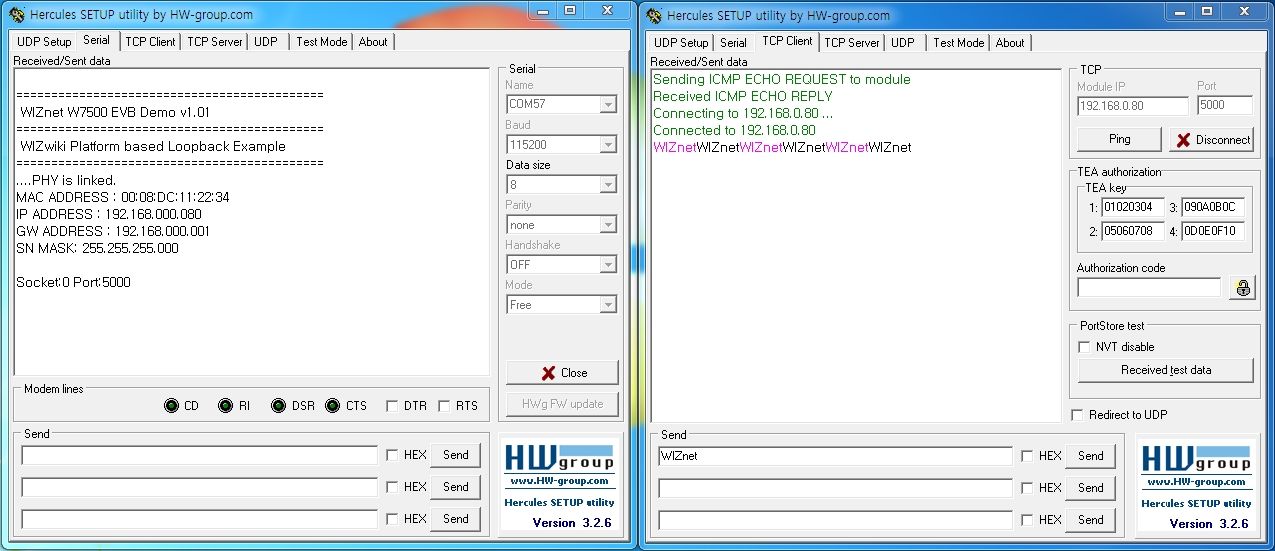
3: Test result
[](http://www.instructables.com/file/FJJ1F12IFDSX3DU/)
1. Program FW into a target.
2. Reset a target.
3. Check Host IP and Server.
4. Connect a target through Client tool.
5. Confirm an echo back operation.
You can see the test result.
*Tip : If you register in [www.wiznetian.com](http://www.wiznetian.com/) and work actively, you can get a sample cheaper than E-sales as well as a free sample.
**Source **: [ипотека онлайн банки](https://rusbank.net/offers/ipoteka/)
---
Source: https://maker.wiznet.io/WIZnet/projects/iot-tcp-application-by-using-bsd-socket/