---
title: "How to Implement Embedded Mqtt Client Using W5500 IC."
url: "https://maker.wiznet.io/WIZnet/projects/how-to-implement-embedded-mqtt-client-using-w5500-ic/"
markdown_url: "https://maker.wiznet.io/WIZnet/projects/how-to-implement-embedded-mqtt-client-using-w5500-ic/md"
type: "UCC: User Created Content"
author: "보현방"
author_url: "https://www.instructables.com/How-to-implement-embedded-Mqtt-Client-using-W5500-/"
editor: "WIZnet"
editor_url: "https://maker.wiznet.io/"
original_author: "보현방"
original_url: "https://www.instructables.com/How-to-implement-embedded-Mqtt-Client-using-W5500-/"
published: "2023-02-09"
language: "en"
hardware: ["WIZnet W5500 Ethernet Shield"]
likes: 2
views: 460
comments: 0
source: "WIZnet Makers (https://maker.wiznet.io/)"
---
# How to Implement Embedded Mqtt Client Using W5500 IC.
> How to implement embedded Mqtt Client using W5500 IC.
Original author: 보현방 (source: https://www.instructables.com/How-to-implement-embedded-Mqtt-Client-using-W5500-/)
## Components
- **WIZnet W5500 Ethernet Shield** x 1
- Software: **CloudMQTT**
## Article
## **Step 1: Stuffs That You Have to Prepare.**

1. W5500 Embedded Ethernet Board.
– W5500 with Cortex M Series recommended. I used my custom board. My custom ethernet board includes W5500 and stm32f103vc(ST’s cortex M3).
2. IDE.
– Whatever you want. I used CoIDE(with gcc).
3. Broker Server.
– A. Use Cloud Services, such as CloudMQTT. – Recommended.
– B. Make you own broker server using cloud server service, such as google cloud or aws.
## **Step 2: Preparing Broker Server – CloudMQTT**

1. Visit the
2. Sign up with your e-mail and login.
3. Create CloudMQTT Instance.
4. Complete.
## **Step 3: Paho Mqtt Library Download and Import.**


1. Visit the
2. Download [C/C++ MQTT Embedded clients](http://git.eclipse.org/c/paho/org.eclipse.paho.mqtt.embedded-c.git/snapshot/org.eclipse.paho.mqtt.embedded-c-1.0.0.zip) and unzip.
3. Import MQTT library(You have to import 1 Folder & 2 Files)
A. Folder: c:your downdload pathorg.eclipse.paho.mqtt.embedded-c-1.0.0MQTTPacketsrc
B. Files: c:your downdload pathorg.eclipse.paho.mqtt.embedded-c-1.0.0MQTTClient-Csrc MQTTClient.c & .h files.
## **Step 4: MQTT Library Porting.**
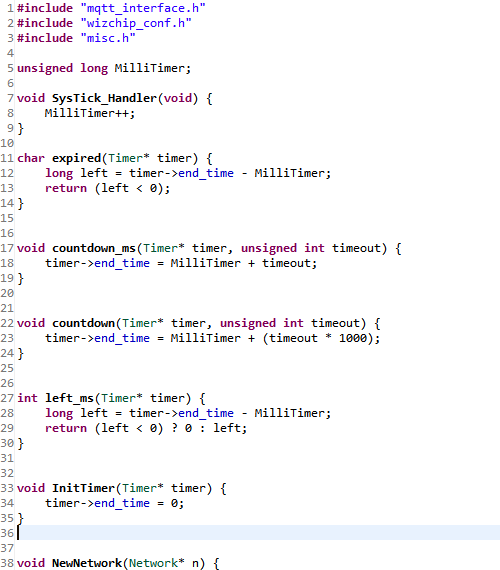
1. Create new file. MQTTInterface.c & MQTTInterface.h (File name is not important.)
2. Define the functions and structures.
3. coding Main() using MQTT library.
You can download full source code from my github:
## **Step 5: Test**


1. MQTT FX(mqtt pc client software from
2. make a connection propile using CloudMQTT Instance info.
A. Broker Server Address
B. Broker Port
C. User Name
D. Password
3. Connect and Write a topic & data.
4. Click publish.
5. Check the mqtt client works well.
---
Source: https://maker.wiznet.io/WIZnet/projects/how-to-implement-embedded-mqtt-client-using-w5500-ic/