---
title: "WaterFlowKit V2: Building a Wired Water Flow Monitor for Home Assistant with ESP32-C6 and W5500"
url: "https://maker.wiznet.io/Aimee0/resellers/waterflowkit/"
markdown_url: "https://maker.wiznet.io/Aimee0/resellers/waterflowkit/md"
type: "VAR: Value-Added Reseller Products"
author: "smarthomeshop"
author_url: "https://waterflowkit.nl/en"
editor: "WIZnet"
editor_url: "https://maker.wiznet.io/"
original_author: "smarthomeshop"
original_url: "https://waterflowkit.nl/en"
published: "2026-06-05"
language: "en"
hardware: ["WIZnet W5500"]
likes: 0
views: 463
comments: 0
source: "WIZnet Makers (https://maker.wiznet.io/)"
---
# WaterFlowKit V2: Building a Wired Water Flow Monitor for Home Assistant with ESP32-C6 and W5500
> WaterFlowKit V2: Building a Wired Water Flow Monitor for Home Assistant with ESP32-C6 and W5500*
Original author: smarthomeshop (source: https://waterflowkit.nl/en)
## Components
- **WIZnet W5500** x 1 ([docs](https://docs.wiznet.io/Product/Chip/Ethernet/W5500))
WIZnet parts: W5500 ([Datasheet](https://docs.wiznet.io/Product/Chip/Ethernet/W5500/datasheet?utm_source=maker&utm_medium=project&utm_campaign=w5500), [product hub](https://maker.wiznet.io/products/w5500/))
## Article
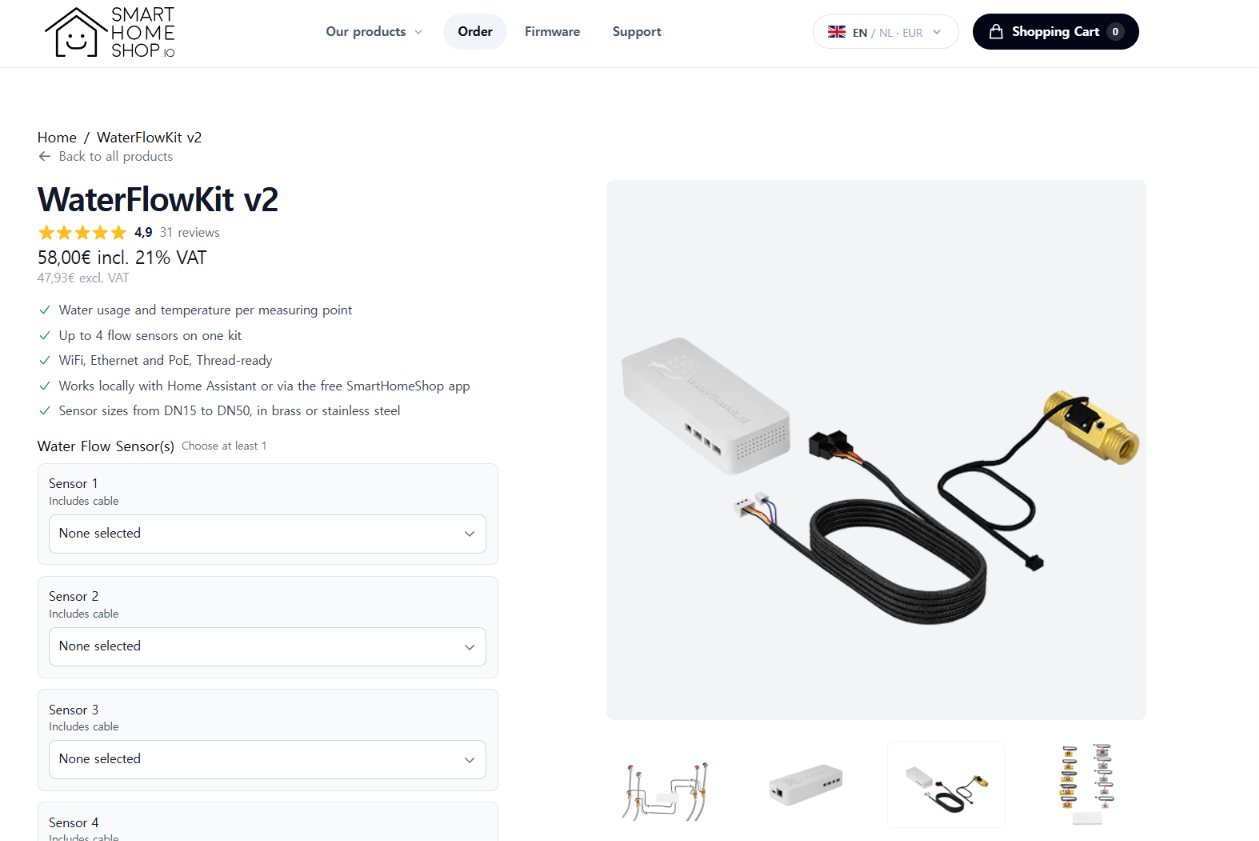
*https://smarthomeshop.io/en/products/waterflowkit-v2*
## Overview
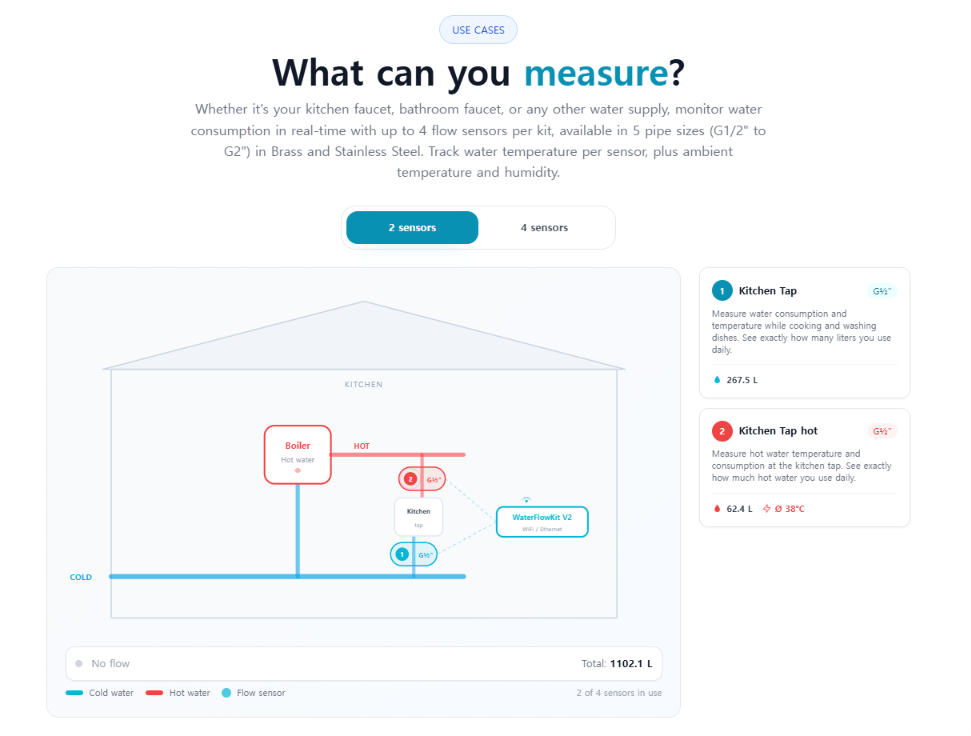
WaterFlowKit V2는 최대 4개의 water flow sensor를 연결해 개별 배관의 유량과 누적 사용량을 측정하고, ESPHome을 통해 Home Assistant 또는 SmartHomeShop cloud로 전달하는 water monitoring device입니다. V2는 ESP32-C6를 MCU로 사용하며, Ethernet firmware에서는 **WIZnet W5500을 SPI로 연결해 wired Ethernet network path를 구성**합니다.
WaterFlowKit V1은 Wi-Fi와 2개의 flow input을 지원하지만, V2는 ESP32-C6 기반으로 변경되면서 4개의 flow input과 Ethernet option을 제공합니다. SmartHomeShop 공식 문서에서도 V2의 Ethernet interface가 W5500 기반임을 명시하고 있습니다.
이 프로젝트에서 흥미로운 부분은 단순히 W5500을 추가했다는 점보다 **sensor application logic과 network configuration을 ESPHome package로 분리했다는 것**입니다. `base.yaml`에 flow measurement와 공통 기능을 두고 `eth.yaml`, `wifi.yaml`, `thread.yaml`에서 network layer를 선택하기 때문에 동일한 sensor logic을 서로 다른 network path에서 재사용할 수 있습니다.
*https://waterflowkit.nl/en*
## Technical Architecture
*https://waterflowkit.nl/en#specifications*
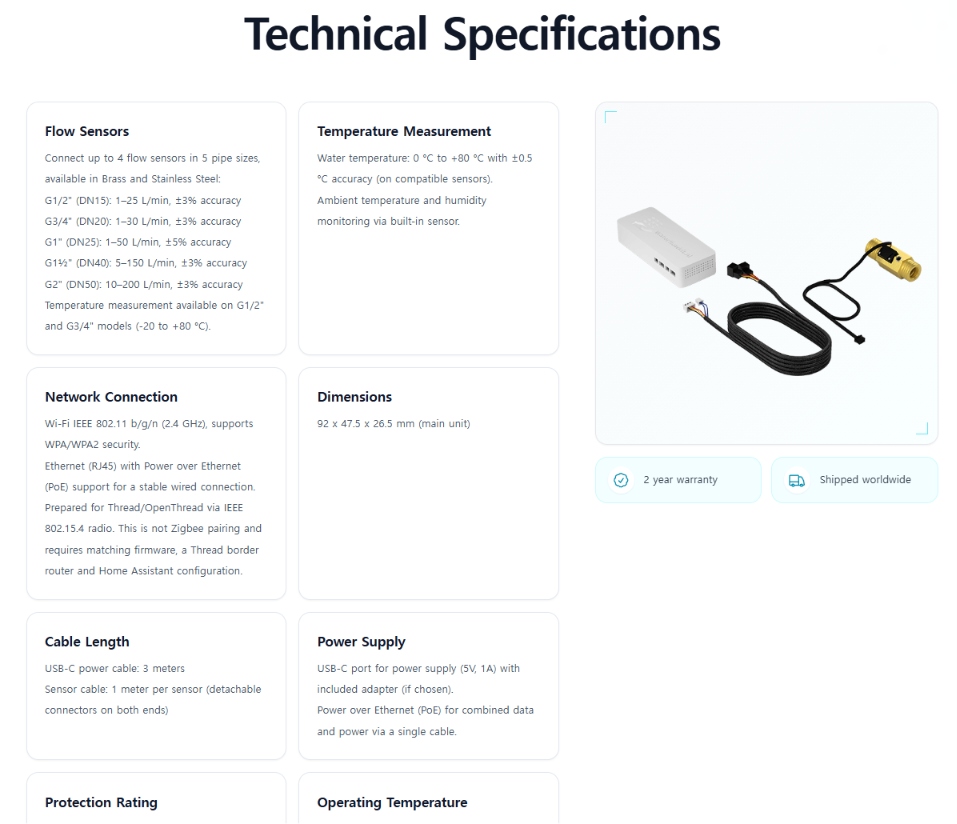
WaterFlowKit V2의 실제 configuration은 ESPHome YAML 중심으로 공개되어 있습니다. ESP32-C6는 ESP-IDF framework로 구성되며, Ethernet variant는 `waterflowkit-v2/eth.yaml`의 ESPHome `ethernet:` component에서 `type: W5500`을 지정합니다. (GitHub: https://github.com/smarthomeshop/waterflowkit/blob/main/waterflowkit-v2/base.yaml, GitHub: https://github.com/smarthomeshop/waterflowkit/blob/main/waterflowkit-v2/eth.yaml)
| Item | Confirmed Details |
| --- | --- |
| WIZnet Chip/Module | W5500, ESPHome `ethernet: type: W5500` |
| MCU/Board | ESP32-C6 / `esp32-c6-devkitc-1` |
| Framework | ESP-IDF via ESPHome |
| Interface | SPI |
| W5500 Pins | CLK GPIO20, MOSI GPIO18, MISO GPIO19, CS GPIO21, INT GPIO12, RESET GPIO13 |
| Ethernet Power | GPIO8, inverted, `restore_mode: ALWAYS_ON` |
| Sensor Inputs | 4× `pulse_counter`, 4× NTC ADC, HDC1080 I2C |
| Local Network | ESPHome native API → Home Assistant; optional web server port 80 |
| Cloud Network | HTTPS REST + Bearer token → SmartHomeShop API |
| Firmware Structure | Wi-Fi / Ethernet / Thread를 별도 ESPHome package로 구성 |
Local Ethernet path는 다음과 같이 정리할 수 있습니다.
```plaintext
Hall Flow Sensor
→ ESP32-C6 pulse_counter
→ W5500 SPI
→ Ethernet
→ ESPHome native API
→ Home Assistant
```
`base.yaml`에는 Flow 1~4가 `pulse_counter`로 구현되어 있으며 GPIO7, GPIO1, GPIO10, GPIO11을 사용합니다. 각 input은 pulse를 L/min 단위로 변환하고 누적 사용량을 `total_increasing` water sensor로 제공합니다. (GitHub: https://github.com/smarthomeshop/waterflowkit/blob/main/waterflowkit-v2/base.yaml)
Cloud firmware에서는 마지막 구간만 달라집니다.
```plaintext
Flow / Temperature Data
→ ESP32-C6
→ W5500
→ Ethernet
→ HTTPS REST
→ api.smarthomeshop.io
```
`cloud.yaml`은 MQTT가 아니라 ESPHome `http_request`를 사용하며, device registration과 data ingestion에 각각 `/api/v1/devices/register`, `/api/v1/devices/ingest` endpoint를 사용합니다. 같은 cloud layer가 Wi-Fi와 Ethernet firmware 양쪽에서 사용되도록 구성되어 있습니다. (GitHub: https://github.com/smarthomeshop/waterflowkit/blob/main/waterflowkit-v2/cloud.yaml)
## WIZnet Role in This Project
W5500은 ESP32-C6와 SPI로 연결되는 WaterFlowKit V2의 wired network interface입니다. `eth.yaml`에는 `clk_pin`, `mosi_pin`, `miso_pin`, `cs_pin`뿐 아니라 `interrupt_pin`과 `reset_pin`까지 명시되어 있으며, 별도의 GPIO8 power switch를 boot 시 활성화하도록 구성합니다.
특히 Ethernet 설정이 sensor application에서 분리되어 있다는 점이 중요합니다. `waterflowkit-ethernet.yaml`은 `base.yaml + eth.yaml + diagnostics.yaml`을 조합하고, `waterflowkit-ethernet-cloud.yaml`은 `base.yaml + eth.yaml + cloud.yaml`을 조합합니다. 따라서 flow measurement logic을 수정하지 않고 local Ethernet과 cloud-connected Ethernet product variant를 구성할 수 있습니다.
또한 Wi-Fi와 Ethernet은 동시에 사용하는 failover 구조가 아닙니다. WaterFlowKit은 Wi-Fi, Ethernet, Wi-Fi Cloud, Ethernet Cloud firmware를 구분하며 Home Assistant의 firmware selector를 통해 해당 update manifest를 변경할 수 있습니다. SmartHomeShop 공식 network documentation도 Ethernet과 Wi-Fi를 별도 firmware variant로 설명합니다.
W5500의 Hardwired TCP/IP socket offload를 이 프로젝트에서 직접 사용한다는 근거는 현재 공개 configuration에서 확인되지 않습니다. 따라서 이 사례에서 W5500의 역할은 확인 가능한 범위인 **ESPHome/ESP-IDF 환경의 SPI Ethernet interface**로 보는 것이 정확합니다.
## Developer Takeaways
- **Network layer를 application logic에서 분리하는 ESPHome package 구조를 참고할 수 있습니다.** `base.yaml`에는 sensor와 공통 application logic을 유지하고 Ethernet 관련 설정은 `eth.yaml`로 분리합니다. 같은 application을 Wi-Fi, Ethernet, Thread variant로 관리해야 하는 제품에서 유용한 패턴입니다.
- **ESP32-C6 + W5500의 실제 ESPHome SPI pin configuration을 확인할 수 있습니다.** W5500은 GPIO20/18/19/21의 SPI와 GPIO12 INT, GPIO13 RESET으로 구성되고 Ethernet power control에는 GPIO8을 사용합니다. (GitHub: https://github.com/smarthomeshop/waterflowkit/blob/main/waterflowkit-v2/eth.yaml)
- **Pulse sensor를 Home Assistant Ethernet sensor node로 구성하는 방법을 참고할 수 있습니다.** 4개의 `pulse_counter` input에서 현재 L/min과 누적 L 값을 생성한 뒤 ESPHome API를 통해 Home Assistant로 전달하는 전체 path가 공개 YAML에 포함되어 있습니다. (GitHub: https://github.com/smarthomeshop/waterflowkit/blob/main/waterflowkit-v2/base.yaml)
- **Local과 cloud firmware가 network interface를 공유하는 방법도 참고할 수 있습니다.** Ethernet cloud variant는 W5500 network package 위에 `cloud.yaml`을 추가하며, HTTPS REST와 Bearer token을 이용해 raw pulse 및 environmental data를 전송합니다. (GitHub: https://github.com/smarthomeshop/waterflowkit/blob/main/waterflowkit-v2/cloud.yaml)
- **ESP32-C6의 resource 제약을 configuration 단계에서 관리하는 사례도 확인할 수 있습니다.** 프로젝트는 I2C에서 `scan: false`를 사용하고, 사용하지 않는 BLE 5.0 feature를 비활성화하며, cloud variant에서는 flash 사용량을 고려해 diagnostics package를 제외합니다. (GitHub: https://github.com/smarthomeshop/waterflowkit/blob/main/waterflowkit-v2/base.yaml)
## Related Maker Content and Application Value
Maker Site의 **ESPHome-W5500-Ethernet-on-ESP32-boards**는 ESP32-C3에서 ESPHome `ethernet: type: W5500`을 구성하고 이후 ESP-IDF framework에서도 동작시키는 사례입니다. WaterFlowKit과 마찬가지로 ESPHome configuration에서 W5500을 직접 선언한다는 점이 유사하지만, WaterFlowKit은 이를 실제 4-channel water monitoring product의 firmware architecture에 적용한다는 차이가 있습니다. (Maker Site: )
**Satellite1 PoE SHOE**는 ESP32-S3 + W5500 + ESPHome + Home Assistant라는 wired smart-home architecture를 보여줍니다. Satellite1이 voice와 environmental sensing에 초점을 맞춘다면 WaterFlowKit은 ESP32-C6에서 pulse-based water measurement와 network variant separation을 보여주므로, 두 사례를 함께 보면 W5500 Ethernet을 서로 다른 Home Assistant endpoint device에 적용하는 방법을 비교할 수 있습니다. (Maker Site: )
또한 **W5500-EVB-Pico + ESPHome** 사례는 RP2040 + W5500에서 ESPHome을 사용한다는 점에서 플랫폼 확장 방향을 보여줍니다. WaterFlowKit은 ESPHome이 기본적으로 지원하는 ESP32 계열에서 W5500을 실제 제품 configuration에 적용했다는 차이가 있어, 개발보드 수준의 Ethernet enablement에서 product-level sensor application으로 이어지는 비교 자료가 됩니다. (Maker Site: )
## FAQ
**Q1. WaterFlowKit V2에서 W5500은 어떤 역할을 하나요?**
W5500은 ESP32-C6와 SPI로 연결되어 Ethernet network interface를 제공합니다. Local firmware에서는 이 경로를 통해 ESPHome native API로 Home Assistant와 연결하고, cloud firmware에서는 HTTPS REST traffic도 같은 Ethernet path를 사용합니다.
**Q2. Wi-Fi와 Ethernet을 동시에 사용하는 Hybrid 구조인가요?**
아닙니다. 공개된 configuration에서는 Wi-Fi, Ethernet, Thread가 각각 별도의 firmware variant이며, Home Assistant의 firmware selector가 선택된 variant에 맞는 OTA manifest를 지정합니다. Ethernet과 Wi-Fi가 동시에 동작하는 network failover 구조는 현재 공개 자료에서 확인되지 않습니다.
**Q3. 이 프로젝트에서 가장 재사용하기 좋은 설계 포인트는 무엇인가요?**
`base.yaml`의 sensor/application logic과 `eth.yaml`, `wifi.yaml`, `thread.yaml`의 network layer를 분리한 package architecture입니다. 이 방식은 동일한 ESPHome application을 유지하면서 wired Ethernet과 다른 network variant를 별도 제품 또는 firmware configuration으로 관리할 때 참고할 수 있습니다.
## Verified Scope and Sources
| Source | Link | Checked Date | Notes |
| --- | --- | --- | --- |
| GitHub Repository | | 2026-08-13 | ESPHome configuration source |
| W5500 Configuration | https://github.com/smarthomeshop/waterflowkit/blob/main/waterflowkit-v2/eth.yaml | 2026-08-13 | W5500 SPI/pin/power configuration |
| Base Configuration | https://github.com/smarthomeshop/waterflowkit/blob/main/waterflowkit-v2/base.yaml | 2026-08-13 | ESP32-C6, sensors, OTA |
| Cloud Configuration | https://github.com/smarthomeshop/waterflowkit/blob/main/waterflowkit-v2/cloud.yaml | 2026-08-13 | HTTPS REST cloud path |
| Ethernet Firmware | https://github.com/smarthomeshop/waterflowkit/blob/main/waterflowkit-v2/waterflowkit-ethernet.yaml | 2026-08-13 | ESPHome package composition |
| Product / Documentation | | 2026-08-14 | Product information |
| Product Page | [https://smarthomeshop.io/en/products/waterflowkit-v2](https://smarthomeshop.io/en/products/waterflowkit-v2?utm_source=chatgpt.com) | 2026-08-14 | Commercial product reference |
확인된 repository snapshot 기준 V2 software version은 `2.14.0`, main commit은 `0659221`(2026-08-05)이며 55 commits가 확인되었습니다. 현재 공개 자료에서 W5500의 SPI Ethernet 구성, ESP32-C6, 4-channel flow input, Home Assistant local path와 HTTPS cloud path는 확인할 수 있지만, **W5500 socket offload 사용 여부, schematic/PCB/BOM, throughput·latency 등의 성능 수치는 확인되지 않습니다.**
WaterFlowKit V2의 핵심 가치는 W5500을 단순히 Ethernet interface로 추가한 것보다, **실제 ESPHome 기반 제품에서 sensor application과 network layer를 분리해 wired Ethernet variant를 구성한 구현 사례**라는 데 있습니다. ESP32-C6 + W5500 조합뿐 아니라, ESPHome 기반 sensor node를 Home Assistant에 유선으로 연결하거나 동일 application을 여러 network variant로 관리하려는 개발자에게 재사용 가능한 구조를 보여줍니다.
---
Source: https://maker.wiznet.io/Aimee0/resellers/waterflowkit/