


client_pico
client_pico
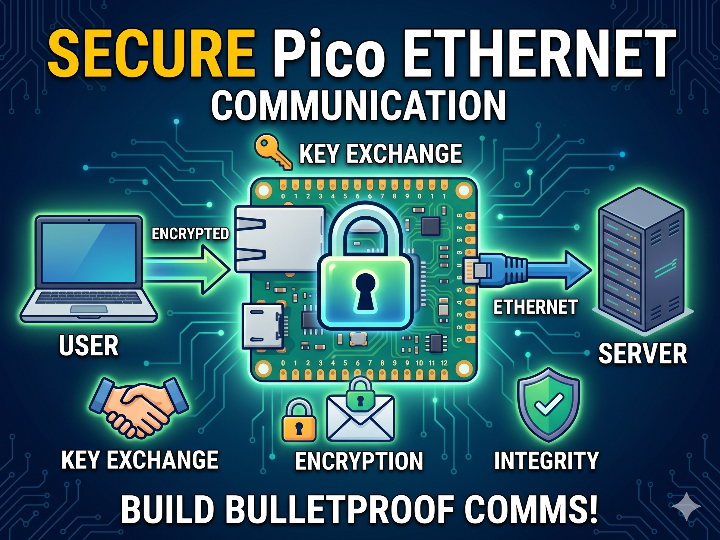
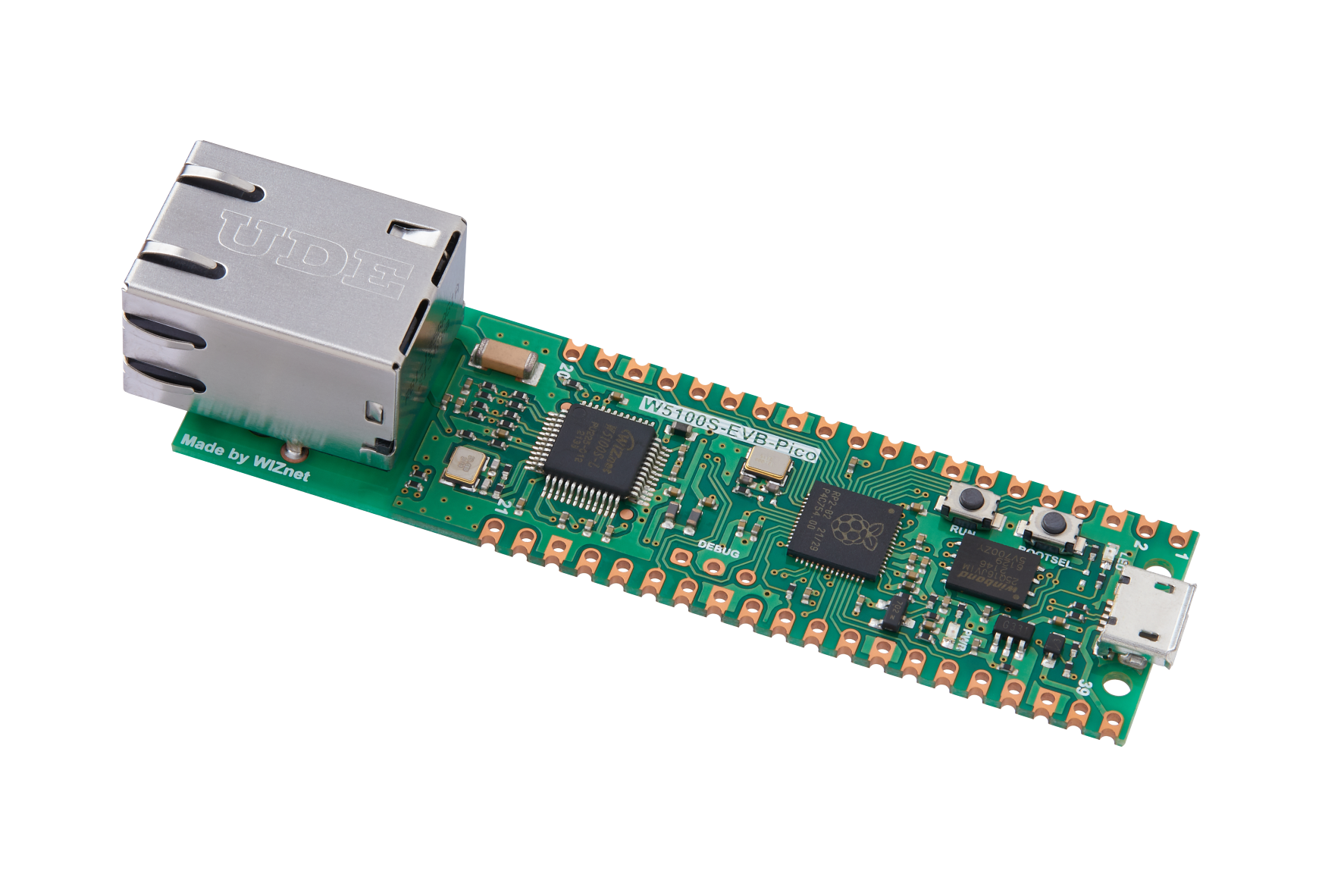
WIZnet - W5100S-EVB-Pico
x 1

프로젝트가 하는 일
이 프로젝트는 W5100S-EVB-Pico를 클라이언트 장치로 사용해 서버와 암호화된 메시지를 주고받습니다. 사용자는 USB 또는 UART를 통해 보드와 상호작용하고, 보드는 Ethernet을 통해 서버에 연결됩니다.
펌웨어는 단순히 메시지를 보내는 것이 아니라, 통신 전에 키를 교환하고 상대방을 확인한 뒤, 메시지를 암호화해서 전송합니다. 수신한 메시지는 변조 여부를 확인한 후에만 복호화됩니다. 따라서 이 프로젝트는 embedded security, 보안 통신 실험, 유선 기반 암호화 장치 구현에 적합합니다.
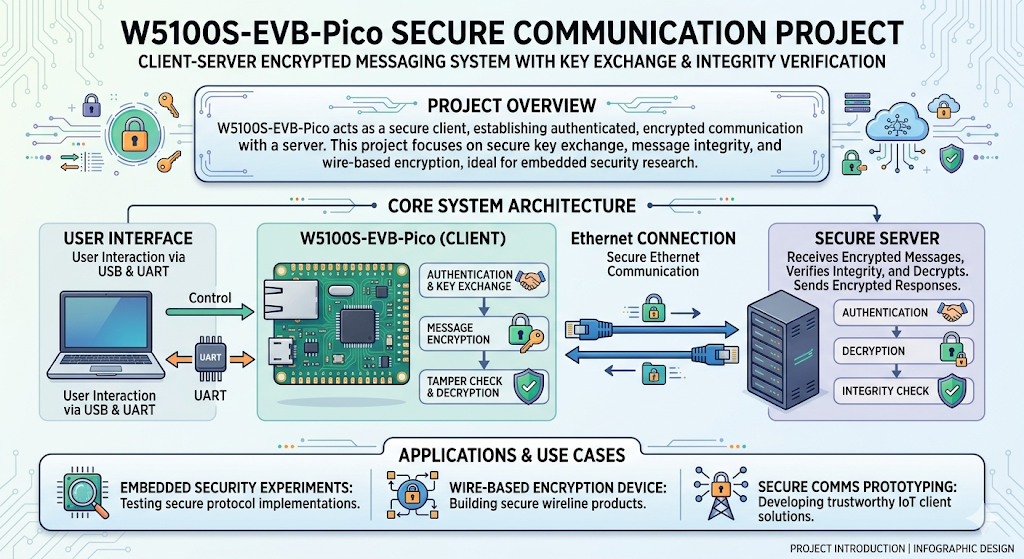
이미지 출처 : AI 생성
WIZnet이 들어가는 위치
이 프로젝트에서 사용된 WIZnet 제품은 W5100S-EVB-Pico입니다. W5100S는 암호화 칩이 아니라, 암호화된 데이터를 서버까지 전달하는 Ethernet transport 역할을 합니다.
암호화 로직은 RP2040 펌웨어에서 처리됩니다. W5100S는 TCP socket 연결을 담당하고, RP2040은 키 교환, 인증, 암호화, 복호화, 메모리 정리를 담당합니다. 이 구조는 네트워크 처리와 보안 처리를 분리하므로 구현을 이해하기 쉽고, Wi-Fi보다 안정적인 유선 연결을 기반으로 보안 통신을 실험할 수 있습니다.
암호화 Flow
암호화 흐름은 먼저 W5100S를 통해 서버와 TCP 연결을 만드는 것에서 시작됩니다. 연결이 완료되면 클라이언트와 서버는 바로 평문 메시지를 주고받지 않고, 먼저 키 교환을 수행합니다.
키 교환은 양쪽이 같은 비밀 키를 직접 보내지 않으면서도, 각자 같은 암호화용 세션 키를 만들 수 있게 하는 과정입니다. 이 프로젝트는 X25519 기반 키 교환을 사용하며, public key가 네트워크에서 너무 뚜렷하게 보이지 않도록 Elligator 2를 사용합니다. 또한 PADME padding을 적용해 key, nonce, MAC, 메시지 크기 같은 메타데이터가 쉽게 드러나지 않도록 합니다.
키 교환 후에는 보내는 방향과 받는 방향에 서로 다른 키를 사용합니다. 클라이언트가 서버로 보낼 때 쓰는 키와, 서버가 클라이언트로 보낸 메시지를 읽을 때 쓰는 키가 분리됩니다. 이후 MAC 검증을 통해 상대방이 올바른 비밀 정보를 가진 서버인지 확인합니다.
실제 메시지를 보낼 때는 먼저 메시지를 압축하고, AEAD 방식으로 암호화합니다. AEAD는 메시지를 숨기는 암호화와 메시지가 바뀌었는지 확인하는 인증을 함께 제공합니다. 이 프로젝트에서는 ChaCha20과 Poly1305 기반 인증 암호화 흐름을 사용합니다.
수신 시에는 반대로 동작합니다. 먼저 MAC을 검증해 메시지가 변조되지 않았는지 확인하고, 검증에 성공한 경우에만 복호화합니다. 이후 압축을 풀어 사용자가 읽을 수 있는 평문으로 되돌립니다. 사용이 끝난 민감한 키와 비밀값은 메모리에서 지워 보안 위험을 줄입니다.
전체 흐름은 다음과 같이 정리할 수 있습니다.
W5100S Ethernet 연결
→ 키 교환
→ public key와 크기 정보 은닉
→ 송신용/수신용 세션 키 생성
→ MAC (Message Authentication Code) 기반 상대 인증
→ 메시지 압축
→ AEAD (Authenticated Encryption with Associated Data) 암호화
→ W5100S TCP socket으로 전송
→ 수신 메시지 MAC 검증
→ 복호화 및 압축 해제
→ 민감한 메모리 정리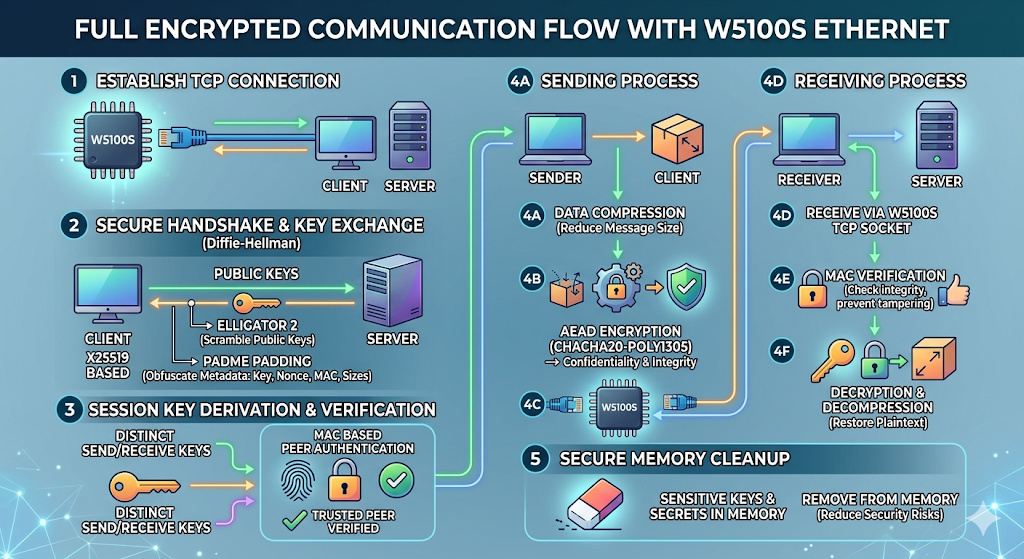
이미지 출처 : AI생성
구현 관점에서의 의미
이 프로젝트의 핵심은 W5100S가 암호화 자체를 대신하는 것이 아니라, 보안 펌웨어가 의존할 수 있는 안정적인 유선 네트워크 경로를 제공한다는 점입니다. 암호화 처리는 RP2040에서 수행하고, W5100S는 암호화된 byte stream을 TCP socket으로 운반합니다.
이 방식은 보안 장치 개발에서 유리합니다. Wi-Fi처럼 연결 상태가 주변 환경에 영향을 많이 받는 구조보다, 유선 Ethernet은 실험과 디버깅이 더 단순합니다. 특히 키 교환 실패, MAC 검증 실패, 메시지 framing 문제를 확인해야 하는 보안 펌웨어에서는 안정적인 transport가 중요합니다.
실용 팁 / 주의할 점
- Ethernet cable과 서버 연결 상태를 먼저 확인해야 합니다.
- W5100S는 암호화 모듈이 아니라 TCP 통신 모듈로 이해해야 합니다.
- 암호화 키, nonce, MAC은 펌웨어에서 관리되므로 메모리 정리가 중요합니다.
- USB와 UART 중 어떤 방식으로 사용자 입출력을 받을지 빌드 단계에서 정해야 합니다.
- 보안 실험 환경에서는 DHCP보다 고정 IP 설정이 디버깅과 재현에 유리할 수 있습니다.
- 키 교환과 인증이 실패하면 메시지를 계속 처리하지 않고 중단하는 구조가 필요합니다.
FAQ
Q: 왜 W5100S-EVB-Pico를 사용하나요?
A: RP2040에서 암호화 펌웨어를 실행하면서도 서버와 안정적인 유선 TCP 통신을 하기 위해서입니다. W5100S는 네트워크 전송을 맡고, RP2040은 보안 처리를 담당합니다.
Q: W5100S는 암호화를 직접 수행하나요?
A: 아닙니다. W5100S는 Ethernet 통신을 담당합니다. 키 교환, 인증, 암호화, 복호화는 RP2040 펌웨어에서 수행됩니다.
Q: 이 프로젝트에서 W5100S의 역할은 무엇인가요?
A: 암호화된 메시지를 서버로 보내고, 서버에서 온 암호화된 메시지를 받는 TCP socket transport 역할입니다.
Q: 초보자도 따라할 수 있나요?
A: 완전한 초보자보다는 Pico SDK, socket 통신, 기본 암호화 개념을 이해한 중급 개발자에게 적합합니다.
Q: Wi-Fi 대신 유선 Ethernet을 쓰는 이유는 무엇인가요?
A: 보안 펌웨어를 실험할 때는 통신 경로가 안정적이어야 합니다. 유선 Ethernet은 무선 간섭이나 연결 변동이 적어 키 교환, 인증 실패, 메시지 검증 문제를 분석하기 쉽습니다.
What the Project Does
This project uses the W5100S-EVB-Pico as a client device to exchange encrypted messages with a server. The user interacts with the board through USB or UART, while the board connects to the server through Ethernet.
The firmware does more than simply send messages. Before communication begins, it exchanges keys, verifies the other side, and then encrypts messages before transmission. Received messages are decrypted only after their integrity has been verified. This makes the project suitable for embedded security, secure communication experiments, and wired encryption device development.
Image source: AI-generated
Where WIZnet Fits
The WIZnet product used in this project is the W5100S-EVB-Pico. The W5100S is not an encryption chip. Its role is to provide Ethernet transport for delivering encrypted data to the server.
The encryption logic is handled by the RP2040 firmware. The W5100S manages the TCP socket connection, while the RP2040 handles key exchange, authentication, encryption, decryption, and memory cleanup. This structure separates network processing from security processing, making the implementation easier to understand. It also allows secure communication to be tested over a wired connection, which is more stable than Wi-Fi.
Encryption Flow
The encryption flow starts by establishing a TCP connection to the server through the W5100S. Once the connection is established, the client and server do not immediately exchange plaintext messages. Instead, they first perform a key exchange.
Key exchange is a process that allows both sides to create the same encryption session key without directly sending the shared secret key over the network. This project uses X25519-based key exchange. It also uses Elligator 2 so that the public key does not appear too obvious on the network. PADME padding is applied to reduce the visibility of metadata such as key size, nonce size, MAC size, and message length.
After key exchange, separate keys are used for each direction. The key used by the client to send messages to the server is separated from the key used to read messages sent from the server to the client. The client then uses MAC verification to check whether the other side is a legitimate server with the correct secret information.
When sending an actual message, the firmware first compresses the message and then encrypts it using AEAD. AEAD provides both encryption, which hides the message content, and authentication, which checks whether the message has been modified. This project uses an authenticated encryption flow based on ChaCha20 and Poly1305.
Receiving works in the opposite direction. The firmware first verifies the MAC to check whether the message has been modified. Only if verification succeeds does it decrypt the message. It then decompresses the message and restores it into plaintext that the user can read. Sensitive keys and secret values that are no longer needed are erased from memory to reduce security risk.
The overall flow can be summarized as follows:
W5100S Ethernet connection
→ Key exchange
→ Public key and size metadata hiding
→ TX/RX session key generation
→ Peer authentication using MAC (Message Authentication Code)
→ Message compression
→ AEAD (Authenticated Encryption with Associated Data) encryption
→ Transmission through the W5100S TCP socket
→ MAC verification of received message
→ Decryption and decompression
→ Sensitive memory cleanup
Image source: AI-generated
Implementation Meaning
The key point of this project is that the W5100S does not perform encryption itself. Instead, it provides a stable wired network path that the security firmware can rely on. Encryption is handled by the RP2040, while the W5100S carries the encrypted byte stream through a TCP socket.
This approach is useful for security device development. Compared with Wi-Fi, where connection quality can be affected by the surrounding environment, wired Ethernet makes experimentation and debugging simpler. A stable transport layer is especially important in security firmware, where developers need to analyze key exchange failures, MAC verification failures, and message framing issues.
Practical Tips / Pitfalls
Check the Ethernet cable and server connection status first.
Understand the W5100S as a TCP communication module, not as an encryption module.
Encryption keys, nonces, and MAC values are managed by the firmware, so memory cleanup is important.
Decide at the build stage whether USB or UART will be used for user input and output.
In a security test environment, static IP configuration may be more useful than DHCP for debugging and reproducibility.
If key exchange or authentication fails, the system should stop processing messages instead of continuing communication.
FAQ
Q: Why use the W5100S-EVB-Pico?
A: It allows the RP2040 to run encryption firmware while maintaining a stable wired TCP connection to the server. The W5100S handles network transport, while the RP2040 handles security processing.
Q: Does the W5100S perform encryption directly?
A: No. The W5100S handles Ethernet communication. Key exchange, authentication, encryption, and decryption are performed by the RP2040 firmware.
Q: What is the role of the W5100S in this project?
A: It acts as the TCP socket transport that sends encrypted messages to the server and receives encrypted messages from the server.
Q: Can beginners follow this project?
A: This project is better suited to intermediate developers who understand the Pico SDK, socket communication, and basic encryption concepts, rather than complete beginners.
Q: Why use wired Ethernet instead of Wi-Fi?
A: When testing security firmware, the communication path needs to be stable. Wired Ethernet has less wireless interference and fewer connection fluctuations, making it easier to analyze key exchange, authentication failures, and message verification issues.
-
Github Code
