


Central_Heating_Arduino_MQTT_Home_Assistant
Central_Heating_Arduino_MQTT_Home_Assistant


WIZnet - W5500
x 1

프로젝트가 하는 일
이 프로젝트는 Home Assistant에서 난방 회로를 켜거나 끄면 Arduino가 MQTT 메시지를 받아 릴레이를 제어하는 구조입니다. 각 릴레이는 이름, 핀 번호, 동작 레벨, 보일러 연동 여부를 설정값으로 가집니다.
예를 들어 바닥난방 회로가 켜지면 Arduino는 해당 릴레이를 동작시키고, 보일러 호출이 필요한 회로라면 가스보일러 릴레이도 함께 제어합니다. 단순히 스위치를 원격으로 켜는 구조가 아니라, 여러 난방 회로의 상태를 종합해 보일러 동작까지 관리하는 방식입니다.
데이터 흐름은 다음과 같습니다.
Home Assistant 자동화 → MQTT 브로커 → Arduino Ethernet 연결 → 릴레이 제어 → 난방 회로 및 보일러 동작
이 구조에서는 네트워크 연결 안정성이 중요합니다. 난방 제어 장치는 장시간 켜져 있어야 하고, 공유기 재시작이나 MQTT 브로커 재부팅 이후에도 다시 연결되어야 하기 때문입니다.
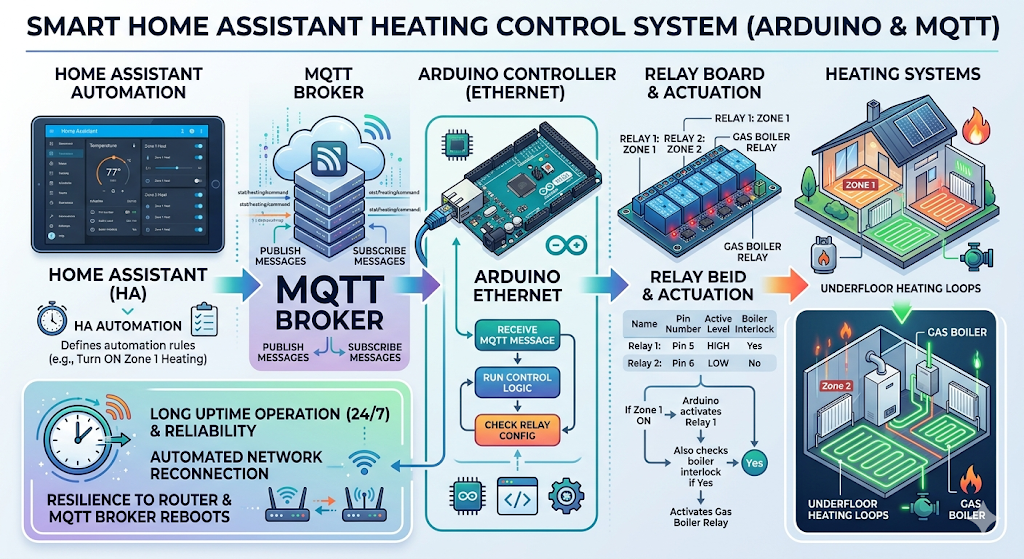
이미지 출처 : AI 생성
WIZnet이 들어가는 위치
원 저장소에서 실제 테스트된 하드웨어는 Arduino Mega 2560과 W5100입니다. 다만 프로젝트 설명에는 W5500도 사용할 수 있다고 되어 있으며, W5500-EVB-Pico용 설정도 준비되어 있습니다. 단, W5500-EVB-Pico 구성은 이 프로젝트에서 아직 완전히 테스트된 상태는 아닙니다.
이 프로젝트에서 W5500의 역할은 Home Assistant 명령을 직접 처리하는 것이 아닙니다. W5500은 Arduino가 MQTT 브로커와 통신할 수 있도록 유선 Ethernet 연결을 제공하는 네트워크 인터페이스입니다.
W5500은 하드웨어 TCP/IP 스택을 내장한 Ethernet 컨트롤러입니다. MCU가 TCP/IP 처리를 모두 소프트웨어로 처리하지 않아도 되므로, Arduino는 릴레이 상태 관리와 MQTT 메시지 처리에 더 집중할 수 있습니다. 보일러실, 분전함, DIN 레일 환경처럼 Ethernet 케이블을 배선할 수 있는 스마트홈 설비에서는 Wi-Fi보다 안정적인 선택이 될 수 있습니다.
구현 노트
이 저장소는 WIZnet ioLibrary를 직접 호출하지 않고 Arduino Ethernet 라이브러리를 사용합니다. 따라서 W5100과 W5500은 같은 EthernetClient 구조 안에서 사용할 수 있습니다.
Central_Heating_Arduino_MQTT_Home_Assistant.ino
#include <Ethernet.h>
#include <ArduinoHA.h>

#define BROKER_ADDR IPAddress(192,168,1,188)

byte mac[] = {0x00, 0x10, 0xF1, 0x6E, 0x01, 0x88};

EthernetClient client;
HADevice device(mac, sizeof(mac));
HAMqtt mqtt(client, device, 50);
이 코드는 Ethernet 연결 위에 Home Assistant MQTT 장치를 구성하는 부분입니다. EthernetClient는 TCP 연결을 만들고, HAMqtt는 그 연결을 이용해 Home Assistant와 MQTT 메시지를 주고받습니다.
W5500을 사용할 때는 보드에 맞는 CS 핀 설정이 중요합니다.
// Ethernet.init(17); // Raspberry Pi Pico with W5500
// Ethernet.init(48); // Easyswitch with W5500
Ethernet.init();     // Easyswitch with W5100

Ethernet.begin(mac, ip, dns, gw, sn);
현재 활성화된 코드는 W5100용 기본 초기화입니다. W5500 보드로 옮기려면 사용하는 보드의 CS 핀에 맞춰 Ethernet.init(...)를 지정해야 합니다. 이후 IP 주소, DNS, 게이트웨이, 서브넷 설정을 실제 홈 네트워크에 맞게 수정합니다.
네트워크 유지 로직도 중요합니다.
if (Ethernet.linkStatus() == 2) {
  Serial.println("ERROR: Cable disconnected");
} else {
  if (Ethernet.maintain() % 2 == 1) {
    Serial.println("ERROR: DHCP");
  } else {
    while (!mqtt.isConnected()) {
      mqtt.begin(BROKER_ADDR, 1883);
      mqtt.loop();
    }
  }
}
이 코드는 Ethernet 케이블 상태를 확인하고, 네트워크 유지 처리를 수행한 뒤 MQTT 연결이 끊어진 경우 다시 연결합니다. 난방 제어 시스템은 장시간 동작해야 하므로 이런 재연결 처리가 필수입니다.
실전 팁 / 주의점
- W5500을 사용할 때는 반드시 보드의 CS 핀을 확인해야 합니다. CS 핀이 맞지 않으면 Ethernet 칩이 정상적으로 응답하지 않습니다.
- W5500-EVB-Pico는 3.3V 계열이고 Arduino Mega 2560은 5V 계열입니다. 릴레이 보드와 신호선을 연결할 때 전압 레벨을 확인해야 합니다.
- 실제 보일러 릴레이를 연결하기 전에 LED나 저전압 부하로 먼저 테스트하는 것이 안전합니다.
- Home Assistant에서는 MQTT 통합과 MQTT 브로커가 준비되어 있어야 합니다.
- 전원 복구 후 릴레이 상태가 어떻게 복원되는지 확인해야 합니다. 난방 설비에서는 “이전 상태 유지”가 항상 안전한 선택은 아닐 수 있습니다.
- 보일러실이나 분전함 주변은 전기적 노이즈가 있을 수 있으므로 릴레이 접점 정격, 전원 분리, 배선 간격을 확인해야 합니다.
- 장시간 운용 장치라면 Watchdog, 네트워크 재연결, MQTT 재접속 로그를 함께 확인하는 것이 좋습니다.
FAQ
Q: 왜 W5500을 Home Assistant 난방 제어에 사용할 수 있나요?
A: W5500은 하드웨어 TCP/IP 스택을 내장한 유선 Ethernet 컨트롤러입니다. 난방 제어처럼 장시간 안정적인 연결이 필요한 장치에서는 Wi-Fi보다 예측 가능한 네트워크 경로를 만들기 쉽습니다.
Q: Arduino에는 어떻게 연결하나요?
A: W5500은 SPI로 MCU와 연결됩니다. 기본적으로 MISO, MOSI, SCK, CS 핀이 필요하며, Arduino Ethernet 라이브러리에서는 Ethernet.init(CS_PIN)으로 CS 핀을 지정합니다.
Q: 이 프로젝트에서 W5500은 어떤 역할을 하나요?
A: W5500은 Home Assistant와 직접 통신하는 애플리케이션 로직이 아니라, MQTT 브로커와 연결하기 위한 Ethernet 전송 경로를 담당합니다. 실제 스위치 등록과 메시지 처리는 ArduinoHA 라이브러리가 수행합니다.
Q: 초보자도 따라 할 수 있나요?
A: Arduino IDE, 릴레이 제어, 고정 IP 설정, MQTT, Home Assistant 자동화에 대한 기본 지식이 필요합니다. 단순 입문 예제보다는 중급 스마트홈 프로젝트에 가깝습니다.
Q: Wi-Fi 기반 ESP32 릴레이와 비교하면 어떤가요?
A: Wi-Fi는 배선이 필요 없어 설치가 쉽지만, 신호 품질과 무선 간섭의 영향을 받습니다. W5500 기반 유선 Ethernet은 케이블 배선이 필요하지만, 보일러실이나 고정 설비처럼 위치가 정해진 장치에는 더 안정적인 선택이 될 수 있습니다.
What the Project Does
This project uses Arduino as a relay controller for a Home Assistant-based heating system. When a heating circuit is turned on or off in Home Assistant, Arduino receives the corresponding MQTT message and controls the assigned relay. Each relay is defined with a name, pin number, trigger level, and whether it should also request boiler operation.
For example, when an underfloor heating circuit is turned on, Arduino activates the relay assigned to that circuit. If that circuit requires boiler operation, the gas boiler relay is also controlled automatically. This is not just a simple remote switch. The firmware checks the state of multiple heating circuits and uses that information to manage boiler operation.
The data flow is as follows:
Home Assistant automation → MQTT broker → Arduino Ethernet connection → Relay control → Heating circuit and boiler operation
In this structure, network reliability is important. A heating controller must remain online for long periods, and it should reconnect correctly after a router restart or MQTT broker reboot.
Image source: AI-generated
Where WIZnet Fits
The original repository was tested with an Arduino Mega 2560 and W5100. However, the project description also states that W5500 can be used, and configuration options for W5500-EVB-Pico are prepared. The W5500-EVB-Pico configuration, however, has not been fully tested in this project.
In this project, the W5500 does not process Home Assistant commands directly. Its role is to provide a wired Ethernet interface so that Arduino can communicate with the MQTT broker.
The W5500 is an Ethernet controller with a hardware TCP/IP stack. Because the MCU does not need to handle all TCP/IP processing in software, Arduino can focus on relay state management and MQTT message handling. In smart home installations where Ethernet cabling is available, such as boiler rooms, distribution panels, or DIN rail enclosures, W5500 can be a more stable option than Wi-Fi.
Implementation Notes
This repository does not call the WIZnet ioLibrary directly. Instead, it uses the Arduino Ethernet library. This means W5100 and W5500 can be used through the same EthernetClient structure.
Central_Heating_Arduino_MQTT_Home_Assistant.ino
#include <Ethernet.h>
#include <ArduinoHA.h>

#define BROKER_ADDR IPAddress(192,168,1,188)

byte mac[] = {0x00, 0x10, 0xF1, 0x6E, 0x01, 0x88};

EthernetClient client;
HADevice device(mac, sizeof(mac));
HAMqtt mqtt(client, device, 50);
This code creates a Home Assistant MQTT device over an Ethernet connection. EthernetClient provides the TCP connection, while HAMqtt uses that connection to exchange MQTT messages with Home Assistant.
When using W5500, the CS pin configuration must match the target board.
// Ethernet.init(17); // Raspberry Pi Pico with W5500
// Ethernet.init(48); // Easyswitch with W5500
Ethernet.init();     // Easyswitch with W5100

Ethernet.begin(mac, ip, dns, gw, sn);
The currently active code uses the default initialization for W5100. To move the project to a W5500 board, Ethernet.init(...) must be set to the correct CS pin for the board. The IP address, DNS, gateway, and subnet settings should also be adjusted to match the actual home network.
The network maintenance logic is also important.
if (Ethernet.linkStatus() == 2) {
  Serial.println("ERROR: Cable disconnected");
} else {
  if (Ethernet.maintain() % 2 == 1) {
    Serial.println("ERROR: DHCP");
  } else {
    while (!mqtt.isConnected()) {
      mqtt.begin(BROKER_ADDR, 1883);
      mqtt.loop();
    }
  }
}
This code checks the Ethernet cable status, performs network maintenance, and reconnects to MQTT when the connection is lost. This kind of reconnection logic is essential for a heating control system that needs to run continuously.
Practical Tips / Pitfalls
- When using W5500, always check the board’s CS pin. If the CS pin is incorrect, the Ethernet chip will not respond properly.
- W5500-EVB-Pico is a 3.3 V platform, while Arduino Mega 2560 is a 5 V platform. Check voltage levels carefully before connecting relay boards or signal lines.
- Before connecting a real boiler relay, test the output with an LED or a low-voltage load.
- Home Assistant must have MQTT integration and an MQTT broker configured.
- Check how relay states are restored after a power failure. In a heating system, restoring the previous state is not always the safest behavior.
- Boiler rooms and distribution panels can be electrically noisy environments. Check relay contact ratings, power separation, and wiring clearance.
- For long-term operation, use a watchdog and review network reconnection and MQTT reconnection logs.
FAQ
Q: Why can W5500 be used for Home Assistant heating control?
A: W5500 is a wired Ethernet controller with a hardware TCP/IP stack. For devices that require long-term stable connectivity, such as heating controllers, it can provide a more predictable network path than Wi-Fi.
Q: How does it connect to Arduino?
A: W5500 connects to the MCU over SPI. The basic signals are MISO, MOSI, SCK, and CS. In the Arduino Ethernet library, the CS pin is configured with Ethernet.init(CS_PIN).
Q: What role does W5500 play in this project?
A: W5500 is not the application logic that communicates directly with Home Assistant. It provides the Ethernet transport path used to connect to the MQTT broker. Device registration and switch message handling are performed by the ArduinoHA library.
Q: Can beginners follow this project?
A: This project requires basic knowledge of the Arduino IDE, relay control, static IP configuration, MQTT, and Home Assistant automation. It is closer to an intermediate smart home project than a simple beginner example.
Q: How does it compare with an ESP32 Wi-Fi relay?
A: Wi-Fi is easier to install because it does not require cabling, but it is affected by signal quality and wireless interference. W5500-based wired Ethernet requires a cable, but it can be a more stable choice for fixed installations such as boiler rooms or smart home control panels.
-
github code


