



Arduino Ethernet and SD card shield (WIZnet W5100)
Arduino Ethernet and SD card shield (WIZnet W5100)
COMPONENTS
Hardware components
- W5100
x 1
PROJECT DESCRIPTION
Standard Arduino Ethernet shields use the WIZnet W5100 chip, which provides hardware support for TCP/IP. The W5100 is supported out of the box by?Pixl.js
Most other offical Espruino boards have firmware with support for the?WIZnet W5500?and will not work with the W5100 without a special firmware build.
 and add wires on the underside of the board.
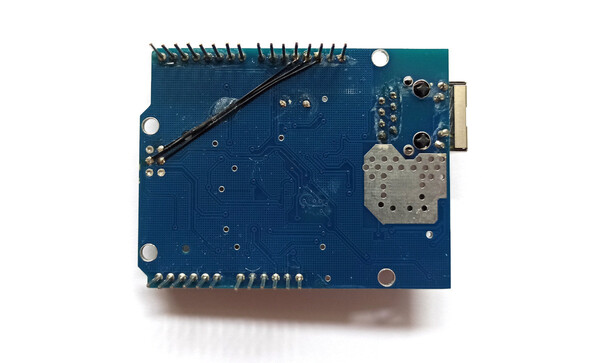 Now attach Pixl to shield

Wiring?
The Ethernet shield shown above exposes the W5100 through pins on the Arduino 2x3 pin?ICSP?header (which isn't present on?Pixl.js) rather than the standard Arduino footprint.
To connect it up, you will need to add 3 wires to the shield (mirroring the connections there would be on an Arduino UNO board), connecting:
- ICSP MOSI to?
D11 - ICSP MISO to?
D12 - ICSP SCK to?
D13
 ---------------------------------
|              D13  D12  D11      |
|              SCK MISO  MOSI     |
|
| ETH                               |
| JACK                              |
|                                   |
|                        MISO ---   |
|                        SCK  MOSI  |
|                        ---- GND   |
|                                   |
|                         SD CARD   |
|                                   |
|                                   |
| RESET                            /
----------------------------------ICSP?header completely
and add wires on the underside of the board.
Now attach Pixl to shield
Pinout?
This board has the following connections:| Pin | Connection |
|---|---|
| D13 | SCK |
| D12 | MISO |
| D11 | MOSI |
| D10 | W5100 CS |
| D4 | SD Card CS |
| D2 | W5100 IRQ |
Software?
Ethernet?
First, you need to set up communications with the WIZnet chip:SPI1.setup({ mosi:D11, miso:D12, sck:D13 });
var eth = require("WIZnet").connect(SPI1, D10 /*CS*/);eth.setIP({mac:"00:08:dc:ab:cd:ef"});
eth.setIP();eth.setIP({
ip:"192.168.1.123",
subnet:"255.255.255.0",
gateway:"192.168.1.1",
dns:"8.8.8.8",
mac:"00:08:dc:ab:cd:ef"
});require("http").get("http://www.pur3.co.uk/hello.txt", function(res) {
res.on('data', function(d) {
console.log("--->"+d);
});
});function pageHandler(req, res) {
res.writeHead(200);
res.end("Hello World");
}
require("http").createServer(pageHandler).listen(80);
console.log("Connect to http://"+eth.getIP().ip)eth?are documented in?the Ethernet Class
See the?Internet?page for more examples of things you can do on Espruino with an Internet connection.
SD Card?
All you need to do to set up the SD card is:// Setup SPI - no need to call this if you've already set up Ethernet
SPI1.setup({ mosi:D11, miso:D12, sck:D13 });
// Configure the SD card
E.connectSDCard(SPI1, D4 /*CS*/);// see what's on the device
console.log(require("fs").readdirSync());
// write
require("fs")writeFileSync("test.txt","Some Data");
// read
print(require("fs").readFileSync("test.txt"));
Documents
Comments
Write