



netpuck
NetPuck 5G: An ESP32-S3 open-source tool for 5GHz Wi-Fi (BW16) & wired LAN (W5500) analysis. Features 1.8" LCD, joystick, and 18650 batteries in an RF-optimized
NetPuck 5G: 5GHz Wi-Fi와 유선을 아우르는 휴대용 네트워크 분석기
네트워크 엔지니어와 임베디드 개발자를 위한 혁신적인 오픈소스 도구, NetPuck 5G를 소개합니다. 이 장치는 Arduino 기반의 ESP32-S3 플랫폼을 활용하여, 단순한 무선 스캐너를 넘어 유선 Ethernet까지 진단할 수 있는 휴대용 하이브리드 분석기입니다.
1. 하드웨어의 핵심: 트리플 통신 엔진
일반적인 ESP32 기반 장치들은 2.4GHz Wi-Fi 대역만 지원하는 한계가 있습니다. 하지만 NetPuck 5G는 이름에 걸맞게 5GHz Wi-Fi 스캐닝 능력을 갖추었으며, 여기에 WIZnet W5500을 통한 유선 네트워크 분석 기능을 더해 진정한 '통합 진단'을 실현했습니다.
핵심 하드웨어 구성
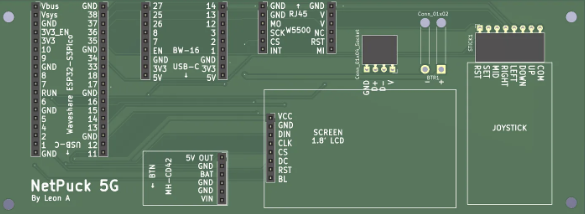
- Waveshare ESP32-S3-Pico (Main Unit): 전체 시스템의 두뇌 역할을 하며 데이터 처리, UI 제어 및 기본적인 2.4GHz Wi-Fi/Bluetooth 통신을 지휘합니다.
- BW16 (5GHz Wi-Fi Scanner): 이 프로젝트의 하이라이트입니다. ESP32-S3가 지원하지 못하는 5GHz 대역의 Access PoinPt(AP)를 전문적으로 스캔하고 분석하는 역할을 수행합니다.
- W5500 이더넷 모듈: 무선이 불안정한 상황에서도 RJ45 포트를 통해 유선 네트워크에 연결된 장치의 상세 정보를 리스트업하고 분석합니다.
- User Interface: 1.8인치 컬러 LCD & 5방향 디지털 조이스틱
- Power System: 삼성 18650 배터리(2개) & MH-CD42 충전/부스트 모듈
2. 하이브리드 네트워크 분석 원리
NetPuck 5G는 무선과 유선의 데이터를 병렬로 처리하여 사용자에게 종합적인 정보를 제공합니다.
- 무선 분석 (2.4GHz & 5GHz)
- 메인 MCU인 ESP32-S3가 기본 무선 통신을 담당하는 동안, BW16 모듈이 독립적으로 5GHz 대역을 탐색합니다. 이를 통해 주변의 모든 Wi-Fi 채널 혼잡도와 신호 강도(RSSI)를 LCD에 실시간으로 시각화합니다.
- 유선 분석 (WIZnet W5500의 역할)
- 이 프로젝트에서 W5500은 유선 연결의 핵심입니다. 무선 신호가 아예 잡히지 않는 전파 사각지대나 보안이 엄격한 환경에서도 RJ45 포트를 통해 네트워크에 즉각 참여합니다.
- 하드웨어 TCP/IP 오프로드: MCU의 소프트웨어 스택 부하를 줄여 안정적인 데이터 수집 가능
- 네트워크 리스트업: 연결된 네트워크의 IP, 게이트웨이, 서브넷 마스크 등 상세 정보를 분석
- 이 프로젝트에서 W5500은 유선 연결의 핵심입니다. 무선 신호가 아예 잡히지 않는 전파 사각지대나 보안이 엄격한 환경에서도 RJ45 포트를 통해 네트워크에 즉각 참여합니다.
3. 사용자 인터페이스 & 구동 시스템
기술적인 데이터를 사용자가 직관적으로 확인할 수 있도록 설계된 인터페이스가 돋보입니다.
- 1.8인치 LCD 디스플레이: BW16과 W5500으로부터 수집된 모든 네트워크 정보를 한눈에 보여줍니다.
- 5방향 디지털 조이스틱: 로우 프로파일 설계의 조이스틱으로 복잡한 네트워크 메뉴를 쉽고 빠르게 탐색할 수 있습니다.
- 강력한 전원부: 삼성 18650 배터리 2개와 MH-CD42 충전/부스트 모듈을 결합하여, 야외 현장에서도 끊김 없이 안정적으로 동작합니다.
4. 구현 가이드 (Conceptual Code)
Arduino 환경에서 WIZnet ioLibrary를 활용해 W5500을 초기화하고 네트워크 정보를 수집하는 기본 구조입니다.
#include <SPI.h>
#include <Ethernet.h> // W5500 전용 라이브러리 활용

// 네트워크 정보 설정 (예시: 고정 IP 진단 모드)
byte mac[] = { 0xDE, 0xAD, 0xBE, 0xEF, 0xFE, 0xED };
IPAddress ip(192, 168, 0, 50);

void setup() {
  // SPI 설정 및 W5500 초기화
  Ethernet.init(7); // CS 핀 설정 (ESP32-S3 GPIO 대응)
  Ethernet.begin(mac, ip);

  if (Ethernet.linkStatus() == LinkON) {
    // 유선 연결 성공 시 LCD에 정보 출력 로직 수행
  }
}
5. 실제 외형 및 포트 구성 (3D 모델링 기반)
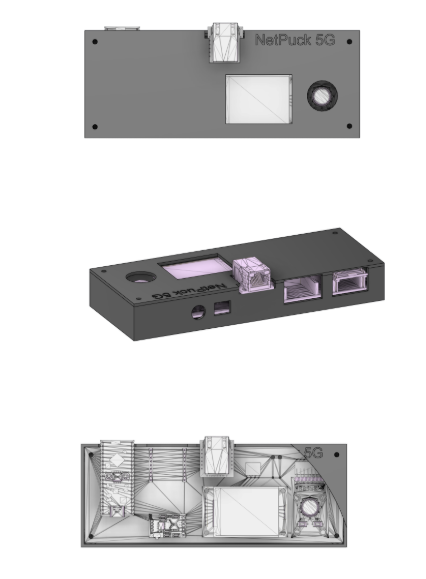
3D 케이스 모델(image_6.png)을 통해 본 NetPuck 5G는 현장형 장비로서의 완성도를 갖추고 있습니다.
- 상단: LCD 스크린과 조이스틱 배치로 한 손 조작 최적화
- 사이드 포트: * 유선 랜 연결을 위한 RJ45 커넥터
- 전원 공급 및 펌웨어 업로드를 위한 USB-C 포트
- 전원 온/오프 스위치
또한, 하우징은 Autodesk Fusion을 사용해 설계되었으며, 현장 사용을 고려한 내구성을 갖춘 구조입니다. 특히 ‘샌드위치 마운트(Sandwich Mount)’ 구조를 적용하여 내부 부품을 안정적으로 고정하고, M3 히트셋 인서트와 나일론 나사를 사용하여 금속 나사로 인한 RF 간섭 가능성을 줄였습니다.
6. NetPuck 5G의 주요 활용 사례
- 무선 환경 최적화: 사무실이나 작업장의 2.4GHz와 5GHz Wi-Fi 신호 강도를 분석하여 최적의 채널을 설정할 때
- 유선 네트워크 점검: 벽면 포트나 스위치 허브의 활성화 상태 및 네트워크 상세 정보를 현장에서 바로 확인할 때
- 임베디드 학습 및 개발: ESP32-S3와 BW16이라는 서로 다른 통신 모듈을 연동하는 고급 임베디드 기술을 연구할 때
7. FAQ
Q: 왜 W5500을 사용하나요?
A: 무선 환경이 불안정한 산업 현장이나 서버실에서 유선 LAN의 상태를 직접 확인하기 위함입니다. 하드웨어 TCP/IP 엔진 덕분에 MCU 리소스를 아끼며 정확한 진단이 가능합니다.
Q: ESP32-S3에 어떻게 연결하나요?
A: SPI 인터페이스(MISO, MOSI, SCK, CS)를 사용해 연결하며, RJ45 포트를 통해 물리적 네트워크에 접속합니다.
Q: 이 프로젝트에서 W5500의 역할은 무엇인가요?
A: 유선 네트워크 상태를 분석하고, LAN 연결 정보를 수집하는 역할을 수행합니다.
Q: 초보자도 구현할 수 있나요?
A: 기본적인 SPI 통신과 네트워크 개념을 이해하면 가능하지만, 전체 시스템은 중급 이상의 수준이 요구됩니다.
Q: 기존 Wi-Fi 분석기와의 차별점은? A: 5GHz Wi-Fi와 유선 Ethernet 정보를 한 화면에서 동시에 볼 수 있다는 점이 가장 큰 강점입니다.
NetPuck 5G: A Portable Network Analyzer Covering 5GHz Wi-Fi and Wired Connections
Introducing NetPuck 5G, an innovative open-source tool for network engineers and embedded developers. Utilizing the Arduino-based ESP32-S3 platform, this device is a portable hybrid analyzer capable of diagnosing not only wireless signals but also wired Ethernet.
1. The Core of Hardware: Triple Communication Engine
Standard ESP32-based devices are limited to the 2.4GHz Wi-Fi band. However, true to its name, NetPuck 5G possesses 5GHz Wi-Fi scanning capabilities and realizes "integrated diagnosis" by adding wired network analysis via the WIZnet W5500.
Core Hardware Configuration:
- Waveshare ESP32-S3-Pico (Main Unit): Acts as the brain of the entire system, directing data processing, UI control, and basic 2.4GHz Wi-Fi/Bluetooth communication.
- BW16 (5GHz Wi-Fi Scanner): The highlight of this project. It professionally scans and analyzes Access Points (APs) in the 5GHz band, which the ESP32-S3 cannot support.
- W5500 Ethernet Module: Lists and analyzes detailed information of devices connected to the wired network via the RJ45 port, even when wireless conditions are unstable.
- User Interface: 1.8-inch color LCD & 5-way digital joystick.
- Power System: Two Samsung 18650 batteries & MH-CD42 charge/boost module.
2. Principles of Hybrid Network Analysis
NetPuck 5G processes both wireless and wired data in parallel to provide comprehensive information to the user.
- Wireless Analysis (2.4GHz & 5GHz): While the main MCU, ESP32-S3, handles basic wireless communication, the BW16 module independently explores the 5GHz band. This allows for real-time visualization of Wi-Fi channel congestion and Signal Strength (RSSI) on the LCD.
- Wired Analysis (Role of WIZnet W5500): In this project, the W5500 is the key to wired connectivity. It joins the network instantly through the RJ45 port, even in radio dead zones or strictly secured environments.
- Hardware TCP/IP Offload: Reduces the software stack load on the MCU, enabling stable data collection.
- Network Listing: Analyzes detailed information such as the IP, Gateway, and Subnet Mask of the connected network.
3. User Interface & Driving System
The interface is designed for users to intuitively verify technical data.
- 1.8-inch LCD Display: Shows all gathered network information from the BW16 and W5500 at a glance.
- 5-Way Digital Joystick: A low-profile joystick that allows for quick and easy navigation through complex network menus.
- Powerful Power Section: Combines two Samsung 18650 batteries with an MH-CD42 module to operate without interruption in the field.
4. Implementation Guide (Conceptual Code)
This is a basic structure for initializing the W5500 and collecting network information using the WIZnet ioLibrary in the Arduino environment.
#include <SPI.h>
#include <Ethernet.h> // Utilizing the W5500 dedicated library

// Network information setup (Example: Static IP diagnosis mode)
byte mac[] = { 0xDE, 0xAD, 0xBE, 0xEF, 0xFE, 0xED };
IPAddress ip(192, 168, 0, 50);

void setup() {
  // SPI setup and W5500 initialization
  Ethernet.init(7); // CS pin setup (corresponding to ESP32-S3 GPIO)
  Ethernet.begin(mac, ip);

  if (Ethernet.linkStatus() == LinkON) {
    // Logic to output information to the LCD upon successful wired connection
  }
}5. Actual Appearance & Port Configuration (Based on 3D Modeling)
Viewed through the 3D case model (image_6.png), NetPuck 5G demonstrates the completeness of field-ready equipment.
- Top: Optimized for one-handed operation with the layout of the LCD screen and joystick.
- Side Ports:
- RJ45 Connector for wired LAN connection.
- USB-C Port for power supply and firmware uploading.
- Power On/Off switch.
The housing was designed using Autodesk Fusion and features a structure durable for field use. Specifically, a "Sandwich Mount" structure was applied to securely fix internal components, and the use of M3 heat-set inserts and nylon screws reduced the possibility of RF interference caused by metal screws.
6. Key Use Cases for NetPuck 5G
- Wireless Environment Optimization: Analyzing 2.4GHz and 5GHz Wi-Fi signal strength in offices or workplaces to set optimal channels.
- Wired Network Inspection: Directly checking the activation status and detailed network information of wall ports or switch hubs in the field.
- Embedded Learning & Development: Researching advanced embedded technologies by interlocking different communication modules like the ESP32-S3 and BW16.
7. FAQ
Q: Why use the W5500?
A: To directly check the status of a wired LAN in industrial sites or server rooms where wireless environments are unstable. The hardware TCP/IP engine allows for accurate diagnosis while saving MCU resources.
Q: How is it connected to the ESP32-S3?
A: It connects using the SPI interface (MISO, MOSI, SCK, CS) and accesses physical networks through the RJ45 port.
Q: What is the role of the W5500 in this project?
A: It analyzes the wired network status and performs the role of collecting LAN connection information.
Q: Can a beginner implement this?
A: It is possible if one understands basic SPI communication and network concepts, but the overall system requires an intermediate level or higher.
Q: What is the difference from existing Wi-Fi analyzers?
A: The biggest strength is the ability to see 5GHz Wi-Fi and wired Ethernet information simultaneously on one screen.